
1. Introduction
This manual provides detailed instructions for the installation, setup, and operation of your Belleye 2K HD Battery Doorbell Camera (Model DB3) and its accompanying chime. Please read this manual thoroughly before using the product to ensure proper functionality and safety.
2. What's in the Box
- Belleye 2K HD Battery Doorbell Camera
- Wireless Ring Chime (USB-A)
- Mounting Bracket
- Mounting Screws and Wall Anchors
- Double-Sided Adhesive Tape
- USB Charging Cable (USB-A to USB-C)
- Instruction Manual

Image: The Belleye 2K HD Battery Doorbell Camera and its accompanying USB chime, showcasing the main components included in the package.
3. Product Overview
The Belleye DB3 is a wireless, battery-powered video doorbell designed for enhanced home security. It features 2K HD video, two-way audio, smart motion detection, and night vision capabilities.
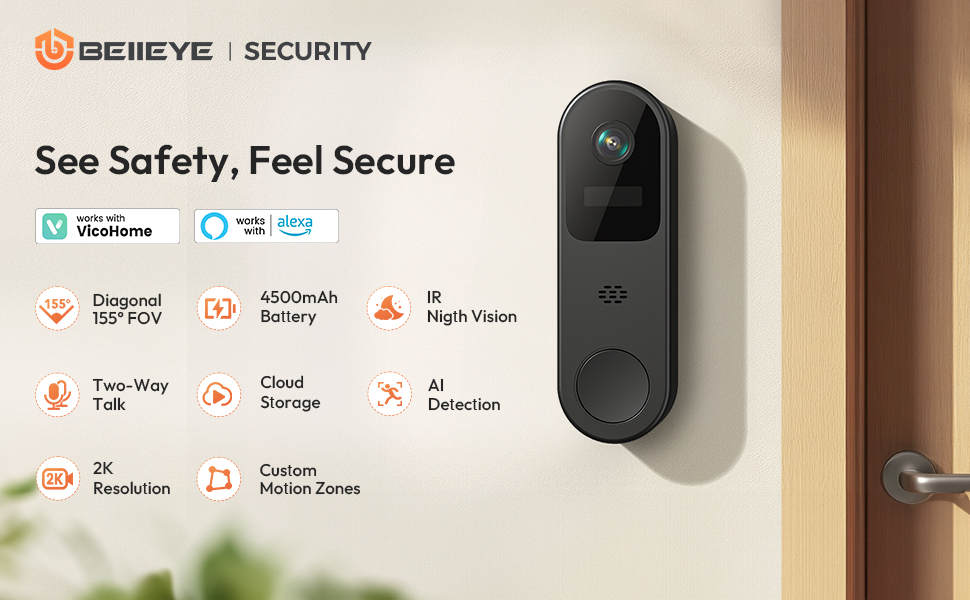
Image: An overview of the Belleye DB3 Doorbell Camera, highlighting its main features such as battery power, 2K HD video, two-way talk, and smart AI detection.
Key Features:
- 2K Ultra HD Camera & Night Vision: Captures clear video day and night.
- Two-Way Audio: Speak to visitors in real-time.
- Smart PIR Motion Detection: Receive instant alerts for activity at your door.
- Secure Cloud Storage: Safely stores recordings online (subscription may be required).
- 4500 mAh Battery: Provides extended usage on a single charge.
- IP66 Weather Resistant: Durable design for outdoor use in various weather conditions.
- 2.4GHz Wi-Fi Connectivity: Offers better wall penetration and wider range (5GHz not supported).
- VicoHome App Compatible: Manage settings and view live feed via iOS & Android app.
4. Setup
4.1 Charging the Doorbell
Before initial use, fully charge the doorbell camera using the provided USB charging cable. The charging port is located on the side of the device, protected by a rubber flap. A green indicator light will show when charging is complete.

Image: The Belleye DB3 Doorbell Camera connected to a power adapter via its USB-C charging cable, illustrating the charging process.
4.2 Physical Installation
The doorbell can be installed using either screws or double-sided adhesive tape. Choose the method suitable for your door surface.
- Attach the mounting bracket to your desired location on the door frame or wall. Ensure the 'UP' arrow on the bracket points upwards.
- If using screws, mark the drill points through the bracket holes, drill pilot holes, insert wall anchors (if needed), and secure the bracket with screws.
- If using adhesive tape, clean the surface thoroughly, peel the backing from the double-sided tape on the bracket, and firmly press the bracket onto the desired location.
- Slide the doorbell camera onto the mounted bracket until it clicks securely into place.
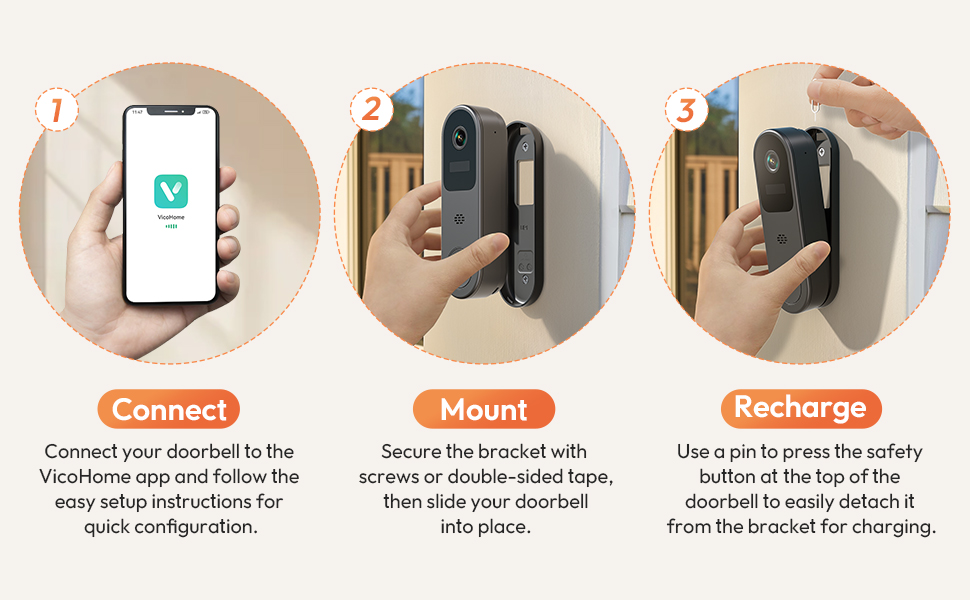
Image: A visual guide showing the three main steps for installing the doorbell: connecting to the app, mounting the bracket, and recharging the doorbell.
4.3 App Download and Setup
- Download the VicoHome app from the App Store (iOS) or Google Play Store (Android).
- Register for a new account or log in if you already have one.
- Follow the in-app instructions to add your new doorbell device. Ensure your phone's Bluetooth and Wi-Fi are enabled.
- Connect the doorbell to your 2.4GHz Wi-Fi network. Note: 5GHz Wi-Fi is not supported. Avoid special characters in your Wi-Fi name or password.
Video: A demonstration of how to connect the Belleye DB3 Doorbell Camera to your Wi-Fi network using the VicoHome app.
4.4 Chime Pairing
The wireless chime plugs into any standard USB-A port. To pair it with your doorbell:
- Plug the chime into a USB power source.
- Press and hold the pairing button on the chime until it beeps.
- Press and hold the doorbell button for 6 seconds. Both the doorbell and chime will beep, indicating successful pairing.
Video: Instructions on how to connect the doorbell camera to Wi-Fi and pair it with the wireless chime.
5. Operation
5.1 Live View and Two-Way Talk
Access the VicoHome app to view a live feed from your doorbell camera. Use the two-way talk feature to communicate with visitors at your door from anywhere.

Image: A user viewing the live feed from the doorbell camera on their smartphone, demonstrating the live view and two-way talk functionality.
5.2 Motion Detection and Alerts
The doorbell features Smart PIR Motion Detection. When motion is detected, you will receive instant notifications on your smartphone. Customize detection sensitivity and activity zones within the app to reduce false alerts.

Image: The doorbell camera detecting a person approaching the door, with a corresponding instant alert displayed on a smartphone.
5.3 Cloud Storage
Recordings are securely stored online. A 30-day free trial of premium AI features, including smart recognition for people, pets, vehicles, or packages, is available. Subscription plans are sold separately for extended storage and advanced features.

Image: The doorbell camera visually connected to a smartphone displaying a cloud storage interface, indicating secure online storage for recorded events.
5.4 Sharing Device Access
You can share access to your doorbell camera with family members or other trusted individuals through the VicoHome app. This allows multiple users to view the live feed, receive alerts, and utilize two-way talk.
Video: A guide on how to share access to your Belleye DB3 Doorbell Camera with other users via the VicoHome app.
6. Maintenance
6.1 Recharging the Battery
When the battery level is low, detach the doorbell from its mounting bracket by pressing the safety button at the top (use a pin if necessary). Connect the USB charging cable to the doorbell's charging port. A full charge typically takes several hours.

Image: A hand detaching the doorbell camera from its wall mount using a pin, illustrating the ease of removal for recharging.
6.2 Cleaning
Wipe the camera lens and the doorbell's exterior with a soft, damp cloth. Avoid using harsh chemicals or abrasive materials that could damage the device.
7. Troubleshooting
- Doorbell not connecting to Wi-Fi:
Ensure your Wi-Fi is 2.4GHz. Check Wi-Fi signal strength at the installation location. Restart your router and the doorbell. Verify your Wi-Fi password is correct and contains no special characters or spaces. - No motion detection alerts:
Check motion detection settings in the VicoHome app. Adjust sensitivity levels. Ensure the doorbell is online and has sufficient battery. - Poor video quality:
Check your Wi-Fi connection strength. Ensure the camera lens is clean and free from obstructions. - Chime not ringing:
Ensure the chime is plugged into a powered USB port and successfully paired with the doorbell. Check the chime's volume settings. - Battery draining quickly:
Frequent motion detection events or live view access can consume more battery. Adjust motion detection sensitivity and recording duration in the app. Ensure the doorbell is not installed in an area with extreme temperatures.
8. Specifications
| Feature | Detail |
|---|---|
| Model Name | DB3 |
| Video Capture Resolution | 2K (1440p) |
| Power Source | Battery Powered (1 Lithium Ion battery included) |
| Battery Capacity | 4500 mAh |
| Connectivity Technology | Wireless (2.4GHz Wi-Fi only) |
| Controller Type | VicoHome App |
| Special Features | 2-Way Audio, HD Resolution, Motion Sensor, Night Vision, Weather Proof (IP66) |
| Indoor/Outdoor Usage | Indoor, Outdoor |
| Item Dimensions (L x W x H) | 1.8 x 1.2 x 5.8 inches |
| Item Weight | 10.5 ounces (0.3 Kilograms) |
9. Warranty and Support
For warranty information and technical support, please refer to the contact details provided on the product packaging or visit the official Belleye website. Keep your purchase receipt as proof of purchase for warranty claims.