
Introduction
This manual provides essential information for the installation, operation, maintenance, and troubleshooting of YSVQHHDV TV Motherboards, specifically for models CV580U1 and CV500U2. These motherboards are designed as replacement parts for compatible Rainbow TVs, addressing various display and performance issues. Please read these instructions carefully before proceeding with any installation or repair.
Important Safety Notice: Installation of TV motherboards requires technical expertise and should ideally be performed by qualified professionals. Incorrect installation can lead to damage to the TV or personal injury. Always disconnect the TV from the power source before beginning any work.
Product Overview
The YSVQHHDV TV Motherboard serves as a crucial component for your television's functionality. Replacing a faulty motherboard can resolve common TV issues and extend the lifespan of your device. These motherboards are compatible with Rainbow TVs and specific part numbers including TPD.MT9602.PB763(T), EL.MT9602PRO-FG95, CV580U1-T01, and CV500U2-T01.

Image: YSVQHHDV TV Motherboard, model CV580U2, showing the main circuit board layout and components.

Image: YSVQHHDV TV Motherboard, model CV500U2, illustrating its design and various connection ports.

Image: Close-up view of a label on the motherboard, indicating the model number CV580U1-T01 and other identification details.

Image: Detailed view of a label on the motherboard, showing the model number CV500U2-T01-V0 and related specifications.
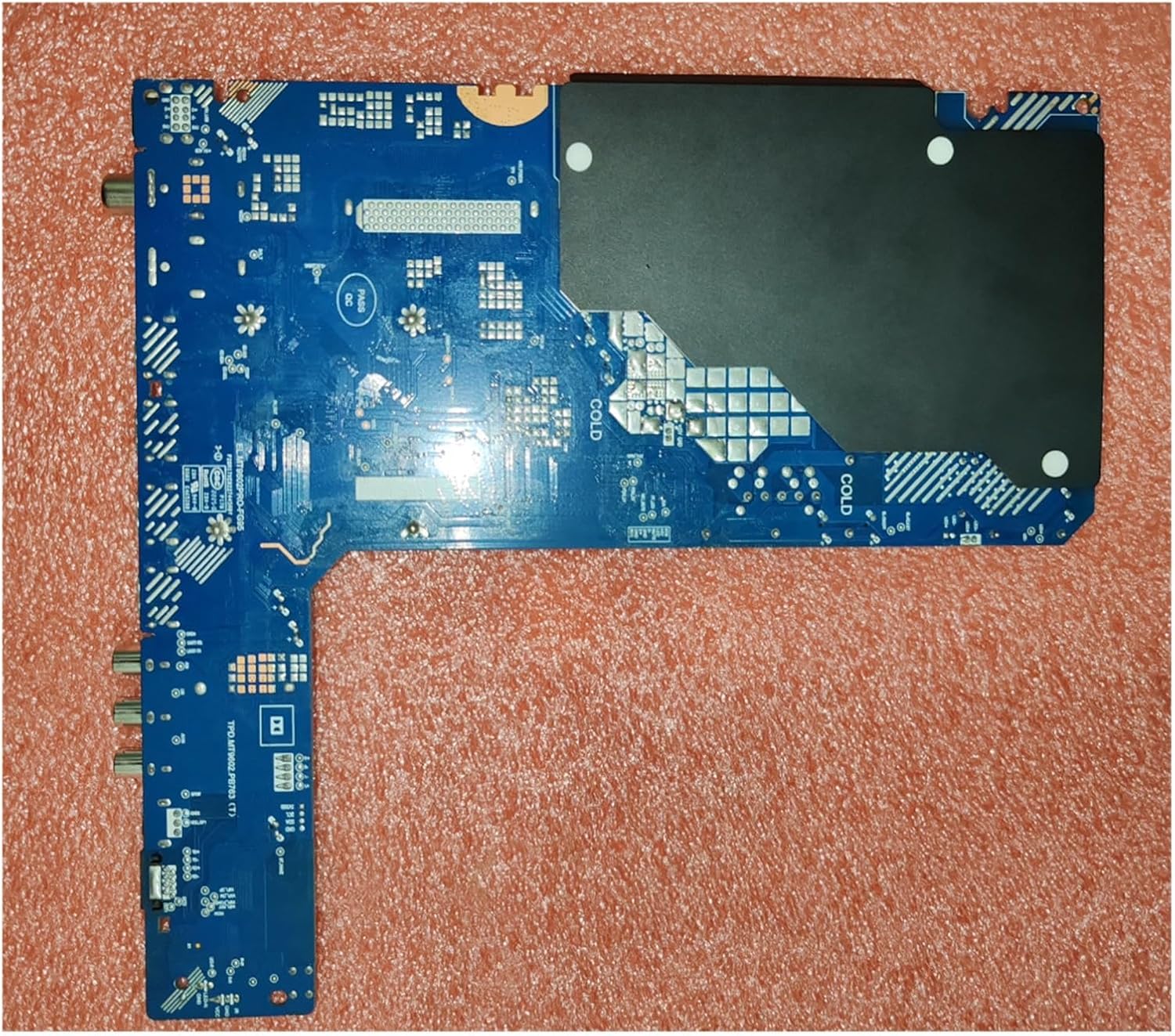
Image: Rear view of the TV motherboard, displaying the solder points and circuit traces on the underside.
Specifications
| Feature | Detail |
|---|---|
| Brand | YSVQHHDV |
| Compatible Models | CV580U1-T01, CV500U2-T01 |
| Compatible Part Numbers | TPD.MT9602.PB763(T), EL.MT9602PRO-FG95 |
| Package Dimensions | 1.18 x 0.79 x 0.39 inches |
| Item Weight | 1.76 ounces |
| Manufacturer | congyili |

Image: Close-up of a label displaying a QR code and power specifications such as voltage (72V-87V), current (700mA), and wattage (95W1).
Setup and Installation
Replacing a TV motherboard requires careful attention to detail and knowledge of electronics. It is highly recommended that this procedure be performed by a certified technician to prevent damage to the product or the television.
General Installation Steps:
- Safety First: Ensure the television is completely unplugged from the power outlet and all external devices are disconnected.
- Access the Motherboard: Carefully remove the back panel of the TV to expose the internal components. Refer to your TV's specific service manual for panel removal instructions.
- Disconnect Cables: Document and carefully disconnect all cables and connectors attached to the old motherboard. Take photos for reference if necessary.
- Remove Old Motherboard: Unscrew and remove the old motherboard from its mounting points.
- Install New Motherboard: Position the new YSVQHHDV motherboard (CV580U1 or CV500U2) into place and secure it with the appropriate screws.
- Reconnect Cables: Carefully reconnect all cables and connectors to their corresponding ports on the new motherboard. Ensure all connections are firm and correct.
- Test Functionality: Before reattaching the back panel, temporarily connect the TV to power and perform a basic functionality test to ensure the display and basic operations are working.
- Final Assembly: If the test is successful, disconnect power, reattach the TV's back panel, and secure all screws.
For detailed, model-specific instructions, consult the service manual for your particular television model.
Operating Instructions
Once the YSVQHHDV TV Motherboard is correctly installed, the television should power on and function as intended. The motherboard manages all core operations, including video processing, audio output, and input signal handling.
- Power on the TV using the remote control or the TV's power button.
- Select the desired input source (HDMI, AV, etc.) using the TV remote.
- Adjust picture and sound settings as needed through the TV's on-screen menu.
If the TV does not power on or displays errors after installation, refer to the Troubleshooting section.
Maintenance
Proper maintenance can help prolong the life of your TV and its components, including the motherboard.
- Keep Clean: Ensure the TV's ventilation openings are free from dust and debris to allow for proper airflow and prevent overheating.
- Avoid Liquids: Keep liquids away from the television to prevent accidental spills that could damage internal electronics.
- Stable Power: Use a surge protector to protect the TV from power fluctuations and surges.
- Environmental Conditions: Operate the TV in a well-ventilated area, away from direct sunlight and excessive humidity.
Troubleshooting
If you encounter issues after installing the YSVQHHDV TV Motherboard, refer to the following common problems and potential solutions:
- No Power / TV Does Not Turn On:
- Check all power connections, ensuring the TV is securely plugged into a working outlet.
- Verify that all internal cables to the motherboard are correctly connected.
- Ensure the power supply unit (PSU) of the TV is functional.
- Display Faults (Blurred Screen, Black Screen, Flickering, Vertical Lines, Color Shifts):
- Confirm that the display panel (screen) itself is not damaged.
- Check the connection of the LVDS cable (or similar display interface cable) between the motherboard and the display panel.
- Ensure the T-Con board (if separate) is properly connected and functional.
- Verify that the correct motherboard model was installed for your TV.
- No Audio:
- Check external speaker connections if applicable.
- Verify audio settings in the TV's menu.
- Ensure internal audio cables are properly connected to the motherboard.
- Input Not Working:
- Ensure external devices are correctly connected to the TV's input ports.
- Select the correct input source using the TV remote.
- Inspect the physical input ports on the motherboard for any damage.
If these steps do not resolve the issue, contact customer support or a qualified technician.
Warranty Information
This product is subject to a standard return policy, typically allowing returns within 30 days of purchase for refund or replacement. Specific warranty terms and conditions may vary. Please retain your proof of purchase. For detailed warranty information, refer to the seller's policy at the time of purchase.
Support and Contact
For further assistance, technical support, or inquiries regarding your YSVQHHDV TV Motherboard, please contact the seller directly through the platform where the purchase was made. Provide your order details and a clear description of the issue for prompt support.