
Introduction
This manual provides detailed instructions for the setup, operation, maintenance, and troubleshooting of your lotmusic 5.8GHZ Wireless Guitar System, Model STX-02. Please read this manual thoroughly before using the device to ensure proper functionality and to maximize its lifespan. Keep this manual for future reference.
Product Overview
The lotmusic STX-02 is a 5.8GHZ digital wireless system designed for electric guitars, basses, and other electronic musical instruments with a 6.35mm jack. It consists of a transmitter and a receiver unit, providing a cable-free connection between your instrument and amplifier or audio mixer.
Components
- 1 x Wireless Transmitter (STX-02)
- 1 x Wireless Receiver (STX-02)
- 1 x USB Charging Cable
- 1 x User Manual

Image: Contents of the lotmusic STX-02 Wireless Guitar System package.
Key Features
- 5.8GHZ Digital Transmission: Provides stable and clear signal transmission with low noise and latency.
- 6 Channels Support: Allows up to 6 sets of devices to operate simultaneously without interference.
- Plug and Play: Simple one-to-one pairing. One transmitter can also broadcast to multiple receivers.
- Wide Frequency Response: Crystal-clear sampling at 10Hz to 22kHz.
- Extended Range: Effective transmission range of approximately 30 meters (100 feet).
- 270° Rotatable Plug: Accommodates various instrument jack positions.
- Long Battery Endurance: Built-in 3.7V/650 mAh rechargeable lithium battery provides over 10 hours of working time on a 1.5-hour charge.

Image: The lotmusic STX-02 Wireless Guitar System Transmitter and Receiver units.
Setup
1. Charging the Units
Before initial use, fully charge both the transmitter and receiver units. Connect the included USB charging cable to the charging ports on both units and to a standard USB power adapter (not included). The charging indicator light will illuminate during charging and turn off when fully charged. A full charge typically takes 1.5 hours and provides over 10 hours of operation.
2. Connecting to Instruments and Amplifiers
- Plug the Transmitter unit into the 6.35mm output jack of your electric guitar, bass, or other instrument.
- Plug the Receiver unit into the 6.35mm input jack of your amplifier, audio mixer, or effects pedal.
The 270° rotatable plug allows for flexible positioning to avoid interference with your instrument's body or other cables.

Image: The 270° rotatable plug design for versatile instrument connection.
3. Pairing the Transmitter and Receiver
The units are typically pre-paired from the factory. If re-pairing is necessary or if you are using multiple units:
- Power on both the transmitter and receiver units by sliding the ON/OFF switch.
- Long press the signal key (usually labeled 'Pair' or with a signal icon) on both the transmitter and receiver simultaneously.
- The indicator lights will flash during pairing and become solid when a successful connection is established.
- The system supports 6 channels. If you experience interference, briefly press the signal key on both units to cycle through available channels until a clear signal is found.
One transmitter can transmit a signal to multiple receivers simultaneously. To achieve this, pair the transmitter with each receiver individually, ensuring they are on the same channel.

Image: Instructions for simultaneous broadcast pairing on 6 channels.
Operating Instructions
Power On/Off
- To power on, slide the ON/OFF switch to the 'ON' position. The power indicator light will illuminate.
- To power off, slide the ON/OFF switch to the 'OFF' position. The power indicator light will turn off.
Channel Selection
If you encounter signal interference or wish to use multiple systems in the same area, you can change the operating channel. Briefly press the signal key on both the transmitter and receiver to cycle through the 6 available channels. Ensure both units are set to the same channel for proper operation.
Battery Indicator
The units feature a battery indicator. A blue or green light typically indicates sufficient battery charge, while a flashing or red light may indicate a low battery, signaling that recharging is required.
Maintenance
Cleaning
Wipe the units with a soft, dry cloth. Do not use abrasive cleaners, solvents, or harsh chemicals, as these can damage the finish and internal components.
Storage
When not in use, store the wireless system in a cool, dry place away from direct sunlight and extreme temperatures. Ensure the units are powered off before storage.
Battery Care
- To prolong battery life, avoid completely draining the battery frequently.
- Recharge the units regularly, even if not used for extended periods (e.g., once every 3 months).
- Do not attempt to replace the built-in battery yourself. Contact customer support if battery issues arise.
Troubleshooting
| Problem | Possible Cause | Solution |
|---|---|---|
| No sound or intermittent signal | Units not paired; low battery; interference from other 5.8GHZ devices; units too far apart. | Ensure both units are charged and powered on. Re-pair the transmitter and receiver. Change to a different channel. Reduce distance between units. |
| Short battery life | Battery not fully charged; aging battery. | Ensure units are fully charged (1.5 hours). If battery life significantly degrades, contact customer support. |
| Interference when using multiple systems | Multiple systems operating on the same or adjacent channels. | Ensure each pair of transmitter/receiver is on a unique channel. Cycle through channels to find the clearest one for each system. |
| Unit does not power on | Battery completely drained; faulty unit. | Charge the unit for at least 30 minutes. If it still does not power on, contact customer support. |
Specifications
| Feature | Specification |
|---|---|
| Model | STX-02 |
| Frequency Band | 5.8GHZ |
| Frequency Response | 10Hz - 22kHz |
| Transmission Range | Approx. 30 meters (100 feet) |
| Latency | <5ms |
| Channels | 6 |
| Battery Type | Built-in 3.7V/650 mAh Rechargeable Lithium Battery |
| Working Time | Over 10 hours |
| Charging Time | Approx. 1.5 hours |
| Plug Type | 6.35mm (1/4 inch) rotatable jack |
| Item Weight | 5.3 ounces (total for both units) |
| Dimensions (each unit) | Approx. 7.2cm x 3.4cm (excluding plug) |
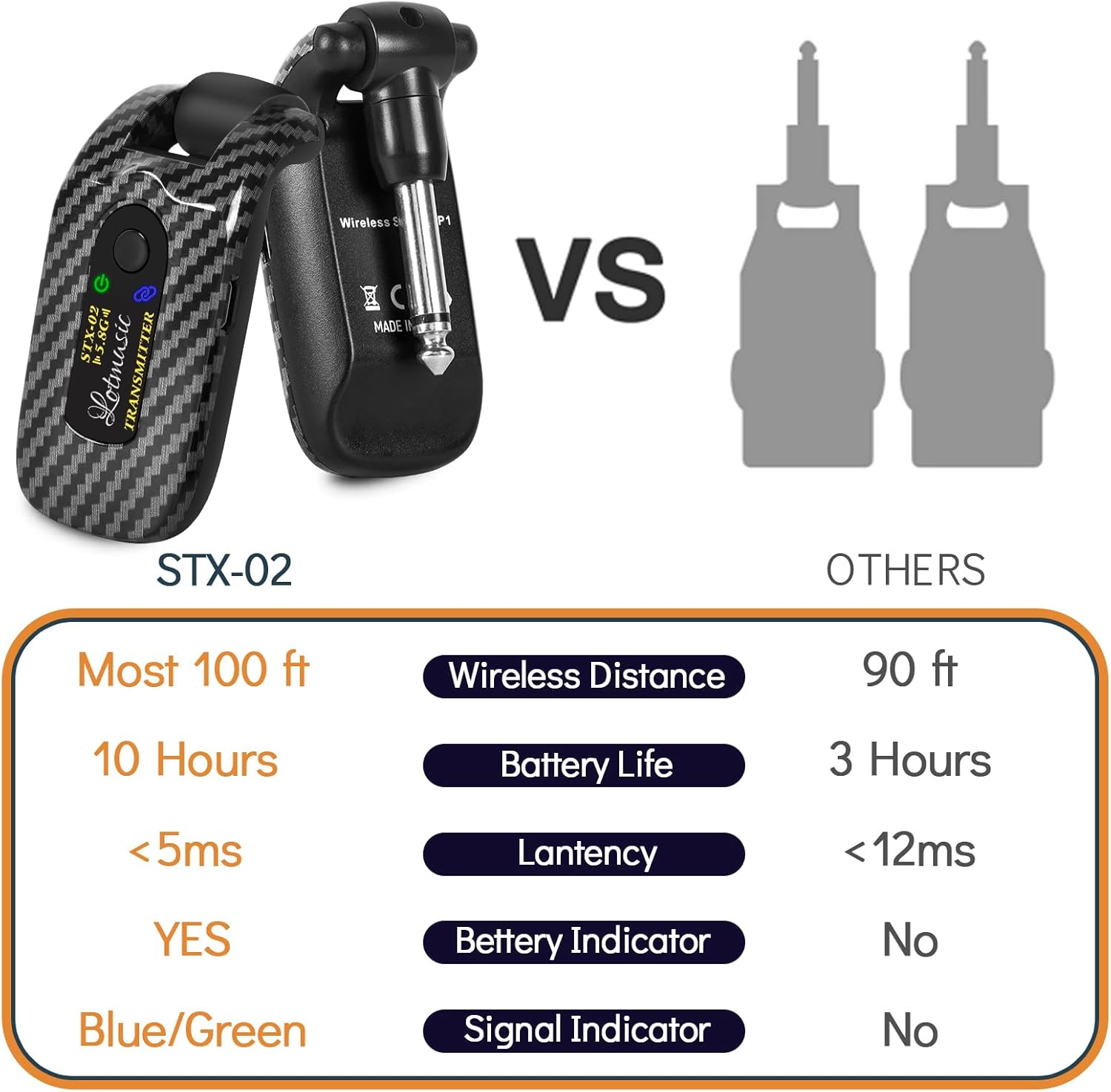
Image: Performance comparison of the lotmusic STX-02 system.

Image: Wide application compatibility of the lotmusic STX-02 wireless system.
Warranty Information
Specific warranty details for the lotmusic STX-02 Wireless Guitar System are not provided in this manual. Please refer to the product packaging or contact the seller/manufacturer directly for information regarding warranty coverage and terms.
Support
For further assistance, technical support, or inquiries not covered in this manual, please contact the lotmusic customer service department or the retailer from whom you purchased the product. Contact information can typically be found on the product packaging or the manufacturer's official website.


