
1. Introduction
This manual provides instructions for the safe and effective use of your LP LP-E6N LP-E6 replacement battery. This high-capacity battery is designed to power a wide range of compatible Canon EOS cameras, offering a convenient USB-C charging port for versatile power options.
2. Product Overview
The LP LP-E6N LP-E6 battery is a 2600mAh, 7.4V rechargeable lithium-ion battery. It features an integrated USB-C charging port, allowing for direct charging without a dedicated external charger. Each battery includes LED indicators to show charging status and comes with a protective storage box that also accommodates memory cards.

Image: Two LP LP-E6N LP-E6 batteries. One battery displays its front label with specifications like 'FOR LP-E6', '7.4V 2600mAh 19.3Wh', and regulatory marks. The other battery is shown from its side, highlighting the USB-C charging port.
Key Features:
- High Capacity: 2600mAh for extended usage.
- USB-C Charging: Direct charging via a USB-C port on the battery.
- LED Indicators: Red light for charging, green light for fully charged.
- Multiple Protections: Built-in safeguards against overcharge, over-discharge, short-circuit, surge, over-voltage, and over-current.
- Battery Storage Box: Included for safe storage of batteries and memory cards.
3. Setup and Charging
Charging the Battery:
- Locate the USB-C charging port on the side of the LP-E6N LP-E6 battery.
- Connect the provided 2-in-1 USB-C charging cable to the battery's USB-C port.
- Connect the other end of the USB-C cable to a compatible USB power source (e.g., USB wall adapter, car charger, power bank, or laptop USB port).
- Observe the LED indicator next to the USB-C port:
- A red light indicates the battery is currently charging.
- A green light indicates the battery is fully charged.
- Once fully charged, disconnect the USB-C cable from the battery and the power source.

Image: A close-up view of the LP-E6N LP-E6 battery's USB-C charging port. A USB-C cable is inserted, and a red LED light is visible, indicating that the battery is currently charging.

Image: An illustration demonstrating various charging methods for the LP-E6N LP-E6 battery. It shows the battery connected to a laptop, a wall charger, a car charger, and a portable power bank, highlighting its versatile charging capabilities.
4. Operating Instructions
Installing the Battery in Your Camera:
- Ensure your camera is powered off before installing or removing the battery.
- Open the battery compartment cover on your compatible Canon EOS camera.
- Insert the LP LP-E6N LP-E6 battery into the compartment, aligning it correctly according to the camera's battery orientation guide. Ensure it clicks securely into place.
- Close the battery compartment cover firmly.
- Power on your camera. The battery level should be displayed on your camera's screen or viewfinder.
Compatible Camera Models:
This LP-E6N LP-E6 replacement battery is compatible with a wide range of Canon EOS cameras, including but not limited to:
- Canon EOS R, R5, R5 Mark II, R6, R6 Mark II, R7
- Canon EOS 5D Mark II, 5D Mark III, 5D Mark IV, 5DS R
- Canon EOS 6D, 6D Mark II
- Canon EOS 7D, 7D Mark II
- Canon EOS 60D, 60Da, 70D, 80D, 90D
- Canon XC10, XC15
- And other models using BG-E6, E7, E9, E11, E13, E14 battery grips.
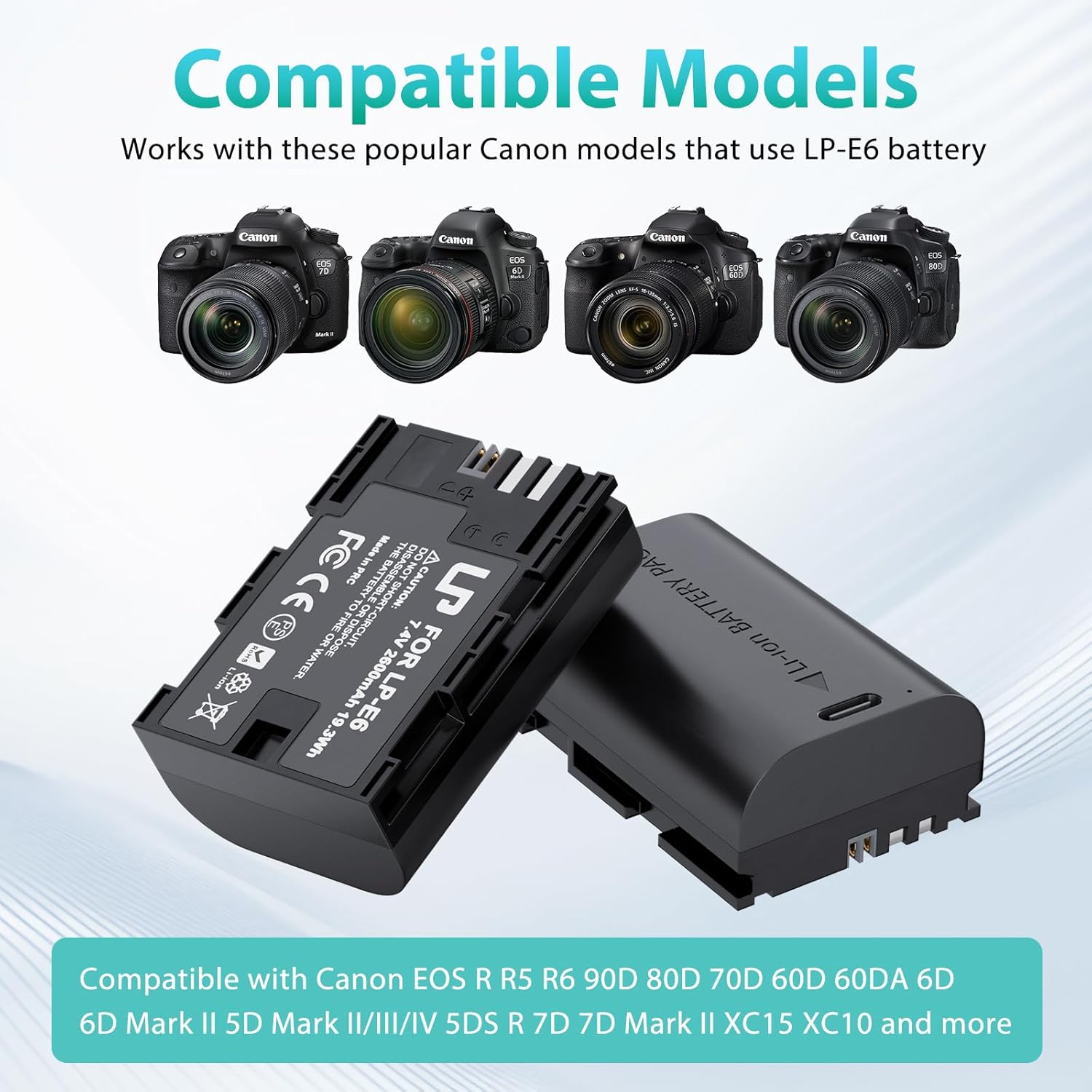
Image: A visual representation of the LP-E6N LP-E6 batteries alongside several compatible Canon EOS camera models, including the EOS R, 5D Mark IV, 6D Mark II, and 7D Mark II, to demonstrate broad compatibility.
5. Maintenance and Storage
Battery Care:
- Avoid fully discharging the battery regularly to prolong its lifespan.
- Do not expose the battery to extreme temperatures (hot or cold).
- Keep battery contacts clean and dry. Use a soft, dry cloth to wipe them if necessary.
- Do not disassemble, crush, or puncture the battery.
Storage:
When not in use for extended periods, store the battery in a cool, dry place, ideally at approximately 50% charge. The included battery storage box is designed to protect your batteries and memory cards from dust and physical damage.

Image: An open battery organizer box, designed to hold two LP-E6N LP-E6 batteries and multiple memory cards. The batteries are placed in their respective slots, and the memory card slots are clearly visible.
6. Troubleshooting
Common Issues and Solutions:
- Battery not charging:
- Ensure the USB-C cable is securely connected to both the battery and the power source.
- Verify the power source is active and providing power.
- Check if the LED indicator on the battery turns red when connected. If not, try a different USB-C cable or power source.
- Camera not powering on with battery:
- Ensure the battery is fully charged (green LED indicator).
- Confirm the battery is correctly inserted into the camera's battery compartment and the cover is closed.
- Clean the battery contacts on both the battery and the camera with a dry cloth.
- Test with another known-good battery if available to rule out a camera issue.
- Battery draining quickly:
- Battery performance can be affected by extreme temperatures.
- High-power camera functions (e.g., video recording, continuous shooting, Wi-Fi) consume more power.
- Ensure the battery has completed several full charge/discharge cycles to optimize its capacity.
7. Specifications
| Feature | Specification |
|---|---|
| Model Number | LP-E6 |
| Battery Type | Lithium-Ion |
| Capacity | 2600mAh |
| Voltage | 7.4V |
| Charging Port | USB-C |
| Certifications | CE, FCC, RoHS |
| Item Weight | 0.21 Kilograms |
8. Safety Information
Your LP LP-E6N LP-E6 battery is equipped with multiple protection features to ensure safe operation:
- Overcharge Protection
- Over-discharge Protection
- Short-circuit Protection
- Surge Protection
- Over-voltage Protection
- Over-current Protection

Image: A graphic depicting the six layers of protection integrated into the LP-E6N LP-E6 battery, including electric shock, over-voltage, over-heat, over-current, short-circuit, and over-charge protection.
General Safety Warnings:
- Do not expose the battery to fire or water.
- Do not use the battery if it appears damaged, swollen, or leaking.
- Keep out of reach of children.
- Dispose of batteries according to local regulations. Do not dispose of with household waste.
9. Warranty and Support
Warranty Information:
This LP LP-E6N LP-E6 replacement battery comes with a 1-year manufacturer's warranty from the date of purchase. Additionally, a 30-day refund policy is offered for customer satisfaction.
Customer Support:
For any questions, concerns, or technical assistance, please contact our customer support team. We aim to provide a quick and friendly response within 24 hours during working days.
Contact Information: Please refer to your purchase documentation or the seller's platform for specific contact details.


