
1. Introduction
This manual provides detailed instructions for the installation, operation, and maintenance of your Sodola 10Gbps L3 Managed Switch. Please read this manual thoroughly before using the device to ensure proper setup and optimal performance. This switch is designed for high-speed network environments in both home and office settings.
2. Product Overview
2.1. Physical Components
The Sodola 10Gbps L3 Managed Switch features 8 SFP+ ports for high-speed connectivity and a console port for management. Key indicators provide status information.

Image 2.1: Front and Rear Panel Overview. This image displays the front panel with 8 SFP+ ports, a console port, and LED indicators. The rear panel shows the DC 12V power input and grounding screw. Labels indicate the function of each component, including the reset button, power indicator (PWR), and system indicator (SYS).
2.2. Key Features
- 8x10Gb SFP+ Ports: Provides high-density 10G network connectivity with excellent scalability and flexibility.
- L3 Management: Offers an intuitive web interface and comprehensive configuration options including Link Aggregation, LACP, Storm Control, Port Mirroring, VLAN Management, MAC Address, Spanning Tree Protocol, Multicast, QoS, DHCP Snooping, SNMP, and RSTP.
- 160G Backplane Bandwidth: Capable of handling ultra-large traffic loads, ensuring stable network operation even under heavy use.
- Fanless Design: Features a built-in fanless double-sided heat dissipation design for quiet operation.
- Wall-Mountable: Supports flexible installation options for desktop or wall-mounting.
- 6KV Surge Protection: Integrated circuit for enhanced reliability during lightning events.
3. Package Contents
Please verify that all items are present in the package:
- Sodola 10Gbps L3 Managed Switch (Model: SL-SWTGW3C8F)
- Power Adapter (12V 2A)
- Console Cable
- Foot Pads (4 pcs)
- Instruction Manual
Important Note: SFP+ modules are NOT included and must be purchased separately.

Image 3.1: Package Contents and Installation Options. This image shows the switch, power adapter, console cable, foot pads, and manual. It also illustrates the switch dimensions and its suitability for both desktop and wall-mount installations.
4. Hardware Installation
4.1. Placement
The switch can be placed on a desktop or mounted on a wall. Ensure adequate ventilation around the device, as it uses a fanless heat dissipation design.
4.2. Connecting SFP+ Modules
Insert compatible SFP+ modules (1G, 2.5G, or 10G) into the SFP+ ports. If using RJ45 (copper cable) connections, a compatible 10G SFP+ to RJ45 converter module is required.
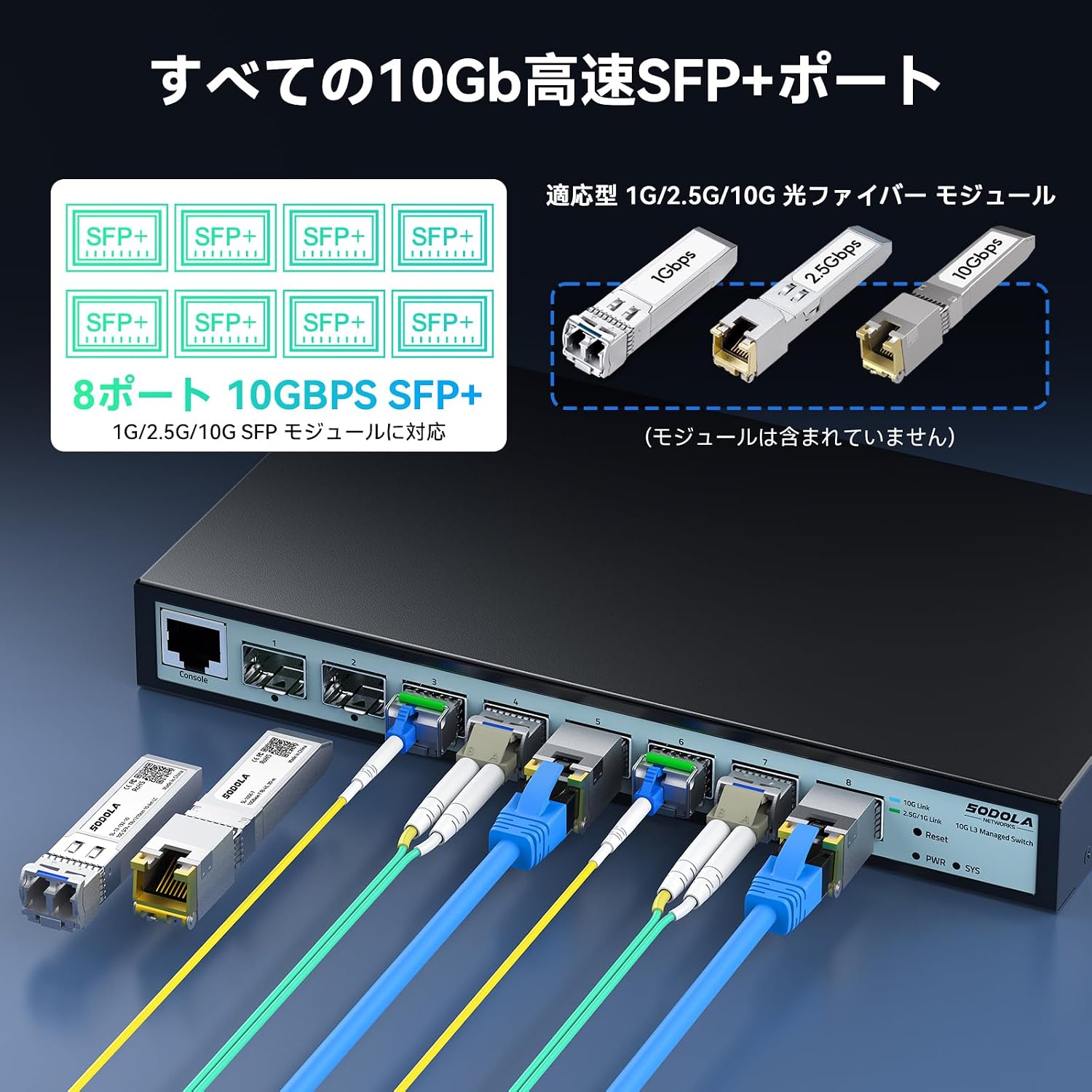
Image 4.1: SFP+ Port Connectivity. This image illustrates the 8 SFP+ ports and shows examples of 1G, 2.5G, and 10G fiber modules that can be used. It emphasizes that these modules are not included with the switch.
4.3. Power Connection
- Connect the power adapter to the DC 12V input port on the switch.
- Plug the power adapter into a suitable power outlet.
- Ensure the grounding screw is properly connected for safety.
5. Initial Configuration
5.1. Setting IP Address
Before connecting the switch, you must first set an IP address on your computer to match the switch's subnet.
- Clear your browser's cache.
- Adjust your network settings.
- Set your PC's IP address to match the switch's subnet (e.g., if the switch's default IP is 192.168.2.1, set your PC's IP to 192.168.2.x, where x is not 1).

Image 5.1: Simple Web Management Access. This image illustrates the steps to prepare your computer for accessing the switch's web interface, including setting a compatible IP address.
5.2. Accessing the Web Interface
- Open a web browser on your computer.
- Enter the default IP address: 192.168.2.1
- Log in using the default credentials:
Username: admin
Password: admin

Image 5.2: Web Interface Login. This image shows the default IP address, username, and password for accessing the switch's web management interface.
6. Operating the Switch
6.1. LED Indicators
- PWR (Power Indicator): Indicates power status.
- SYS (System Indicator): Indicates system status.
- Port Link/Activity LEDs: Indicate link status and data activity for each SFP+ port.
6.2. Port Speed Configuration
The default port speed is 10G/2.5G auto-negotiation. When connecting 1G devices, you must manually set the port to 10G/1G mode via the management interface.
- Log in to the web management interface.
- Navigate to the port settings.
- Select the desired speed (e.g., 10G/1G) and click "Apply".
- Save the applied settings.
- Reboot the switch for changes to take effect.

Image 6.1: Manual SFP Speed Setting. This image shows the web interface for configuring port speeds, allowing selection between 10G/1000M or 10G/2.5G modes.

Image 6.2: Saving Configuration. This image highlights the importance of saving settings after making adjustments in the web interface.
7. Advanced Configuration (L3 Management)
The Sodola L3 Managed Switch offers a wide range of advanced features accessible through its web management interface. These features enable robust network control and optimization.
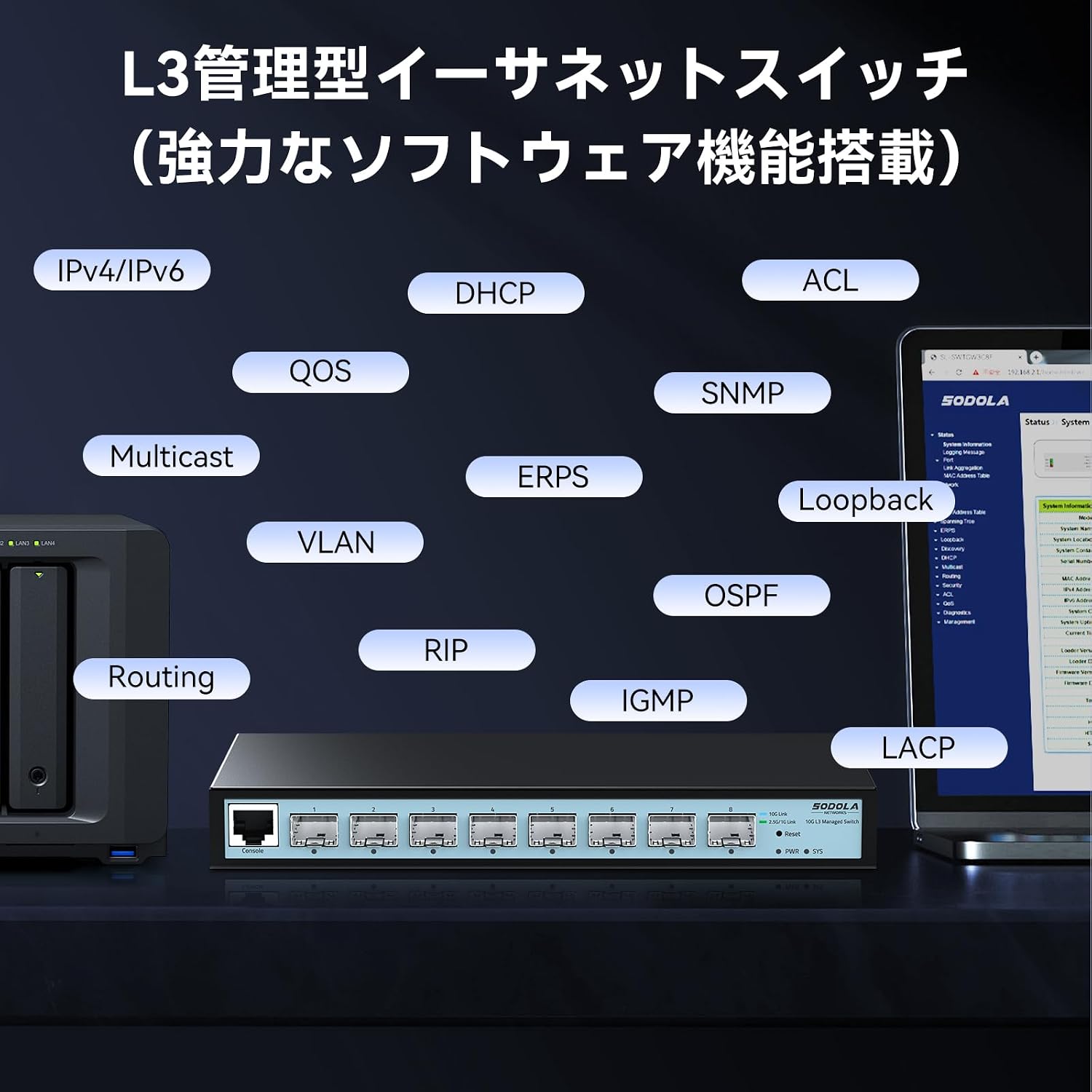
Image 7.1: L3 Management Capabilities. This image displays a range of L3 management features supported by the switch, including IPv4/IPv6, DHCP, ACL, QoS, SNMP, Multicast, VLAN, Routing, RIP, OSPF, IGMP, and LACP.
7.1. Security Features
The switch includes comprehensive security measures to protect your network:
- Quadruple Binding: Enhances network security by binding IP, MAC, VLAN, and Port.
- ARP Protection: Defends against ARP spoofing attacks.
- IP Source Guard: Prevents unauthorized IP addresses from accessing the network.
- DoS Defense: Protects against Denial of Service attacks.
- 802.1X Authentication: Provides port-based network access control.
- DHCP Snooping: Filters untrusted DHCP messages.

Image 7.2: Comprehensive Security Protection. This image visually represents the various security features of the switch, such as Quadruple Binding, ARP Protection, IP Source Guard, DoS Defense, 802.1X Authentication, and DHCP Snooping.
8. Maintenance
8.1. General Care
- Keep the device in a clean, dry environment.
- Avoid exposing the switch to extreme temperatures or humidity.
- Do not block the ventilation holes on the sides of the switch.
- Clean the exterior with a soft, dry cloth. Do not use liquid cleaners.
8.2. Firmware Updates
Periodically check the manufacturer's website for firmware updates to ensure optimal performance and access to new features. Follow the instructions provided with the firmware update package carefully.
9. Troubleshooting
If you encounter issues with your switch, refer to the following common problems and solutions:
| Problem | Possible Cause | Solution |
|---|---|---|
| No power/PWR LED off | Power adapter not connected or faulty. | Check power connections. Ensure the power adapter is working. |
| No link on SFP+ port | Incorrect SFP module, faulty cable, or incorrect speed setting. | Ensure SFP module is compatible and correctly inserted. Check fiber/copper cable. Verify port speed setting in web interface. |
| Cannot access web interface | Incorrect IP address on PC, wrong default gateway, or browser cache issue. | Verify PC's IP address is in the same subnet as the switch (192.168.2.x). Clear browser cache. Try a different browser. |
| Slow network performance | High network traffic, incorrect port speed, or faulty SFP module/cable. | Check network utilization. Ensure port speeds are correctly configured for connected devices. Inspect cables and SFP modules. |
10. Specifications
Detailed technical specifications for the Sodola 10Gbps L3 Managed Switch (Model: SL-SWTGW3C8F):

Image 10.1: Product Specifications. This image provides a summary of the switch's technical details, including model, interface, switching capacity, packet forwarding rate, buffer, MAC address table size, jumbo frame support, surge protection, power, no-load power, and operating temperature.
- Model: SL-SWTGW3C8F
- Interface: 8x10G SFP+ Ports
- Switching Capacity: 160Gbps
- Packet Forwarding Rate: 119.04Mpps
- Packet Buffer: 12Mbit
- MAC Address Table: 16K
- Jumbo Frame: 10K
- Surge Protection: 6KV
- Power Input: DC 12V 2A
- No-load Power Consumption: 3.7W
- Operating Temperature: 0~40°C (32~104°F)
- Storage Temperature: -40~70°C (-40~158°F)
- Operating Humidity: 10%~90% non-condensing
- Storage Humidity: 5%~90% non-condensing
- Compatible Devices: Desktop computers, laptops, routers, NAS
- Color: Black
11. Warranty and Support
11.1. Warranty Information
This Sodola product comes with a 1-year warranty from the date of purchase. The warranty covers defects in materials and workmanship under normal use. It does not cover damage caused by misuse, accidents, unauthorized modifications, or external factors.
11.2. Technical Support
For technical assistance, troubleshooting, or warranty claims, please contact Sodola Networks customer support. Refer to the contact information provided on the official Sodola website or your purchase documentation.


