
Introduction
Thank you for choosing the SKMEI Digital Sports Watch Model 2348. This manual provides detailed instructions on how to set up, operate, and maintain your watch. Please read it carefully to ensure proper use and longevity of your timepiece.

Image: Front view of the SKMEI Digital Sports Watch Model 2348, showcasing its digital display and yellow strap.
Key Features
- Multifunctional Digital Display: World Time, Chronograph, 4 Alarms, Date, Week Display, EL Backlight, 12/24-hour format.
- 50M Water Resistance: Suitable for handwashing, rain, and splashes. Not for diving or hot water.
- Durable Construction: Rugged ABS case, TPU band, stainless steel buckle.
- EL Backlight: Electroluminescent backlight for clear visibility in low-light conditions.
- Comfortable Design: Lightweight (48.4g) with a soft TPU strap and ergonomic 45.5mm case.

Image: Infographic highlighting key features such as digital display, round dial, durable TPU strap, 5ATM water resistance, and alarm/LED light functions.
Watch Components
Familiarize yourself with the buttons and display areas of your watch.

Image: Diagram illustrating the watch's buttons and their typical functions (e.g., Mode, Light, Start, Reset).
- Button A (Top Left): EL Backlight
- Button B (Bottom Left): Mode Selection
- Button C (Top Right): Start/Stop (Chronograph), Adjust (Setting)
- Button D (Bottom Right): Reset (Chronograph), Next Item (Setting)
Setup and Initial Settings
1. Time and Date Setting
- In Timekeeping Mode, press and hold Button B until the seconds begin to flash (indicating setting mode).
- Press Button D to cycle through the settings: Seconds → Hours → Minutes → Year → Month → Day → 12/24-hour format.
- Use Button C to adjust the flashing value.
- Once all settings are correct, press Button B to exit the setting mode.
2. 12/24-Hour Format
During time setting, you can toggle between 12-hour (P for PM) and 24-hour formats using Button C when the hour setting is flashing.
Operating Instructions
Mode Selection
Press Button B repeatedly to cycle through the different modes:
- Timekeeping Mode (displays current time, date, day)
- Chronograph Mode (stopwatch)
- Alarm Mode
- Countdown Timer Mode
- World Time Mode
1. Chronograph (Stopwatch) Mode
- Enter Chronograph Mode by pressing Button B.
- Press Button C to start the stopwatch.
- Press Button C again to stop the stopwatch.
- Press Button D to reset the stopwatch to zero.
- To record split times, press Button D while the stopwatch is running. Press Button D again to release the split and view the current running time.
2. Alarm Mode
The watch features 4 independent alarms.
- Enter Alarm Mode by pressing Button B.
- Press and hold Button C until the alarm hour begins to flash.
- Press Button D to select hours or minutes.
- Use Button C to adjust the flashing value.
- Press Button C to confirm and exit alarm setting.
- To turn an alarm ON/OFF, press Button D in Alarm Mode (without holding) to cycle through alarms, then press Button C to toggle ON/OFF.
3. Countdown Timer Mode
- Enter Countdown Timer Mode by pressing Button B.
- Press and hold Button C until the timer hours begin to flash.
- Press Button D to select hours, minutes, or seconds.
- Use Button C to adjust the flashing value.
- Press Button C to confirm and exit timer setting.
- Press Button C to start or pause the countdown.
- Press Button D to reset the timer to its preset value.
4. World Time Mode
This mode allows you to view the current time in various major cities around the world.
- Enter World Time Mode by pressing Button B.
- Press Button C to scroll through different city time zones.
- Press Button D to toggle Daylight Saving Time (DST) ON/OFF for the selected city.
5. EL Backlight
Press Button A (top left) at any time to illuminate the display for a few seconds, enhancing visibility in low-light conditions.
Maintenance and Care
- Water Resistance: The watch is 50M (5ATM) water-resistant. This means it can withstand splashes, rain, and brief immersion in water (e.g., handwashing). Do not press buttons underwater. Do not use in hot water, saunas, or for diving.
- Cleaning: Wipe the watch with a soft, dry cloth. For stubborn dirt, use a slightly damp cloth and mild soap, then dry thoroughly.
- Temperature: Avoid exposing the watch to extreme temperatures (hot or cold) for extended periods.
- Chemicals: Keep the watch away from solvents, detergents, perfumes, and other chemicals, as they may damage the case or strap.
- Battery Replacement: The watch uses 1 C battery (included). When the display dims or functions become erratic, it's time to replace the battery. It is recommended to have battery replacement performed by a qualified technician to ensure water resistance is maintained.

Image: Close-up of the watch's back case, indicating "Water Resistant 5ATM" and model number "2348".
Troubleshooting
| Problem | Possible Cause | Solution |
|---|---|---|
| Display is blank or dim. | Low battery. | Replace the battery. |
| Time is incorrect. | Time not set correctly or accidental button press. | Refer to "Time and Date Setting" section to reset the time. |
| Watch not responding to button presses. | Temporary software glitch or low battery. | Try removing and reinserting the battery (if comfortable) or replace the battery. If issue persists, contact support. |
| Water inside the watch. | Buttons pressed underwater, exposure to hot water, or seal damage. | Immediately take the watch to a professional for inspection and repair to prevent further damage. |
Specifications
- Model: 2348
- Display Type: Digital
- Case Material: ABS
- Strap Material: Thermoplastic Polyurethane (TPU)
- Case Diameter: 45.5 mm
- Case Thickness: 13.2 mm
- Strap/Lug Width: 22 mm
- Item Weight: 48.4 g
- Water Resistance: 50M (5ATM)
- Movement Type: Quartz
- Battery: 1 C battery (included)

Image: Diagram showing the dimensions of the SKMEI Digital Sports Watch, including case height, width, and strap width.
Warranty and Support
This SKMEI watch comes with a 9-month manufacturer's warranty from the date of purchase. The warranty covers manufacturing defects under normal use. It does not cover damage caused by misuse, accidents, unauthorized repairs, or normal wear and tear.
For warranty claims or technical support, please contact your retailer or visit the official SKMEI website for contact information.
Manufacturer: SKMEI
Additional Information
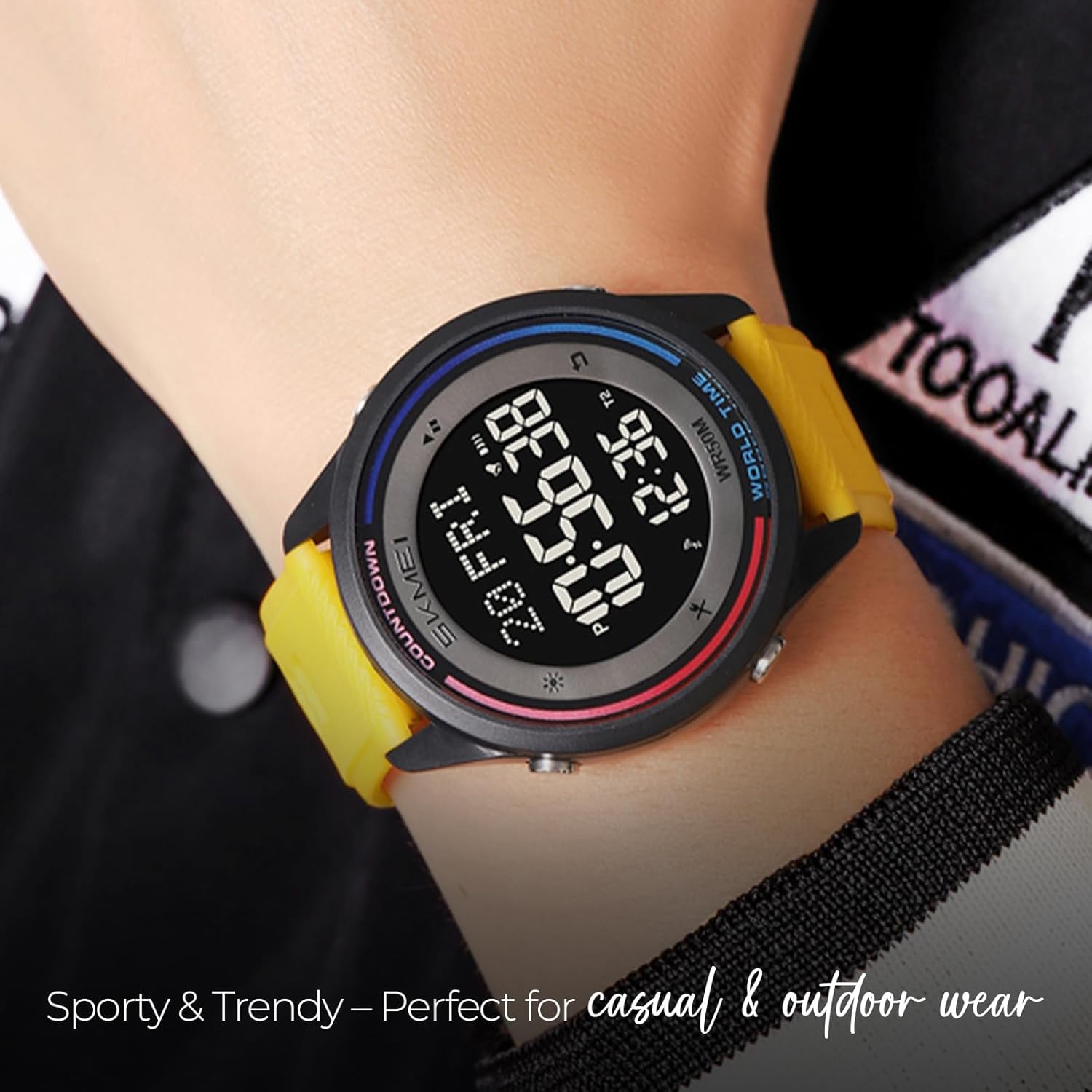
Image: A person wearing the SKMEI Digital Sports Watch on their wrist, demonstrating its fit and appearance.

Image: The SKMEI branded packaging box for the watch.