
1. Introduction
Thank you for choosing the Condere C-CPSF20A Electric Induction Cooktop. This portable and efficient cooking solution is designed for convenience and performance in various settings. This manual provides essential information for the safe and effective operation, maintenance, and troubleshooting of your new induction cooktop. Please read it thoroughly before first use and keep it for future reference.
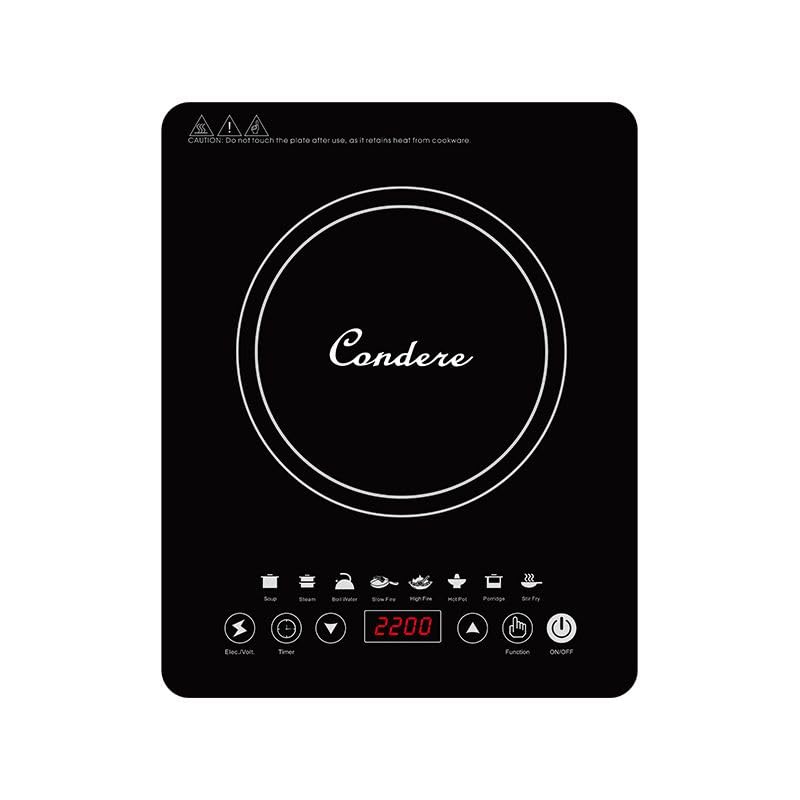
Image 1.1: The Condere C-CPSF20A Electric Induction Cooktop, showcasing its sleek black crystal glass surface and compact design.
2. Important Safety Instructions
To prevent injury or damage, always follow basic safety precautions when using electrical appliances. This cooktop is for household use only.
- Electrical Safety: Ensure the power outlet matches the voltage specified on the cooktop. Do not use with damaged cords or plugs. Do not immerse the cooktop in water or other liquids.
- Heat and Burn Hazard: The cooktop surface and cookware will become hot during use. Always use oven mitts or pot holders. Do not touch the hot surface immediately after use.
- Placement: Place the cooktop on a stable, flat, heat-resistant surface. Ensure adequate ventilation around the unit (at least 10 cm clearance from walls or other objects). Do not place near flammable materials.
- Cookware: Use only induction-compatible cookware. Non-compatible cookware will not heat. Ensure the cookware base covers the cooking zone adequately.
- Children and Pets: Keep the appliance out of reach of children and pets. Close supervision is necessary when the appliance is used near children.
- Maintenance: Unplug the cooktop before cleaning. Allow it to cool completely. Do not attempt to repair the appliance yourself; contact qualified service personnel.
- Overheating Protection: The cooktop is equipped with overheating protection. If the unit becomes too hot, it will automatically shut off.
- Water and Moth Protection: This unit features water and moth protection technology for enhanced durability and safety.
3. Product Overview and Features
The Condere C-CPSF20A is a high-performance, portable induction cooktop designed for efficiency and ease of use. Key features include:
- Efficient and Portable Design: Delivers strong and fast heating, ideal for countertop use in various settings.
- Durable Black Crystal Glass Surface: Sleek, high-quality surface for durability and easy cleaning.
- User-Friendly Sensor Control Panel: Intelligent digital display for precise temperature adjustments.
- Energy-Saving Technology: Innovative heating reduces energy consumption by up to 70%.
- Comprehensive Safety Features: Includes water and moth protection, overheating protection, and overloading protection.
4. Initial Setup
Follow these steps to set up your induction cooktop for the first time:
- Unpack: Carefully remove the cooktop and all accessories from the packaging. Retain packaging for future storage or transport.
- Inspect: Check the cooktop for any signs of damage. Do not use if damaged.
- Placement: Place the cooktop on a dry, stable, and level surface. Ensure there is at least 10 cm of clear space around all sides for proper ventilation. Do not block the air vents located on the bottom or sides of the unit.
- Power Connection: Plug the power cord into a grounded electrical outlet that matches the voltage requirements of the cooktop.
5. Operating Instructions
5.1 Compatible Cookware
Induction cooktops require specific types of cookware. Use only pots and pans that are made of or contain a magnetic material at the base.
- Compatible Materials: Cast iron, enameled iron, stainless steel (magnetic grade), or flat-bottomed pots/pans with a magnetic base.
- Incompatible Materials: Glass, ceramic, copper, aluminum, or non-magnetic stainless steel.
- Test: To check if your cookware is compatible, hold a magnet to the bottom of the pot or pan. If the magnet sticks, it is compatible.
5.2 Basic Operation
Follow these steps to operate your Condere C-CPSF20A Induction Cooktop:
- Place Cookware: Place induction-compatible cookware, containing food or liquid, centrally on the cooking zone.
- Power On: Plug the cooktop into a power outlet. The unit will beep once, and the digital display will show a standby indicator. Press the "On/Off" button to turn on the cooktop.
- Select Cooking Mode: The cooktop will typically default to a specific power level or temperature. Use the "+" and "-" buttons or dedicated mode buttons on the sensor control panel to adjust the power level (e.g., 200W to 2200W) or temperature setting.
- Adjust Settings: During cooking, you can adjust the power or temperature as needed using the control panel.
- Timer Function (if available): If your model includes a timer, press the "Timer" button and use "+" and "-" to set the desired cooking duration. The cooktop will automatically shut off when the timer expires.
- Power Off: After cooking, press the "On/Off" button to turn off the cooktop. The fan may continue to run for a short period to cool down the internal components.
- Unplug: Once the cooktop has cooled down, unplug it from the power outlet.
6. Maintenance and Cleaning
Proper maintenance ensures the longevity and performance of your induction cooktop.
- Before Cleaning: Always unplug the cooktop from the power outlet and allow it to cool completely before cleaning.
- Cooktop Surface: Wipe the black crystal glass surface with a soft, damp cloth and mild detergent. For stubborn stains, use a non-abrasive ceramic cooktop cleaner. Do not use abrasive pads, harsh chemicals, or steel wool.
- Control Panel: Wipe the sensor control panel with a soft, damp cloth. Ensure no liquid enters the panel.
- Housing: Clean the exterior housing with a soft, damp cloth.
- Air Vents: Periodically check and clean the air vents to ensure they are free from dust and debris, which can impede ventilation. Use a soft brush or vacuum cleaner.
- Storage: When not in use, store the cooktop in a dry, safe place, away from direct sunlight and moisture.
7. Troubleshooting
If you encounter issues with your cooktop, refer to the table below for common problems and solutions.
| Problem | Possible Cause / Solution |
|---|---|
| Cooktop does not turn on. | Check if the power cord is securely plugged into a working outlet. Ensure the "On/Off" button has been pressed. |
| No heat generated. | Verify that the cookware is induction-compatible. Ensure the cookware is centered on the cooking zone. |
| Cooktop shuts off during operation. | This may be due to overheating protection. Allow the unit to cool down. Check for blocked air vents. Ensure the cookware is not empty. |
| Display shows an error code. | Refer to the specific error code in a more detailed manual if available, or contact customer support. Common codes relate to incompatible cookware or overheating. |
| Loud fan noise. | The cooling fan operates during and after cooking to dissipate heat. This is normal. Ensure vents are not blocked. |
8. Technical Specifications
Below are the technical specifications for the Condere C-CPSF20A Electric Induction Cooktop:
| Feature | Value |
|---|---|
| Model Number | C-CPSF20A |
| Power | 2200W |
| Surface Material | Black Crystal Glass |
| Product Dimensions (D x W x H) | 6D x 35W x 28H centimetres |
| Color | Black |
| Included Components | Induction Cooktop, Power Cord, Manual |
| Safety Features | Water and Moth Protection, Overheating Protection, Overloading Protection |
9. Warranty and Customer Support
Your Condere C-CPSF20A Electric Induction Cooktop comes with a standard manufacturer's warranty. Please refer to the warranty card included in your package for specific terms and conditions, including the warranty period and coverage details. Keep your proof of purchase for warranty claims.
For technical assistance, troubleshooting beyond this manual, or warranty inquiries, please contact the retailer or the manufacturer's customer support. Contact information can typically be found on the product packaging or the official brand website.