
1. Important Safety Information
Please read all instructions carefully before using the Generic Vibration Plate Exercise Machine Model 001. Retain this manual for future reference.
- Consult a physician before starting any new exercise program, especially if you have pre-existing health conditions.
- Ensure the machine is placed on a flat, stable surface.
- Do not exceed the maximum weight capacity of 330 pounds (150 kg).
- Keep children and pets away from the machine during operation.
- Do not use the machine if you are pregnant, have a pacemaker, or suffer from severe medical conditions without medical advice.
- Always wear appropriate footwear or use the machine barefoot if comfortable, ensuring a secure grip.
- Stop exercising immediately if you feel dizzy, nauseous, or experience any pain.
- Unplug the machine from the power outlet when not in use or before cleaning.
2. Product Overview
The Generic Vibration Plate Exercise Machine Model 001 is designed for whole-body vibration training, suitable for home and office use. It features an ultra-quiet operation, resistance bands, and multiple intensity zones.
2.1 Package Contents
Upon unpacking, please verify that all the following items are included:
- 1 x Vibration Plate
- 1 x Remote Control
- 2 x Training Ropes (Resistance Bands)
- 1 x Instruction Manual (this document)
- 1 x Power Cord
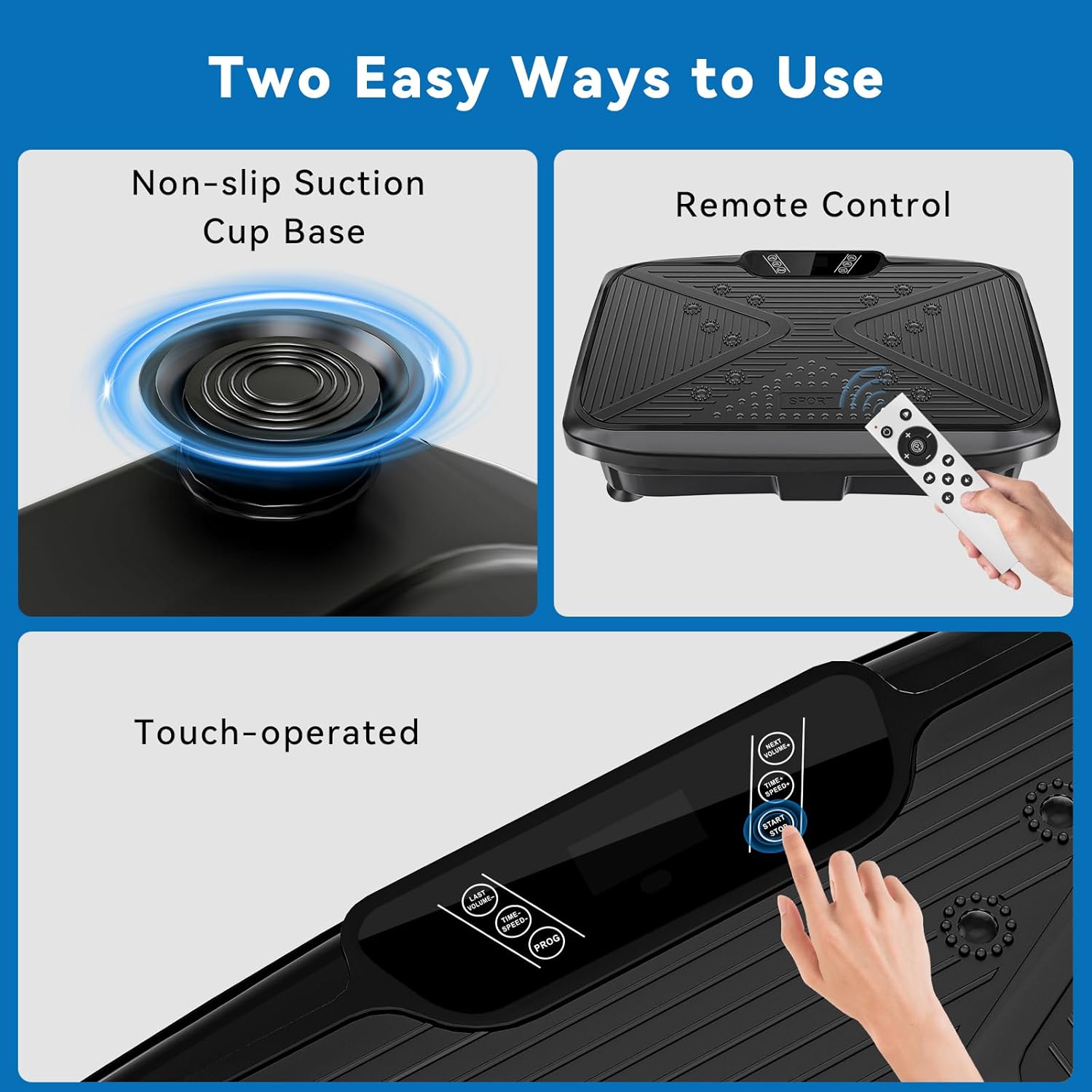
Image 2.1: Contents of the product package, including the vibration plate, remote, resistance bands, power cord, and manual.
2.2 Product Components
The vibration plate consists of the main platform, an LED display panel, and a power switch. It is constructed from Acrylonitrile Butadiene Styrene (ABS) material.
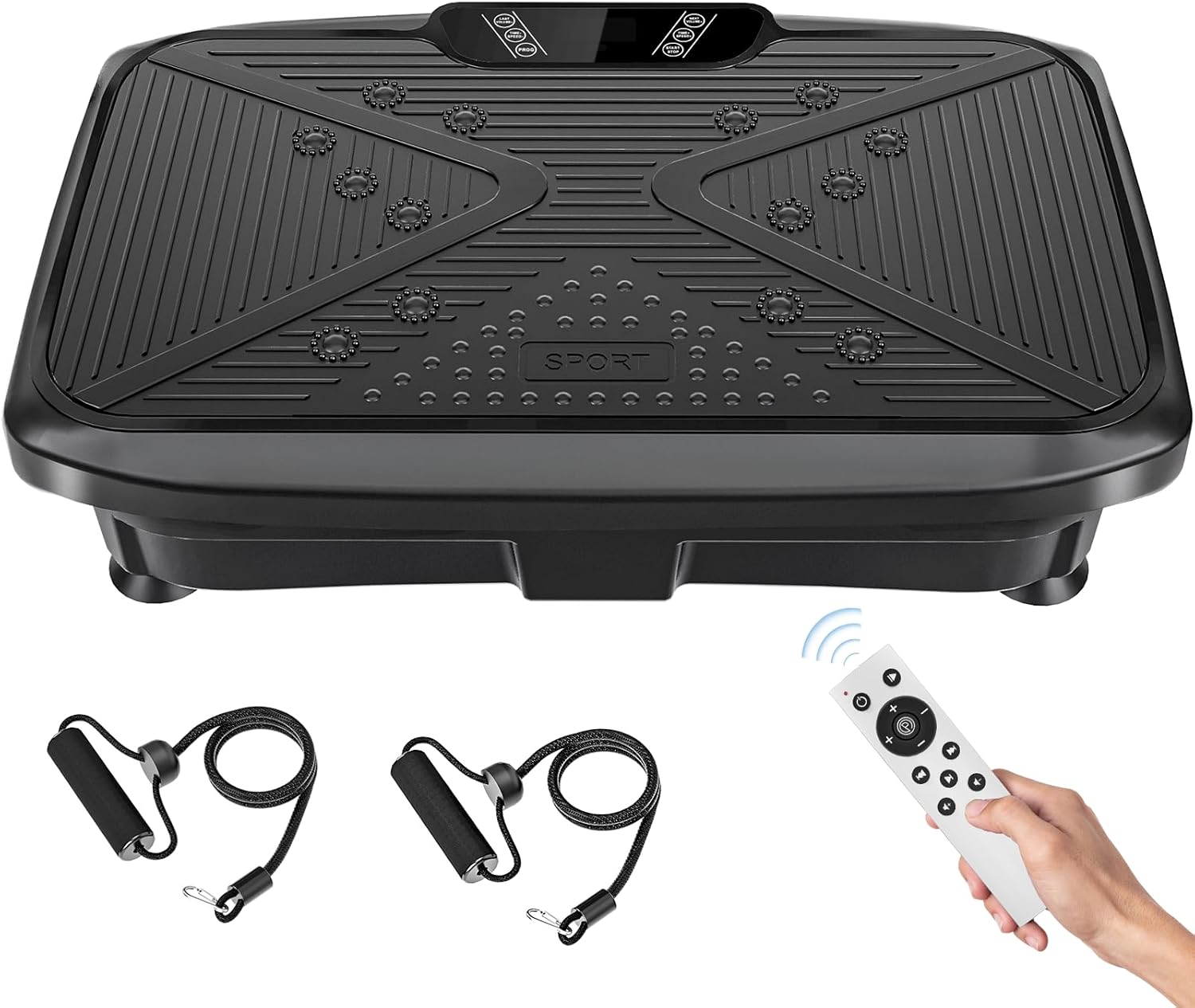
Image 2.2: The Generic Vibration Plate Exercise Machine with its remote control and resistance bands.
3. Setup
3.1 Placement
Place the vibration plate on a firm, level surface. The machine features non-slip suction cups on its base to ensure stability during use. Ensure there is adequate space around the machine for safe operation and movement.

Image 3.1: Examples of placing the vibration plate for use under a desk or storing it under furniture.
3.2 Power Connection
- Connect the power cord to the machine's power input port.
- Plug the other end of the power cord into a standard electrical outlet.
- Turn on the main power switch, usually located on the side or back of the unit. The LED display should illuminate.
3.3 Attaching Resistance Bands
If desired, attach the training ropes (resistance bands) to the designated hooks on the sides of the vibration plate. Ensure they are securely fastened before use.
4. Operating Instructions
The vibration plate can be operated using either the integrated touch panel or the remote control. Regular use of the vibration plate may contribute to benefits such as decreased stress, increased core strength, improved mobility and flexibility, enhanced circulation, and relief from muscle pain.

Image 4.1: Operating the vibration plate via touch panel or remote control.
4.1 Remote Control Functions
The remote control provides convenient access to all functions. Ensure batteries are installed (nonstandard battery type required, not included).

Image 4.2: Remote control layout and button functions.
- Power Switch: Turns the machine on/off.
- Start/Pause: Begins or pauses the vibration.
- Speed +/-: Adjusts the vibration intensity (1-120 levels).
- Time +/-: Sets the duration of the exercise session.
- Program (PROG): Cycles through pre-set exercise programs. (Note: Specific program details may vary and are best understood through experimentation.)
- Music Controls: If equipped with Bluetooth, these buttons control music playback (Next/Last Music, Music Start/Stop, Volume +/-).
4.2 Using the Vibration Plate
The vibration plate offers different intensity zones based on foot placement:
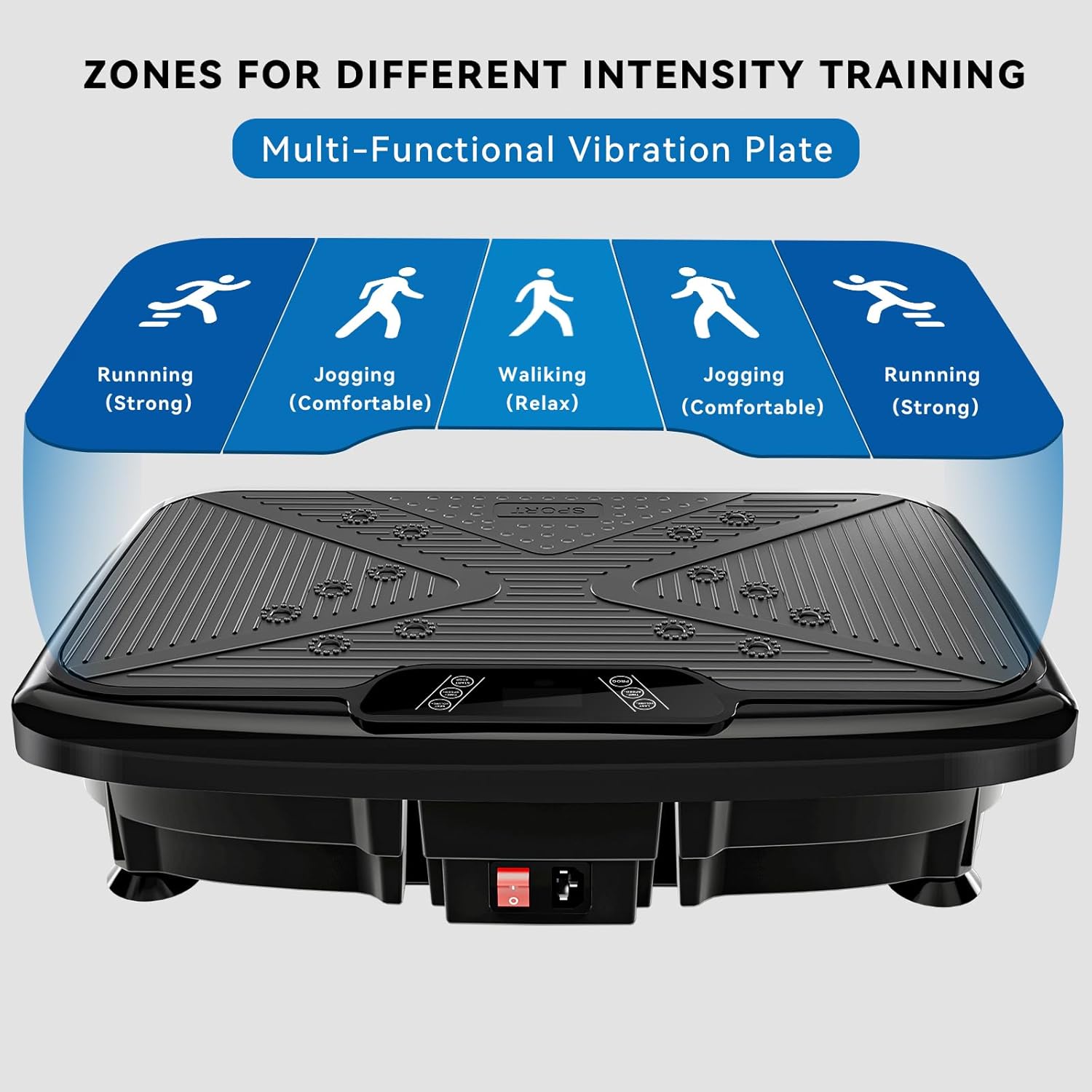
Image 4.3: Foot placement zones for different intensity levels.
- Walking (Relax): Place feet close together in the center.
- Jogging (Comfortable): Place feet slightly wider apart.
- Running (Strong): Place feet widest apart, towards the edges of the plate.
Experiment with different postures and exercises to target various muscle groups. Examples include:

Image 4.4: Examples of exercises on the vibration plate.
- Leg Lifts: Works on abdominals and buttocks.
- Bridge Pose: Enhances gluteal muscle strength and core stability.
- Plank Pose: Shapes the lines of the waist, abdomen, and buttocks.
- Half-squat Position: Exercises legs and buttocks.
The resistance bands can be used simultaneously to engage upper body muscles.
5. Maintenance
5.1 Cleaning
- Always unplug the machine before cleaning.
- Wipe the surface of the vibration plate with a soft, damp cloth. Do not use abrasive cleaners or solvents.
- Ensure no liquid enters the internal components.
5.2 Storage
Store the vibration plate in a cool, dry place away from direct sunlight and extreme temperatures. Its compact design allows for easy storage under beds or desks.
6. Troubleshooting
| Problem | Possible Cause | Solution |
|---|---|---|
| Machine does not power on. | Power cord not securely plugged in; Main power switch is off; Power outlet malfunction. | Check power cord connections; Ensure main power switch is on; Try a different power outlet. |
| Remote control is unresponsive. | Remote control batteries are depleted or incorrectly installed. | Replace remote control batteries (nonstandard battery type required); Ensure batteries are inserted with correct polarity. |
| Machine stops unexpectedly or functions erratically. | Overuse or frequent command input; Overheating protection activated. | Allow the machine to cool down; Avoid rapid, repeated button presses; If problem persists, unplug and restart after a few minutes. |
| Unusual noises during operation. | Minor operational sounds are normal. | Slight humming or mechanical sounds are part of normal operation. If the noise is loud or unusual, discontinue use and contact support. |
7. Specifications
| Feature | Detail |
|---|---|
| Model Name | 001 |
| Brand | Generic |
| Operation Mode | Vibration |
| Material | Acrylonitrile Butadiene Styrene (ABS) |
| Product Dimensions (LxWxH) | 20" x 10" x 5" (50.8 cm x 25.4 cm x 12.7 cm) |
| Item Weight | 15 Pounds (6.8 kg) |
| Maximum Weight Recommendation | 330 Pounds (150 kg) |
| Display Type | LED |
| Maximum Speed | 120 RPM |
| Minimum Speed | 1.0 |
| Motor Horsepower | 1.5 Horsepower |
| Number of Batteries (Remote) | Nonstandard Battery (not included) |
| Manufacturer | VonderFit US |
8. Warranty Information
This Generic Vibration Plate Exercise Machine Model 001 comes with a 1-year warranty from the date of purchase. This warranty covers manufacturing defects under normal use. It does not cover damage caused by misuse, accidents, unauthorized modifications, or improper maintenance.
Please retain your proof of purchase for warranty claims.
9. Customer Support
If you have any questions, concerns, or require assistance with your Generic Vibration Plate Exercise Machine Model 001, please contact the seller or manufacturer directly through your purchase platform for support.