1. Introduction
The SmartSee Wireless HD Transmitter and 4 Receiver Kit provides a seamless solution for wirelessly mirroring or extending your device's screen to multiple displays. This plug-and-play system eliminates the need for complex wiring, offering a stable and low-latency connection for various applications, from business presentations to home entertainment.
Key features include 4K decoding with 1080p@60Hz output, dual 5GHz WiFi modules for stable transmission up to 170 feet, and support for connecting one transmitter to up to four receivers, plus two mobile devices via the TuTuPlay app.
2. What's in the Box
Carefully unpack your SmartSee Wireless HD Transmitter and 4 Receiver Kit. The package should contain the following items:
- 1 x Transmitter (TX)
- 4 x Receivers (RXs)
- 1 x Micro-HD Adapter
- 1 x Mini-HD Adapter
- 5 x USB Charging Cables
- 1 x User Manual
Video: This video demonstrates the contents of the SmartSee Wireless HD Display Adapter package, showing each item included.
Video: An unboxing video showcasing the SmartSee Wireless HD Transmitter and Receiver Kit and its components.

Image: A clear view of all components included in the SmartSee Wireless HD Transmitter and 4 Receiver Kit, laid out on a white surface.
3. Setup Instructions
The SmartSee Wireless HD Kit is designed for true plug-and-play convenience with automatic pairing. Follow these steps for quick setup:
- Connect Receiver (RX): Plug each Receiver (RX) unit into an available HD input port on your display device (TV, monitor, or projector).
- Connect Transmitter (TX): Plug the Transmitter (TX) unit into the HD output port of your source device (laptop, PC, camera, set-top box, etc.). Use the provided Micro-HD or Mini-HD adapters if necessary.
- Power On: Connect the USB charging cables to the USB-C power ports on both the TX and RX units, then plug the other end into a 5V/2A USB power adapter (not included) or a USB port on your display/source device.
- Automatic Pairing: The TX and RX units are factory-paired. Once powered on, they will automatically connect within seconds, and your screen will be mirrored or extended.

Image: Illustration showing the simple plug-and-play setup for both mirror and extended modes, highlighting the wireless connection between a laptop and a large screen.

Image: A collage demonstrating various application scenarios for the wireless HD kit, including outdoor use, conferences, teaching, and home theater, showing TX and RX connections.
4. Operating Instructions
Once the transmitter and receivers are set up and powered, the system operates automatically. You can choose between mirroring or extending your display:
4.1. Mirror Mode
In Mirror Mode, the content displayed on your source device (e.g., laptop) is duplicated onto the connected display(s). This is ideal for presentations, sharing videos, or displaying the same content to a larger audience.
4.2. Extended Mode
In Extended Mode, your connected display acts as a secondary screen, expanding your desktop workspace. This allows for enhanced multitasking, such as working on one screen while referencing material on another.
To switch between Mirror and Extend modes, use your computer's display settings (e.g., Windows Display Settings or macOS System Preferences).
4.3. Wireless Transmission Performance
The kit utilizes dual powerful 5GHz WiFi modules to ensure a stable, smooth, and low-latency connection. It supports transmission up to 170 feet (50 meters) in open spaces, providing uninterrupted wireless streaming.
Video: This video demonstrates the SmartSee Wireless HD Transmitter and Receiver Kit in action, showing one transmitter connected to multiple displays simultaneously.

Image: An illustration highlighting the exceptional wireless transmission performance of up to 170 feet (50 meters) between the transmitter and receiver.
5. Compatibility
The SmartSee Wireless HD Kit offers broad compatibility with a wide range of devices and content:
5.1. Compatible Source Devices (TX)
- Laptops (Windows, macOS)
- Desktop PCs
- Cameras
- Cable Boxes
- PlayStation (PS5)
- Blu-ray Players
- Set-top Boxes
- Other devices with HD output
5.2. Compatible Display Devices (RX)
- HDTVs
- Monitors
- Projectors
5.3. Supported Content
The kit supports all major streaming applications, including Netflix, Hulu, HBO, YouTube, and TikTok. It also handles local media files such as videos, audio, images, and documents.

Image: A diagram illustrating the wide range of compatible input devices (TX) like PC, laptop, camera, and output devices (RX) such as projectors, TVs, and monitors.
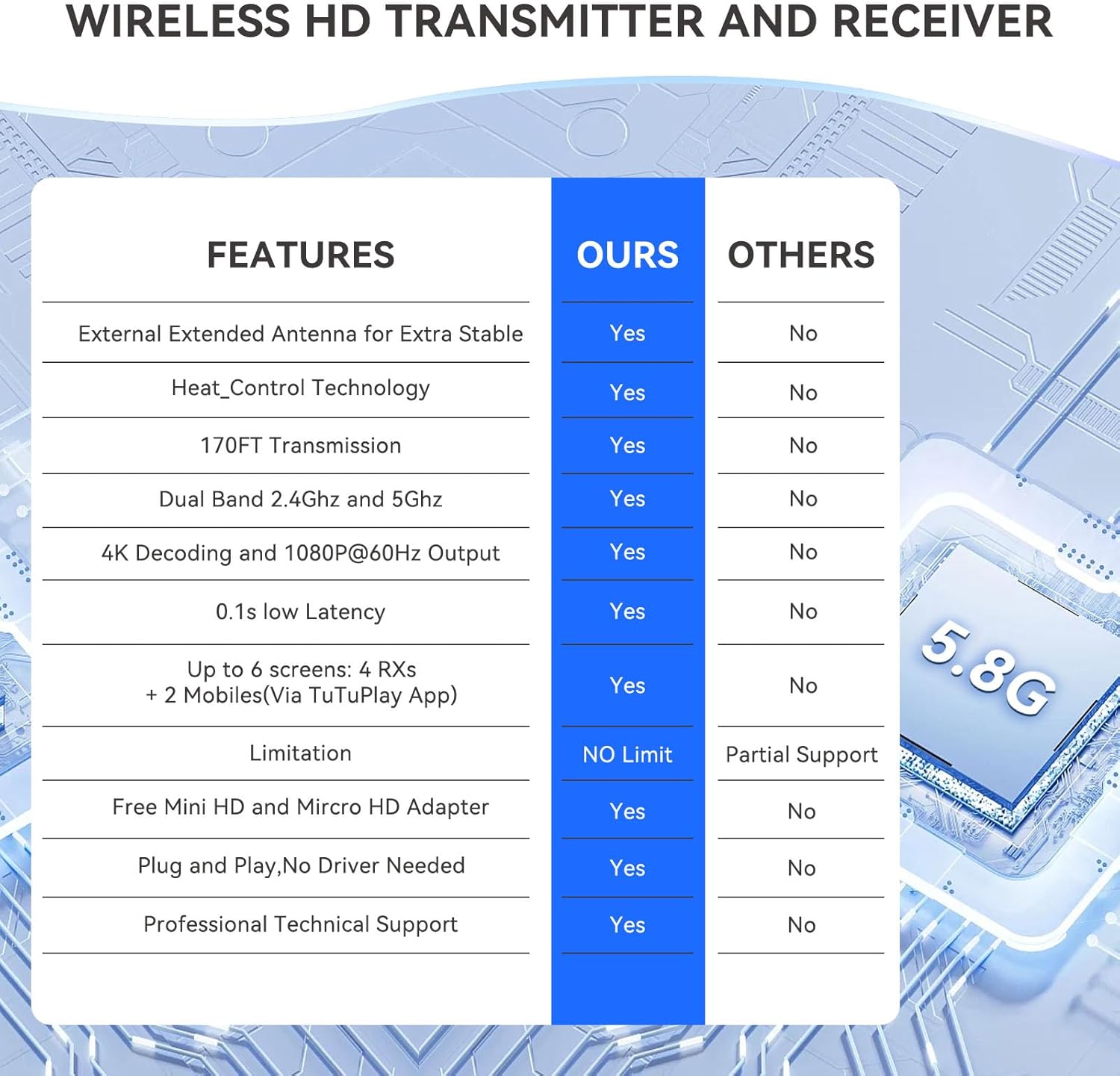
Image: A comparison table highlighting the features of the SmartSee Wireless HD Transmitter and Receiver, including external antenna, heat control, transmission range, dual-band WiFi, 4K decoding, low latency, and support for multiple receivers.
6. Troubleshooting
If you encounter issues with your SmartSee Wireless HD Kit, please refer to the following common solutions:
- No Signal/Black Screen:
- Ensure both the Transmitter (TX) and all Receivers (RXs) are properly connected to their respective HD ports and are receiving adequate power from the USB cables.
- Verify that the input source on your display (TV/monitor/projector) is set to the correct HD port where the RX is connected.
- Check if the source device (laptop/PC) is outputting a signal. Try connecting it directly to the display with an HD cable to confirm.
- Intermittent Connection/Poor Quality:
- Ensure the TX and RX units are within the recommended operating range (up to 170 feet in open space) and that there are no significant obstructions (thick walls, metal objects) between them.
- Minimize interference from other 5GHz wireless devices.
- Ensure the USB power supply for both units is stable and provides at least 5V/2A.
- No Audio:
- Check the audio settings on your source device and display.
- Ensure the volume is not muted on either device.
- Units Overheating:
- The units are designed with intelligent cooling. Ensure they have adequate ventilation and are not covered.
- If overheating persists, disconnect power and contact customer support.
If these steps do not resolve your issue, please refer to the Warranty and Support section for further assistance.
7. Specifications
| Feature | Detail |
|---|---|
| Brand | SmartSee |
| Model Name | CHD02 |
| Item Model Number | 1*TX+4*RX Kit |
| Color | Black |
| Item Weight | 1.15 pounds |
| Package Dimensions | 9.69 x 5.59 x 1.81 inches |
| Connectivity Technology | HD, Wireless, Micro HD, Mini HD |
| Connector Type | HD, Micro HD/Mini HD |
| Special Feature | Factory paired |
| Resolution | 1080p (Supports 4K input decoding) |
| Supported Internet Services | Netflix, Hulu, HBO, YouTube, TikTok |
| Form Factor | TV Stick |
| Compatible Devices | Camera, Laptop, PS5, TV Box, Television |
8. Warranty and Support
For warranty information and technical support, please refer to the documentation included with your product or contact SmartSee customer service directly. Our support team is available to assist you with any questions or issues you may have regarding the setup, operation, or performance of your Wireless HD Transmitter and Receiver Kit.
Please retain your proof of purchase for warranty claims.