
1. Introduction
Thank you for choosing the Electactic Nugget Ice Maker Pro. This manual provides essential information for the safe operation, maintenance, and troubleshooting of your new ice maker. Please read it thoroughly before first use and retain it for future reference.
This countertop ice maker produces soft, chewable nugget ice, also known as pebble ice, ideal for various beverages. It features a 34 lbs/24H ice production capacity and a convenient self-cleaning function.
2. Safety Instructions
WARNING: To reduce the risk of fire, electric shock, or injury, observe the following basic precautions:
- Ensure the power outlet voltage matches the appliance's requirements (115 Volts).
- Do not immerse the appliance, power cord, or plug in water or other liquids.
- Unplug the ice maker from the power outlet before cleaning, servicing, or when not in use.
- Do not operate any appliance with a damaged cord or plug, or after the appliance malfunctions or has been damaged in any manner.
- Place the ice maker on a stable, level surface, away from direct sunlight and heat sources.
- Allow at least 4 inches (10 cm) of clearance around the appliance for proper ventilation.
- Use only potable water in the water tank.
- This appliance is not intended for use by persons (including children) with reduced physical, sensory, or mental capabilities, or lack of experience and knowledge, unless they have been given supervision or instruction concerning use of the appliance by a person responsible for their safety.
- Do not use outdoors.
3. Product Overview
Familiarize yourself with the components of your Electactic Nugget Ice Maker Pro.

Figure 3.1: Electactic Nugget Ice Maker Pro with included accessories.
Included Components:
- Ice Maker Machine (1)
- Ice Basket (1)
- Ice Scoop (1)
Key Features:
- Fast Ice Making: Produces up to 34 lbs of ice in 24 hours.
- Chewable Nugget Ice: Soft, pebble-like ice for beverages.
- Quiet Operation: Designed for minimal noise.
- One-Touch Operation: Simple control panel.
- Self-Cleaning Function: Automated cleaning cycle.
- Compact Design: Fits easily on most countertops.
4. Setup
4.1 Unpacking
- Carefully remove the ice maker from its packaging.
- Remove all packing materials, including tape and protective films.
- Inspect the appliance for any damage. If damaged, do not operate and contact customer support.
4.2 Placement
- Place the ice maker on a flat, stable, and heat-resistant surface.
- Ensure there is adequate ventilation around the unit. Maintain at least 4 inches (10 cm) of space from walls or other objects on all sides.
- Avoid placing the unit near heat sources (e.g., ovens, radiators) or in direct sunlight, as this can affect ice production efficiency.
- Do not place the ice maker in an enclosed cabinet.

Figure 4.1: Proper placement with dimensions for adequate ventilation.
4.3 Initial Cleaning
Before first use, it is recommended to clean the ice maker.
- Wipe the interior and exterior surfaces with a soft cloth dampened with warm water and a mild detergent.
- Rinse thoroughly and dry.
- Perform a self-cleaning cycle as described in Section 6.1.
5. Operating Instructions
5.1 Filling the Water Tank
- Open the lid of the ice maker.
- Fill the water tank with potable water up to the "MAX" fill line. The tank capacity is 1.1 liters.
- Close the lid securely.

Figure 5.1: Filling the water tank with potable water.
5.2 Starting Ice Production
- Plug the ice maker into a grounded electrical outlet.
- Press the Ice/Clean button once to start the ice-making cycle. The indicator light will illuminate.
- The ice maker will begin producing nugget ice within 6-8 minutes.
- The ice basket will gradually fill with ice.
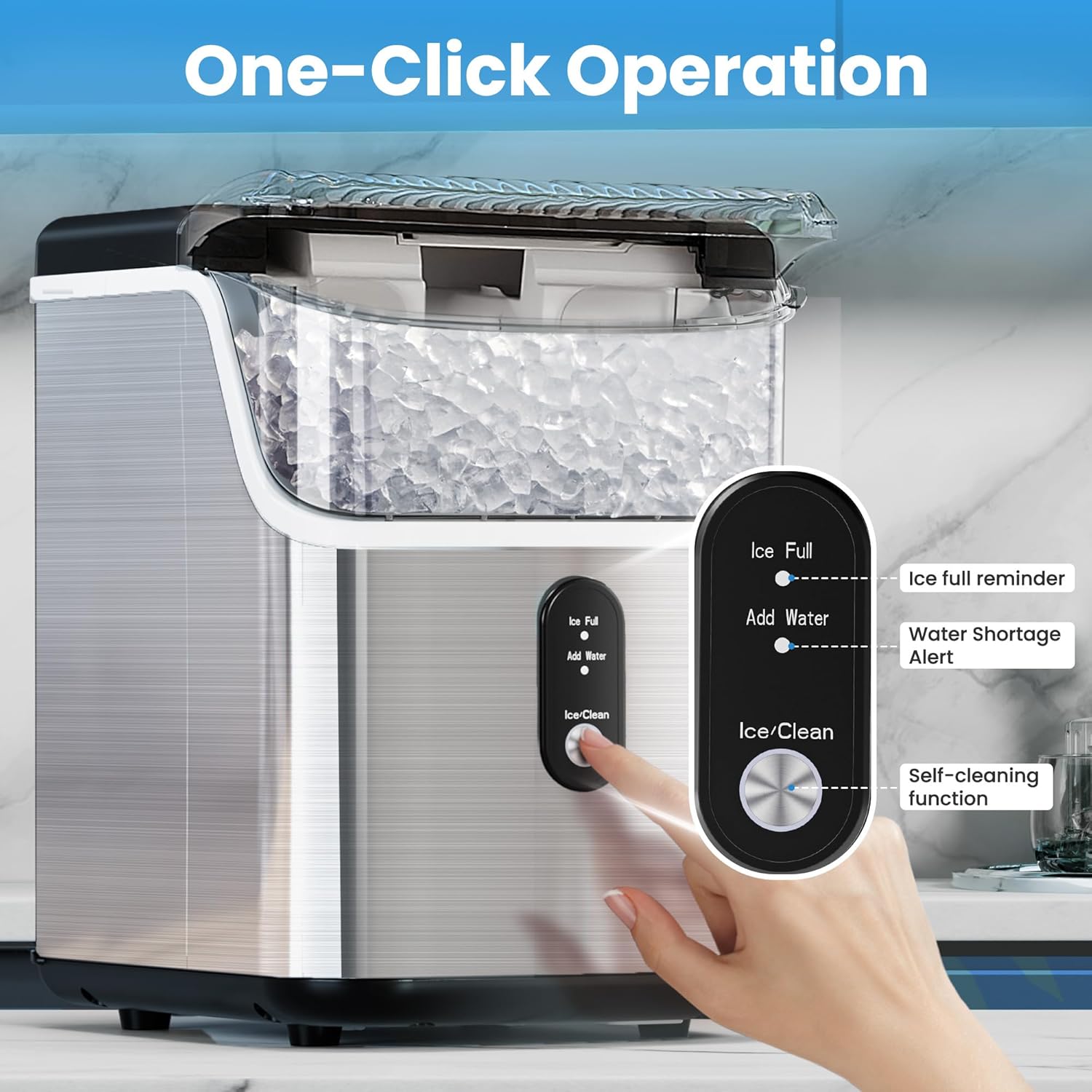
Figure 5.2: One-touch operation control panel with indicator lights.
5.3 Indicator Lights
- Ice Full: This light illuminates when the ice basket is full. The ice maker will automatically pause production. Remove ice to resume operation.
- Add Water: This light illuminates when the water level in the tank is low. Add water to the tank to resume ice production.
5.4 Clearing the Dispenser
If ice production stops and the "Ice Full" indicator is not lit, ice may be blocking the dispenser mechanism.

Figure 5.3: Use the provided ice scoop to gently clear any ice obstructing the dispenser to restart the machine.
6. Maintenance and Cleaning
6.1 Self-Cleaning Function
The ice maker features an automatic self-cleaning cycle to maintain hygiene.
- Ensure the water tank is filled with clean water.
- Press and hold the Ice/Clean button for 5 seconds to activate the self-cleaning function. The cleaning cycle will last approximately 15 minutes.
- During the cleaning cycle, water will circulate through the system.
- Once the cycle is complete, the machine will automatically exit the cleaning process.
- Drain the water from the unit after the cleaning cycle (refer to Section 6.2).

Figure 6.1: The self-cleaning function circulates water to clean internal components.
6.2 Draining Water
Regularly drain the water from the ice maker, especially after cleaning or before storing the unit.
- Unplug the ice maker from the power outlet.
- Locate the drain plug at the bottom front of the unit.
- Place a container under the drain plug to collect the water.
- Remove the drain plug to allow water to flow out.
- Once all water has drained, replace the drain plug securely.
6.3 Exterior Cleaning
Wipe the exterior of the ice maker with a soft, damp cloth. Do not use abrasive cleaners or solvents.
7. Troubleshooting
Refer to the table below for common issues and their solutions.
| Problem | Possible Cause | Solution |
|---|---|---|
| Ice maker not turning on. | Not plugged in; power outage; fuse blown. | Ensure unit is securely plugged in. Check power supply. |
| "Add Water" indicator is on. | Water tank is empty or low. | Fill the water tank with potable water. |
| "Ice Full" indicator is on. | Ice basket is full. | Remove ice from the basket. |
| No ice production or very little ice. | Low water level; ambient temperature too high; air vents blocked; ice dispenser blocked. | Add water. Ensure proper ventilation. Clear any ice blockage in the dispenser area with the scoop. Operate in a cooler environment. |
| Ice melts quickly. | High ambient temperature; lid not closed properly. | Ensure lid is closed. Operate in a cooler environment. Note that the ice maker is not a freezer and ice will melt over time. |
| Unusual noise during operation. | Normal operation sounds (compressor, water pump); loose part. | Some operational noises are normal. If noise is excessive or unusual, unplug and contact support. |
8. Specifications
| Feature | Detail |
|---|---|
| Brand | Electactic |
| Model Name | Nugget Ice Maker |
| Part Number | Z5825NB |
| Product Dimensions (D x W x H) | 11.2" x 8.6" x 12.6" |
| Water Tank Capacity | 1.1 Liters (38 Fluid Ounces) |
| Voltage | 115 Volts |
| Refrigerant | R600a |
| Ice Production per Day | Up to 34 Pounds |
| Material | Stainless Steel |
| Item Weight | 21.9 pounds |
9. Warranty and Support
This Electactic product is covered by a manufacturer's warranty. Please refer to the warranty card included with your purchase for specific terms and conditions.
For technical assistance, troubleshooting beyond this manual, or warranty claims, please contact Electactic customer support. Contact details are typically found on the product packaging or the official Electactic website.
When contacting support, please have your model number (Z5825NB) and purchase date available.