
1. Introduction
This manual provides essential instructions for the setup, operation, and maintenance of your RoboUP T1200Pro Robot Lawn Mower. Please read this manual thoroughly before using the product to ensure safe and efficient operation. The RoboUP T1200Pro is designed for automated lawn care, featuring wire-free navigation, RTK+Vision technology for precise mapping, AI obstacle avoidance, and multi-zone management via a dedicated mobile application.

Image: The RoboUP T1200Pro Robot Lawn Mower, a gray and black robotic device, is shown alongside a smartphone displaying its control application. This illustrates the mower's design and its app-controlled functionality.
2. Product Overview
2.1 What's in the Box

Image: A detailed view of the RoboUP T1200Pro package contents, including the robot lawn mower, charging station set, RTK base station set, replacement blades, and user manual.
The RoboUP T1200Pro package includes the following components:
- RoboUP Robot Lawn Mower
- Charging Station Set (Charging station, power adapter, mounting screws)
- RTK Base Station Set (RTK antenna, pole sections, cables, ground stakes)
- Replacement Blades and User Manual (Instruction Information, Quick Start Guide, replacement blades with screws)
2.2 Key Features
- Wire-Free Operation: No boundary wires required for installation.
- RTK+Vision Navigation: Utilizes advanced positioning and AI vision for precise lawn coverage.
- AI Obstacle Avoidance: Detects people, pets, and objects in real-time to prevent collisions.
- APP Multi-Zone Management: Customize mowing schedules, zones, and settings via the RoboUP application.
- Ride-on Edge Mapping and Mowing: Efficiently maps and mows along lawn edges.
- Automatic Return & Charging: Returns to the charging station when battery is low or during rain, resuming work when charged or weather clears.
- Quiet Operation: Operates at approximately 56dB(A).
- Lightweight Design: Weighs 10.9 kg, minimizing lawn compaction.
- Night Pause: Automatically pauses operation at night to protect wildlife.
3. Setup
Setting up your RoboUP T1200Pro is a straightforward process, designed to be wire-free and efficient.
3.1 Initial Placement and Charging Station Installation
Place the charging station in an area with good signal reception and access to power. Ensure the area around the charging station is clear for the mower to dock easily.

Image: The RoboUP T1200Pro is shown on a lawn with a dashed line indicating its wire-free boundary mapping capability. This highlights the ease of installation without physical wires.
3.2 App Installation and Mower Pairing
- Download the RoboUP application from your device's app store.
- Follow the in-app instructions to pair your T1200Pro mower with your smartphone.
3.3 Lawn Mapping
The T1200Pro uses RTK+Vision technology for precise lawn mapping. You will guide the mower around the perimeter of your lawn using the app to define the mowing area. This process creates a virtual boundary.

Image: The RoboUP T1200Pro is seen mowing a lawn, with a blue transparent overlay indicating its wire-free operational path. This illustrates the convenience of its boundary-free setup.
During mapping, you can define:
- To-Go Zones: Paths the mower can use to travel between different mowing areas, such as stone paths.
- No-Go Zones: Areas the mower should avoid, like flower beds or obstacles.

Image: The RoboUP T1200Pro is shown moving along a stone path, with a green glow indicating a "To-Go Zone." This demonstrates its ability to navigate non-grass areas to reach different mowing sections.

Image: An aerial view shows the RoboUP T1200Pro on a lawn, with red circles indicating "No-Go Zones" around outdoor furniture. This illustrates how users can define areas for the mower to avoid.
4. Operating Instructions
The RoboUP T1200Pro offers comprehensive control through its mobile application.
4.1 Starting and Stopping Mowing
Initiate or pause mowing directly from the RoboUP app. The mower will follow its programmed schedule or begin an immediate mowing task.

Image: A hand holds a smartphone displaying the RoboUP app interface, with the RoboUP T1200Pro in the background on a lawn. The app shows controls for starting mowing, indicating automatic lawn care at your fingertips.
4.2 Multi-Zone Management
The app allows you to divide your lawn into multiple zones, each with customizable settings.

Image: An aerial view of a house and yard with different sections highlighted as "Lawn A," "Lawn B," and "Lawn C," each with specific mowing schedules and settings. This demonstrates the multi-zone management feature of the RoboUP T1200Pro.
- Define specific areas for customized mowing.
- Set individual schedules, mowing heights, and patterns for each zone.
- The app will remind you to relocate the mower if your lawn has disconnected areas.

Image: An aerial view of a property with two distinct lawn areas, one connected and one highlighted as an "Unconnected Zone" on a smartphone app. This illustrates the smart reminder feature for managing disconnected yard sections.
4.3 Scheduling Mowing Tasks
Create and manage mowing schedules through the app. You can set specific start and end times for each mowing session.

Image: The RoboUP T1200Pro is on a lush green lawn, with a smartphone displaying the app's scheduling interface, showing options to set start and end times for mowing tasks.
4.4 Adjusting Mowing Height
The cutting height can be adjusted for different areas of your yard, typically ranging from 3 to 6 cm.

Image: A close-up view of the RoboUP T1200Pro's cutting blades and height adjustment mechanism, indicating a customizable range of 3-6 cm for mowing height.
4.5 Mowing Patterns and Edge Mowing
The T1200Pro utilizes parallel mowing and automatic angle adjustment to create clean, visually appealing stripes. It also performs ride-on edge mowing for a neat finish.

Image: A lawn is shown with distinct stripes, illustrating the RoboUP T1200Pro's smart parallel mowing capability that delivers clean and visually pleasing patterns.
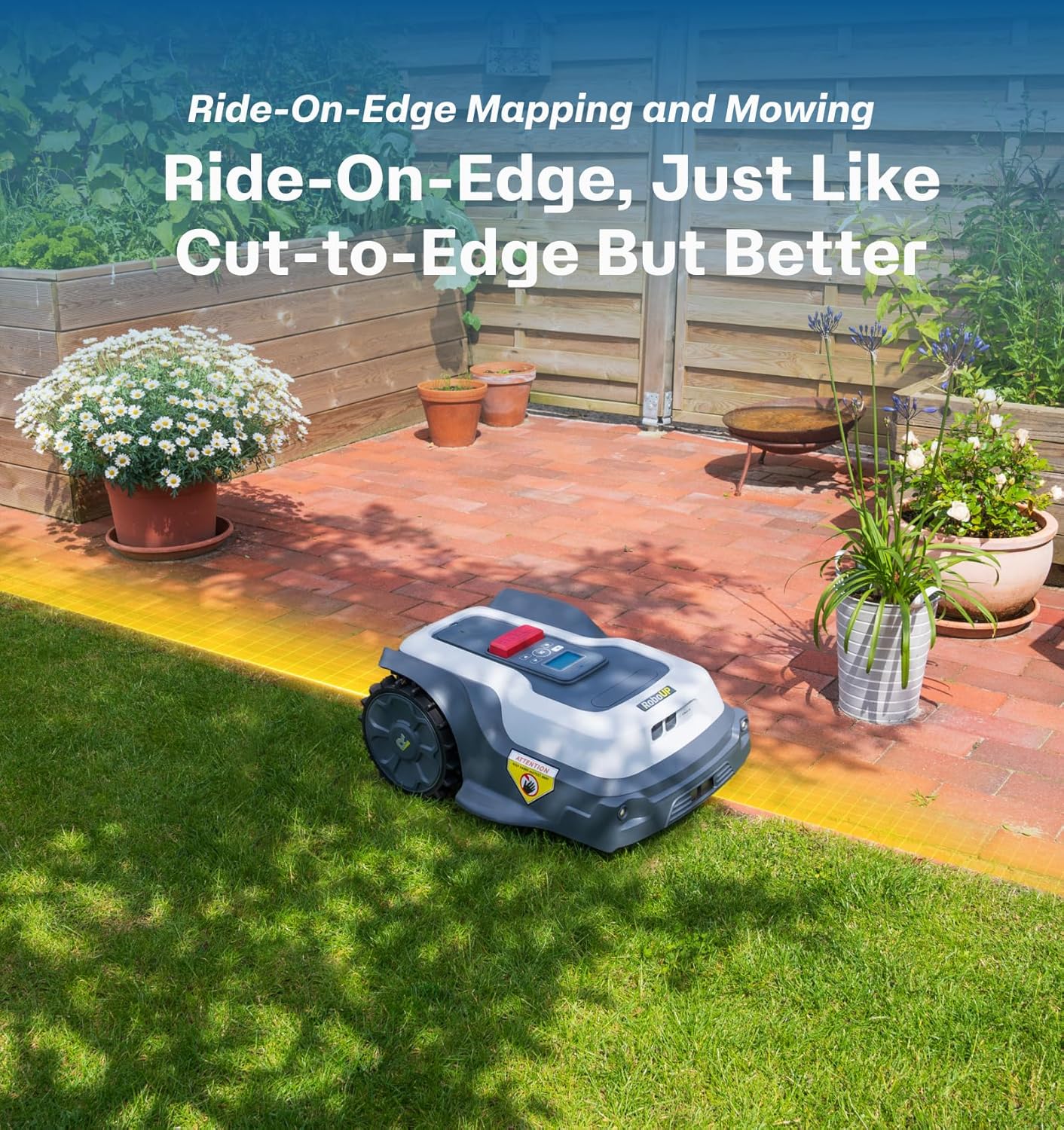
Image: The RoboUP T1200Pro is shown mowing along the edge of a patio, with a yellow highlight indicating its ride-on edge mapping and mowing function for precise border trimming.
5. Safety Features
The RoboUP T1200Pro is equipped with advanced safety features to protect users, pets, and wildlife.
- AI Obstacle Avoidance: Advanced AI cameras detect people, pets, and common garden objects in real-time, allowing the mower to adjust its path and avoid collisions.
- Lift and Tilt Sensors: The mower stops instantly if lifted or tilted.
- Night Pause: Automatically pauses mowing at night to ensure a safe and undisturbed environment for nocturnal wildlife.
- "Mow Around It, Not Into It" Technology: AI-powered force-fields allow the mower to smoothly navigate around obstacles like soccer balls.

Image: The RoboUP T1200Pro is shown on a lawn with a child and a dog nearby, illustrating its AI camera's ability to detect people and animals in real-time for safety.

Image: The RoboUP T1200Pro is shown on a lawn at night, near its charging station, with a large house in the background. This illustrates the "Night Pause" feature, ensuring a safe environment for wildlife.

Image: The RoboUP T1200Pro is shown on a lawn, with a soccer ball in the foreground. The text "Mow Around It, Not Into It" highlights its AI-powered obstacle avoidance capabilities.
6. Maintenance
Proper maintenance ensures the longevity and optimal performance of your RoboUP T1200Pro.
6.1 General Care
- Keep the mower clean from grass clippings and debris.
- Regularly inspect the blades for sharpness and replace them when dull or damaged.
- The lightweight design (10.9 kg) and flexible turning minimize damage to your lawn.

Image: The RoboUP T1200Pro is shown on a lawn, with the text "Light on Weight, Gentle on Grass" and "10.9 KG" prominently displayed, emphasizing its lightweight design and minimal impact on the lawn.
6.2 Automatic Return and Charging
The mower is designed for low maintenance with intelligent features:
- Detects rain and sunrise, automatically returning to its charging station during rain or at sunset.
- Resumes mowing after rain stops or when charged to 90% (returns to charge at 20% battery).
6.3 Sustainable Lawn Care
The T1200Pro's precise 1 cm cuts naturally fertilize the grass, reducing the need for chemical fertilizers and promoting a healthier lawn ecosystem.

Image: The RoboUP T1200Pro is on a vibrant green lawn, with flowers and bees in the foreground. The text "Making Your Lawn Healthy Again" highlights its eco-friendly and sustainable lawn care benefits.
7. Troubleshooting
This section addresses common issues you might encounter with your RoboUP T1200Pro.
| Problem | Possible Cause | Solution |
|---|---|---|
| Mower not starting or charging. | Charging station not powered, poor connection, or battery issue. | Ensure charging station is plugged in and receiving power. Check connections. Contact support if battery issues persist. |
| Mower gets stuck frequently. | Obstacles in mowing path, uneven terrain, or incorrect No-Go Zone mapping. | Clear the mowing area of debris. Review and adjust No-Go Zones in the app. Ensure the lawn is suitable for robotic mowing (max 20° slope). |
| Inaccurate mowing or missed spots. | RTK signal interference, outdated map, or dirty sensors. | Ensure RTK base station has a clear view of the sky. Clean the mower's sensors and cameras. Remap the lawn if necessary. |
| App connectivity issues. | Weak Wi-Fi signal, outdated app version, or pairing issue. | Ensure strong Wi-Fi signal near the mower and charging station. Update the RoboUP app to the latest version. Re-pair the mower if necessary. |
8. Specifications
| Feature | Detail |
|---|---|
| Brand | RoboUP |
| Model Number | T1200 Pro |
| Power Source | Battery Powered |
| Material | Plastic |
| Color | Gray |
| Item Weight | 24 Pounds (10.9 kg) |
| Cutting Width | 8 Inches |
| Operation Mode | Automatic |
| Product Dimensions | 17"D x 24"W x 11"H |
| Maximum Adjustable Cutting Height | 6 Centimeters |
| Minimum Adjustable Cutting Height | 1.18 Inches |
| Maximum Slope Handling | 20° |
| Noise Level | 56 dB(A) |
| Recommended Yard Size | Up to 0.35 Acre |
9. Warranty and Support
RoboUP is committed to providing excellent product service. Upon receiving your wire-free RoboUP robot mower, you are covered by our support system.
For any inquiries or assistance, please contact RoboUP customer service. Our team is dedicated to helping you and ensuring a positive experience with your RoboUP robot lawn mower. You can expect a prompt response and support from us.
For specific warranty details, please refer to the warranty card included with your product or visit the official RoboUP website.
