
1. Introduction
Thank you for choosing the Ubigbuy 350W USB C Charger. This advanced charging station is designed to provide high-speed, efficient, and safe power delivery for a wide range of electronic devices. Featuring GaN technology and multiple ports, it offers a versatile charging solution for both home and travel use.

Figure 1: Ubigbuy 350W USB C Charger with detachable power cord.
Key Features:
- Ultra Powerful Output: Delivers up to 350W total output. The USB-C1 port supports PD 3.1 protocol, providing 140W for devices like the MacBook Pro 16" (M1/M2).
- 6-in-1 Multiport Charging: Equipped with 5 USB-C ports and 1 USB-A port, allowing simultaneous fast charging of multiple devices. Intelligent dynamic power allocation optimizes charging for each connected device.
- Broad Compatibility: Supports PD3.1/PD3.0/PPS/QC5/QC3.0/SCP/FCP/AFC fast charging protocols, compatible with a wide range of laptops, phones, tablets, and other gadgets.
- Advanced GaN Technology: Utilizes Gallium Nitride (GaN) technology for higher charging efficiency, reduced heat generation, and extended product lifespan.
- Portable and Compact Design: Features a foldable wall plug and a compact form factor, ideal for travel and minimizing clutter.

Figure 2: Key features of the Ubigbuy 350W Charger, including GaN III Pro technology, Smart IC for intelligent power diversion, PD+QC fast charging, and 6 multi-port output.
2. Setup
What's in the Box:
- 1 x Ubigbuy 350W USB C Charger
- 1 x 5ft (1.5m) AC Extension Power Cord
- User Manual (this document)
Connecting to Power:
The Ubigbuy 350W charger offers two methods for connecting to a power outlet:
- Direct Wall Plug: For a compact setup, simply unfold the integrated wall plug on the charger unit and plug it directly into a standard AC 100-240V wall outlet.
- Using the AC Extension Power Cord: For extended reach or desktop use, attach the provided 5ft (1.5m) AC Extension Cord to the charger unit. Plug the other end of the extension cord into a standard AC 100-240V wall outlet. This converts the unit into a desktop charging station.
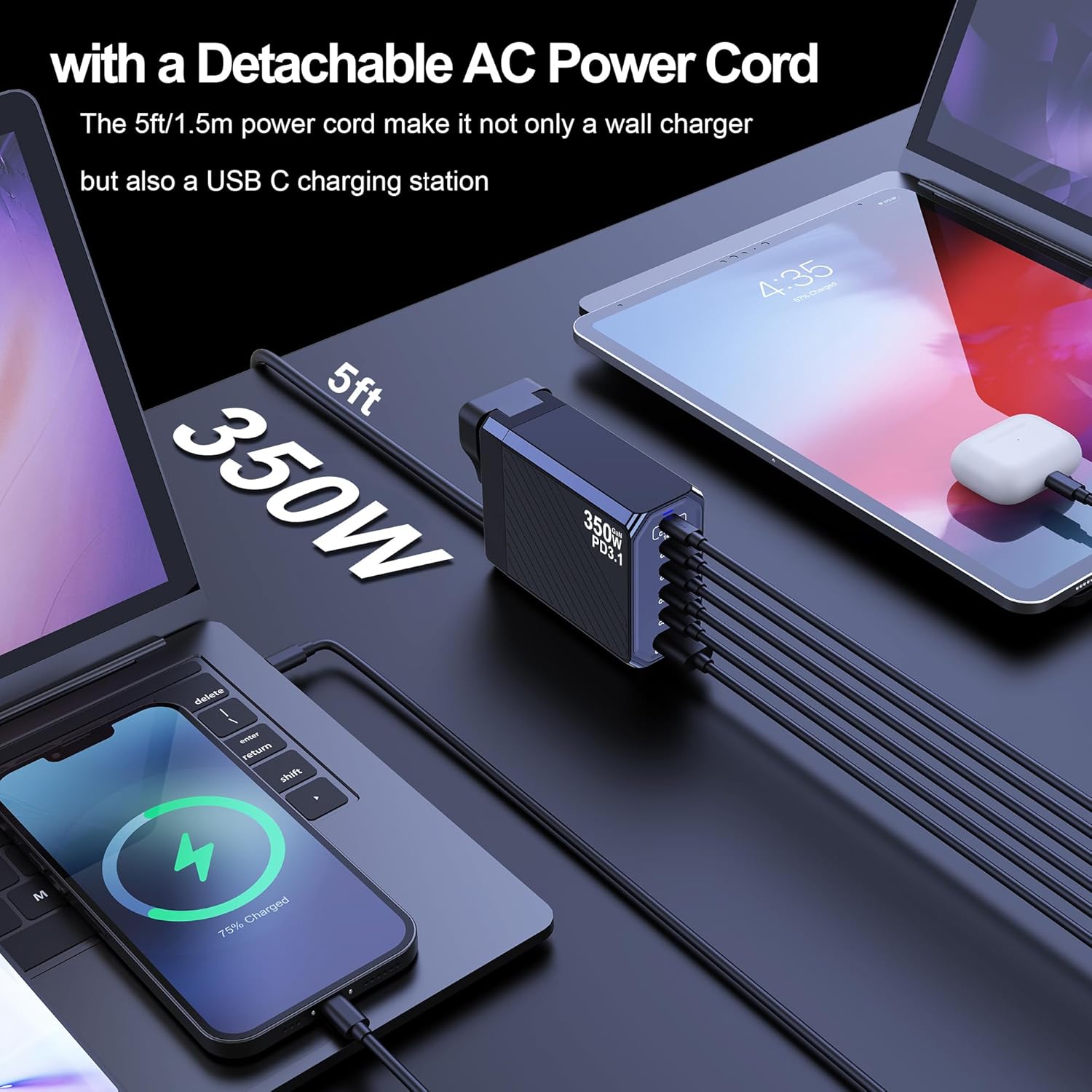
Figure 3: The Ubigbuy 350W Charger can be used as a wall charger or a desktop charging station with the detachable 5ft AC power cord.
3. Operating Instructions
Connecting Your Devices:
Once the charger is connected to a power source, you can begin charging your devices. The charger features 5 USB-C ports and 1 USB-A port, each with specific power delivery capabilities:
- USB-C1 Port: PD3.1, up to 140W max output (e.g., MacBook Pro 16").
- USB-C2 Port: Up to 65W output.
- USB-C3 Port: Up to 45W output.
- USB-C4/C5 Ports: Up to 100W output each.
- USB-A Port: Up to 60W output.
Connect your device's charging cable to the appropriate port on the Ubigbuy charger. The intelligent dynamic power allocation feature will automatically detect your device's power requirements and distribute the total 350W output efficiently among all connected devices.

Figure 4: The Ubigbuy 350W Charger can charge multiple devices simultaneously, including laptops, tablets, and smartphones.
Simultaneous Charging:
The charger is designed to handle multiple devices at once. For example, it can simultaneously charge two laptops, with one receiving up to 140W and the other up to 100W, alongside other smaller devices. The charger's internal smart IC chip manages power distribution to ensure optimal charging speeds for each device without overloading.

Figure 5: The Ubigbuy 350W Charger demonstrating simultaneous charging of two laptops, with one receiving 140W and the other 100W.
4. Specifications
| Feature | Detail |
|---|---|
| Product Dimensions | 3.54 x 2.76 x 1.46 inches |
| Item Weight | 10 ounces |
| Model Number | BK-030T |
| Brand | Ubigbuy |
| Connector Type | USB Type A, USB Type C |
| Compatible Devices | Cellular Phones, Game Consoles, Laptops, Smartwatches, Tablets |
| Input Voltage | 120 Volts (AC) |
| Amperage | 5 Amps |
| Total USB Ports | 6 (5 USB-C, 1 USB-A) |
| Special Features | 350W High Power, Multi Device Charging, PD3.1 140W Super Speed, Short Circuit Protection, Travel |
5. Safety and Protection
The Ubigbuy 350W USB C Charger is built with advanced safety features to protect both the charger and your connected devices. It incorporates a powerful safety protection system and premium microchips.
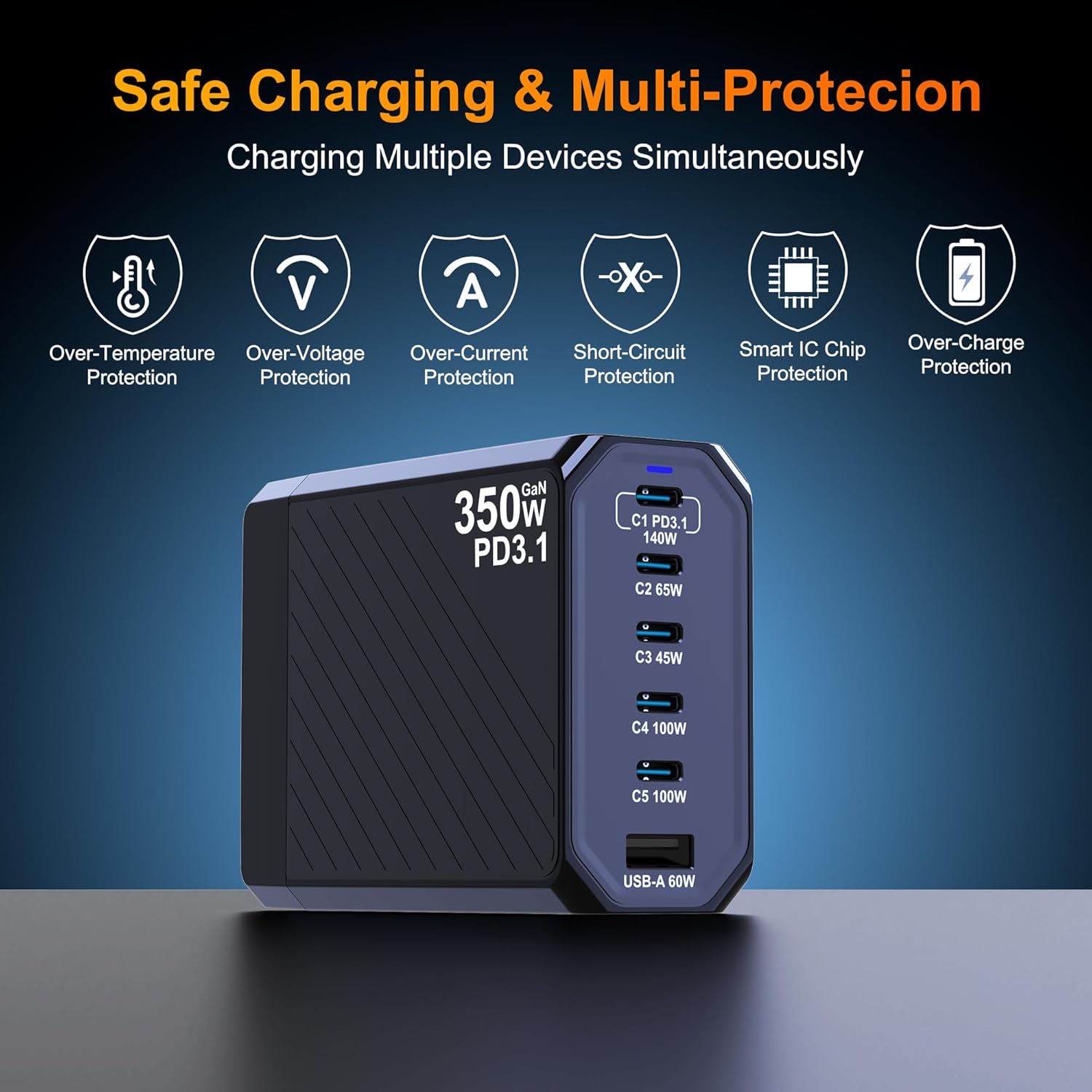
Figure 6: The Ubigbuy 350W Charger features multiple protection mechanisms for safe charging.
Protection Features:
- Over-Temperature Protection: Prevents overheating during operation.
- Over-Voltage Protection: Safeguards against excessive voltage input.
- Over-Current Protection: Protects against damaging current levels.
- Short-Circuit Protection: Automatically cuts power in case of a short circuit.
- Smart IC Chip Protection: Intelligent chip management for stable and safe charging.
- Over-Charge Protection: Charging automatically stops when the device battery is full.
The charger is constructed with ABS + PC fireproof material for added safety.
6. Troubleshooting
Common Issues and Solutions:
- Device not charging:
- Ensure the charger is securely plugged into a working power outlet.
- Verify that the charging cable is properly connected to both the charger and your device.
- Try a different charging cable or port on the charger.
- Check if your device is compatible with the charger's output specifications.
- Slow charging:
- Ensure you are using a high-quality cable that supports fast charging.
- Check if your device supports the fast charging protocols (PD3.1, QC5, etc.) offered by the charger.
- If multiple devices are connected, the total power output is shared. Disconnecting some devices may increase charging speed for others.
- Ensure the device is connected to a port with sufficient wattage for its needs (e.g., 140W port for a MacBook Pro).
- Charger feels warm:
- It is normal for the charger to feel warm during high-power charging due to GaN technology's efficiency.
- If the charger becomes excessively hot or emits smoke/unusual odors, immediately unplug it from the power outlet and discontinue use. Contact customer support.
- LED indicator not lit:
- Ensure the charger is properly connected to a live power outlet.
- Check the power outlet with another device to confirm it is working.
7. Warranty and Support
Protection Plans:
Extended protection plans are available for your Ubigbuy 350W USB C Charger:
- 2-Year Protection Plan: Available for $6.99.
- 3-Year Protection Plan: Available for $8.99.
- Complete Protect: One plan covers all eligible past and future purchases for $16.99/month.
For more details on protection plans, please refer to the product's purchase page or contact your retailer.
Manufacturer Information:
Manufacturer: ShenZhen BIKKON Technology Limited
For further assistance, technical support, or warranty claims, please contact the manufacturer or your point of purchase.