
1. Introduction
Thank you for choosing the Merryking AI Language Translation Earbuds, Model 001. These earbuds are designed to facilitate real-time, two-way communication across various languages, making them suitable for travel, business, and learning environments. This manual provides detailed instructions to help you get started and utilize all features effectively.
2. Product Overview
The Merryking AI Language Translation Earbuds combine audio playback with advanced translation capabilities. Key features include:
- Multi-Language Translation: Supports 144 languages and various accents for real-time, two-way translation.
- Offline Language Support: Offline language packages are available for purchase through the dedicated application, including Chinese, English, Japanese, Korean, Russian, German, French, and Spanish.
- Versatile Translation Modes: Offers Free Talk, Offline, Audio Transcription, and Photo Translation modes.
- High-Definition Audio: Equipped with 10mm speakers for clear audio during music playback, calls, and translations.
- Extended Battery Life: Provides up to 4 hours of listening time per charge, with the charging case offering up to 60 hours of additional power.
- Ergonomic Open-Wearable Stereo (OWS) Design: Designed for a secure and comfortable fit, allowing awareness of ambient sounds.

A pair of black Merryking AI Language Translation Earbuds, featuring an ear-hook design, resting in their open charging case. The case displays a digital battery percentage.

An image showcasing two Merryking translation earbuds with text overlays indicating 'Natural and Instant Translation'. Below, statistics highlight support for 145 languages, 98% accuracy, and a 0.5-second response time.
3. Setup
Follow these steps to set up your Merryking AI Language Translation Earbuds:
- Charge the Earbuds: Place both earbuds into the charging case. Connect the charging case to a power source using the provided USB cable. The indicator lights on the case will show charging status.
- Download the Application: Search for the dedicated Merryking translation application on your iOS or Android device's app store. Install the application.
- Create an Account: Open the application and follow the on-screen prompts to create a user account.
- Pair with Your Device:
- Ensure Bluetooth is enabled on your smartphone.
- Open the charging case. The earbuds will automatically enter pairing mode.
- On your smartphone, go to Bluetooth settings and select "Merryking Earbuds" (or similar name) from the list of available devices to pair.
- Confirm pairing within the Merryking application if prompted.
- Initial Application Setup: Within the application, select your native language and the language you wish to translate.
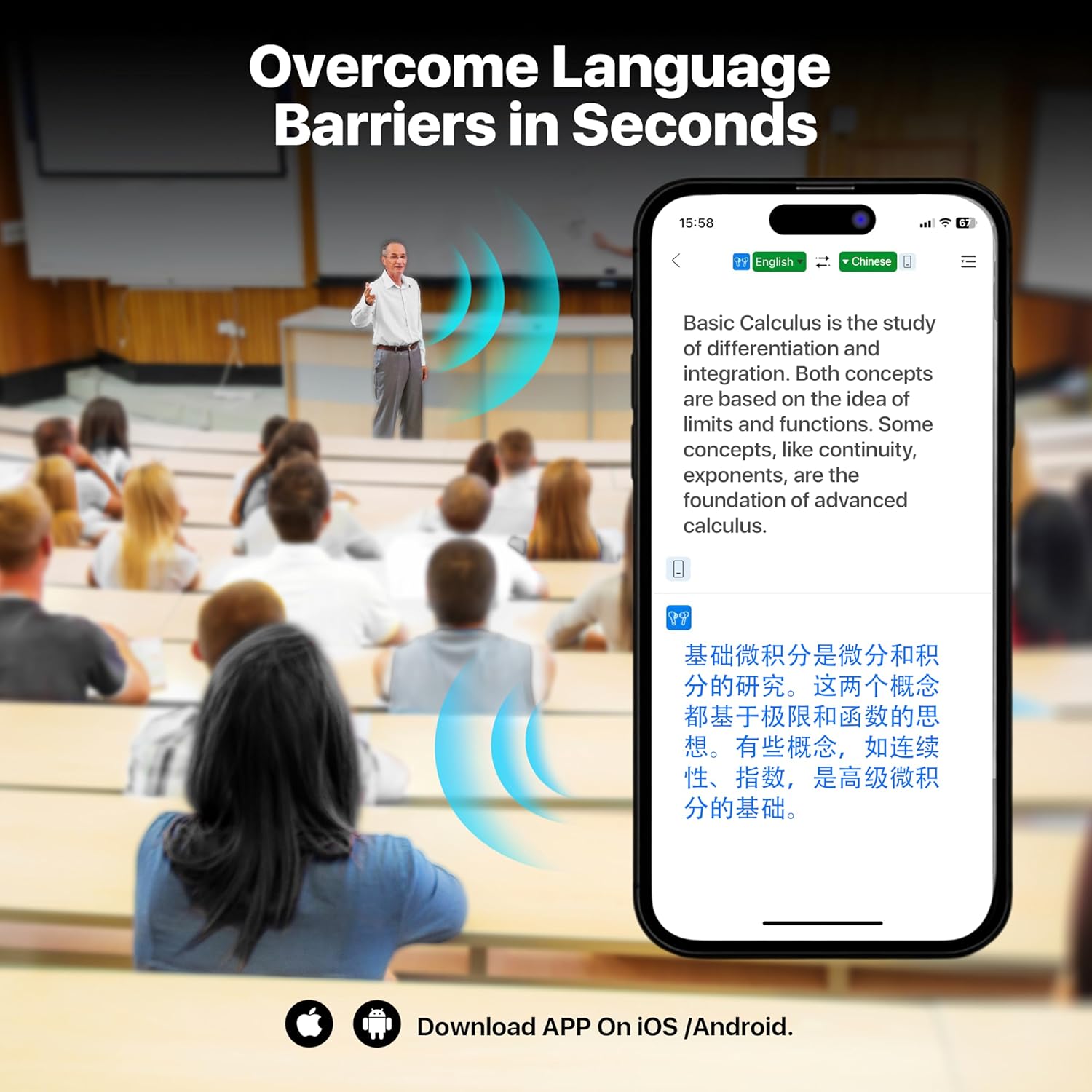
A smartphone screen showing a real-time translation of a lecture from English to Chinese, demonstrating how the Merryking earbuds help 'Overcome Language Barriers in Seconds'. The image also prompts users to 'Download APP On iOS /Android'.
4. Operating Instructions
The Merryking AI Language Translation Earbuds offer several modes to suit different communication needs. Ensure the earbuds are connected to your device and the application is running.

A woman wearing a Merryking earbud, with icons below representing the four versatile translation modes: Offline Mode, Speaker Mode, Touch Mode, and Free-speech Mode, designed for various communication scenarios.
4.1 Translation Modes
- Free Talk Mode: This mode allows for continuous, natural conversation. Both participants can speak freely, and the earbuds will translate in real-time.
- Offline Mode: For situations without internet access, certain language packages can be purchased and downloaded within the app. This mode provides translation without network dependency, enhancing privacy.
- Audio Transcription: Converts spoken language into text, which can then be translated and displayed on your device.
- Photo Translation: Use your smartphone camera through the app to translate text from images.
- Speaker Mode: One person wears an earbud, speaks, and the translation is played through the smartphone's speaker for others to hear.
- Touch Mode: Each participant wears one earbud. Tap the earbud before speaking, and the translation will be heard by the other person within 0.5-3 seconds.
- Free Speech Mode: Designed for one-on-one conversations where each person wears an earbud. Participants can speak normally without needing to tap, and the conversation is automatically translated.

Two people, each wearing a Merryking earbud, engaged in a conversation with speech bubbles showing translation. The image emphasizes 'Offline Voice Translation Between 10 Languages', listing English, Spanish, Mandarin, Russian, French, German, Japanese, and Korean flags.
4.2 Audio Playback and Calls
The earbuds can also be used for listening to music and making phone calls. Use the touch controls on the earbuds to manage playback and calls. Refer to the application for specific touch control configurations.

A detailed diagram illustrating the internal structure of a Merryking earbud, highlighting its 10mm speakers for Hi-Fi audio and an integrated AI chip for enhanced translation performance.
5. Maintenance
Proper maintenance ensures the longevity and optimal performance of your earbuds.
- Cleaning: Use a soft, dry, lint-free cloth to clean the earbuds and charging case. Avoid using liquids or abrasive cleaners.
- Charging: Regularly charge the earbuds and case. The fast-charging case allows for quick power replenishment.
- Storage: Store the earbuds in their charging case when not in use to protect them from dust and damage. Keep them in a cool, dry place away from extreme temperatures.
- Water Exposure: Avoid exposing the earbuds to excessive moisture or submerging them in water.
6. Troubleshooting
If you encounter issues with your Merryking AI Language Translation Earbuds, refer to the following common solutions:
- Earbuds Not Pairing:
- Ensure both earbuds are charged.
- Turn off and on your device's Bluetooth.
- Forget the device in your Bluetooth settings and attempt to pair again.
- Restart your smartphone.
- Translation Inaccuracy or Lag:
- Ensure a stable internet connection for online translation modes.
- Verify that the correct source and target languages are selected in the application.
- Speak clearly and at a moderate pace.
- Update the Merryking application to the latest version.
- Poor Audio Quality:
- Clean the earbud speakers to remove any debris.
- Ensure the earbuds are properly seated in your ears.
- Check the audio source for quality issues.
- Battery Draining Quickly:
- Ensure the earbuds are fully charged before use.
- Close unnecessary applications running in the background on your smartphone.
- Reduce volume levels if excessively high.
For further assistance, please refer to the support section of the Merryking application or contact customer service.
7. Specifications
| Model Number | 001 |
| Brand | Merryking |
| Translation Languages | 144+ (online), 8 (offline via in-app purchase) |
| Listening Time (per charge) | Up to 4 hours |
| Total Battery Life (with case) | Up to 60 hours |
| Communication Range | 10 meters |
| Speaker Size | 10mm |
| Wireless Transmission | Wireless 5.4 |
| Item Weight | 4.6 ounces |
| Package Dimensions | 4.61 x 4.29 x 1.65 inches |
| Date First Available | March 27, 2025 |
8. Warranty and Support
The Merryking AI Language Translation Earbuds Model 001 include a one-year free subscription to online translation services via the dedicated application. For any product-related inquiries, technical support, or warranty claims, please contact Merryking customer service through the contact information provided in the product packaging or on the official Merryking website.