1. Introduction
This manual provides detailed instructions for the installation, operation, and maintenance of the GEPRC GEP-F722-35A AIO (All-In-One) Flight Controller. This advanced flight controller integrates an F722 MCU with a 35A 4-in-1 BLHeli_S ESC, making it an ideal solution for compact FPV freestyle and cinewhoop drone builds. Please read this manual thoroughly before use to ensure proper setup and safe operation.
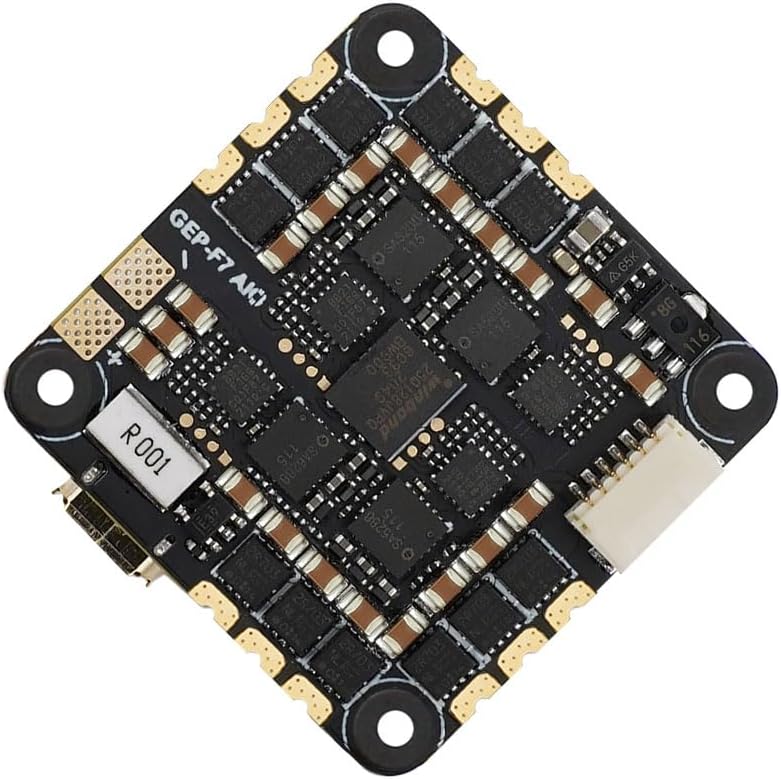
Figure 1.1: Top view of the GEPRC GEP-F722-35A AIO Flight Controller, showcasing its compact design and component layout.
2. Key Features
- High-Performance MCU: Equipped with an STM32F722 microcontroller for robust performance and high computing speed.
- Multiple UART Ports: Features 5 full UART ports, allowing connection of various external devices such as GPS, VTX, and receivers.
- DJI Air Unit Compatibility: Includes a dedicated 6-pin connector for direct plug-and-play integration with DJI Air Unit modules.
- Integrated 35A ESC: The BLHeli_S 35A 4-in-1 ESC supports 35A continuous current (40A burst) and 2-6S LiPo batteries, providing strong flight performance.
- OSD Support: Supports OSD (On-Screen Display) parameter adjustment for real-time flight data.
- Additional Functions: Includes support for buzzer and LED functions.
- Compact Design: Designed with a 25.5x25.5mm mounting pattern, suitable for various drone frames.
3. Setup and Installation
3.1 Package Contents
Before beginning installation, verify that all components are present in the package:

Figure 3.1: The flight controller and its accompanying accessories, including wires, capacitor, and vibration dampeners.
3.2 Dimensions and Mounting
The GEP-F722-35A AIO Flight Controller features a 25.5x25.5mm mounting pattern. Ensure your drone frame is compatible with these dimensions.

Figure 3.2: Detailed dimensions of the flight controller, showing its compact size and mounting hole spacing.
3.3 Wiring Diagram (General)
Connect the flight controller to your drone's components according to the following general guidelines. Refer to the specific pinout diagram provided by GEPRC for precise connections.
- Motors: Solder motor wires to the designated motor pads (M1-M4) on the ESC section of the board.
- Power Input: Connect the main battery lead (2-6S LiPo) to the VBAT and GND pads. It is recommended to solder the included low ESR capacitor across the main battery pads for cleaner power.
- Receiver: Connect your receiver (e.g., SBUS, Crossfire, ELRS) to one of the available UARTs (e.g., RX1/TX1).
- VTX/Camera: Connect your video transmitter (VTX) and FPV camera to the appropriate video in/out and power pads. For DJI Air Unit, use the dedicated 6-pin connector.
- GPS/Other Peripherals: Utilize remaining UARTs for GPS, external compass, or other accessories.

Figure 3.3: Example setup showing the flight controller connected to an FPV camera and a DJI Air Unit, demonstrating the plug-and-play compatibility.
3.4 Firmware Flashing
The flight controller comes pre-flashed with Betaflight firmware. For updates or configuration, connect the board to your computer via the USB-C port and use the Betaflight Configurator software. Ensure you select the correct target for the F722 MCU (e.g., GEPRCF722_AIO).
4. Operating Instructions
4.1 Betaflight Configuration
After physical installation, configure the flight controller using Betaflight Configurator:
- Ports Tab: Enable Serial RX on the UART connected to your receiver. Configure other UARTs for VTX (SmartAudio/TrampHV), GPS, etc.
- Configuration Tab: Select your receiver protocol (e.g., SBUS, CRSF), enable DSHOT for ESC protocol, and set up other features like OSD, Air Mode, etc.
- Motors Tab: Test motor direction and ensure they spin correctly. If not, reverse motor direction in BLHeliSuite32 or Betaflight.
- PID Tuning: Adjust PID values as needed for optimal flight performance.
- OSD: Customize the On-Screen Display to show desired flight information (voltage, current, flight time, etc.).
4.2 Arming and Disarming
Ensure your radio transmitter is properly bound and calibrated. Set up an arming switch in Betaflight Modes tab. Always arm your drone in a safe, open area, clear of people and obstacles.
5. Maintenance
Regular maintenance ensures the longevity and reliability of your flight controller:
- Visual Inspection: Periodically inspect the board for any signs of damage, loose solder joints, or burnt components.
- Cleaning: Gently clean the board with isopropyl alcohol and a soft brush to remove dust, dirt, or flux residue. Ensure the board is completely dry before powering on.
- Firmware Updates: Keep the flight controller firmware updated to the latest stable version of Betaflight for performance improvements and bug fixes.
- Vibration Management: Ensure the flight controller is properly soft-mounted to minimize vibrations, which can affect flight performance and component lifespan.
6. Troubleshooting
If you encounter issues, refer to the following common troubleshooting steps:
- No Power/LEDs Off:
- Check battery connection and polarity.
- Inspect for short circuits on the board or connected components.
- Motors Not Spinning:
- Verify motor connections to the ESC pads.
- Check ESC calibration and firmware.
- Ensure the flight controller is armed and throttle is above minimum.
- Check motor direction in Betaflight Configurator.
- No Receiver Input:
- Confirm receiver is properly bound to the transmitter.
- Verify receiver wiring to the correct UART RX pad.
- Check UART configuration in Betaflight Ports tab.
- Ensure correct receiver protocol is selected in Betaflight Configuration tab.
- Flight Instability:
- Check for excessive vibrations; ensure soft-mounting is effective.
- Review PID tuning settings.
- Ensure propellers are undamaged and balanced.
7. Specifications
| Component | Specification |
|---|---|
| MCU | STM32F722 |
| IMU | BMI270 |
| ESC Firmware | BLHeli_S |
| Continuous Current | 35A |
| Burst Current | 40A |
| Input Voltage | 2-6S LiPo |
| UARTs | 5 Full UARTs |
| Mounting Pattern | 25.5mm x 25.5mm |
| Connector for DJI Air Unit | 6-pin (Plug and Play) |
| Weight | Approximately 8.8g |

Figure 7.1: The flight controller being weighed on a digital scale, indicating its light weight of approximately 8.8 grams.
8. Warranty and Support
This product is covered by the standard warranty provided by the manufacturer, Generic. Please retain your proof of purchase for warranty claims. For technical support, troubleshooting assistance, or warranty inquiries, please contact the seller or the manufacturer directly through their official support channels.
For the latest firmware, documentation, and community support, refer to the official GEPRC website or relevant FPV forums.


