
1. Introduction
The KONNWEI BK300 is a versatile Bluetooth battery monitor designed to provide real-time insights into the health and performance of various battery types. It offers comprehensive testing capabilities including voltage, cranking, and charging system analysis, making it an essential tool for maintaining vehicle and equipment batteries.
This manual provides detailed instructions for the proper installation, operation, and maintenance of your BK300 device. Please read it thoroughly before use.
2. Safety Information
Always observe the following safety precautions to prevent injury or damage to the device and vehicle:
- Wear appropriate eye protection when working near batteries.
- Ensure proper ventilation in the work area.
- Avoid contact with battery acid. If contact occurs, flush immediately with water and seek medical attention.
- Do not connect the device to a damaged or leaking battery.
- Ensure correct polarity when connecting the device to the battery terminals (red to positive, black to negative). Incorrect connection can damage the device and battery.
- Keep the device away from moisture and extreme temperatures. The BK300 has an IP68 waterproof rating, but prolonged submersion or exposure to harsh chemicals should be avoided.
- The device is equipped with short-circuit protection; however, exercise caution during installation.
3. Package Contents
Verify that all items are present in your package:
- KONNWEI BK300 Battery Monitor Unit
- Instruction Manual (this document)
4. Product Overview
The KONNWEI BK300 is a compact device designed for continuous battery monitoring and testing. It connects directly to your vehicle's battery and communicates with a smartphone application via Bluetooth 5.2.

Image 4.1: KONNWEI BK300 device and its associated mobile application interface.
Key Features:
- Voltage Monitoring: Real-time voltage display.
- Cranking Test: Evaluates the battery's ability to start the engine.
- Charging Test: Assesses the vehicle's charging system performance.
- Waveform Analysis: Provides graphical representation of voltage changes.
- Trip Recording: Logs battery data during vehicle operation.
- Bluetooth 5.2 Connectivity: Stable and fast data transfer to the mobile app.
- Wide Battery Compatibility: Supports Lead-acid, AGM Flat/Spiral, EFB, VRLA, GEL, and Lithium batteries (6V, 12V, 24V, 48V).
- Low Power Consumption: Designed to prevent battery drain (approximately 1mA).
- Durability: IP68 waterproof rating and short-circuit protection.
5. Setup and Installation
Follow these steps to install the BK300 and connect it to your smartphone:
5.1. Download the BKmonitor APP
Search for "BKmonitor" in your smartphone's app store (Apple App Store for iOS or Google Play Store for Android) and download the application. The app is free to use.

Image 5.1: Step 1 - Download the BKmonitor APP.
5.2. Connect the Device to the Battery
- Ensure the vehicle's ignition is off.
- Locate your vehicle's battery.
- Connect the red clamp of the BK300 to the positive (+) terminal of the battery.
- Connect the black clamp of the BK300 to the negative (-) terminal of the battery.
- Ensure connections are secure.
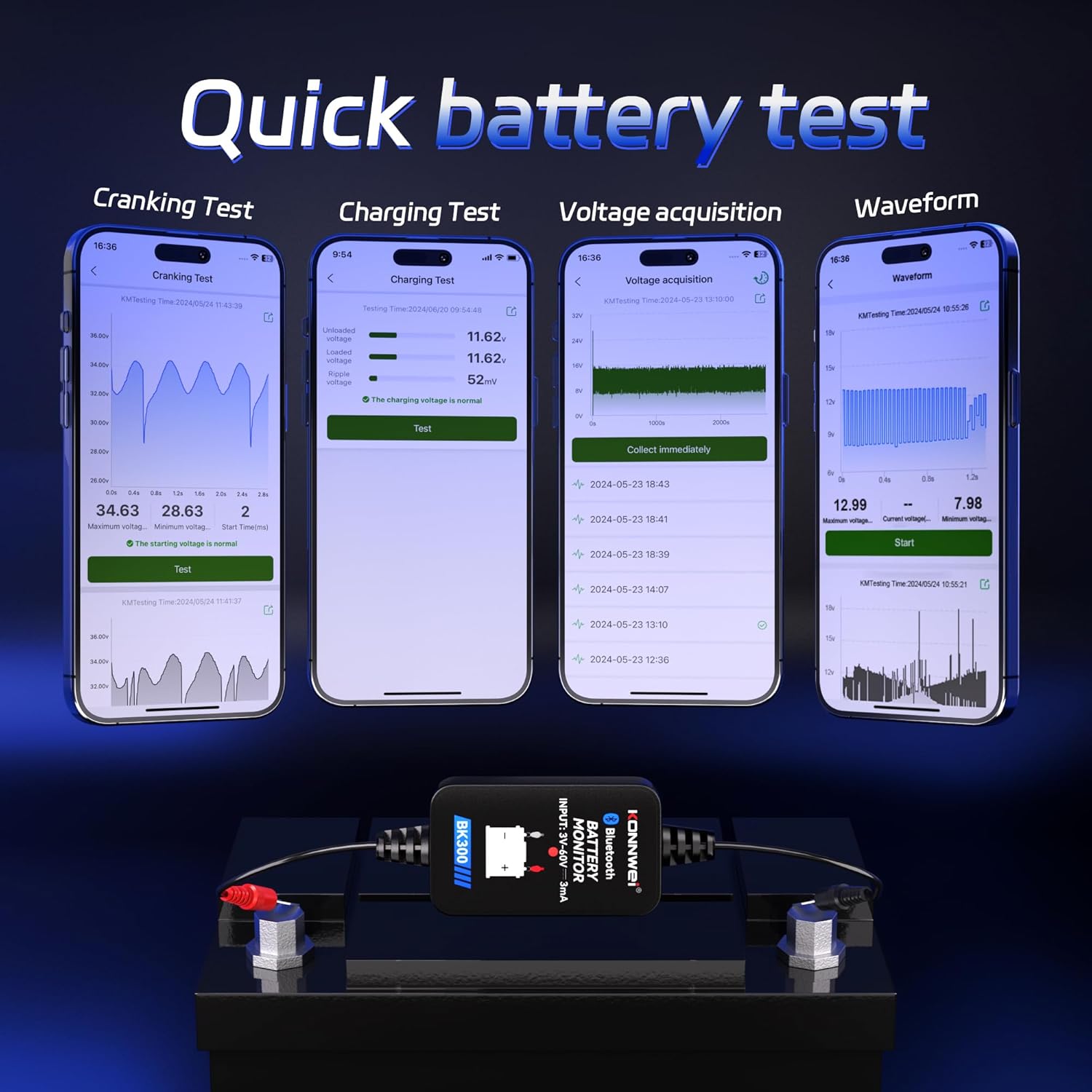
Image 5.2: The BK300 device connected to a vehicle battery.

Image 5.3: Step 2 - Connect the battery.
5.3. Connect to Bluetooth
- Open the BKmonitor app on your smartphone.
- Ensure your phone's Bluetooth is enabled.
- The app should automatically detect the BK300 device. Select it from the list of available devices to establish a connection.

Image 5.4: Step 3 - Connect the Bluetooth.
5.4. Begin Testing
Once connected, the app will display the main menu, allowing you to select various testing functions.

Image 5.5: Step 4 - Prepared to begin testing.
6. Operating Instructions
The BK300 offers several diagnostic functions accessible through the BKmonitor app.
6.1. Voltage Test / Battery Monitor
This function provides real-time voltage readings of your battery. It continuously monitors the battery status, allowing you to track its charge level and overall health.

Image 6.1: Battery health monitoring.
6.2. Cranking Test
The Cranking Test evaluates the battery's ability to deliver sufficient power to start the engine. It measures the starting voltage every 0.01 seconds during engine cranking.
- Select "Cranking Test" from the app's main menu.
- Follow the on-screen prompts to start the engine.
- The app will display the maximum, minimum, and current voltage during cranking, along with a waveform graph.
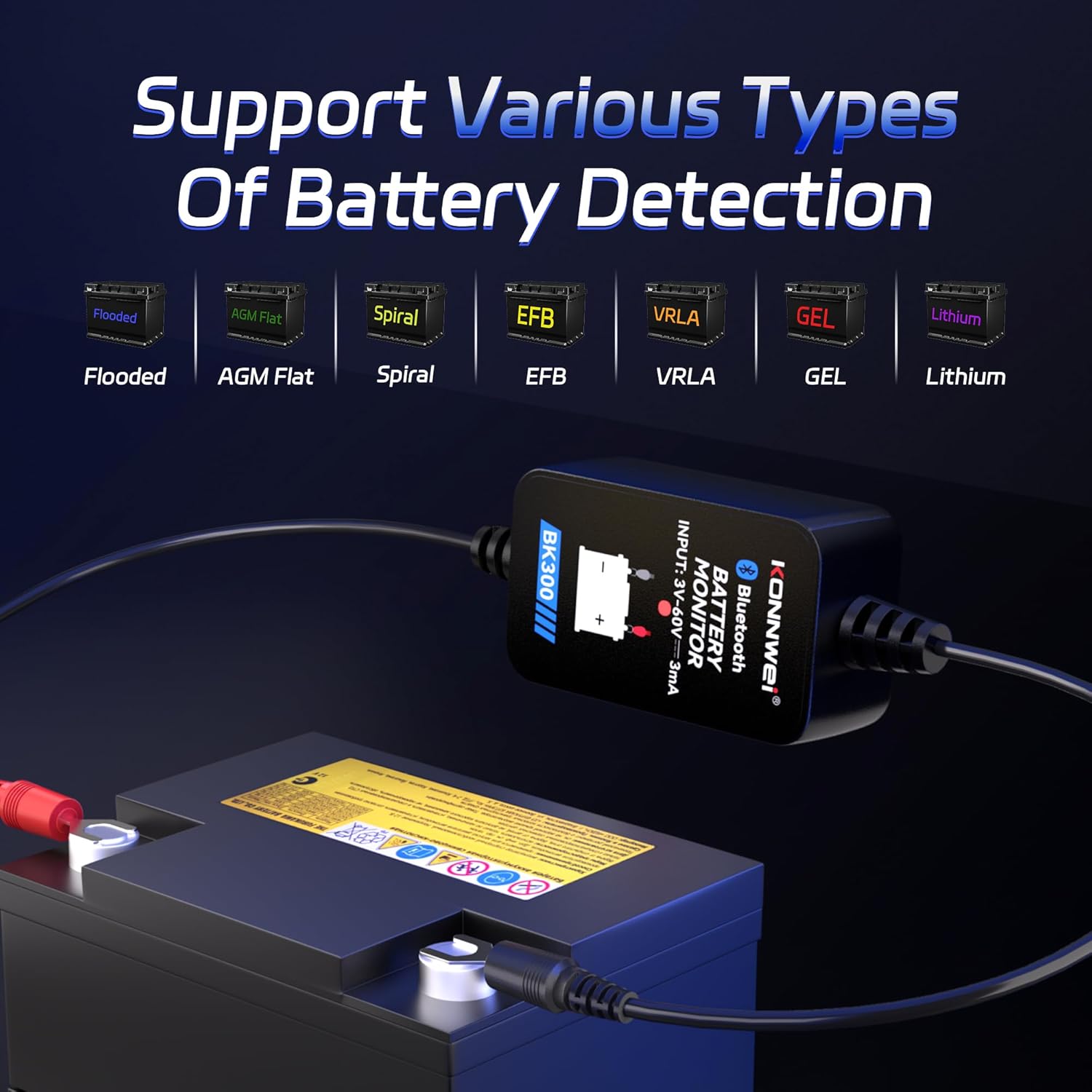
Image 6.2: Cranking Test interface and results.

Image 6.3: Cranking Test analysis.
6.3. Charging Test
The Charging Test evaluates the performance of your vehicle's charging system (alternator, regulator, etc.). It measures unloaded voltage, loaded voltage, and ripple voltage to determine charging efficiency.
- Select "Charging Test" from the app's main menu.
- Follow the on-screen instructions, which may involve running the engine at different speeds.
- The app will display the test results and indicate if the charging system is functioning normally.

Image 6.4: Charging Test interface and results.

Image 6.5: Charging Test analysis.
6.4. Waveform Live Data
The Waveform function provides a graphical representation of voltage over time, which can be useful for advanced diagnostics.
- Select "Waveform" from the app's main menu.
- Observe the real-time voltage fluctuations.

Image 6.6: Waveform Live Data display.
6.5. Trip Recording / Data Collection
The BK300 automatically collects voltage data every second during your trip. This data can be reviewed anytime after the trip to analyze battery performance over time.

Image 6.7: Automatic voltage data collection during trips.
7. Supported Battery Types
The KONNWEI BK300 is compatible with a wide range of 6V, 12V, 24V, and 48V batteries, including:
- Lead-acid batteries
- AGM Flat Plate batteries
- AGM Spiral batteries
- EFB (Enhanced Flooded Battery)
- VRLA (Valve Regulated Lead-Acid) batteries
- GEL batteries
- Lithium batteries

Image 7.1: Supported battery types.
8. Maintenance
To ensure the longevity and accurate performance of your KONNWEI BK300:
- Keep the device clean and free from dirt, grease, and moisture. Wipe with a soft, dry cloth.
- Store the device in a cool, dry place when not in use.
- Regularly check the connection clamps for corrosion or damage. Clean if necessary.
- Ensure the app is updated to the latest version for optimal performance and new features.
9. Troubleshooting
| Problem | Possible Cause | Solution |
|---|---|---|
| Device does not power on / No LED indicator | Incorrect battery connection; Battery voltage too low. | Ensure clamps are securely connected to the correct battery terminals (red to +, black to -). Check battery voltage with a multimeter; if below 3V, the device may not power on. |
| Cannot connect to Bluetooth | Bluetooth disabled on phone; Device out of range; App issue. | Ensure Bluetooth is enabled on your smartphone. Move closer to the device (within 25-50 feet). Restart the app and try again. Ensure the BK300 is powered on. |
| Inaccurate readings | Poor connection; Corroded battery terminals. | Clean battery terminals and ensure a solid connection. |
| App crashes or freezes | Outdated app version; Software conflict. | Update the BKmonitor app to the latest version. Restart your smartphone. |
10. Specifications
| Feature | Detail |
|---|---|
| Model | BK300 |
| Input Voltage Range | 3V - 60V |
| Supported Battery Voltages | 6V, 12V, 24V, 48V |
| Supported Battery Types | Lead-acid, AGM Flat/Spiral, EFB, VRLA, GEL, Lithium |
| Bluetooth Version | 5.2 |
| Wireless Range | 25-50 feet (approx. 7.6-15.2 meters) |
| Power Consumption | Approximately 1mA |
| Waterproof Rating | IP68 |
| Dimensions | 0.59 x 1.18 x 1.77 inches (1.5 x 3 x 4.5 cm) |
| Weight | 0.71 ounces (20 grams) |
11. Warranty and Technical Support
KONNWEI provides a 2-year warranty for the BK300 Bluetooth Battery Monitor from the date of purchase. We also offer lifetime technical support.
If you encounter any compatibility issues, operational problems, or require technical assistance, please contact our support team. Our technical support is available 24/7 to assist you.
For support, please visit the official KONNWEI website or refer to the contact information provided with your product packaging.

Image 11.1: KONNWEI customer support team.


