
Oaufttik INNO V1
Oaufttik INNO V1 Automatic Fiber Optic Cleaver User Manual
Model: INNO V1
1. Introduction
This manual provides detailed instructions for the safe and efficient operation, setup, and maintenance of the Oaufttik INNO V1 Automatic Fiber Optic Cleaver. This device is designed for precise, one-step cleaving of various optical fiber types, including leather wire, bare fiber, and jumper cables, essential for Fiber To The Home (FTTH) applications.
Safety Information
- Always handle optical fibers with care. Fiber shards are extremely sharp and can cause injury.
- Wear appropriate personal protective equipment, such as safety glasses, when working with fiber optics.
- Ensure the fiber debris recycler is properly installed and used to collect all fiber fragments.
- Keep the cleaver clean and free from dust and debris to maintain optimal performance.
- Do not attempt to disassemble the cleaver beyond routine maintenance as described in this manual.
2. Product Overview
The INNO V1 Fiber Optic Cleaver features a robust metal design for enhanced stability and durability. It offers a fully automatic, one-step cleaving process with automatic blade return, streamlining fiber preparation tasks.
Key Features:
- Automatic One-Step Cleaving: Simplifies the cleaving process and improves efficiency.
- Automatic Blade Return: Ensures consistent operation and reduces manual intervention.
- Versatile Fiber Compatibility: Accommodates various fiber types including leather wire, bare fiber, and jumper cables using integrated fixtures.
- Integrated Fiber Recycler: Collects fiber debris for safe disposal.
- Durable Construction: Pure metal design for stability and anti-drop performance.
- High-Quality Blade: Imported tungsten steel blade with a lifespan exceeding 60,000 cleaves, featuring scale markings for easy edge rotation.
- Compact and Portable: Small size and light weight for convenient transport and use.
- Anti-Slip Foot Pads: Provides stability during operation.
Product Components:

Figure 2.1: Front view of the INNO V1 Fiber Cleaver in its closed position. The top cover displays the "V1 Fiber Cleaver" branding.
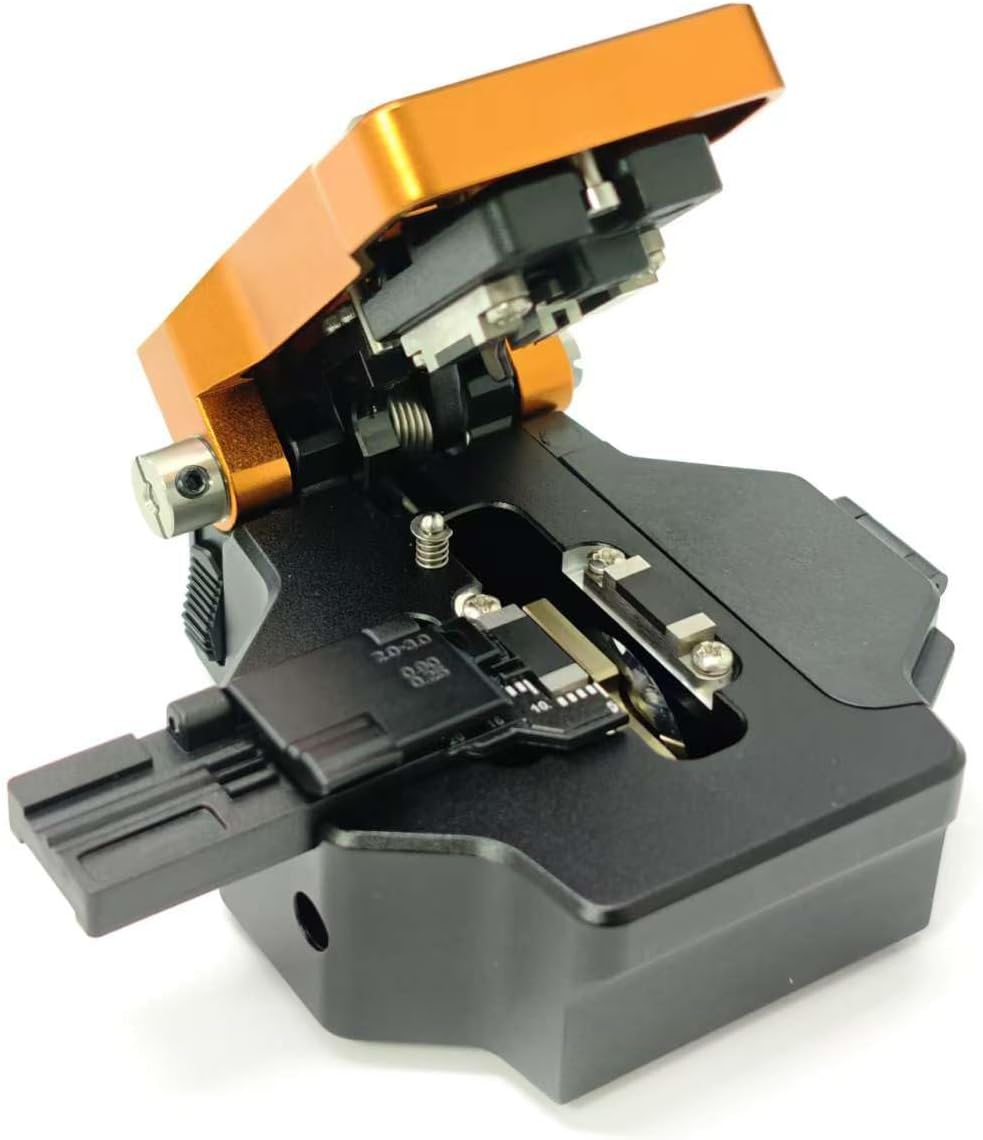
Figure 2.2: The INNO V1 Fiber Cleaver with its top cover open, revealing the internal fiber clamping and cleaving mechanism. The fiber holder is visible on the left.

Figure 2.3: An angled view of the open INNO V1 Fiber Cleaver, highlighting the fiber holder and the precise alignment components for fiber cleaving.

Figure 2.4: A closed front view of the INNO V1 Fiber Cleaver, showing the fiber holder mechanism on the left.

Figure 2.5: Side view of the INNO V1 Fiber Cleaver, showing the extended fiber holder mechanism ready for fiber insertion.

Figure 2.6: The INNO V1 Fiber Cleaver stored securely within its protective carrying case, alongside its instruction manual.
3. Setup
- Unpacking: Carefully remove the INNO V1 Fiber Cleaver and its accessories from the packaging. Inspect for any damage.
- Placement: Place the cleaver on a stable, clean, and level surface. Ensure the anti-slip foot pads are making full contact with the surface.
- Fiber Debris Recycler: Verify that the fiber debris recycler is correctly attached and positioned to collect all fiber fragments during cleaving. This is crucial for safety and cleanliness.
- Blade Inspection: Before first use, gently open the cleaver cover and visually inspect the tungsten steel blade for any visible defects or contamination. Ensure the blade is positioned correctly.
4. Operating Instructions
Follow these steps for precise fiber cleaving:
- Prepare the Fiber: Strip the fiber optic cable to the required length, removing the outer jacket and buffer coating. Clean the bare fiber with an approved fiber cleaning solution and lint-free wipe.
- Open the Cleaver: Gently lift the top cover of the INNO V1 cleaver to expose the fiber clamping mechanism and blade.
- Position the Fiber: Place the prepared bare fiber into the appropriate groove on the fiber holder. Ensure the fiber is straight and extends beyond the desired cleave point. The cleaver's scale markings can assist with precise length measurement.
- Secure the Fiber: Close the fiber clamp to gently secure the fiber in place. Ensure the fiber is not bent or stressed.
- Execute the Cleave: Close the top cover of the cleaver firmly. The automatic mechanism will engage, performing a one-step cleave and returning the blade to its home position.
- Remove Cleaved Fiber: Open the top cover and carefully remove the cleaved fiber. Inspect the cleaved end for quality.
- Dispose of Debris: Ensure the cleaved fiber scrap falls into the integrated fiber debris recycler. Periodically empty the recycler for safe disposal of fiber fragments.
Note: Always refer to the specific cleave length requirements for your fiber optic connectors or splicing equipment.
5. Maintenance
Cleaning:
- Regularly clean the fiber clamping area and blade with a lint-free cloth and isopropyl alcohol to prevent contamination.
- Ensure no fiber debris accumulates within the cleaver mechanism.
Blade Rotation and Replacement:
- The tungsten steel blade has multiple cleaving positions, indicated by scale markings. When cleave quality degrades, rotate the blade to a fresh position.
- To rotate the blade, carefully loosen the blade retaining screw (if applicable, consult specific diagrams if provided with the physical product), rotate the blade to the next numbered position, and re-tighten.
- When all blade positions have been used, replace the blade with an original Oaufttik replacement blade. Follow the reverse procedure for installation.
- Dispose of used blades safely in a sharps container.
Fiber Debris Recycler:
- Empty the fiber debris recycler frequently to prevent overflow and ensure safe collection of fiber fragments.
- Dispose of collected fiber debris in a designated waste container for sharps or fiber optic waste.
6. Troubleshooting
| Problem | Possible Cause | Solution |
|---|---|---|
| Poor cleave quality (angled, chipped, or rough end-face) |
|
|
| Fiber not cleaving completely |
|
|
| Fiber debris not collected by recycler |
|
|
7. Specifications
| Model | INNO V1 |
| Brand | Oaufttik |
| Material | Metal |
| Blade Material | Tungsten Steel |
| Blade Lifespan | Exceeds 60,000 cleaves (with rotations) |
| Item Weight | 320 Grams (11.3 ounces) |
| Package Dimensions | 5.12 x 4.72 x 2.76 inches |
| Color | Orange |
| Included Components | V1 Fiber Cleaver |
8. Warranty and Support
For warranty information and technical support, please refer to the documentation provided with your purchase or contact Oaufttik customer service directly. Keep your purchase receipt as proof of purchase for any warranty claims.
Ask a question about this manual
Ask about setup, troubleshooting, compatibility, parts, safety, or missing instructions. Manuals+ will review the question and use this page’s manual context to help answer it.