1. Introduction
The YOPHOON AI Voice Recorder Model A2 is a compact, high-performance audio recording device designed for modern communication and information capture. Featuring advanced AI technology, it offers dual recording modes, intelligent transcription, summarization, and app control, making it ideal for meetings, lectures, phone calls, and personal notes. With its ultra-thin design and 64GB of built-in memory, it provides a seamless and secure recording experience.

Figure 1.1: YOPHOON AI Voice Recorder Model A2 with companion app.
2. Safety Information
Please read and follow these safety guidelines to ensure safe and proper operation of your device:
- Battery Safety: The device contains a built-in rechargeable battery. Do not attempt to replace the battery yourself. Avoid exposing the device to extreme temperatures (above 60°C/140°F or below -10°C/14°F), direct sunlight, or open flames, as this may cause the battery to overheat, explode, or catch fire.
- Water Resistance: This device is not waterproof. Avoid exposure to water, moisture, or high humidity.
- Cleaning: Use a soft, dry cloth for cleaning. Do not use liquid cleaners or aerosols.
- Disposal: Dispose of the device and its battery responsibly according to local regulations. Do not dispose of with household waste.
- Privacy and Data Security: All recorded data is stored exclusively on the device. Data is only transferred to your smartphone if you actively sync the recording files with the DOWAY app. You retain full control over your recordings and their privacy.
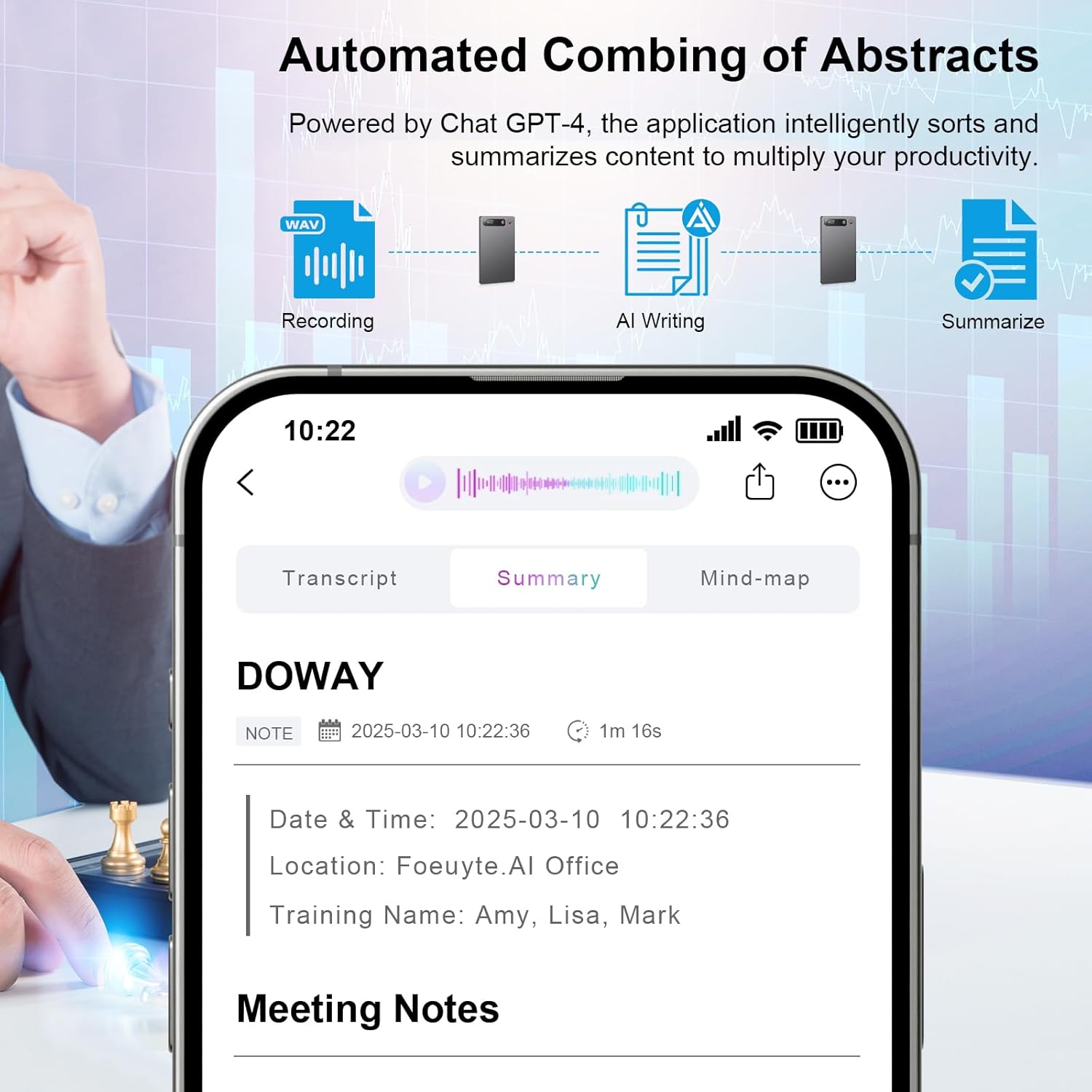
Figure 2.1: Data encryption and privacy features.
3. Package Contents
Verify that all items are present in your package:
- DOWAY Voice Recorder (Model A2)
- DOWAY Black Case
- USB-C Magnetic Charging Cable
- Magnetic Ring
- User Manual (this document)
4. Product Overview
The YOPHOON AI Voice Recorder Model A2 features a sleek, ultra-thin design, measuring approximately 3.4 x 2.1 x 0.1 inches and weighing 1.13 ounces. Its compact form factor allows for easy portability and discreet use.
Physical Features:
- Recording Button: A single, prominent button for one-touch recording initiation.
- LED Indicator: Provides real-time status updates (e.g., recording, charging, low battery).
- Microphones: Built-in dual recording holes for high-frequency noise reduction and clear audio capture.
- Charging Port: Magnetic charging interface for convenient power replenishment.
- Internal Storage: 64GB built-in memory for extensive recording capacity.

Figure 4.1: Slim and lightweight design for portability.
5. Setup
5.1 Charging the Device
Before first use, fully charge your AI Voice Recorder. Connect the magnetic charging cable to the device's charging port and a USB power source. The LED indicator will show charging status. A full charge provides approximately 35 hours of continuous recording.
5.2 Installing the DOWAY App
The DOWAY app is essential for accessing advanced features like transcription, summarization, and file management. Download the DOWAY app from your smartphone's app store (iOS App Store or Google Play Store).
5.3 Initial Pairing and Connection
Once the app is installed, open it and follow the on-screen instructions to pair your AI Voice Recorder. Ensure your device's Wi-Fi is active for the app to detect and connect to it. This connection enables seamless synchronization of recordings and access to AI features.
5.4 Using the Magnetic Ring
The included magnetic ring can be attached to your smartphone or phone case to provide a secure magnetic attachment point for the AI Voice Recorder, allowing it to conveniently stick to your phone.
6. Operating Instructions
6.1 Recording Audio
The device supports two primary recording modes: Normal Recording and Call Recording.
- One-Button Recording: To start a recording, simply press and hold the main recording button. The LED indicator will change to confirm recording has begun. Press the button again to stop and save the recording.
- Automatic Saving: The device automatically saves the current recording file when it reaches 2GB and then resumes recording, ensuring no data loss during long sessions.

Figure 6.1: Using the AI Voice Recorder for general recording.
6.2 Using the DOWAY App Features
The DOWAY app unlocks the full potential of your AI Voice Recorder:
- Intelligent Transcription: The app utilizes AI technology (GPT-4 and Claude 3.5 Sonnet) to accurately transcribe recordings into text. It supports 23 languages.
- Summarization: Generate concise summaries of your recordings, enhancing productivity and review efficiency.
- Multiplier Playback: Adjust playback speed for faster review of recordings.
- Audio Trimming: Easily edit and remove unwanted sections from your audio files directly within the app.
- Speaker Labeling: For meeting recordings, the app can visually distinguish between different speakers, making it easier to follow conversations.
- Cloud Storage: Unlimited cloud storage is available with the Pro Plan for synced files.

Figure 6.2: Transcription feature in the DOWAY app.

Figure 6.3: Automated summarization of abstracts.
7. Maintenance
To ensure the longevity and optimal performance of your YOPHOON AI Voice Recorder, follow these maintenance guidelines:
- Cleaning: Gently wipe the device with a soft, dry, lint-free cloth. Do not use abrasive cleaners, solvents, or strong chemicals.
- Storage: Store the device in a cool, dry place away from direct sunlight and extreme temperatures. When not in use for extended periods, ensure it is partially charged (around 50%) to preserve battery health.
- Software Updates: Regularly check the DOWAY app for available software and firmware updates to ensure you have the latest features and performance improvements.
8. Troubleshooting
If you encounter issues with your AI Voice Recorder, refer to the following common problems and solutions:
| Problem | Possible Cause | Solution |
|---|---|---|
| Device not turning on/recording | Low battery; Device frozen | Charge the device fully. If unresponsive, perform a soft reset (refer to app or manufacturer support for specific reset instructions). |
| Cannot connect to DOWAY app | Bluetooth/Wi-Fi off; App not updated; Device not in pairing mode | Ensure Bluetooth and Wi-Fi are enabled on both devices. Update the DOWAY app to the latest version. Restart both the recorder and your smartphone. |
| Poor recording quality | Microphone obstructed; Excessive background noise; Device too far from source | Ensure microphones are clear. Reduce background noise if possible. Place the recorder closer to the audio source. |
| Transcription inaccuracies | Unclear audio; Multiple speakers; Accent/dialect issues | Ensure clear audio input. Use Speaker Labeling feature for multiple speakers. Review and edit transcriptions manually within the app. |
| Device storage full | Too many recordings saved | Sync recordings to the DOWAY app and delete unnecessary files from the device to free up space. |
For further assistance, please refer to the DOWAY app's help section or contact YOPHOON customer support.
9. Specifications
Detailed technical specifications for the YOPHOON AI Voice Recorder Model A2:
| Feature | Specification |
|---|---|
| Model Number | A2 |
| Product Dimensions | 3.4 x 2.1 x 0.1 inches (8.6 x 5.3 x 0.25 cm) |
| Item Weight | 1.13 ounces (32 grams) |
| Memory Storage Capacity | 64 GB |
| Battery Life (Continuous Recording) | Up to 35 hours |
| Charging Type | Magnetic USB-C |
| Microphone Form Factor | Built-In (Dual Recording Holes) |
| Audio Format | MP3 Audio |
| Compatible Devices | Smartphone (via DOWAY App) |
| Hardware Interface | Bluetooth |
| Supported Transcription Languages | 23 Languages |
10. Warranty and Support
10.1 DOWAY AI Membership Plans
Upon activation, your DOWAY AI Voice Recorder includes a complimentary first year of access to all DOWAY app features, including unlimited transcription and summarization. After the first year, you may choose to subscribe to the Pro Plan package for continued access to these features. The Pro Plan is available for $9.99 per month or $69.99 per year.
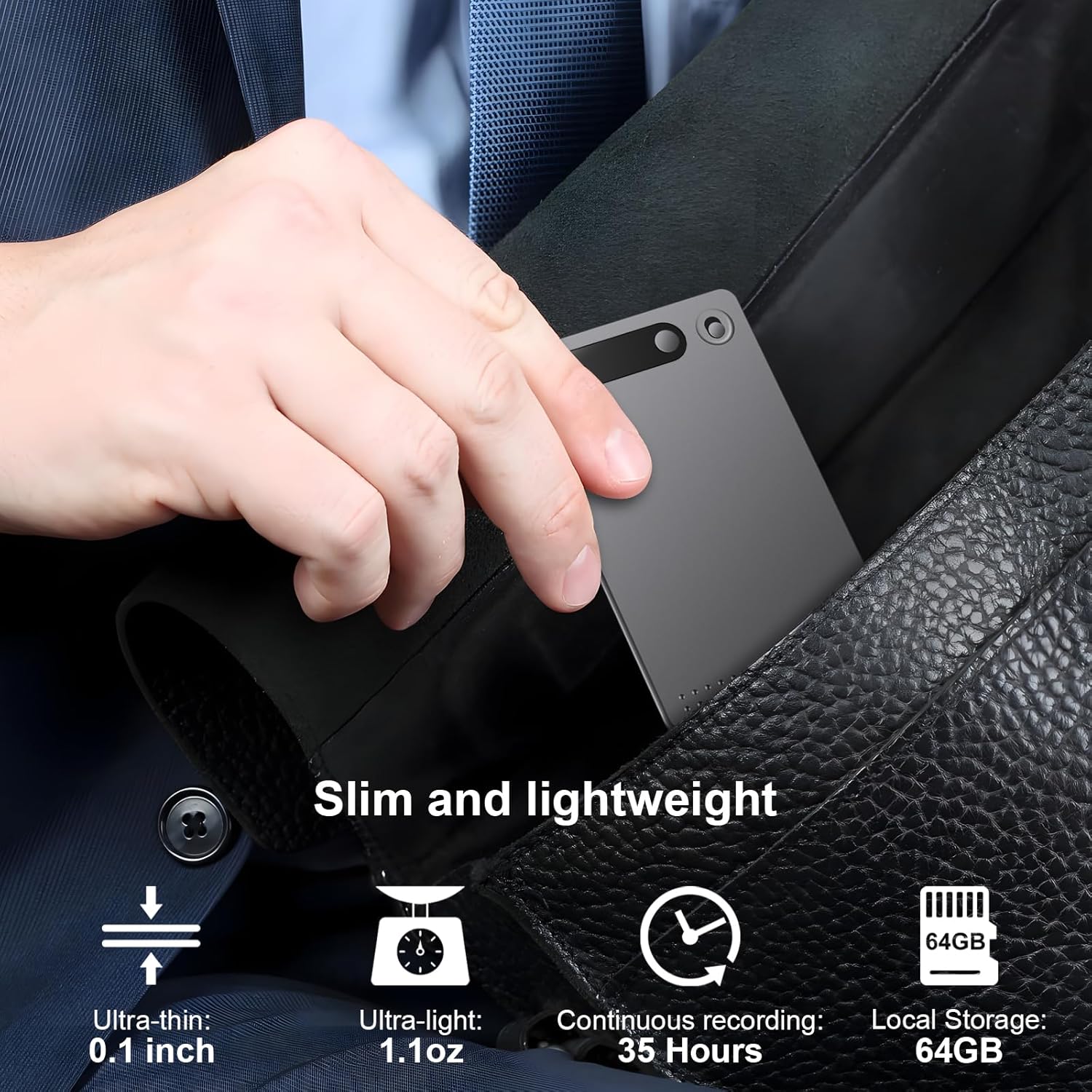
Figure 10.1: DOWAY AI Membership Plan details.
10.2 Customer Support
For technical support, warranty claims, or any inquiries regarding your YOPHOON AI Voice Recorder, please contact YOPHOON customer service through the contact information provided on the product packaging or the official YOPHOON website. Please have your model number (A2) and purchase details ready when contacting support.


