1. Introduction
This manual provides essential information for the proper setup, operation, and maintenance of your new Generic Replacement Remote Control. This infrared (IR) remote is designed to function as a direct replacement for the original remote controls of ALBA T-701, AXXION AXX-1028, and Polaroid T-901 portable DVD players. No programming or setup is required; simply insert batteries and begin use.
2. Product Overview
The replacement remote control is designed to replicate the primary functions of your original remote. It features a standard layout for DVD player controls, including number input, navigation, playback, and volume adjustments. Please compare the appearance of this remote with your original to ensure compatibility.
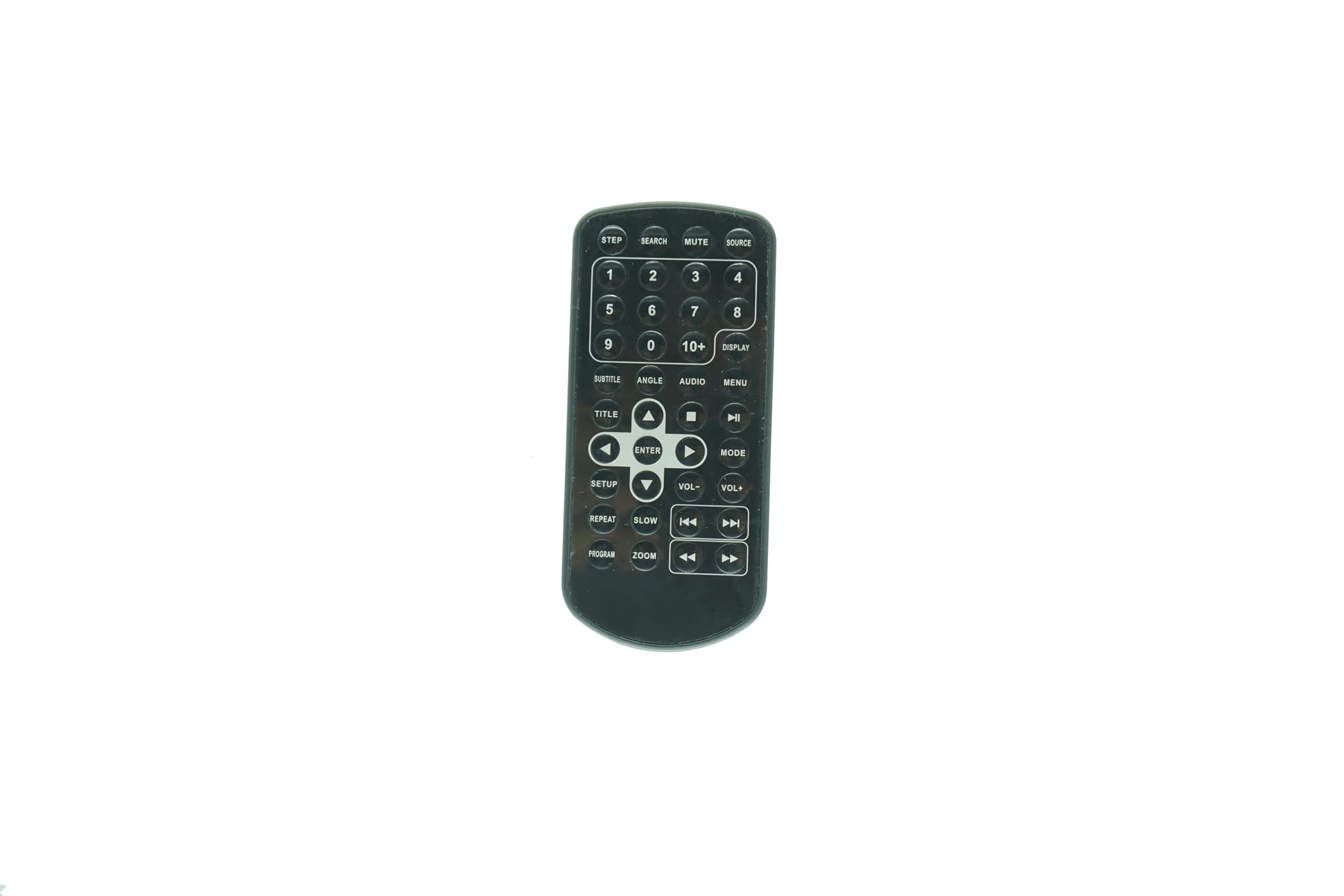
Figure 2.1: Front view of the Generic Replacement Remote Control. This image displays the overall shape and button layout of the remote, confirming its design for compatibility.
3. Setup: Battery Installation
Your remote control requires two (2) AAA batteries (not included) for operation. Follow these steps to install the batteries:
- Locate the battery compartment on the back of the remote control.
- Gently slide the battery compartment cover downwards or outwards to open it.
- Insert two AAA batteries, ensuring the positive (+) and negative (-) terminals align correctly with the markings inside the compartment. Incorrect insertion can prevent the remote from functioning.
- Slide the battery compartment cover back into place until it clicks securely.

Figure 3.1: Back view of the remote control, showing the battery compartment area and a small clip. This clip is part of the battery cover mechanism.
4. Operating Instructions
This remote control operates via infrared (IR) signals. Point the remote directly at the IR receiver on your portable DVD player for optimal performance. No programming is needed; the remote is ready for use once batteries are installed.

Figure 4.1: Detailed view of the remote control's buttons. This image provides a clear reference for identifying each button and its label.
Button Functions:
- Number Pad (0-9, 10+): Used for direct track selection or inputting numerical values.
- SOURCE: Selects the input source (if applicable to your DVD player model).
- MUTE: Silences the audio output. Press again to restore sound.
- SEARCH: Initiates a search function within the DVD content.
- DISPLAY: Shows on-screen information such as current track, time, or settings.
- MENU: Accesses the DVD's main menu.
- AUDIO: Cycles through available audio tracks or languages.
- ANGLE: Changes the camera angle during playback (if supported by the DVD).
- SUBTITLE: Cycles through available subtitle options.
- TITLE: Returns to the DVD's title menu.
- Navigation Buttons (Up, Down, Left, Right): Used to navigate menus and selections.
- ENTER: Confirms a selection or action.
- PLAY/PAUSE (►/❚❚): Starts or pauses playback.
- STOP (■): Stops playback.
- FAST FORWARD (►►): Advances playback quickly.
- REWIND (◄◄): Rewinds playback quickly.
- NEXT (►❚): Skips to the next chapter or track.
- PREVIOUS (❚◄): Skips to the beginning of the current chapter or track, or to the previous one.
- VOL+ / VOL-: Increases or decreases the volume.
- SETUP: Accesses the system setup menu of the DVD player.
- SLOW: Initiates slow-motion playback.
- REPEAT: Repeats the current track, chapter, or entire disc.
- PROGRAM: Allows programming of track playback order.
- ZOOM: Zooms in or out on the video display.
- STEP: Advances playback frame by frame.
5. Maintenance
- Cleaning: Use a soft, dry cloth to clean the remote control. Do not use liquid cleaners or abrasive materials, as they may damage the surface or internal components.
- Battery Replacement: Replace batteries when the remote's performance degrades or stops working. Always replace both batteries at the same time with new ones of the same type (AAA).
- Storage: If the remote will not be used for an extended period, remove the batteries to prevent leakage and potential damage. Store in a cool, dry place.
6. Troubleshooting
If your remote control is not functioning as expected, consider the following:
- Remote Not Responding:
- Ensure the batteries are inserted correctly with the correct polarity (+/-).
- Replace old batteries with new AAA batteries.
- Check for any obstructions between the remote and the DVD player's IR receiver.
- Ensure you are pointing the remote directly at the DVD player.
- Some Functions Not Working:
- While this remote is a replacement, some advanced or unique functions of your original DVD player's remote may not be fully supported. The remote is designed for core playback and navigation.
- Verify that the function you are trying to use is supported by your specific DVD player model.
7. Specifications
- Compatibility: ALBA T-701, AXXION AXX-1028, Polaroid T-901 Portable DVD Players
- Type: Infrared (IR) Remote Control
- Power Source: 2 x AAA Batteries (not included)
- Color: Black
- Max Number of Supported Devices: 1
- Manufacturer: Easytry
8. Warranty and Support
As a generic replacement product, specific warranty details may vary. Please refer to the retailer's return policy for information regarding exchanges or refunds. For any operational questions or concerns not covered in this manual, please contact the seller directly through your purchase platform. It is recommended to verify your original remote's appearance against the product images before purchase to ensure full compatibility.