
1. Introduction
This manual provides essential information for the safe and efficient operation, maintenance, and troubleshooting of your Nakasaki 1600W Professional Electric Planer. Please read this manual thoroughly before using the tool and keep it for future reference.
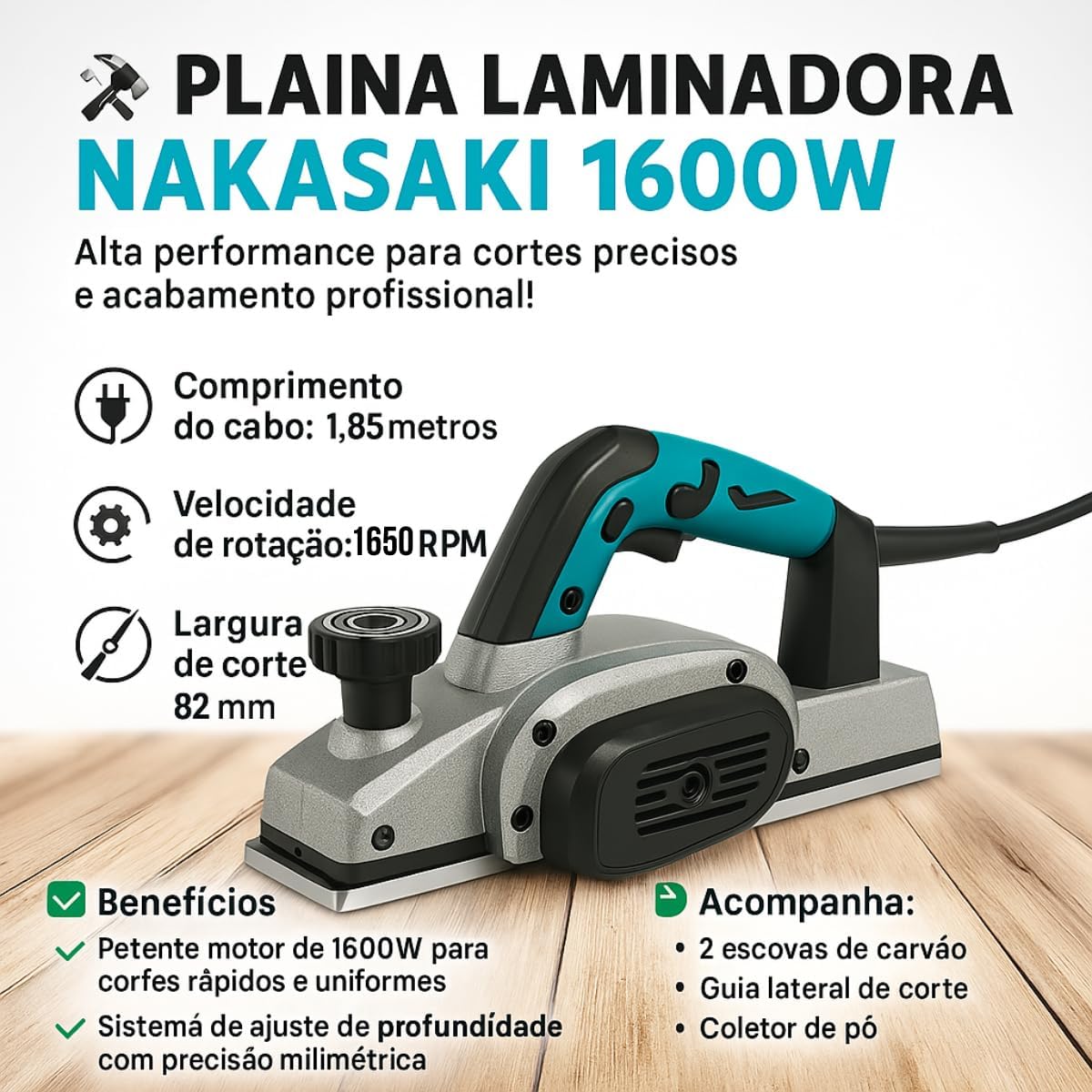
Figure 1: Nakasaki 1600W Electric Planer with highlighted features.
2. Safety Instructions
Always follow basic safety precautions to reduce the risk of fire, electric shock, and personal injury when using power tools.
- Personal Protective Equipment (PPE): Always wear safety glasses, hearing protection, and a dust mask. Use work gloves to protect hands.
- Work Area: Keep your work area clean, well-lit, and free from clutter. Ensure proper ventilation to avoid inhaling wood dust.
- Electrical Safety: Ensure the power supply matches the tool's specifications (220V). Never operate the planer in wet conditions. Disconnect the power plug from the power source before making any adjustments, changing accessories, or storing the tool.
- Tool Handling: Keep hands away from the planing area and rotating blades. Do not force the tool; let the planer do the work. Secure the workpiece firmly before planing.
- Maintenance: Regularly inspect the power cord for damage. Do not use the tool if the cord is damaged.
3. Product Features and Components
The Nakasaki 1600W Electric Planer is designed for high performance and professional finishing. Key features include:
- Powerful Motor: Equipped with a 1600W motor for fast and uniform cuts.
- Adjustable Depth System: Precision millimeter depth adjustment for accurate material removal.
- High Rotation Speed: Operates at 16,500 RPM for smooth finishes.
- Cutting Width: Features an 82 mm cutting width.
- Durable Blades: Utilizes two hard metal TCT (Tungsten Carbide Tipped) blades for efficient and long-lasting performance.
- Ergonomic Design: Designed with a balanced center of gravity in the handle for improved control and safety during operation.
- Dust Collection: Includes a dust collector bag for bilateral chip removal (right/left), keeping the work area cleaner.
- Accessories: Comes with 2 carbon brushes, a side cutting guide, and a wrench for maintenance and setup.
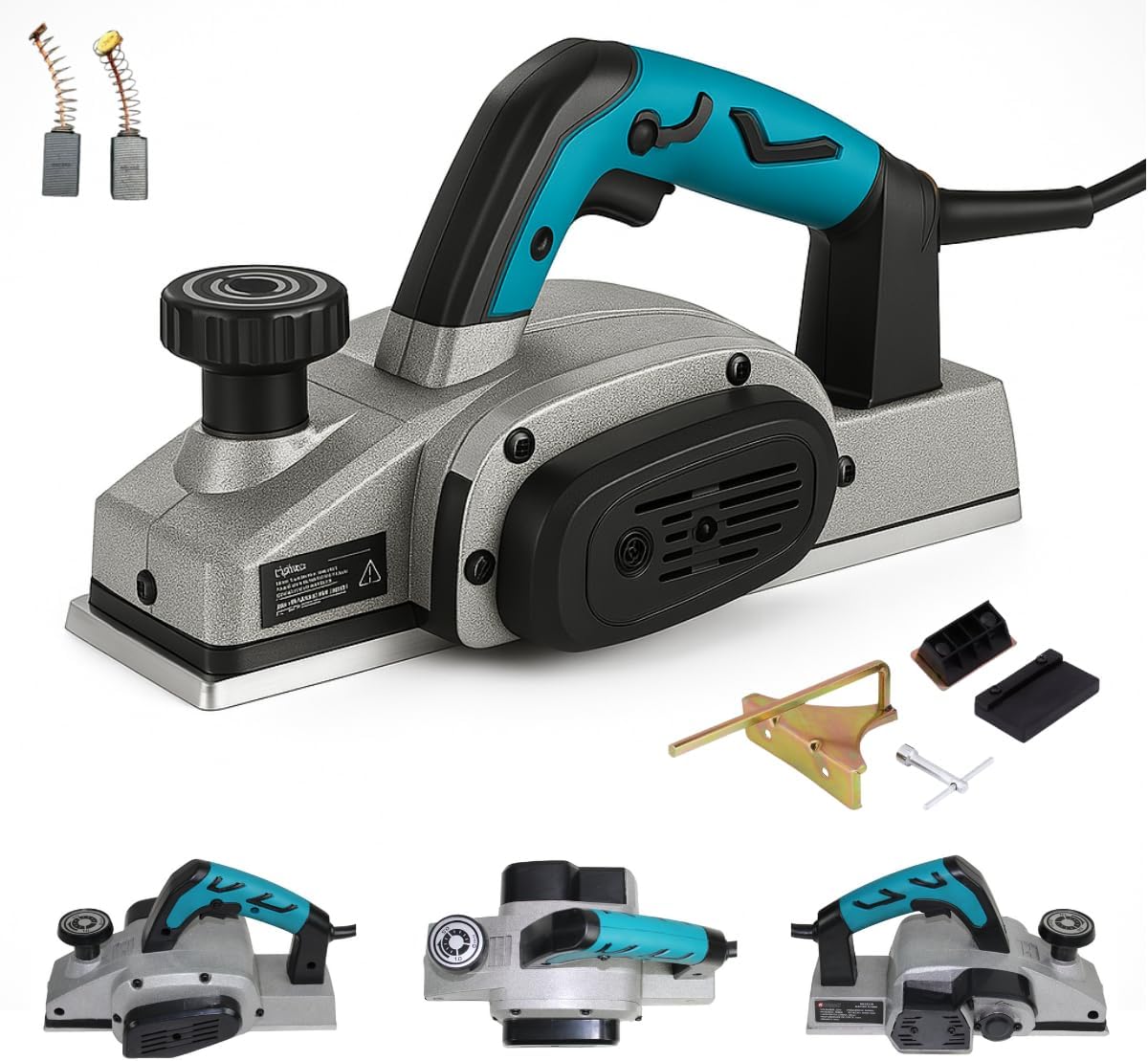
Figure 2: Electric Planer and its accessories.
4. Setup
- Unpacking: Carefully remove the planer and all accessories from the packaging. Inspect for any damage.
- Blade Inspection: Ensure the blades are securely installed and sharp. Refer to the maintenance section for blade replacement if needed.
- Dust Collector Attachment: Attach the dust collector bag to the chip ejection port. Ensure it is securely fastened to effectively collect wood shavings.
- Side Guide (Optional): For precise straight cuts, attach the side cutting guide as needed. Secure it firmly with the provided fasteners.
- Power Connection: Connect the planer to a 220V power outlet. Ensure the power cord is not damaged and is positioned to avoid tripping hazards.
5. Operating Instructions
- Adjusting Cutting Depth: Use the depth adjustment knob located at the front of the planer to set the desired cutting depth. Rotate the knob to increase or decrease the depth. The maximum cutting depth is typically 2.6 mm.
- Securing Workpiece: Always secure the workpiece firmly to prevent movement during planing.
- Starting the Planer: Hold the planer firmly with both hands. Press the safety lock button (if present) and then squeeze the trigger switch to start the motor. Allow the motor to reach full speed before contacting the workpiece.
- Planing Technique: Apply even pressure and move the planer smoothly across the workpiece. Maintain a consistent speed for a uniform finish. Avoid tilting the planer, which can cause uneven cuts.
- Stopping the Planer: Release the trigger switch to stop the motor. Wait for the blades to stop rotating completely before setting the tool down.

Figure 3: Proper use of the electric planer.
6. Maintenance
Regular maintenance ensures the longevity and optimal performance of your electric planer.
- Cleaning: After each use, disconnect the planer from the power supply. Empty the dust collector bag and clean any accumulated dust or debris from the tool's vents and blade area using a brush or compressed air.
- Blade Care: Inspect the blades regularly for sharpness and damage. Dull or chipped blades should be replaced or sharpened by a qualified technician. Always use the provided wrench for blade changes.
- Carbon Brushes: The planer includes spare carbon brushes. If the motor performance decreases or sparks excessively, the carbon brushes may need replacement. Consult a service center for this procedure if you are unsure.
- Storage: Store the planer in a dry, secure place, out of reach of children.
7. Troubleshooting
| Problem | Possible Cause | Solution |
|---|---|---|
| Planer does not start | No power supply; damaged power cord; faulty switch. | Check power connection; inspect cord for damage; contact service center. |
| Poor cut quality / Uneven surface | Dull or damaged blades; incorrect cutting depth; inconsistent pressure. | Replace/sharpen blades; adjust cutting depth; apply even pressure. |
| Excessive vibration or noise | Loose components; damaged blades; motor issue. | Check for loose parts; inspect blades; contact service center. |
| Dust collector not effective | Dust bag full; clogged port. | Empty dust bag; clear any blockages from the port. |
For issues not listed above, please contact Nakasaki customer support.
8. Specifications
- Model: 1600W
- Brand: KNAKASAKI
- Power: 1600W
- Voltage: 220V
- Rotation Speed: 16,500 RPM
- Cutting Width: 82 mm
- Max. Cutting Depth: Up to 2.6 mm
- Cable Length: 1.85 meters
- Material: Metal
- Power Source: Electric with cord
9. Warranty and Support
Your Nakasaki 1600W Professional Electric Planer comes with a 1-year limited warranty from the date of purchase, covering manufacturing defects. Please retain your proof of purchase for warranty claims.
For technical assistance, spare parts, or warranty service, please contact Nakasaki customer support through your retailer or visit the official Nakasaki website for contact information.