1. Introduction
The Generic STM32 Nucleo-64 Development Board is a versatile and cost-effective platform designed for users to explore new concepts and develop prototypes. It supports various STM32 microcontroller families, offering flexibility in performance, power consumption, and functionality. This board features Arduino connectivity support and an ST Morpho socket, enhancing its expandability within the STM32 Nucleo open development ecosystem. It also accommodates a range of professional shields and is based on an open-source design, facilitating rapid prototyping.
2. Key Features
- Microcontroller: STM32F303RET6, ARM Cortex-M4 core with DSP and FPU, 512 Kbytes Flash, 72 MHz CPU, MPU, CCM, 12-bit ADC 5 MSPS, PGA, comparators.
- On-board Debugger/Programmer: Integrated ST-LINK/V2-1 with SWD connector for debugging and programming.
- Power Supply: Can be powered directly from a USB connection.
- User Interface: Features three LEDs and two push-buttons for user interaction and status indication.
- IDE Support: Compatible with a wide selection of Integrated Development Environments (IDEs), including IAR, ARM Keil, and various GCC-based IDEs.
- Applications: Suitable for embedded development, educational institutions, robotics, Internet of Things (IoT) projects, human-machine interfaces, and electronic laboratory automation.
- Connectivity: Supports Arduino Uno V3 and ST Morpho extension headers for expanded functionality.
3. Board Layout and Components
Understanding the layout of the Nucleo-64 board is crucial for proper setup and operation. Below are images illustrating the top and bottom views of the board, highlighting key components and connectors.
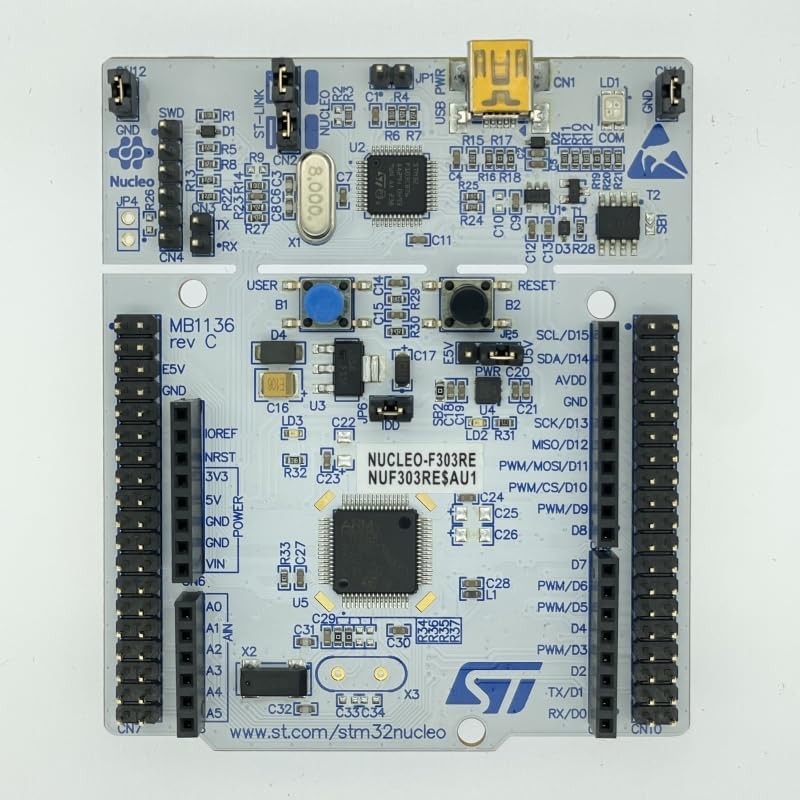
Figure 3.1: Top View of STM32 Nucleo-64 Development Board. This image displays the main components on the top side of the board, including the microcontroller, USB port for power and debugging, and the various pin headers for expansion.

Figure 3.2: Bottom View of STM32 Nucleo-64 Development Board. This image shows the underside of the board, including solder bridges for configuration and identification markings such as MB1136-F303RE-C05 and A230500148.
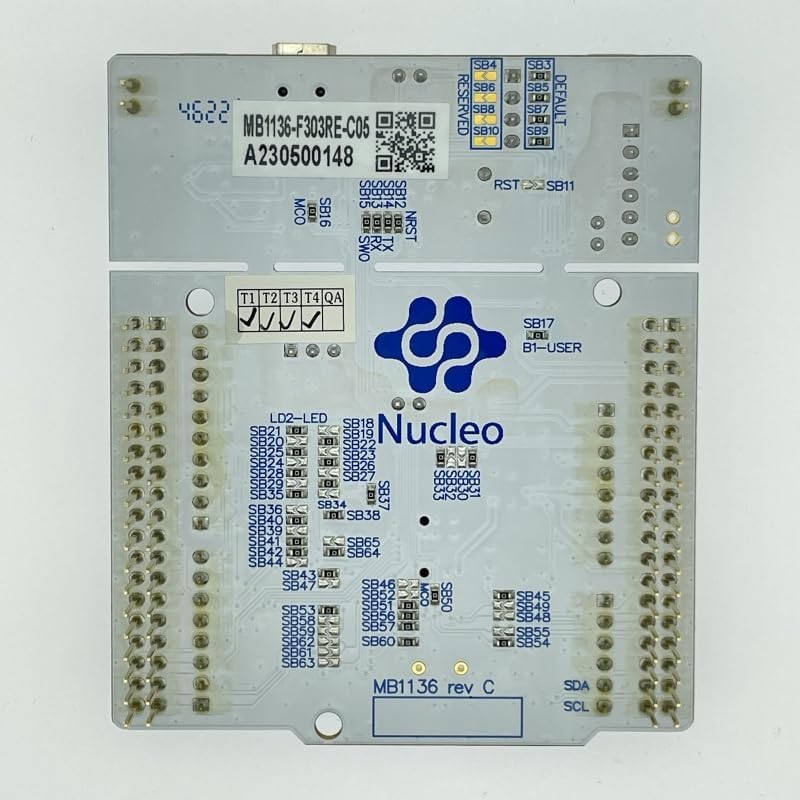
Figure 3.3: Angled View of STM32 Nucleo-64 Development Board. This perspective provides a better understanding of the board's three-dimensional structure and the accessibility of its various connectors.
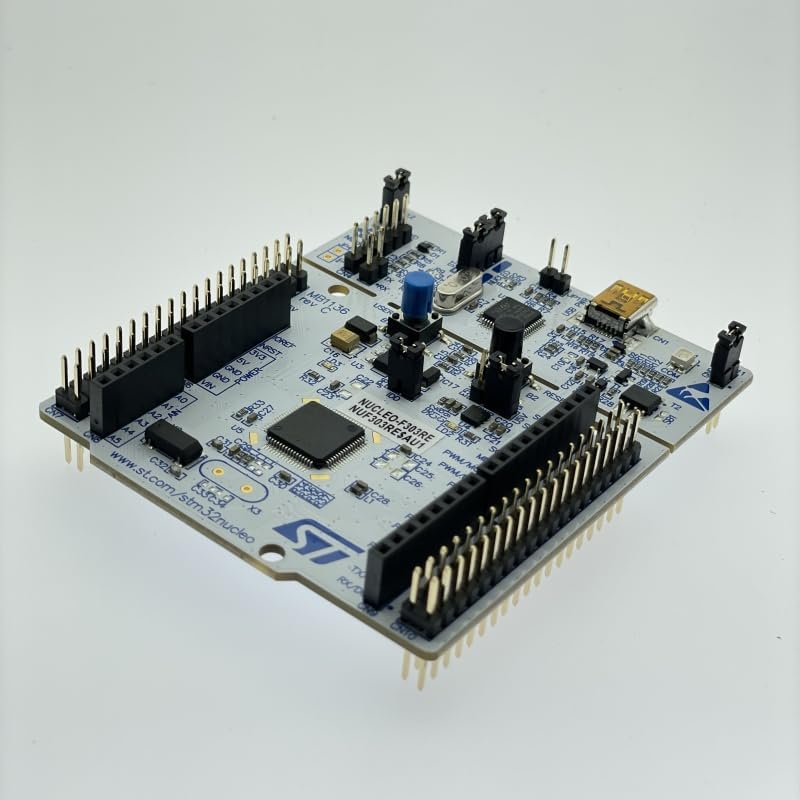
Figure 3.4: Product Packaging Details. This image shows the product box, detailing the model number NUCLEO-F303RE, manufacturing information, and regulatory compliance marks such as RoHS, CE, and FCC.
4. Setup Instructions
- Connect to PC: Connect the Nucleo-64 board to your computer using a standard USB cable (Type-A to Mini-B, typically). The board will be powered via USB.
- Driver Installation: Your operating system may automatically install necessary drivers. If not, download and install the ST-LINK drivers from the official STMicroelectronics website.
- IDE Setup: Install your preferred Integrated Development Environment (IDE) such as STM32CubeIDE, Keil MDK-ARM, IAR Embedded Workbench, or a GCC-based IDE.
- Firmware Examples: Download the STM32CubeF3 firmware package, which contains examples and libraries for the STM32F303RET6 microcontroller.
- First Program: Open an example project in your chosen IDE, build it, and upload it to the Nucleo board using the integrated ST-LINK debugger.
5. Operating the Board
Once set up, the Nucleo-64 board can be used for various embedded development tasks. Here are general operating guidelines:
- Power On: The board powers on automatically when connected to a USB port. The power LED (LD3) should illuminate.
- Programming: Use your IDE to compile and flash your code to the STM32F303RET6 microcontroller. The ST-LINK/V2-1 debugger handles the programming process.
- Debugging: The ST-LINK also provides debugging capabilities, allowing you to step through code, set breakpoints, and inspect variables.
- User LEDs and Buttons: Utilize the on-board user LEDs (LD2) and push-buttons (B1, B2) for basic input/output and testing your applications.
- Expansion: Connect Arduino shields or custom circuitry to the Arduino Uno V3 and ST Morpho headers to extend the board's functionality.
- Serial Communication: The ST-LINK provides a virtual COM port over USB, enabling serial communication with your PC for data logging or command input.
6. Maintenance
The STM32 Nucleo-64 board is designed for durability, but proper care ensures its longevity and reliable operation:
- Handling: Always handle the board by its edges to avoid touching sensitive components, especially the microcontroller.
- Storage: Store the board in an anti-static bag when not in use to protect it from electrostatic discharge (ESD).
- Cleaning: If necessary, gently clean the board with a soft, dry brush or compressed air. Avoid using liquids or abrasive materials.
- Power Supply: Ensure a stable 5V power supply when connecting via USB. Avoid using uncertified or damaged USB cables.
- Environment: Operate the board in a clean, dry environment, away from extreme temperatures, humidity, and direct sunlight.
7. Troubleshooting
If you encounter issues with your Nucleo-64 board, consider the following troubleshooting steps:
- Board Not Powering On:
- Verify the USB cable connection to both the board and your computer.
- Try a different USB port or cable.
- Ensure your computer's USB port provides sufficient power.
- ST-LINK Not Recognized:
- Reinstall the ST-LINK drivers from the official STMicroelectronics website.
- Check Device Manager (Windows) or
lsusb(Linux) to see if the device is detected. - Ensure no other software is conflicting with the ST-LINK.
- Program Upload Fails:
- Check your IDE's output for error messages.
- Ensure the correct target microcontroller (STM32F303RET6) is selected in your project settings.
- Verify that the board is properly powered and connected.
- Try resetting the board using the reset button.
- Application Not Running:
- Check your code for logical errors.
- Use the debugger to step through your code and identify the issue.
- Ensure all necessary peripherals are correctly initialized.
8. Technical Specifications
| Feature | Detail |
|---|---|
| Microcontroller | STM32F303RET6 (ARM Cortex-M4F) |
| CPU Speed | 72 MHz |
| Flash Memory | 512 KB |
| RAM | DDR (Internal SRAM, typically 64KB for F303RE) |
| Debugger/Programmer | On-board ST-LINK/V2-1 with SWD connector |
| Connectivity | USB, Arduino Uno V3, ST Morpho headers |
| Operating System Support | Linux (and other OS for IDEs) |
| Wireless Communication | Bluetooth (likely via external module/shield) |
| Dimensions (LxWxH) | 4 x 3 x 1 inches |
| Item Weight | 0.705 ounces |
| Model Number | NUCLEO-F303RE |
9. Warranty and Support
For warranty information and technical support, please refer to the documentation provided by the manufacturer or contact the vendor from whom the product was purchased. Specific warranty terms and support channels are typically outlined in the product packaging or on the manufacturer's official website.
For additional resources and community support, visit the official STMicroelectronics website (www.st.com/stm32nucleo) for the STM32 Nucleo ecosystem.


