
1. Introduction
This manual provides essential instructions for the safe and effective use of your xbvxzvbn 21.6V 3600mAh replacement battery. This battery is designed for compatibility with specific Roborock Dyad series vacuum cleaners, including Dyad Air, Dyad Pro Combo, A10 Plus, Ultra E, H1C1A, and WD2H1A models. Please read this manual thoroughly before installation and use.
2. Safety Information
Always prioritize safety when handling batteries. Failure to follow these instructions may result in fire, electric shock, or injury.
- Model Confirmation: Before purchasing or installing, confirm that the battery model BRR-2P4S-5200S is compatible with your specific vacuum cleaner model.
- Protection Features: This battery includes built-in protection functions against short circuits, output overvoltage, overtemperature, and output overcurrent. However, proper handling is still crucial.
- Avoid Damage: Do not disassemble, crush, puncture, or short-circuit the battery. Avoid dropping the battery or subjecting it to strong impacts.
- Temperature: Do not expose the battery to high temperatures (above 60°C / 140°F) or direct sunlight. Do not incinerate.
- Moisture: Keep the battery dry. Do not expose it to water or other liquids.
- Disposal: Dispose of used batteries according to local regulations. Do not dispose of with household waste.
- Children: Keep batteries out of reach of children.
3. Setup and Installation
This section outlines the general procedure for replacing the battery in compatible Roborock Dyad series vacuum cleaners. Refer to your vacuum cleaner's original manual for specific instructions on accessing the battery compartment.
- Power Off: Ensure your vacuum cleaner is completely powered off and unplugged from any charging source before beginning.
- Access Battery Compartment: Locate and open the battery compartment on your vacuum cleaner. This usually involves removing screws or latches.
- Disconnect Old Battery: Carefully disconnect the old battery's wiring harness from the vacuum cleaner's connector. Note the orientation of the connectors.
- Remove Old Battery: Remove the old battery from its compartment.
- Insert New Battery: Place the new xbvxzvbn replacement battery (Model BRR-2P4S-5200S) into the compartment, ensuring it fits securely.
- Connect New Battery: Connect the new battery's wiring harness to the vacuum cleaner's connector. Ensure a firm and correct connection.
- Secure Compartment: Close and secure the battery compartment.
- Initial Charge: Fully charge the new battery before its first use.
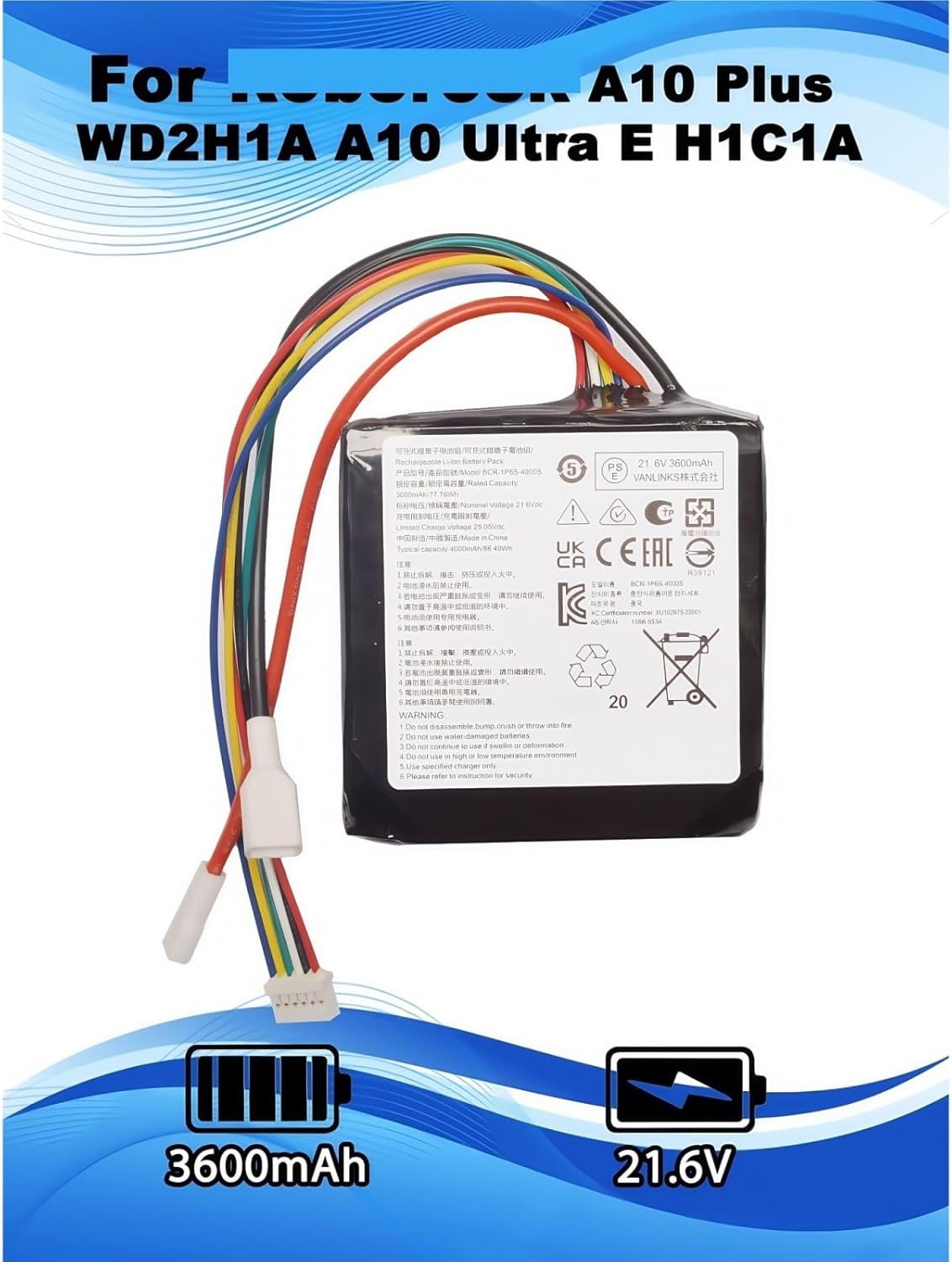
Image 1: The xbvxzvbn 21.6V 3600mAh replacement battery, showing its main body, multi-colored wiring harness, and connectors. The battery label indicates 21.6V and 3600mAh capacity, along with compatibility information for Roborock models.

Image 2: A side view of the replacement battery, highlighting the arrangement of the multi-colored wires and the white plastic connectors, crucial for proper installation.
4. Operating Instructions
To ensure optimal performance and longevity of your new battery, follow these operating guidelines:
- Initial Cycles: New lithium-ion batteries require 2-3 full charge and discharge cycles to achieve their optimal performance and maximum life. Fully charge the battery, then use the vacuum until the battery is depleted, and repeat this process two to three times.
- Charging: Always use the original or a compatible charger provided with your vacuum cleaner. Do not use unauthorized chargers.
- Run Time: The 3600mAh capacity provides an extra-long battery life, typically lasting 120 to 180 minutes per charge, depending on the vacuum cleaner's mode and usage.
- Storage: If storing the battery for an extended period, charge it to approximately 50% and store it in a cool, dry place. Recharge every 3-6 months to prevent deep discharge.
5. Maintenance
Proper maintenance helps extend the life and performance of your battery.
- Regular Use: Regular use and proper charging cycles contribute to battery health.
- Cleaning: Keep the battery and its contacts clean and free from dust or debris. Use a dry, soft cloth for cleaning.
- Longevity: The battery is designed with high-quality rechargeable cells and adaptive chips to stabilize current and voltage. It is expected to retain over 95% of its capacity after 500 charge/discharge cycles.
- Temperature Control: Avoid operating or charging the battery in extreme temperatures. Optimal performance is achieved at room temperature.
6. Troubleshooting
If you encounter issues with your replacement battery, consider the following common solutions:
- Battery Not Charging:
- Ensure the battery is correctly installed and its connectors are firmly seated.
- Verify that the vacuum cleaner's charger is functioning correctly and properly connected to a power source.
- Check for any visible damage to the battery or charger cables.
- Short Run Time:
- Ensure the battery has completed 2-3 full charge/discharge cycles to reach optimal capacity.
- Confirm that the vacuum cleaner is not operating in a high-power mode continuously, which can reduce run time.
- Environmental factors like extreme temperatures can affect battery performance.
- Vacuum Not Powering On:
- Recheck battery installation and connections.
- Ensure the battery is sufficiently charged.
- If the issue persists, consult your vacuum cleaner's original manual for further troubleshooting steps related to power issues.
7. Specifications
| Feature | Specification |
|---|---|
| Model Number | BRR-2P4S-5200S |
| Voltage | 21.6V |
| Capacity | 3600mAh |
| Battery Type | Lithium-ion |
| Compatibility | Roborock Dyad Air, Dyad Pro Combo, A10 Plus, Ultra E, H1C1A, WD2H1A |
| Estimated Run Time | 120-180 minutes (per charge) |
| Cycle Life | Loss less than 5% after 500 cycles |
| Safety Features | Short circuit, overvoltage, overtemperature, overcurrent protection |
| Package Dimensions | 1.18 x 0.79 x 0.39 inches |
| Item Weight | 1.76 ounces (50 Grams) |


