
1. Introduction
This manual provides essential information for the proper installation, operation, and maintenance of the KLUFO Compressor Driver, model 101N2030. This device is designed to control and optimize the performance of refrigerator compressors, ensuring efficient and reliable operation. Please read this manual thoroughly before installation and use to ensure safety and optimal functionality.
2. Safety Information
Always observe the following safety precautions to prevent injury or damage to the product:
- Installation should only be performed by qualified personnel.
- Disconnect power to the appliance before installing or servicing the compressor driver.
- Ensure all electrical connections are secure and comply with local electrical codes.
- Do not expose the device to moisture, extreme temperatures, or corrosive environments.
- Handle the component with care to avoid physical damage.
3. Product Overview
The KLUFO Compressor Driver is an inverter control board designed for direct frequency compressors, commonly found in refrigerators. It offers advanced control and protection features to enhance appliance efficiency and longevity.
Key Features:
- Compressor Control: Manages the start and stop cycles of the compressor, contributing to energy savings.
- Speed Adjustment: Dynamically adjusts compressor speed based on load requirements, optimizing performance and reducing energy consumption.
- Fault Protection: Incorporates detection for abnormal current and temperature, initiating automatic power-off to prevent damage to the compressor and the driver itself.
- Anti-interference Design: Features a stable circuit design that minimizes electromagnetic interference, ensuring reliable operation.
- Versatile Application: Suitable for various environments, including both vehicle and home refrigeration systems.
Component Identification:

Figure 3.1: Front view of two KLUFO compressor drivers. The left unit is labeled "SECOP 101N2530 IN 12-24V FAN OUT F+ F- CE DI TCPS", and the right unit is labeled "SECOP 101N2030 IN 12-24V FAN OUT F+ F- CE DI TCPS" with an "Engineering Sample" sticker. Both units show input/output terminals and model numbers.

Figure 3.2: Side view of the KLUFO compressor driver, illustrating the robust casing and internal component layout. This view highlights the compact design of the unit.
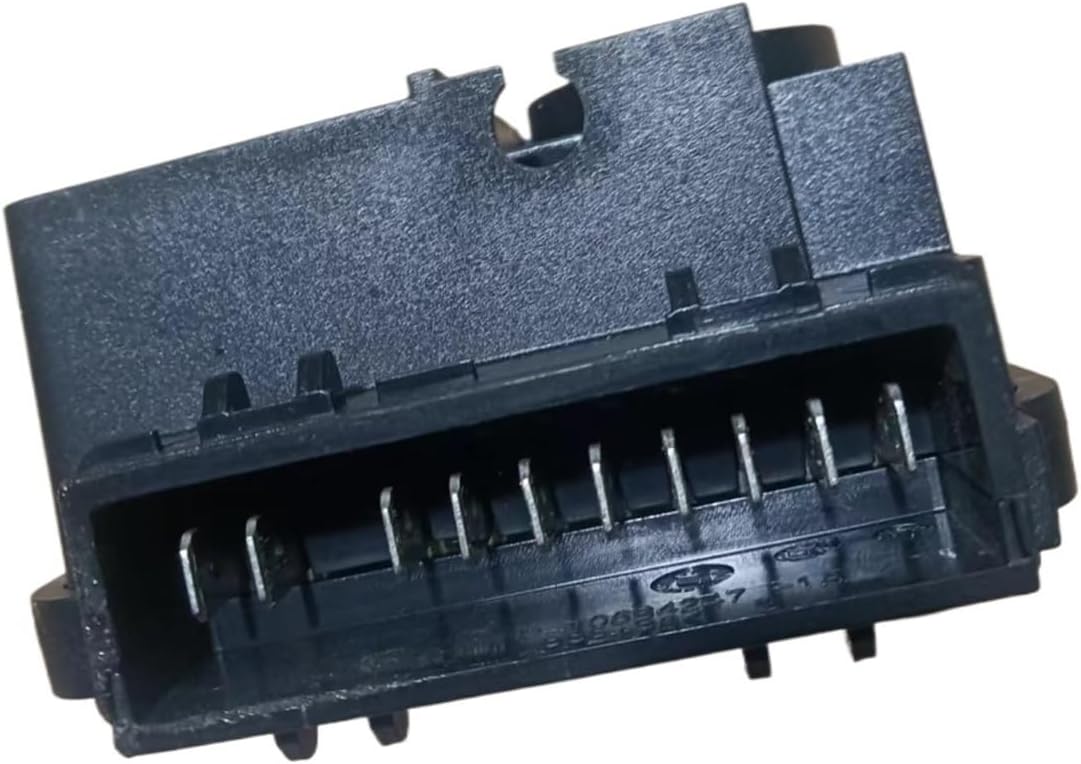
Figure 3.3: Bottom view of the KLUFO compressor driver, featuring the multi-pin electrical connector. This connector facilitates the necessary power and signal connections for the compressor and other system components.
4. Setup and Installation
Proper installation is crucial for the correct functioning of the compressor driver. It is highly recommended that installation be performed by a certified technician.
Installation Steps:
- Power Disconnection: Ensure the main power supply to the refrigerator or appliance is completely disconnected before beginning any installation work.
- Locate Existing Driver: Identify the location of the old compressor driver or the designated mounting area for the new unit.
- Mounting: Securely mount the KLUFO 101N2030 compressor driver in a suitable location, away from excessive heat or moisture.
- Wiring Connections: Carefully connect the input power, compressor, and fan output wires to the corresponding terminals on the driver board. Refer to the wiring diagram provided with your specific appliance or consult a professional. Pay close attention to polarity (F+, F-, IN 12-24V).
- Verify Connections: Double-check all connections for tightness and correct placement to prevent short circuits or malfunctions.
- Power Restoration: Once all connections are verified, restore power to the appliance.
Note: Specific wiring configurations may vary depending on the compressor and appliance model. Always consult the appliance's service manual or a qualified technician for detailed wiring instructions.
5. Operating Instructions
The KLUFO 101N2030 Compressor Driver operates automatically once correctly installed and powered. It continuously monitors the system's requirements and adjusts the compressor's operation accordingly.
- Automatic Control: The driver receives signals from the appliance's control system to initiate compressor start/stop cycles.
- Variable Speed Operation: Based on the cooling demand, the driver modulates the compressor's speed to maintain the desired temperature efficiently.
- Fault Monitoring: The integrated fault protection system continuously monitors for abnormal conditions (e.g., overcurrent, overheating) and will shut down the compressor if a fault is detected to prevent damage.
No direct user interaction is typically required for the operation of the compressor driver itself, as it functions as an internal control component.
6. Maintenance
The KLUFO Compressor Driver is designed for long-term reliability with minimal maintenance. However, periodic checks can help ensure its continued performance.
- Visual Inspection: Periodically inspect the driver and its connections for any signs of physical damage, corrosion, or loose wiring. Ensure the area around the driver is clean and free from dust or debris that could impede cooling.
- Environmental Conditions: Ensure the operating environment remains within specified temperature and humidity ranges to prevent premature component failure.
- Cleaning: If necessary, gently clean the exterior of the driver with a dry, soft cloth. Do not use liquid cleaners or solvents.
Any internal servicing or repair should only be conducted by authorized service personnel.
7. Troubleshooting
If you experience issues with your appliance after installing the KLUFO Compressor Driver, consider the following common troubleshooting steps:
| Problem | Possible Cause | Solution |
|---|---|---|
| Compressor not starting | No power to the driver; Loose connections; Faulty compressor; Driver fault. | Check power supply; Verify all wiring connections; Consult a technician to test the compressor and driver. |
| Irregular compressor operation | Incorrect wiring; Sensor malfunction; Driver fault. | Review wiring diagram; Check sensor connections; Professional diagnosis recommended. |
| Appliance not cooling effectively | Compressor running at low efficiency; Refrigerant issues; Driver fault. | Ensure proper ventilation; Check refrigerant levels (professional service); Consult a technician. |
| Driver appears damaged or overheated | Overload; Poor ventilation; Internal component failure. | Disconnect power immediately; Ensure adequate airflow around the unit; Replace the driver if damaged. |
For complex issues or if troubleshooting steps do not resolve the problem, contact a qualified service technician.
8. Specifications
| Feature | Detail |
|---|---|
| Brand | KLUFO |
| Model Numbers | 101N2030, 101N2002, 101N2050, 101N2530, 101N2020 (Compatible with Danfoss) |
| Product Type | Refrigerator Compressor Inverter Drive Control Board |
| Color | Black |
| Input Voltage | 12-24V (as indicated on unit) |
| Parcel Dimensions | 3 x 2 x 1 cm |
| Item Weight | 50 g |
| Manufacturer | xiwrenkai |
9. Warranty and Support
For warranty information, please refer to the terms and conditions provided by your retailer or the manufacturer at the time of purchase. KLUFO products are designed for reliability, but in case of any issues, please contact the seller or manufacturer's customer support for assistance.
When contacting support, please have your product model number (101N2030) and purchase details readily available.