
KLUFO 101N0212
KLUFO 101N0212 DC Variable Frequency Compressor Driver Board User Manual
Model: 101N0212
1. Introduction
This manual provides essential instructions for the safe and efficient installation, operation, and maintenance of the KLUFO 101N0212 DC Variable Frequency Compressor Driver Board. Please read this manual thoroughly before installation and use, and retain it for future reference.
The KLUFO 101N0212 is designed to control DC variable frequency compressors, offering features such as precise speed adjustment, fault protection, and anti-interference capabilities. It is compatible with 12V/24V DC systems.
2. Safety Information
Always observe the following safety precautions to prevent injury or damage to the product:
- Ensure power is disconnected before installation or maintenance.
- Installation should only be performed by qualified personnel.
- Verify correct voltage (12V/24V DC) before connecting the board.
- Avoid contact with live electrical components.
- Do not expose the board to moisture or extreme temperatures.
3. Product Overview
The KLUFO 101N0212 is a replacement DC variable frequency compressor driver board. It is designed for controlling refrigerator compressors, providing efficient and reliable operation.
Key Features:
- Control compressor start and stop signals.
- Adjust compressor speed for optimized performance.
- Integrated fault protection (abnormal current, temperature).
- Anti-interference design for stable circuit operation.
- Suitable for vehicle and home refrigeration applications.
Component Identification:
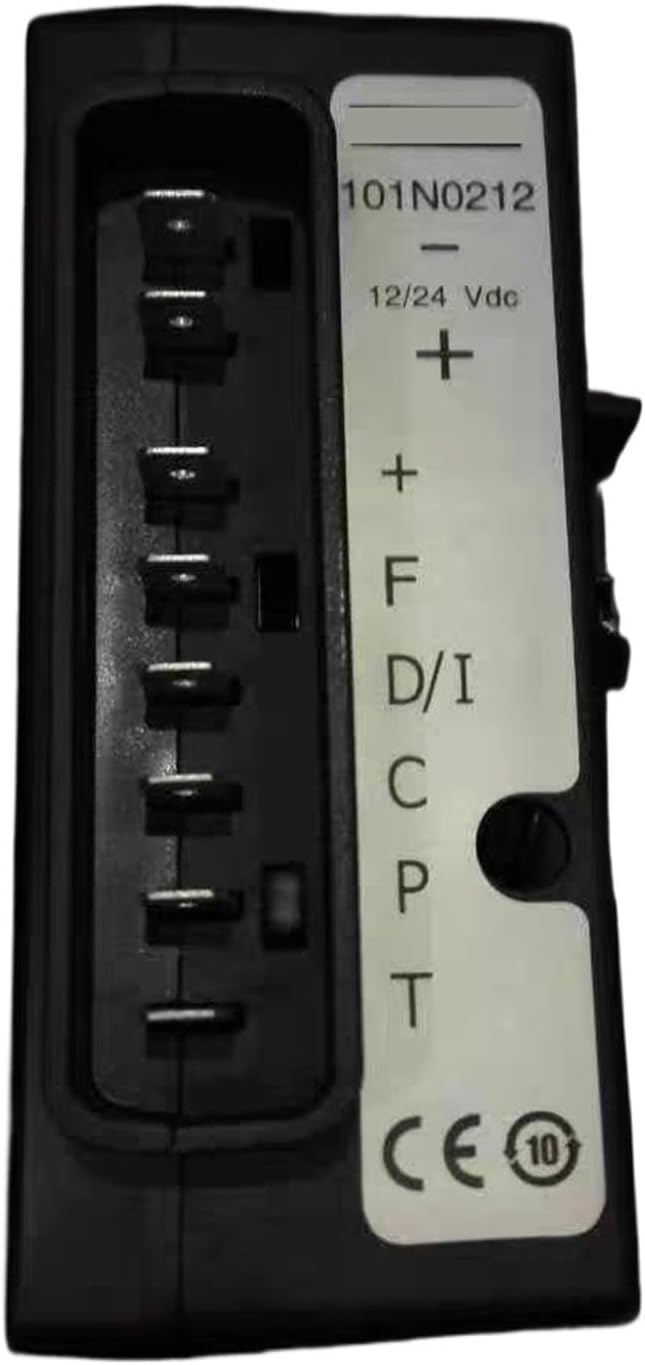
Figure 1: Front view of the KLUFO 101N0212 driver board. This image displays the main connector with labeled pins for power input (12/24 Vdc) and control signals (F, D/I, C, P, T). The model number 101N0212 is clearly visible on the label.

Figure 2: Rear view of the KLUFO 101N0212 driver board. This image shows the back casing of the board, including a QR code label with an ID and date, and an open section revealing internal wiring and a small circuit board.

Figure 3: Side view of a similar compressor driver board (Model 101N0500). This image illustrates a different variant of the driver board, highlighting its connector and pin configuration, which includes labels like F, A, C, D, C, P, T. Note that while similar, this specific image shows model 101N0500, which shares functional similarities with 101N0212.
4. Setup and Installation
Follow these steps for proper installation of the driver board:
- Power Disconnection: Ensure the main power supply to the refrigeration unit is completely disconnected before beginning installation.
- Locate Existing Board: Identify the current compressor driver board in your refrigeration system.
- Disconnect Wiring: Carefully disconnect all wiring from the existing board, noting the position and function of each wire. It is recommended to take photos for reference.
- Remove Old Board: Unmount the old driver board from its position.
- Install New Board: Mount the KLUFO 101N0212 driver board in the same location.
- Connect Wiring: Reconnect all wires to the new board according to the original configuration and the pin assignments shown in Figure 1. Pay close attention to the positive (+) and negative (-) power connections, and control signal pins (F, D/I, C, P, T).
- Secure Connections: Ensure all connections are secure and properly insulated.
- Verify Installation: Double-check all wiring and mounting before restoring power.
Note: The pin assignments on the board are crucial for correct operation. Refer to the labels on the board and any existing wiring diagrams for your specific compressor model.
5. Operating Instructions
Once the KLUFO 101N0212 driver board is correctly installed, the compressor operation is typically managed by the refrigeration unit's main control system. The driver board acts as an interface, translating control signals into compressor actions.
Normal Operation:
- Power On: Restore power to the refrigeration unit. The driver board will initialize.
- Compressor Start/Stop: The board will receive signals from the thermostat or main controller to start or stop the compressor as needed to maintain the desired temperature.
- Speed Adjustment: The variable frequency capability allows the board to adjust the compressor's operating speed based on cooling demand, optimizing energy consumption.
No direct user interaction with the driver board is typically required during normal operation.
6. Maintenance
The KLUFO 101N0212 driver board is designed for minimal maintenance. However, periodic checks can help ensure its longevity and reliable performance.
- Visual Inspection: Annually, with power disconnected, visually inspect the board for any signs of damage, corrosion, or loose connections.
- Cleaning: If dust accumulation is observed, gently clean the board with a soft, dry brush or compressed air. Do not use liquids or abrasive cleaners.
- Environmental Conditions: Ensure the operating environment remains within specified temperature and humidity ranges to prevent premature failure.
Warning: Do not attempt to repair the internal components of the driver board. Unauthorized repairs will void any warranty and may cause further damage or safety hazards.
7. Troubleshooting
If you experience issues with your refrigeration unit after installing the KLUFO 101N0212 driver board, refer to the following troubleshooting guide:
| Problem | Possible Cause | Solution |
|---|---|---|
| Compressor does not start |
|
|
| Compressor runs intermittently or erratically |
|
|
| No cooling or insufficient cooling |
|
|
If the problem persists after attempting these solutions, contact qualified service personnel.
8. Specifications
| Parameter | Value |
|---|---|
| Model | 101N0212 |
| Input Voltage | DC 12V / 24V |
| Compatibility | Compatible with Danfoss DC Variable Frequency Compressors (e.g., 101N0510, 101N0500) |
| Function | Compressor Inverter Drive Control |
| Color | Black |
| Item Weight | Approximately 1.76 ounces (50 grams) |
| Package Dimensions | Approximately 1.18 x 0.79 x 0.39 inches (3 x 2 x 1 cm) |
| Manufacturer | xiwrenkai (Brand: KLUFO) |
9. Warranty and Support
Warranty Information:
Specific warranty details for the KLUFO 101N0212 driver board may vary depending on the point of purchase. Please refer to your purchase documentation or contact your retailer for precise warranty terms and conditions.
Generally, warranties cover defects in materials and workmanship under normal use. Damage resulting from improper installation, misuse, neglect, or unauthorized modifications is typically not covered.
Customer Support:
For technical assistance, troubleshooting beyond this manual, or warranty claims, please contact the seller or manufacturer directly. When contacting support, please have your product model number (101N0212) and purchase details readily available.
You can often find seller contact information through your order history on the platform where the product was purchased.
Ask a question about this manual
Ask about setup, troubleshooting, compatibility, parts, safety, or missing instructions. Manuals+ will review the question and use this page’s manual context to help answer it.