
Important Safety Instructions
To reduce the risk of fire, electric shock, injury to persons, or exposure to excessive microwave energy when using your appliance, follow basic precautions, including the following:
- Read all instructions before using the appliance.
- Do not attempt to operate this oven with the door open since open-door operation can result in harmful exposure to microwave energy.
- Do not place any object between the oven front face and the door or allow soil or cleaner residue to accumulate on sealing surfaces.
- Do not operate the oven if it is damaged. It is particularly important that the oven door closes properly and that there is no damage to the: (1) door (bent), (2) hinges and latches (broken or loosened), (3) door seals and sealing surfaces.
- The oven should not be adjusted or repaired by anyone except properly qualified service personnel.
- Ensure the appliance is properly grounded.
- Do not operate the microwave oven empty.
- Do not heat liquids or other foods in sealed containers as they are liable to explode.
- Close supervision is necessary when the appliance is used by or near children.
- Regularly clean the oven and remove any food deposits.
Product Overview
The Hyundai 800W 20L Digital Microwave is designed for efficient and convenient cooking, reheating, and defrosting. Its compact design and digital controls make it suitable for various kitchen environments.
Key Features
- Powerful 800W Digital Microwave: Features 11 adjustable power levels for versatile cooking.
- Durable Stainless Steel Interior: Rust-resistant, easy to clean, and hygienic.
- Spacious 20L Capacity: Accommodates full-sized dinner plates.
- 6 Auto Cook Modes: Pre-set programs for potatoes, popcorn, pizza, beverages, frozen meals, and reheating.
- Effortless Defrosting: Options for time or weight-based defrost settings.
- Easy-to-Use Digital Controls: Touch control panel with a clear LED display.
- Child Lock Safety Feature: Prevents accidental operation.
- Flexible 99-Minute Programmable Timer: Allows for precise cooking time settings.
Components
- Microwave Unit (HYMW80020)
- Glass Turntable
- User Manual

Figure 1: Front view of the Hyundai 800W 20L Digital Microwave, showcasing its sleek black finish and digital control panel.

Figure 2: An illustrative diagram pointing out the microwave's 800W max power, 6 auto cook modes, 20L capacity, and programmable timer.

Figure 3: A detailed view of the digital control panel, showing the LED display, numeric keypad, and dedicated buttons for auto cook modes, defrost, timer, and power levels.

Figure 4: The microwave's interior, demonstrating its capacity with a bowl of food on the glass turntable during operation, highlighting even cooking.
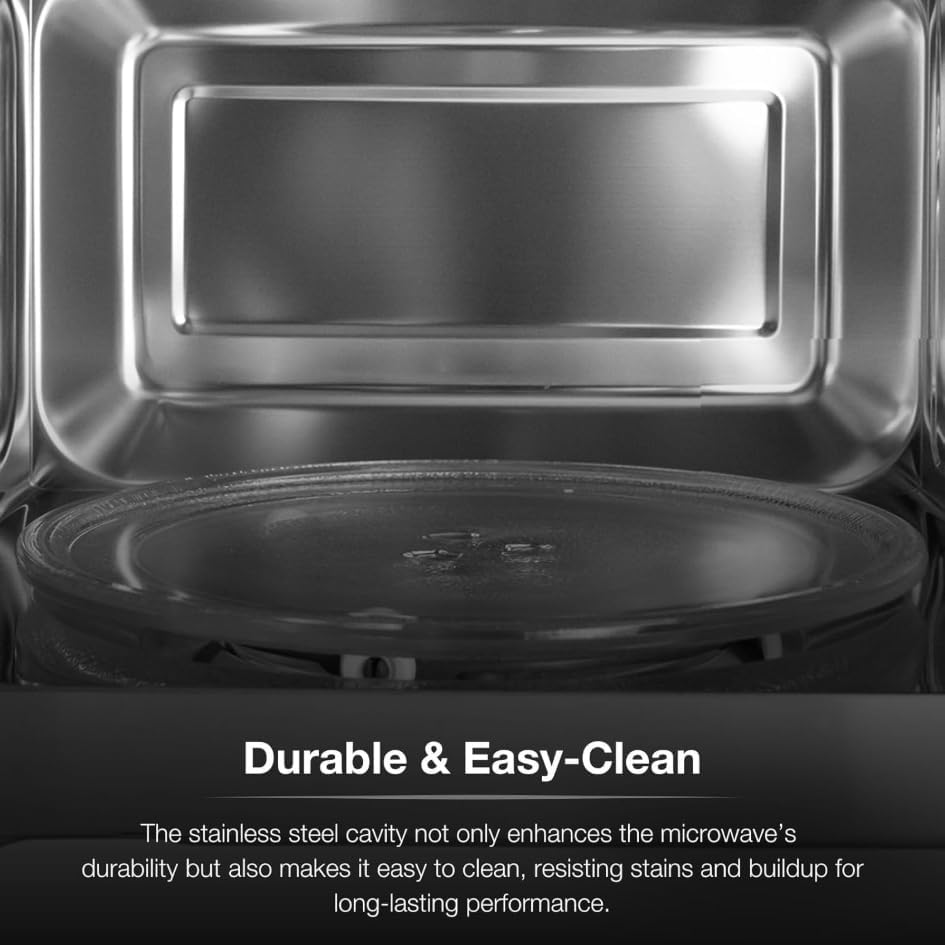
Figure 5: A close-up shot of the durable stainless steel interior and the removable glass turntable, emphasizing the easy-to-clean surface.
Setup and Installation
Unpacking
Carefully remove the microwave oven and all packing materials from the carton. Check the oven for any damage, such as dents or a misaligned door. Do not operate the oven if it is damaged. Retain the carton and packing materials for future use or dispose of them properly.
Placement
- Place the microwave on a flat, stable surface that can support its weight and the heaviest food item likely to be cooked in it.
- Ensure adequate ventilation. Leave a minimum of 10 cm (4 inches) clearance at the rear, 20 cm (8 inches) at the top, and 5 cm (2 inches) on each side.
- Do not block air vents.
- Keep the microwave away from heat sources, steam, or splashing liquids.
Power Connection
Plug the microwave oven into a properly installed and grounded wall outlet. Do not use an extension cord or adapter. Ensure the voltage and frequency match the specifications on the rating label of the appliance.
Operating Your Microwave
Control Panel Overview
The digital control panel features an LED display, numeric keypad (0-9), and various function buttons. Refer to Figure 3 for a visual guide to the control panel layout.
Setting the Clock
- Press the "Clock" button once.
- Use the numeric keypad to enter the current time (e.g., 12:30).
- Press the "Clock" button again to confirm.
Microwave Cooking (Manual Operation)
To cook manually, you can set the cooking time and power level.
- Place food in the microwave-safe container on the turntable. Close the door.
- Press the "Time Cook" button.
- Use the numeric keypad to enter the desired cooking time (e.g., 1 for 1 minute, 10 for 10 seconds).
- Press the "Power Level" button repeatedly to select the desired power level (P10 for 100% power, P01 for 10% power). There are 11 power levels available.
- Press "Start/+30 Sec." to begin cooking.
Auto Cook Modes
The microwave features 6 pre-programmed auto cook modes for common foods:
- Potato: For cooking potatoes.
- Popcorn: For popping popcorn.
- Pizza: For reheating or cooking pizza.
- Beverage: For heating drinks.
- Frozen Dinner: For heating pre-packaged frozen meals.
- Reheat: For general reheating of food.
To use an auto cook mode:
- Place food in the microwave.
- Press the corresponding auto cook button (e.g., "Potato").
- Press "Start/+30 Sec." to begin. Some modes may require pressing the button multiple times to select quantity.
Defrosting
The microwave offers two defrosting methods:
- Time Defrost: Press "Time Defrost", enter desired defrosting time, then press "Start/+30 Sec.".
- Weight Defrost: Press "Weight Defrost", enter the weight of the food (in grams), then press "Start/+30 Sec.". The microwave will automatically calculate the defrosting time.
Using the Timer
The "Kitchen Timer" function can be used as a standalone timer, not affecting microwave operation.
- Press the "Kitchen Timer" button.
- Enter the desired time using the numeric keypad (up to 99 minutes 99 seconds).
- Press "Start/+30 Sec.". The timer will count down, and an audible signal will sound when complete.
Child Lock Feature
To activate the child lock, press and hold the "Stop/Clear" button for 3 seconds. A lock indicator will appear on the display. To deactivate, press and hold the "Stop/Clear" button again for 3 seconds.
Care and Maintenance
Cleaning the Interior
The stainless steel interior is designed for easy cleaning. After each use, wipe the interior with a damp cloth to remove food splatters and moisture. For stubborn stains, use a mild, non-abrasive cleaner specifically designed for stainless steel. Do not use harsh chemicals or abrasive pads.
Cleaning the Exterior
Wipe the exterior surface with a soft, damp cloth. Avoid using abrasive cleaners or solvents that could damage the finish.
Turntable Care
The glass turntable and turntable ring can be removed for cleaning. Wash them in warm, soapy water or in the dishwasher. Ensure they are completely dry before placing them back in the microwave.
Troubleshooting Guide
| Problem | Possible Cause | Solution |
|---|---|---|
| Microwave does not start | Power cord not plugged in; Door not closed properly; Fuse blown or circuit breaker tripped. | Ensure power cord is securely plugged in; Close the door firmly; Check household fuse/circuit breaker. |
| Food not heating | Door not closed properly; Cooking time or power level set too low. | Ensure door is fully closed; Increase cooking time or power level. |
| Turntable not rotating | Turntable not placed correctly; Turntable motor faulty. | Ensure turntable and ring are correctly positioned; Contact customer support if issue persists. |
| Unusual noise during operation | Food container touching interior walls; Turntable not seated correctly. | Adjust food container position; Re-seat turntable and ring. |
| Child lock activated | Child lock feature is on. | Press and hold the "Stop/Clear" button for 3 seconds to deactivate. |
Product Specifications
| Specification | Detail |
|---|---|
| Brand | Hyundai |
| Model | HYMW80020 |
| Capacity | 20 litres |
| Wattage | 800 watts |
| Product Dimensions (L x W x H) | 296 x 315 x 262 cm |
| Item Weight | 11.4 kg |
| Installation Type | Countertop |
| Interior Material | Durable Stainless Steel |
| Colour | Black |
| Special Features | 11 adjustable power levels, 6 Auto Cook Modes, Flexible 99-Minute Programmable Timer, Child Lock Safety Feature, Touch control panel & LED display |
Warranty and Customer Support
Warranty Information
This Hyundai microwave oven is backed by a 3-Year Hyundai Warranty. Please retain your proof of purchase for warranty claims. The warranty covers manufacturing defects and ensures the product is built to last with quality assurance.
Customer Support
For technical assistance, warranty claims, or general inquiries, please refer to the contact information provided in your product packaging or visit the official Hyundai customer support website. When contacting support, please have your model number (HYMW80020) and purchase details ready.