
1. Introduction
The Inkbird IAM-O2 is a 3-in-1 indoor air quality monitor designed to provide real-time measurements of Carbon Dioxide (CO2) concentration, temperature, and humidity. This device is suitable for various indoor environments such as homes, offices, recreational vehicles, and schools, helping users maintain optimal air quality. It features a long-lasting battery and a dual alarm system for enhanced safety.

Figure 1: Front view of the Inkbird IAM-O2 Indoor CO2 Monitor, displaying CO2, temperature, and humidity readings.
2. Product Overview
2.1 Key Features
- 3-in-1 Detection: Monitors CO2 concentration, temperature, and humidity simultaneously.
- Real-time Display: Backlit LCD screen provides clear, instant readings.
- Long-lasting Battery: Built-in 3000mAh lithium battery offers up to 6 months of operation on a single charge, depending on sampling interval.
- High-Precision Sensors: Equipped with a Swedish CO2 sensor (NDIR) for accurate CO2 measurements (0-9999ppm, ±40ppm ±5%) and precise temperature (±0.2°C/±0.36°F) and humidity (±1.8%RH) detection.
- Dual Alarm System: Visual (indicator light) and audible alarms for CO2 levels. Green for good, yellow for medium, red for unhealthy air quality.
- Portable and Versatile Placement: Can be placed flat on a table using its foldable stand or hung on a wall.
- Permanent Setting Memory: Retains personalized settings even after power loss.

Figure 2: Overview of the Inkbird IAM-O2's main functions and display features.
2.2 Components
The device includes the main monitor unit, a USB-C charging cable, and a user manual. The monitor features a large LCD display, control buttons on the side, and a foldable stand at the back.

Figure 3: The IAM-O2 monitor demonstrating its two placement options: using the foldable stand or hanging via the integrated hole.
3. Setup
3.1 Initial Charging
Before first use, fully charge the device using the provided USB-C cable and a standard USB power adapter (not included). The battery indicator on the display will show charging status. A full charge can provide 3-6 months of operation depending on usage and sampling interval settings.

Figure 4: The IAM-O2 features a 3000mAh battery for extended operation.
3.2 Placement
Place the monitor in a central location within the area you wish to monitor. Ensure it is not obstructed and has good airflow. Avoid placing it near vents, windows, or direct heat sources that could affect readings. The device can be placed on a flat surface using its foldable stand or mounted on a wall.
4. Operating Instructions
4.1 Power On/Off
To power on the device, press and hold the power button (usually located on the side) for a few seconds until the display illuminates. To power off, press and hold the power button again until the display turns off.
4.2 Reading the Display
The backlit LCD screen displays three primary measurements:
- CO2 Concentration: Shown in Parts Per Million (PPM).
- Temperature: Displayed in degrees Celsius (°C) or Fahrenheit (°F).
- Humidity: Displayed as a percentage (RH%).

Figure 5: The monitor's display clearly shows CO2 levels, relative humidity, and indoor temperature.
4.3 Interpreting Alarms
The IAM-O2 features a dual alarm system with both visual and audible indicators for CO2 levels:
- Green Light: Indicates good air quality (CO2 levels below 1000ppm).
- Yellow Light: Indicates medium air quality (CO2 levels between 1000-1400ppm).
- Red Light: Warns of unhealthy air quality (CO2 levels above 1400ppm).
When CO2 levels exceed the set high alarm threshold, the device will emit a quiet audible alarm once and the red light will flash. The alarm value is customizable (refer to Section 5.3).
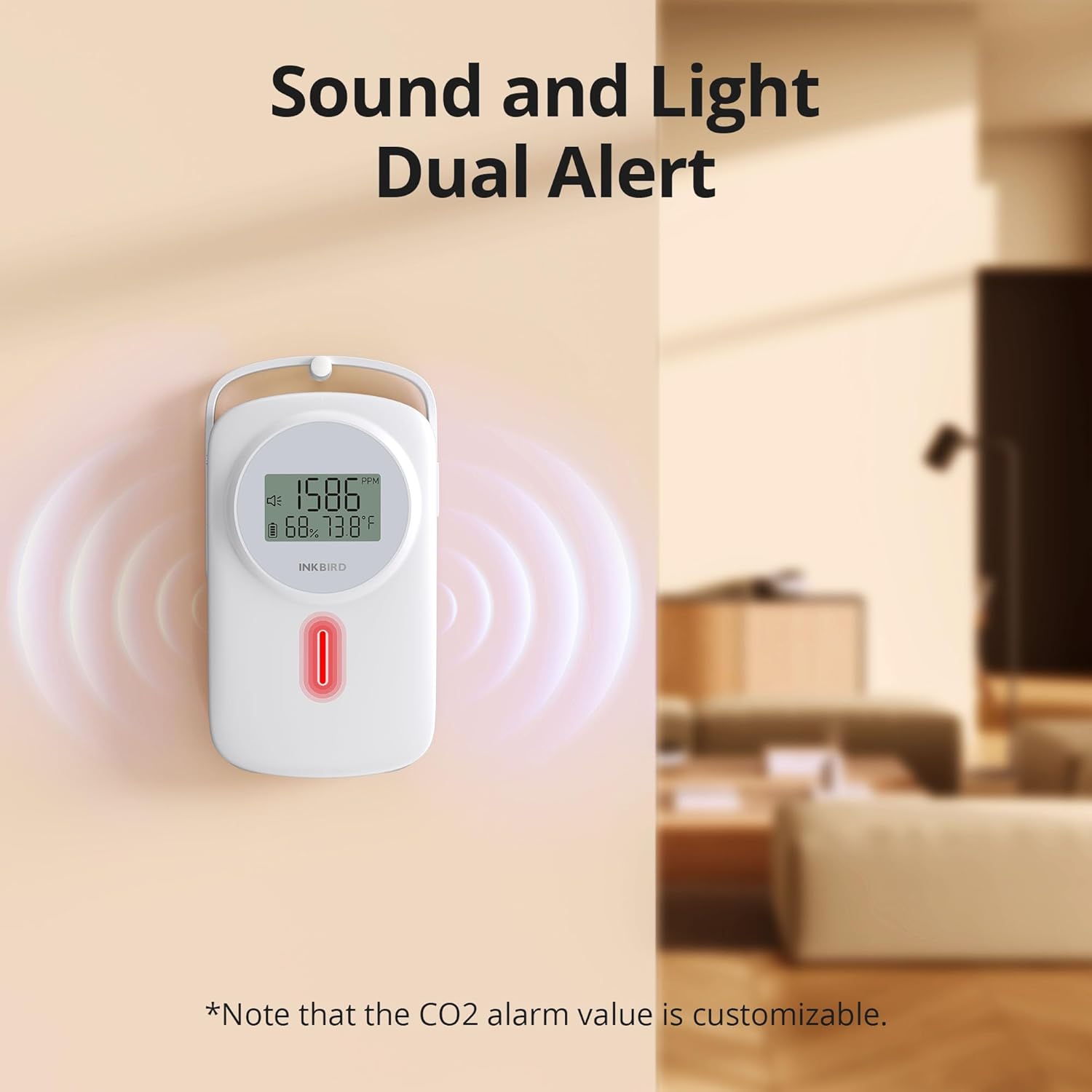
Figure 6: The monitor's red indicator light and sound waves signify an unhealthy CO2 level alarm.
5. Settings and Customization
The device features two buttons on the side for customization. Press and hold both buttons simultaneously to enter the setting mode.

Figure 7: Entering the settings mode by pressing both side buttons.
5.1 Automatic CO2 Calibration
To turn on/off automatic CO2 calibration, long press the 'C/°F' button for 3 seconds. When enabled, the device will periodically calibrate itself. It is not recommended to enable automatic calibration when CO2 levels are consistently above 1000ppm.

Figure 8: Instructions for automatic CO2 calibration.
5.2 Setting 1: CO2 Sampling Interval
When "Int" appears on the screen, press the 'C/°F' or 'Alarm' button to select the CO2 sampling interval (e.g., 1 minute, 2 minutes). A longer interval can extend battery life. Short press both buttons simultaneously to proceed to Setting 2.

Figure 9: Adjusting the CO2 sampling interval.
5.3 Setting 2: High CO2 Concentration Alarm Value (H1)
When "H1" appears, press the 'C/°F' or 'Alarm' button to set the high CO2 concentration alarm value. Short press both buttons simultaneously to proceed to Setting 3.

Figure 10: Setting the high CO2 alarm threshold.
5.4 Setting 3: Low CO2 Concentration Alarm Value (Lo)
When "Lo" appears, press the 'C/°F' or 'Alarm' button to set the low CO2 concentration alarm value. Short press both buttons simultaneously to proceed to Setting 4.

Figure 11: Setting the low CO2 alarm threshold.
5.5 Setting 4: CO2 Calibration Value (CA)
When "CA" appears, press the 'C/°F' or 'Alarm' button to set the CO2 calibration value. This allows for manual adjustment if needed. Short press both buttons simultaneously to proceed to Setting 5.

Figure 12: Adjusting the CO2 calibration value.
5.6 Setting 5: Backlight ON/OFF (bLt)
When "bLt" appears, press the 'C/°F' or 'Alarm' button to select backlight ON or OFF. Press and hold both buttons for 2 seconds to save all settings and exit the setting mode.

Figure 13: Controlling the backlight and saving all customized settings.
5.7 Temperature Unit Selection
To switch between Celsius (°C) and Fahrenheit (°F), short press the 'C/°F' button during normal operation.
6. Maintenance
6.1 Cleaning
Wipe the device with a soft, dry cloth. Do not use abrasive cleaners, solvents, or immerse the device in water. Ensure the sensor vents are clear of dust and debris.
6.2 Battery Care
Recharge the device when the battery indicator shows low power. For optimal battery life, avoid extreme temperatures and prolonged storage in a fully discharged state.
7. Troubleshooting
| Problem | Possible Cause | Solution |
|---|---|---|
| Device does not power on. | Low battery or device is off. | Charge the device using the USB-C cable. Press and hold the power button to turn on. |
| Inaccurate CO2 readings. | Device needs calibration or is in an area with poor airflow. | Perform automatic or manual CO2 calibration (refer to Section 5.1 and 5.5). Relocate the device to an area with better air circulation. |
| Display shows "0 ppm" in a potentially high CO2 environment. | Extremely high CO2 levels exceeding the sensor's maximum range (9999 ppm) can sometimes cause a "0 ppm" reading. | Ventilate the area immediately. If the reading persists after ventilation, contact support. This is a safety feature to indicate an unreadable, potentially dangerous level. |
| Alarm does not sound or is too quiet. | Alarm volume is fixed; alarm only sounds once. | The audible alarm is designed to sound once when the threshold is crossed. The visual red light will remain active. Ensure the device is placed where the visual indicator is easily seen. |
| Battery life is shorter than expected. | Frequent display backlight use or short sampling interval. | Adjust the CO2 sampling interval to a longer duration (Section 5.2). Turn off the backlight if not continuously needed (Section 5.6). |
Important Note: This device monitors Carbon Dioxide (CO2), not Carbon Monoxide (CO). CO is a different gas that can be deadly at much lower concentrations. This monitor does not replace the need for a dedicated carbon monoxide alarm in your home or vehicle.
8. Specifications
- Model: IAM-O2
- CO2 Measurement Range: 0-9999 ppm
- CO2 Accuracy: ±40ppm (±5%)
- Temperature Measurement Range: -50°F to 212°F (-45°C to 100°C)
- Temperature Accuracy: ±0.2°C (±0.36°F)
- Humidity Measurement Range: 0-99% RH
- Humidity Accuracy: ±1.8% RH
- Sensor Type: NDIR (Non-Dispersive Infrared) CO2 sensor, Sensirion sensor for Temp/Humidity
- Battery: 3000mAh Lithium Ion (included)
- Power Source: Battery Powered (USB-C charging)
- Item Weight: Approximately 3.68 ounces (104 grams)
- Package Dimensions: Approximately 7.05 x 4.21 x 1.54 inches (17.9 x 10.7 x 3.9 cm)
- Manufacturer: INKBIRD

Figure 14: Detailed view of the high-precision NDIR and Sensirion sensors and their accuracy.
9. Warranty and Support
For warranty information or technical support, please contact Inkbird customer service. Refer to the product packaging or the official Inkbird website for the most current contact details.
Online Resources: You may find additional support and FAQs on the official Inkbird website: Inkbird Official Store


