
1. Introduction
This manual provides essential information for the safe and efficient use of your POVISON Smart 108" Power Reclining Modular Sofa. Please read these instructions carefully before assembly and operation, and retain them for future reference.
Key Features:
- Smart Electric Reclining: Adjustable backrest and footrest recline up to 135° for personalized comfort. Manually adjustable headrest provides customized neck and head support.
- Advanced Power Control System: Integrated electric recliner controls, USB port, and Type-C charging port for convenient device charging.
- Exceptional Support and Comfort: Constructed with a high-quality solid wood frame and high-density elastic foam, supporting up to 1,000 lbs. Cushions are filled with 35-density foam for a soft seating experience.
- Modular Design: Offers flexibility for various configurations (loveseat, three-seater, four-seater, or custom layouts).
- Durable and Easy-to-Clean Upholstery: High-quality, resilient upholstery designed for everyday use and simple maintenance.
2. Setup
Unpacking and Component Identification:
Your POVISON Smart sofa is delivered in separate packages for easier handling. Carefully unpack all components and verify against the packing list. Ensure all parts are present and undamaged before proceeding with assembly.
Assembly Instructions:
- Positioning Modules: Arrange the modular sections of the sofa in your desired configuration. The modular design allows for flexible placement.
- Connecting Modules: Each modular piece is designed to connect securely using snap joints or brackets. Align the connectors on adjacent modules and push them together until they click into place.
- Attaching Armrests (if separate): If your configuration includes separate armrests, align them with the designated slots on the sofa modules and secure them using the provided clips or bolts.
- Power Connections: For power reclining modules, locate the power cables extending from each module. Connect these cables to the central power supply unit, and then plug the power supply unit into a standard electrical outlet. Ensure all connections are secure.
- Headrest Adjustment: Manually adjust the headrests to your preferred angle for optimal comfort.
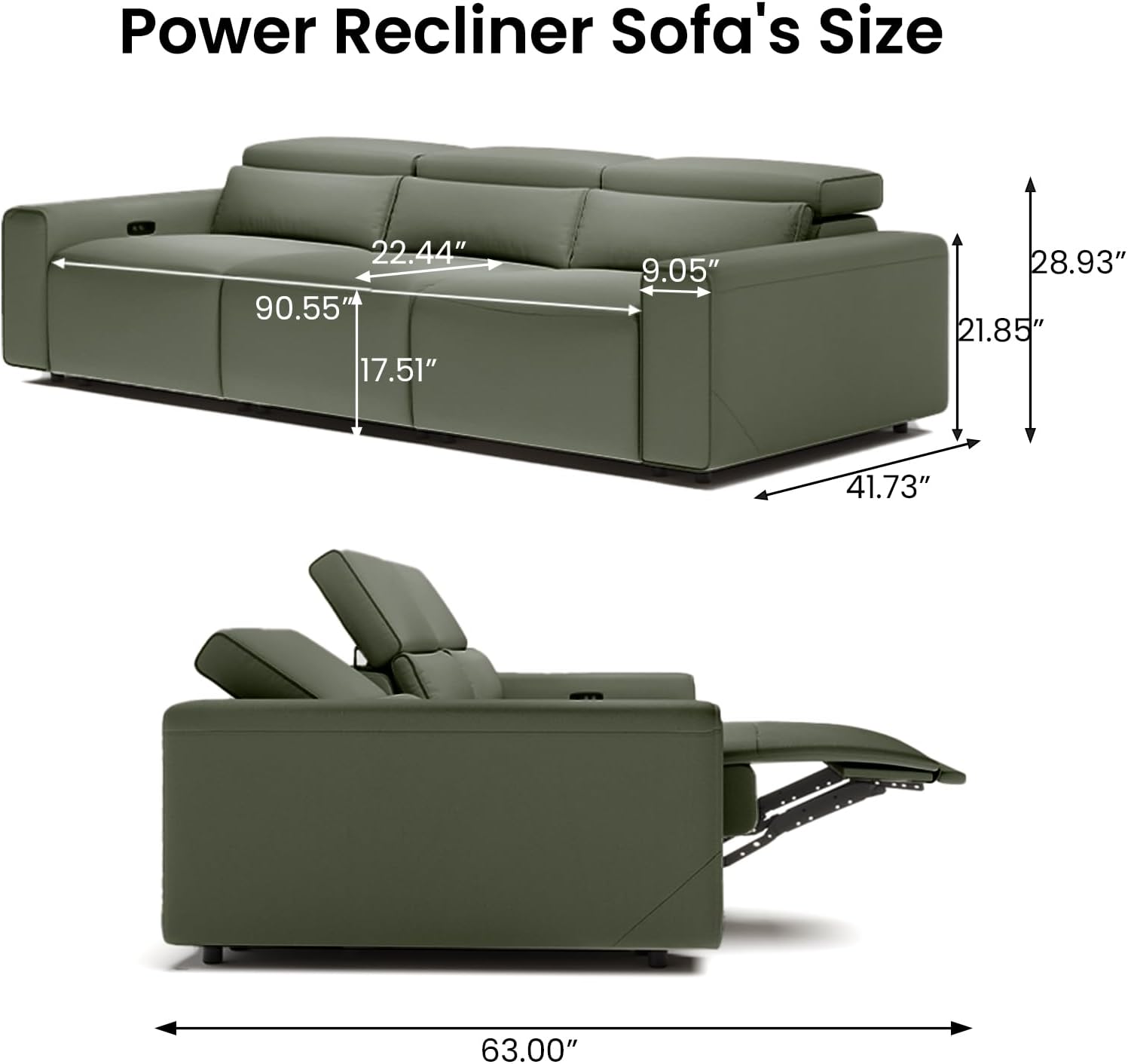
Image: Dimensions of the POVISON Smart Power Recliner Sofa, showing overall length, depth, and height, along with individual seat measurements.
Video: This video demonstrates the installation steps for a power reclining sofa, including connecting modular pieces and power cables. Note: This video is for a similar product and may not perfectly match your specific model, but illustrates general assembly principles.
3. Operating Instructions
Power Reclining Function:
Your sofa features an advanced power control system for effortless reclining. Locate the control panel on the side of the reclining modules.
- Recline: Press and hold the 'Recline' button (usually indicated by an arrow pointing outwards or a reclining figure) to extend the footrest and recline the backrest. Release the button when you reach your desired position.
- Retract: Press and hold the 'Retract' button (usually indicated by an arrow pointing inwards or an upright figure) to return the footrest and backrest to the upright position. Release the button when fully retracted.
- Adjustable Headrest: The headrest can be manually adjusted to provide optimal neck and head support in any reclining position.

Image: A person relaxing on the POVISON Smart Power Recliner Sofa in a reclined position, illustrating the 'Zero Gravity Mode' for enhanced comfort.
Charging Ports:
The control panel includes convenient charging options for your electronic devices.
- USB Port: Plug your USB charging cable into the standard USB port to charge compatible devices.
- Type-C Port: Use the Type-C charging port for devices that support this connection type.

Image: Close-up of the POVISON Smart Power Recliner Sofa's control panel, highlighting the dual charging ports (USB and Type-C) and the ergonomic adjustable headrest.
Zero Wall Clearance Feature:
The sofa is designed with a zero-wall clearance mechanism, allowing it to recline fully even when placed close to a wall. This feature optimizes space utilization in your living area.
Video: This video demonstrates the zero-wall clearance feature of a power recliner sofa, showing how it reclines without needing significant space behind it. It also highlights the extended footrest and power headrest.
4. Maintenance
Cleaning and Care:
- Regular Cleaning: For general cleaning, wipe the leatherette upholstery with a soft, damp cloth. Avoid using harsh chemicals or abrasive cleaners, as these can damage the material.
- Spills: Blot spills immediately with a clean, dry cloth. Do not rub, as this can spread the stain.
- Avoid Direct Sunlight: Prolonged exposure to direct sunlight can cause the upholstery to fade or crack. Position your sofa away from direct sunlight or use curtains/blinds.
- Avoid Sharp Objects: Keep sharp objects away from the sofa to prevent punctures or tears in the upholstery.

Image: Close-up of the sofa's upholstery, emphasizing its softness, easy-to-clean properties, and eco-friendly leatherette material.
Safety Precautions:
- Keep away from open flames or high heat sources.
- Do not charge devices overnight.
- Supervise children and pets to avoid entrapment risks within the reclining mechanism.
- Follow manufacturer's instructions for safe handling and installation.
5. Troubleshooting
Common Issues and Solutions:
- Sofa Not Reclining:
- Ensure the power cord is securely plugged into both the sofa's power supply unit and a working electrical outlet.
- Check if the wall outlet is functional by plugging in another device.
- Verify that all modular connections are properly engaged.
- Charging Ports Not Working:
- Confirm the sofa is powered on and plugged in.
- Try a different charging cable or device to rule out cable/device issues.
- Unusual Noises During Reclining:
- Minor noises are normal during operation. If the noise is loud or persistent, inspect the reclining mechanism for any obstructions or loose parts. Do not attempt to repair complex mechanical issues yourself; contact customer support.
6. Specifications
| Feature | Detail |
|---|---|
| Brand | POVISON Smart |
| Model | B0F2HSP7PT |
| Product Dimensions (D x W x H) | 41.73"D x 108.65"W x 28.93"H |
| Seating Capacity | 3.0 |
| Color | Dark Green |
| Style | Modern |
| Special Features | Adjustable Backrest, Adjustable Headrest, Ergonomic, Modular Convertible, USB Charging Ports |
| Room Type | Living Room |
| Frame Material Type | Wood |
| Material Type | Leatherette (Soft, supportive, and easy to clean fabric) |
| Seat Fill Material | Foam (High Density Foam) |
| Cushion Construction | High-density foam cushions |
| Reclining Seat Count | 3 |
| Reclining Position Count | 2 |
| Assembly Required | No (Component Connector Assembly: Built-In) |
| Warranty Type | Lifetime |
7. Warranty & Support
Warranty Information:
Your POVISON Smart Power Reclining Modular Sofa comes with a Lifetime Warranty. This warranty covers manufacturing defects and ensures the long-term durability of your product. Please refer to the specific warranty terms provided with your purchase for full details on coverage and claims.
Customer Support:
For any questions, concerns, or assistance with your POVISON Smart sofa, please contact our customer support team. You can find contact information on the POVISON Smart website or through your original purchase platform.