
NEEWER PS099S
NEEWER Smart Mini V Mount Battery User Manual
Model: PS099S | Brand: NEEWER
1. Introduction
Thank you for choosing the NEEWER Smart Mini V Mount Battery. This manual provides essential information for the safe and effective operation, setup, and maintenance of your new battery. Please read this manual thoroughly before use and retain it for future reference.
2. Product Overview
2.1 Package Contents
- NEEWER Smart Mini V Mount Battery (PS099S)
- Universal V Mount Battery Plate (PS008 K3)
- Super Clamp Mount Pole Holder
- USB-C to USB-C Cable
- USB-A to USB-C Cable
2.2 Key Features
- Smart APP Control: Connect to the 'NEEWER' app for real-time monitoring of input/output power, remaining battery life, and output adjustments.
- 100W Bidirectional PD Fast Charging: Supports various fast charging protocols (PD3.0, QC3.0, PPS, etc.) via USB-C, allowing full charge in 2 hours with a 100W PD charger.
- Multiple Output Ports: Equipped with dual USB-C, USB-A, 5.5x2.1mm DC 8V, 5.5x2.5mm DC 12V, BP, and D-Tap interfaces for simultaneous powering of multiple devices.
- Intelligent Battery Management System (BMS): Provides protection against short circuits, overvoltage, overcurrent, overcharging, and over-discharge.
- OLED Digital Display: Offers intuitive real-time charging status updates and battery information.
- Universal V Mount Compatibility: The included V mount plate is compatible with standard V lock batteries and NEEWER Light FS Series.

Figure 2.1: NEEWER Smart Mini V Mount Battery, V-mount plate, and included cables.

Figure 2.2: The Mini V Mount Battery highlighting its 6800mAh capacity, multiple ports, 100W PD, and BMS.
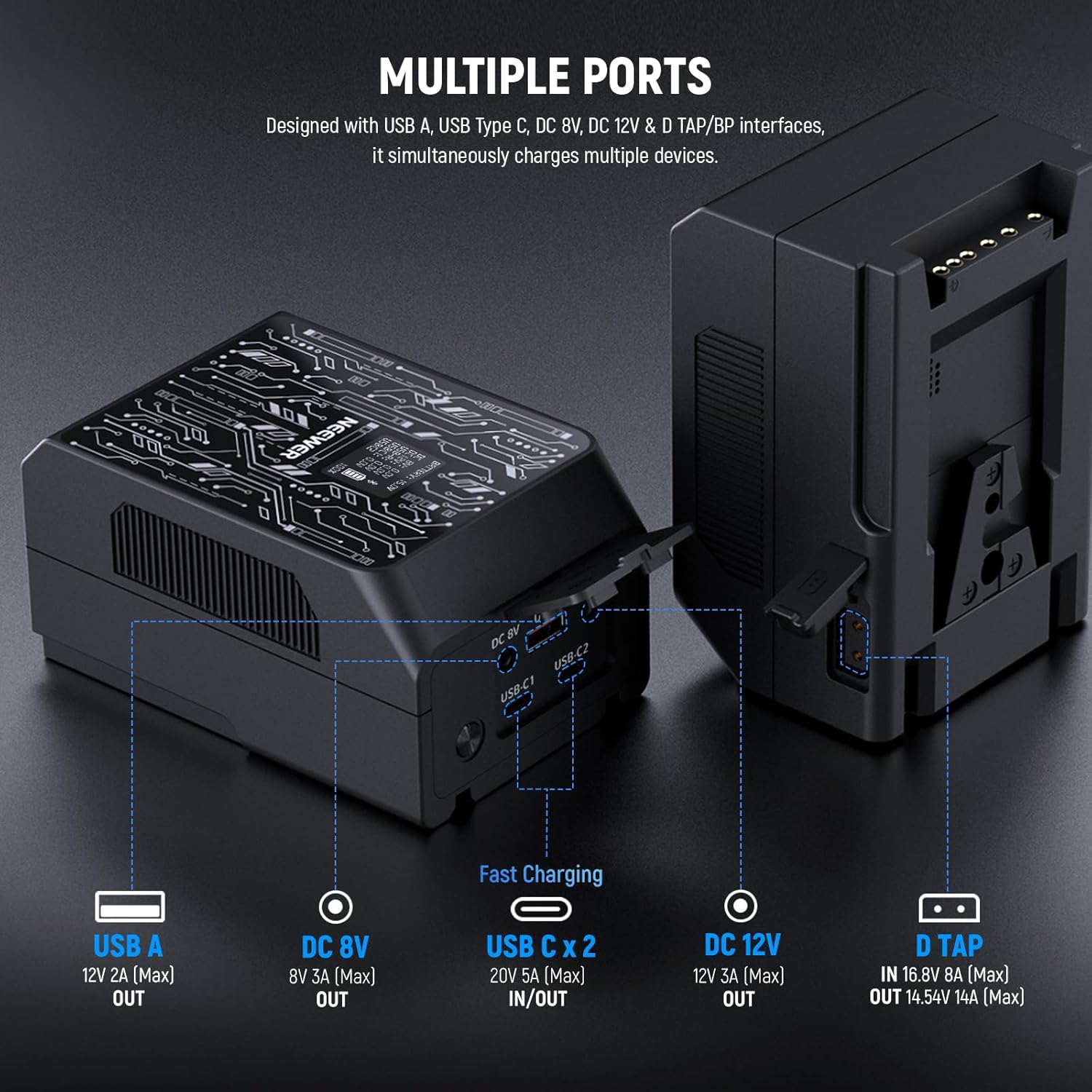
Figure 2.3: Detailed view of the battery's multiple output ports, including USB-A, DC 8V, USB-C (x2), DC 12V, and D-Tap.

Figure 2.4: Illustration of the PS008 V-mount plate, showing the release button, V mount lock, D-Tap port, knob, and electrode contacts.
3. Setup
3.1 Initial Charging
- Connect the provided USB-C cable to one of the battery's USB-C ports.
- Connect the other end of the USB-C cable to a 100W PD fast charging GaN charger (not included).
- The OLED display will show charging status. Allow approximately 2 hours for a full charge.
3.2 Mounting the Battery
- Attach the V Mount Battery Plate (PS008 K3) to your camera rig or light stand using the Super Clamp Mount Pole Holder.
- Align the V-lock on the battery with the V-mount on the plate.
- Slide the battery down until it clicks securely into place. Ensure the release button is engaged.
3.3 App Setup (NEEWER App)
- Download the 'NEEWER' app from your device's app store (compatible with iOS & Android).
- Enable Bluetooth on your smartphone.
- Open the NEEWER app and follow the on-screen instructions to connect to your PS099S battery. The app will detect nearby NEEWER devices.
- Once connected, you can view real-time battery status and adjust settings.

Figure 3.1: The NEEWER app interface for controlling and monitoring the PS099S battery.
4. Operating Instructions
4.1 Using the OLED Digital Display
The integrated OLED display provides real-time information about the battery's status. It shows:
- Battery Voltage (V)
- Output Voltage (V) and Current (A) for each port (DC 8V, DC 12V, USB-A, USB-C1, USB-C2)
- Remaining Battery Percentage (%)
- Bluetooth connection status

Figure 4.1: The OLED display providing intuitive charging status updates and output information.
4.2 Powering Devices
Connect your devices (e.g., cameras, monitors, LED lights, laptops, smartphones) to the appropriate output ports on the battery or the V mount plate. The battery can power multiple devices simultaneously, provided the total output does not exceed 100W.
- USB-C Ports: Use for devices requiring PD fast charging (up to 100W bidirectional).
- USB-A Port: For standard USB-powered devices.
- DC 8V / DC 12V Ports: For compatible camera and monitor power inputs.
- BP / D-Tap Ports: For professional cinema equipment.

Figure 4.2: Illustration of the 100W bidirectional PD fast charging capability via USB-C.
4.3 Using the NEEWER App for Control
The NEEWER app allows for advanced control and monitoring:
- Real-time Monitoring: View current input/output power, battery temperature, and remaining battery life.
- Output Adjustments: Optimize power distribution for each port based on connected devices.
- Custom Power Supply Protocol: Customize the power output order and settings to maintain battery power and prevent overload.
- Battery Health Status: Monitor charging and discharging cycles.
5. Maintenance
5.1 Battery Care and Storage
- Store the battery in a cool, dry place away from direct sunlight and extreme temperatures.
- For long-term storage, charge the battery to approximately 50-60% capacity.
- Avoid fully discharging the battery frequently, as this can reduce its lifespan.
- The battery features advanced lithium-ion cells supporting over 1000 recharge cycles without memory effect.
5.2 Cleaning
Wipe the battery and V mount plate with a soft, dry cloth. Do not use harsh chemicals or abrasive cleaners. Ensure all ports are free of dust and debris.

Figure 5.1: Information on safe management features and battery health monitoring.
6. Troubleshooting
6.1 Common Issues
| Problem | Possible Cause | Solution |
|---|---|---|
| Battery not charging | Charger not connected properly; Charger not powerful enough; Faulty cable. | Ensure secure connection. Use a 100W PD charger. Try a different USB-C cable. |
| Devices not powering on | Battery low; Total output exceeds 100W; Incorrect port used; Cable issue. | Check battery level. Reduce number of connected devices. Ensure correct port for device. Try different cable. |
| App not connecting to battery | Bluetooth off; Battery not discoverable; App issue. | Ensure Bluetooth is on. Restart battery and app. Reinstall app if necessary. |
| OLED display not working | Battery fully discharged; Internal fault. | Charge the battery. If issue persists, contact support. |
6.2 BMS Alerts
The intelligent Battery Management System (BMS) will send timely alerts in case of:
- Overpower
- Overcurrent
- Overvoltage
- Overheating
- Under power discharge
If an alert occurs, disconnect devices and allow the battery to cool down or reset. If the issue persists, contact NEEWER customer support.
7. Specifications
| Parameter | Value |
|---|---|
| Model | PS099S |
| Capacity | 6800mAh / 99Wh |
| Nominal Voltage | 14.5V |
| USB-C Input/Output | Max 100W (Bidirectional PD Fast Charging) |
| USB-A Output | 12V 2A (Max) |
| DC 8V Output | 8V 3A (Max) |
| DC 12V Output | 12V 3A (Max) |
| D-Tap Input/Output | 16.8V 8A (Max) / 14.54V 14A (Max) |
| Display | OLED Digital Display |
| Control | NEEWER APP (Bluetooth) |
| Safety Features | BMS (Short circuit, overvoltage, overcurrent, overcharging, over-discharge protection) |
| Shell Material | Fire resistant PC V0 |
| ASIN | B0F2HGLYCB |
| Date First Available | March 26, 2025 |
8. Warranty and Support
NEEWER products typically come with a standard manufacturer's warranty. For specific warranty details, product support, or technical assistance, please refer to the warranty card included with your product or visit the official NEEWER website. You may also contact the seller directly for assistance.
NEEWER Official Website: www.neewer.com
Ask a question about this manual
Ask about setup, troubleshooting, compatibility, parts, safety, or missing instructions. Manuals+ will review the question and use this page’s manual context to help answer it.