
BWHEKMO SWS
BWHEKMO MYAILOCK SWS Smart Bluetooth Lock Instruction Manual
Model: SWS | Brand: BWHEKMO
1. Product Overview
The BWHEKMO MYAILOCK SWS Smart Bluetooth Lock offers advanced security and convenience with multiple access methods. Designed for wooden doors with a thickness of 30-80mm, this electronic lock integrates fingerprint recognition, password entry, IC card access, Bluetooth app control, temporary passwords, and traditional mechanical keys.
Its robust design and smart features provide a secure and flexible solution for various environments, including homes, rental properties, offices, and hotels.
2. Package Contents
Please verify that all components are present before beginning installation.
- Electronic Lock *1
- Lock Body *1
- Cylinder *1
- AAA Batteries *4
- 6cm Square Steel Shaft *1
- 8cm Square Steel Shaft *1
- Accessory Pack *1
- Mechanical Keys *2
- IC Cards *2
- User Manual *1

Image: All components included in the BWHEKMO MYAILOCK SWS Smart Bluetooth Lock package.
3. Installation Guide
This section provides detailed instructions for installing your BWHEKMO MYAILOCK SWS Smart Bluetooth Lock. Ensure you have the necessary tools before proceeding.
3.1 Important Notes
- The included 6cm and 8cm door shafts are recommended for wooden doors with a thickness of 3-8 cm. If the length is not suitable, it can be cut to fit.
- The initial administrator password is "123456". Change this immediately after setup.
- For any installation issues, contact customer support.
3.2 Step-by-Step Installation
- Prepare the Door: Ensure your door is compatible with the lock's dimensions (30-80mm thickness).
- Install the Lock Body: Insert the lock body into the door edge. Secure it with screws.
- Attach the Outer Panel: Connect the outer panel to the lock body, ensuring the spindle and wires are correctly aligned.
- Attach the Inner Panel: Connect the inner panel, ensuring the wires are properly connected and the panel is aligned.
- Secure the Panels: Use the provided screws to firmly attach both the inner and outer panels to the door.
- Install Batteries: Open the battery compartment on the inner panel and insert 4 AAA batteries, observing polarity.
- Test Operation: After installation, test all locking and unlocking mechanisms using the mechanical key and the handle.
Video: This video demonstrates the physical installation process of the smart lock, including attaching the lock body, panels, and securing components. It shows how to correctly align the parts and insert the screws.
4. Operating Instructions
The MYAILOCK SWS Smart Bluetooth Lock offers six convenient methods for access.
4.1 Access Methods
- Fingerprint: Use the integrated biometric fingerprint sensor for quick access.
- Password: Enter a numerical password on the keypad.
- IC Card: Tap the provided IC card on the designated area.
- Bluetooth App (TuYa): Control the lock remotely via the TuYa app on your smartphone.
- Temporary Password: Generate time-limited passwords for guests or service providers.
- Mechanical Key: Use the physical key for traditional unlocking, especially in emergencies.

Image: Close-up of the smart lock's semiconductor fingerprint sensor, highlighting its high recognition rate and speed.

Image: Visual representation of the six unlocking methods: fingerprint, temporary password, numeric password, IC card, mechanical key, and TuYa app Bluetooth unlock.
4.2 TuYa App Management
The TuYa app allows for comprehensive management of your smart lock:
- User Management: Add or delete users, including administrators and regular users.
- Access Control: Set up and manage fingerprints (up to 50), passwords (up to 110 groups), and IC cards (up to 110 pieces).
- Real-time Monitoring: View unlock records and monitor the lock's status (e.g., battery level) when connected via Bluetooth.
- Temporary Passwords: Easily generate and manage temporary access codes for visitors.
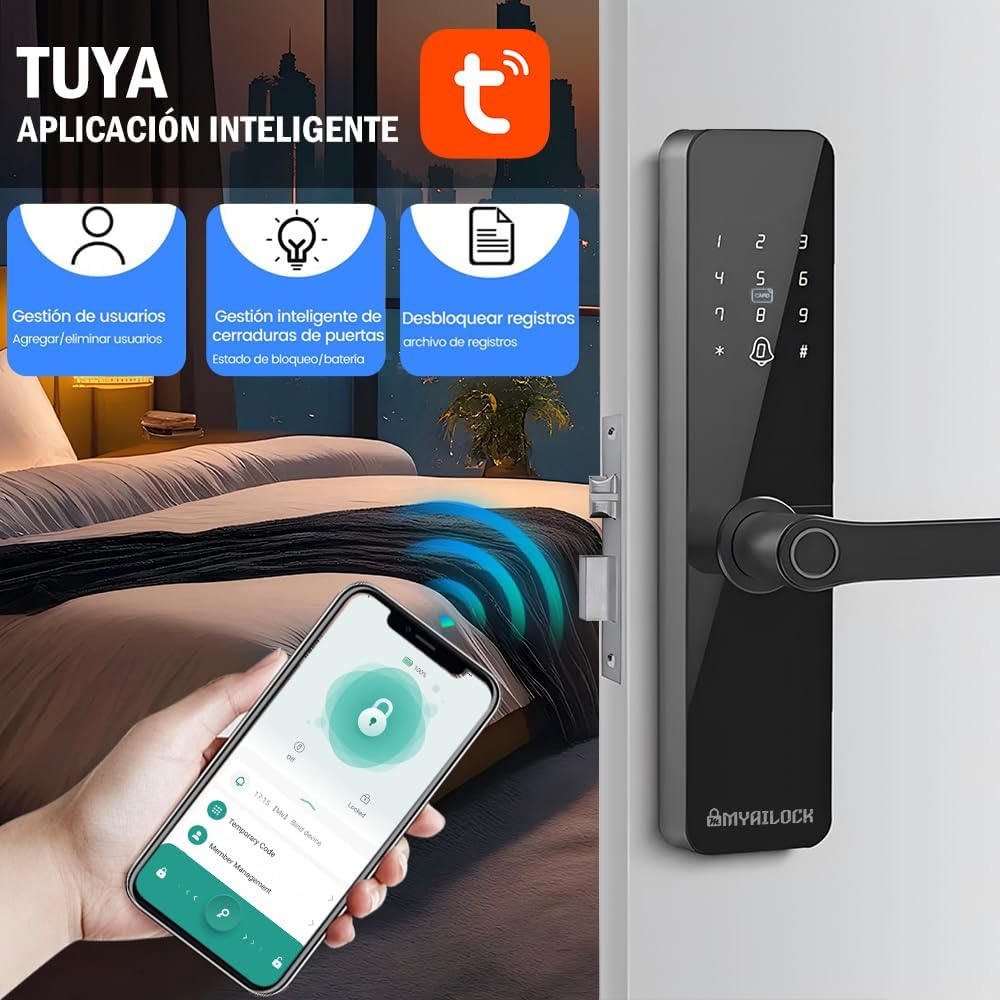
Image: Screenshot of the TuYa smart app interface, showing options for user management, smart lock control, and unlock record viewing.
Video: This video demonstrates the process of connecting the smart lock to the TuYa app via Bluetooth and managing its functions, including unlocking and viewing status.
5. Safety Features and Alarms
The MYAILOCK SWS Smart Bluetooth Lock incorporates several safety features and alarm functions to enhance security.
- Anti-Peeping Function: Enter random digits before or after your actual password to prevent others from guessing your code.
- Incorrect Entry Lockout: The keypad will lock for 1 minute if an incorrect password is entered more than 5 consecutive times.
- Multiple Alarms: The lock features various alarms, including:
- Fingerprint trial and error alarm
- Password trial and error alarm
- Door card trial and error alarm
- Anti-pry alarm
- Key insertion alarm
- Low power alarm
- Battery exhaustion alarm
- Vibration alarm
- Anti-alarm fabric (tamper alarm)

Image: Illustration of the anti-peeping function for password entry and a list of various alarm types supported by the smart lock.
6. Power and Maintenance
Proper power management ensures continuous operation of your smart lock.
- Power Source: The lock operates on 4 AAA batteries.
- Battery Life: On average, batteries require replacement approximately every 6 months.
- Low Power Reminder: An intelligent low power reminder provides an automatic voice alert when the battery voltage is insufficient (below 4.8V).
- Emergency Power: In case of complete battery depletion, the lock supports Type-C emergency power via an external power bank.

Image: Depiction of the smart lock's battery compartment for 4 AAA batteries and the Type-C emergency charging port, emphasizing long battery life and emergency power options.
7. Technical Specifications
| Parameter | Value |
|---|---|
| Size | 28 x 6.4 cm (Product Dimensions: 36.5 x 7.01 x 3.81 cm) |
| Power Supply | DC 6V, 4 AAA batteries |
| IC Card Type | Normal IC card (13.56mhz) |
| Applicable Door Thickness | 40-80mm (Recommended for 30-80mm wooden doors) |
| Working Temperature | -25℃ ~ 70℃ |
| Operating Humidity | 20% ~ 90%RH |
| Fingerprint Type | Biometric semiconductor |
| Emergency Power Supply | Type-C interface |
| Password Length | 6-10 digits |
| Virtual Password Length | ≤16 digits |
| Number of Administrators | 10 |
| Number of Regular Users | 100 |
| Fingerprint Capacity | Maximum 50 pieces |
| Password Capacity | 110 groups |
| IC Card Capacity | 110 pieces |
| Low Voltage Alarm | 4.8V |
| Material | Stainless Steel |
| Color | Black |

Image: Diagram showing the product dimensions and compatible door thickness range (30-80mm), along with the lock body dimensions.
8. Warranty and Support
This product comes with a 6-month quality warranty. If any issues arise during use, please contact us immediately. During the warranty period, if a quality problem occurs that is not caused by user error, the product can be returned at no cost. We offer 24-hour customer support in Mexico.
For support, please refer to the contact information provided at the time of purchase or on the product packaging.