
Driauto B0F2H6BCVR
Driauto 4 Channel Digital Wireless Backup Camera System User Manual
Model: B0F2H6BCVR
1. Introduction
This manual provides comprehensive instructions for the installation, operation, maintenance, and troubleshooting of your Driauto 4 Channel Digital Wireless Backup Camera System. Please read this manual thoroughly before using the product to ensure proper function and safety.
The Driauto 4 Channel Digital Wireless Backup Camera System offers enhanced visibility and safety for various vehicles, including cars, trucks, RVs, and trailers. It features a 7-inch monitor, four wireless cameras with night vision and waterproof capabilities, blind spot detection, and recording functionality.
2. Package Contents
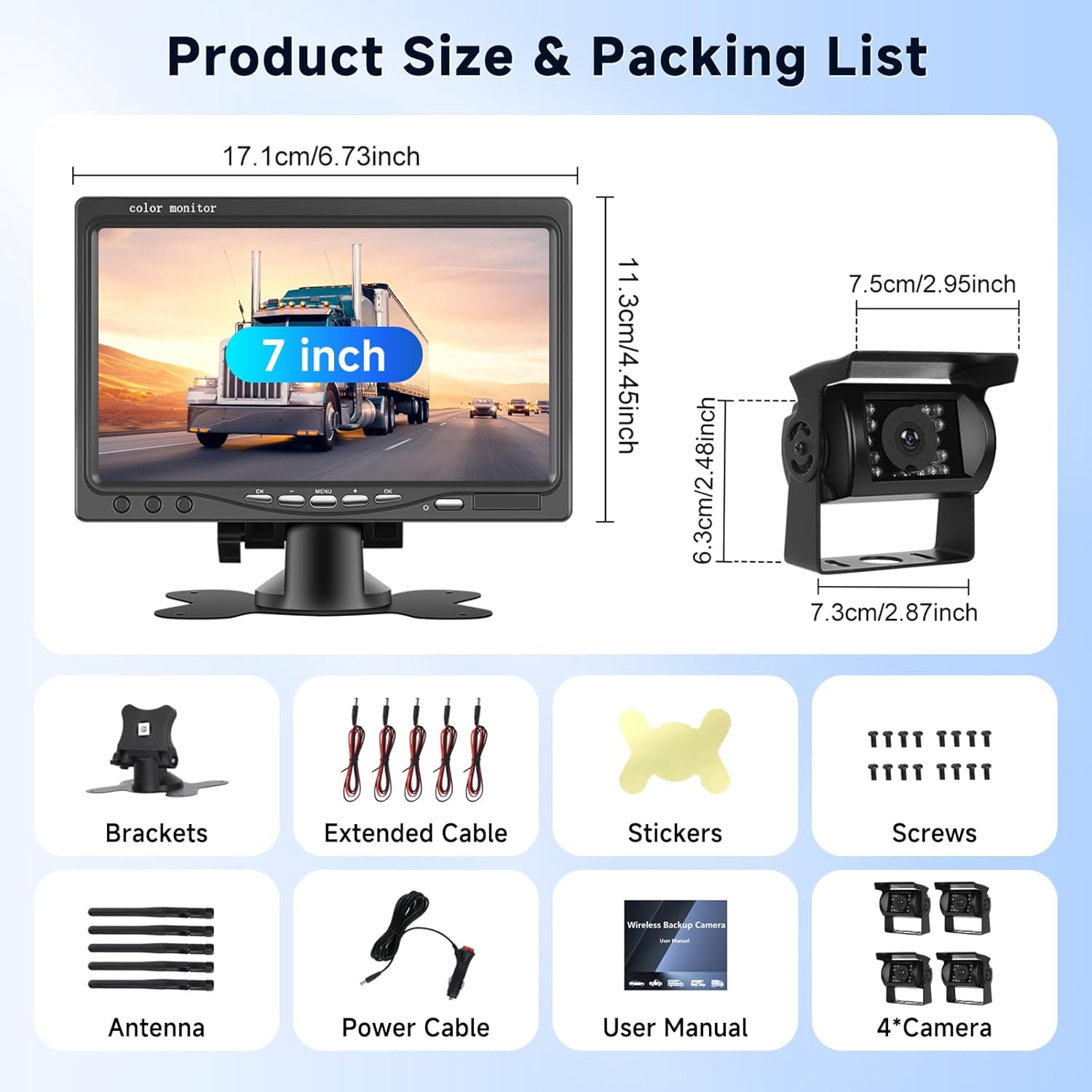
Please verify that all components listed below are included in your package:
- 7-inch Monitor
- Wireless Cameras (x4)
- Monitor Bracket
- Power Cable for Monitor (Cigarette Lighter Adapter)
- Antennas for Cameras (x4)
- Extended Cables (for camera power connection)
- Mounting Screws
- User Manual
3. Setup and Installation
The Driauto wireless camera system is designed for straightforward installation. No complex video wiring is required between the cameras and the monitor.
3.1 Camera Installation
- Mounting: Securely mount each camera in the desired location on your vehicle (e.g., rear, sides). Ensure a clear line of sight for optimal wireless transmission.
- Power Connection: Connect each camera to a 12-36V power source. This can typically be done by wiring the camera to the vehicle's reverse lights (for reverse-only activation) or running lights (for continuous operation). Ensure proper polarity.
- Antenna Attachment: Screw the provided antennas onto each camera.
3.2 Monitor Installation
- Mounting: Attach the monitor bracket to a suitable surface in your vehicle's cabin, ensuring it does not obstruct your view while driving.
- Power Connection: Plug the monitor's power cable into a 12-36V cigarette lighter socket.
- Antenna Attachment: Screw the antenna onto the monitor.
3.3 Initial Pairing (if necessary)
The cameras and monitor are typically pre-paired. If pairing is lost or you are adding new cameras, refer to the on-screen menu for pairing instructions. The system utilizes digital wireless technology for stable signal transmission up to 330 feet in open areas.

4. Operating Instructions
4.1 Powering On/Off
The system will power on automatically when the vehicle's ignition is turned on (if wired to an accessory power source) or when the cigarette lighter adapter receives power. To power off, simply remove power from the monitor.
4.2 Monitor Display Options
The 7-inch IPS screen offers multiple viewing modes:
- Full View: Displays a single camera feed.
- Split View: Displays two camera feeds simultaneously.
- Triple View: Displays three camera feeds simultaneously.
- Quad View: Displays all four camera feeds simultaneously.
Use the buttons on the monitor to cycle through these display options. The monitor also supports mirrored or reflected images, which can be adjusted via the menu settings to suit the camera's installation location.

4.3 Reversing Line (Guidelines)
The system includes adjustable reversing guidelines. You can enable or disable these lines through the monitor's menu. This feature assists with parking and maneuvering.

4.4 Blind Spot Detection (BSD)
The integrated advanced digital blind spot detection function provides real-time monitoring of blind spot areas, enhancing driving safety. Alerts are displayed on the monitor.

4.5 Video Recording
The system supports loop recording (SD card not included). When an SD card is inserted, the system will automatically record video footage. The efficient loop recording function ensures optimal use of memory by overwriting the earliest unlocked video. This provides reliable protection for driving records and accident forensics.
4.6 Night Vision
The cameras are equipped with HD night vision functionality, allowing clear object recognition in low-light conditions, significantly improving safety during nighttime operation.

5. Maintenance
To ensure the longevity and optimal performance of your Driauto camera system, follow these maintenance guidelines:
- Cleaning: Regularly clean the camera lenses and monitor screen with a soft, damp cloth. Avoid abrasive cleaners that could scratch surfaces.
- Waterproof Cameras: The cameras have an IP68 waterproof rating, making them suitable for all weather conditions. However, avoid directing high-pressure water jets directly at the camera housing for extended periods.
- Cable Inspection: Periodically check all power cables and connections for any signs of wear, damage, or loose connections.
- SD Card (if used): If using an SD card for recording, format it periodically to maintain optimal recording performance. Refer to the monitor's menu for formatting options.
6. Troubleshooting
If you encounter issues with your Driauto camera system, refer to the following common problems and solutions:
- No Image on Monitor:
- Ensure the monitor is receiving power and is turned on.
- Verify that all cameras are properly powered and their antennas are securely attached.
- Check if the cameras are paired with the monitor. Re-pair if necessary (refer to Section 3.3).
- Confirm that the correct camera channel is selected on the monitor.
- Poor Image Quality/Signal Loss:
- Ensure antennas on both cameras and monitor are securely attached and oriented correctly.
- Reduce the distance between cameras and the monitor if possible.
- Check for potential sources of interference (e.g., other wireless devices, large metal objects).
- Clean camera lenses if blurry.
- Recording Not Working:
- Ensure an SD card is inserted correctly.
- Check if the SD card is full; format it if necessary (this will erase all data).
- Verify the SD card is compatible and not damaged.
- Blind Spot Detection Not Alerting:
- Ensure the BSD feature is enabled in the monitor's settings.
- Confirm cameras are positioned correctly to cover blind spot areas.
If these steps do not resolve the issue, please contact Driauto customer support.
7. Specifications
| Feature | Specification |
|---|---|
| Brand | Driauto |
| Model | B0F2H6BCVR |
| Screen Size | 7 Inches |
| Display Technology | LCD |
| Connectivity | Digital Wireless |
| Voltage | 12-36 Volts (DC) |
| Camera Waterproof Rating | IP68 |
| Optical Sensor Technology | Infrared (for Night Vision) |
| Lens Type | Wide Angle |
| Real Angle of View | 105 Degrees (Vertical), 150 Degrees (Diagonal) |
| Product Dimensions (Monitor) | Approx. 6.73"L x 4.45"W x 1.26"H (17.1cm x 11.3cm x 3.2cm) |
| Product Dimensions (Camera) | Approx. 2.87"L x 2.95"W x 2.48"H (7.3cm x 7.5cm x 6.3cm) |
| Item Weight | 3.85 pounds (total system) |
8. Warranty and Support
Driauto is committed to providing quality products and customer satisfaction.
- Warranty: This product includes a 2-Year Replacement Warranty.
- Returns: You are eligible for a 60-Day Return period.
- Customer Support: Driauto offers Lifetime Support with an average response time of 18 Hours.
For further assistance, please visit the official Driauto Store on Amazon or contact their customer service directly.
