
Introduction
This manual provides detailed instructions for the proper use and maintenance of your AIWA FPH-S200-2G mobile phone. Please read this manual thoroughly before operating your device to ensure optimal performance and longevity. The AIWA FPH-S200-2G is a basic mobile phone designed for ease of use, featuring a 2.4-inch screen, 2G connectivity, dual SIM support, Bluetooth, FM radio, a 0.3MP camera, and a 1000 mAh battery.
Package Contents
Upon unpacking your AIWA FPH-S200-2G, please verify that all the following items are included:
- AIWA FPH-S200-2G Mobile Phone
- Instruction Manual
- Charging Cable or Connector
Product Overview
Familiarize yourself with the key components of your AIWA FPH-S200-2G mobile phone.
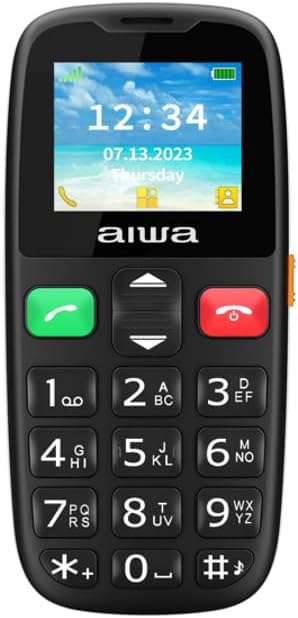
Figure 1: Front view of the AIWA FPH-S200-2G mobile phone. This image shows the device's screen, which displays the time, date, and signal indicators. Below the screen are the navigation keys, call and end call buttons, and a standard numeric keypad.

Figure 2: Angled side view of the AIWA FPH-S200-2G mobile phone. This perspective highlights the phone's ergonomic design and the placement of any side-mounted buttons or ports, such as volume controls or a charging port.
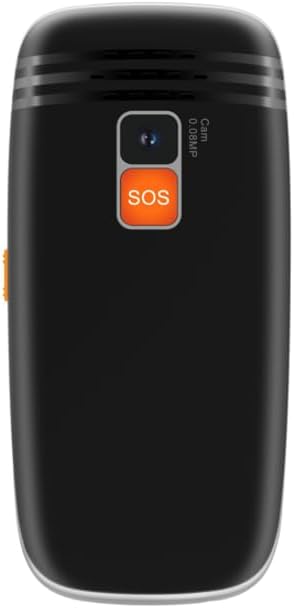
Figure 3: Back view of the AIWA FPH-S200-2G mobile phone. This image clearly shows the rear camera lens and the prominent orange SOS button, designed for emergency situations.
Setup
Installing the SIM Card and Battery
Follow these steps to correctly install your SIM card(s) and battery:
- Remove the Back Cover: Gently pry open the back cover of the phone using the designated notch.
- Insert SIM Card(s): Locate the SIM card slot(s). Carefully insert your 2G SIM card(s) into the slot(s) with the gold contacts facing down, ensuring they are properly seated. This phone supports dual SIM cards.
- Insert Battery: Place the battery into the battery compartment, aligning the gold contacts on the battery with the contacts in the phone.
- Replace Back Cover: Align the back cover and press it firmly until it clicks into place.
- Charge the Device: Connect the charging cable to the phone's USB port and plug the other end into a power adapter. Charge the phone fully before first use.
Operating Instructions
Power On/Off
- To Power On: Press and hold the red 'End Call' button until the screen lights up.
- To Power Off: Press and hold the red 'End Call' button until the power off options appear, then select 'Power Off'.
Making Calls
- From the home screen, enter the phone number using the numeric keypad.
- Press the green 'Call' button to initiate the call.
- To end a call, press the red 'End Call' button.
Sending Messages
- Navigate to the 'Messages' menu from the main screen.
- Select 'New Message' or 'Create SMS'.
- Enter the recipient's phone number or select from contacts.
- Type your message using the keypad.
- Press 'Send'.
FM Radio
To use the FM radio, ensure headphones are connected as they act as the antenna.
- Connect your headphones to the phone's audio jack.
- Navigate to the 'FM Radio' application.
- Use the navigation keys to scan for stations or tune manually.
Camera
The phone features a 0.3MP rear camera for basic photography.
- Navigate to the 'Camera' application.
- Frame your shot using the screen as a viewfinder.
- Press the designated 'Capture' or 'OK' button to take a photo.
SOS Function
The AIWA FPH-S200-2G includes an SOS button for emergencies.
- Activating SOS: In an emergency, press and hold the orange SOS button located on the back of the phone.
- The phone will automatically dial pre-set emergency contacts and send an emergency SMS message.
- Ensure emergency contacts are configured in the phone's settings.
Maintenance
Proper care ensures the longevity of your AIWA FPH-S200-2G mobile phone.
- Cleaning: Use a soft, dry cloth to clean the phone's screen and body. Avoid using liquid cleaners or abrasive materials.
- Battery Care: Avoid extreme temperatures. Do not expose the battery to direct sunlight or very cold conditions. Charge the battery regularly, but avoid overcharging for extended periods.
- Storage: When not in use for extended periods, store the phone in a cool, dry place.
- Water Resistance: This device is not water-resistant. Keep it away from liquids.
Troubleshooting
If you encounter issues with your AIWA FPH-S200-2G, refer to the following common problems and solutions:
- Phone Will Not Turn On:
- Ensure the battery is charged. Connect the charger and wait a few minutes before attempting to power on.
- Verify the battery is correctly inserted.
- No Network Signal:
- Check if the SIM card is properly inserted.
- Ensure you are in an area with 2G network coverage.
- Restart the phone.
- Cannot Make/Receive Calls:
- Check network signal strength.
- Verify that your SIM card is active and has sufficient credit/plan.
- Ensure call barring or flight mode is not activated.
- Battery Drains Quickly:
- Reduce screen brightness.
- Close unused applications.
- Limit background data usage (if applicable).
Technical Specifications
Below are the detailed specifications for the AIWA FPH-S200-2G mobile phone:
| Feature | Specification |
|---|---|
| Model Number | FPH-S200-2G |
| Display | 2.4 inches (240x320 pixels) |
| RAM | 32MB |
| Internal Storage | 32MB |
| Network Connectivity | 2G (GSM) |
| SIM Support | Dual SIM |
| Bluetooth | Yes |
| FM Radio | Yes |
| Rear Camera | 0.3 Megapixels |
| Battery Capacity | 1000 mAh Lithium-ion |
| Charging Port | USB |
| Form Factor | Bar |
Warranty and Support
Your AIWA FPH-S200-2G mobile phone comes with a three-year warranty against manufacturing defects from the date of purchase. This warranty covers defects in materials and workmanship under normal use.
For warranty claims or technical support, please contact your retailer or the official AIWA customer service channel. Keep your proof of purchase for warranty validation.


