
User Manual: Plastic Back Cover for Realme C67 4G
Brand: Generic | Model: BCC-CCB125
1. Product Overview
1.1 Key Features
- Adds an aesthetic touch to your phone and maintains its elegant appearance.
- Available in a variety of colors and patterns to suit your personal style.
- Protects the phone from stains and dirt, making it easy to clean and maintain.
- Provides complete protection for the phone without affecting its functions or performance.
1.2 Product Description
This phone protective cover features a durable and elegant design that provides strong protection for your device. It is made of high-quality materials designed to protect the phone from shocks and scratches. The cover features an ergonomic design that allows easy access to all phone inputs and control buttons. This protective cover enhances the aesthetic appeal of your phone while preserving its original elegant appearance.
2. Setup and Installation
Follow these steps to properly install the protective back cover on your Realme C67 4G smartphone.
- Prepare Your Device: Ensure your Realme C67 4G phone is clean and free of dust or debris. Gently wipe the back of the phone with a soft, dry cloth if necessary.
- Align the Cover: Hold the protective cover with the camera cutout aligned with your phone's camera module. Carefully position the cover over the back of your phone.
- Snap into Place: Starting from one corner, gently press the phone into the cover. Work your way around the edges, ensuring all sides and corners of the phone are securely seated within the cover. You should hear a slight click as the phone snaps into place.
- Check Fit: Once installed, gently press around the edges of the cover to ensure it is snug and there are no loose areas. Verify that all ports (charging, headphone jack) and buttons (power, volume) are accessible and function correctly.
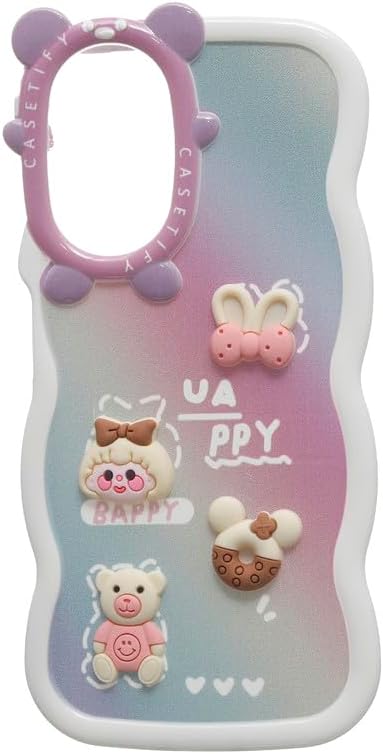
Figure 2.1: Front view of the installed protective cover, highlighting the precise cutouts for the camera and ports.

Figure 2.2: Side view of the protective cover, illustrating how it wraps around the phone for full protection.
3. Operating and Usage
The protective back cover is designed for seamless integration with your Realme C67 4G. Once installed, it provides continuous protection without hindering phone functionality.
- Button Access: The cover features precise cutouts and raised button covers (if applicable) to ensure easy and responsive access to your power and volume buttons.
- Port Access: All essential ports, including the charging port, headphone jack (if present), and speaker grilles, remain fully accessible for normal use.
- Camera Protection: The raised bezel around the camera cutout helps protect the camera lens from scratches when the phone is placed on flat surfaces.
- Screen Protection: While primarily a back cover, the slightly raised edges around the screen (if applicable) can offer minor protection when the phone is placed face down.
4. Maintenance
To ensure the longevity and appearance of your protective cover, follow these simple maintenance guidelines:
- Cleaning: Regularly wipe the cover with a soft, slightly damp cloth to remove dust, dirt, and fingerprints. For stubborn stains, a mild soap solution can be used, followed by wiping with a clean, dry cloth.
- Avoid Harsh Chemicals: Do not use abrasive cleaners, solvents, or strong chemicals, as these can damage the material and finish of the cover.
- Storage: If removing the cover for extended periods, store it in a clean, dry place away from direct sunlight and extreme temperatures.
5. Troubleshooting
Here are some common issues and their solutions:
- Cover Does Not Fit Properly:
Ensure you have the correct model of phone (Realme C67 4G). Double-check that the phone is aligned correctly within the cover and all edges are snapped into place. Remove and re-install if necessary.
- Buttons Are Stiff or Unresponsive:
Verify that the phone is fully seated in the cover and that the button covers (if any) are aligned with the phone's physical buttons. Sometimes, a slight adjustment of the phone within the case can resolve this.
- Dirt Accumulation Under the Cover:
Periodically remove the cover and clean both the phone's back and the inside of the cover to prevent dust and debris from accumulating and potentially scratching the phone.
6. Specifications
| Attribute | Detail |
|---|---|
| Product Name | Plastic Back Cover For Realme C67 4G |
| Brand | Generic |
| Model Number | BCC-CCB125 |
| Compatible Phone Models | Oppo Realme C67 4G |
| Product Dimensions | 15 x 7 x 1 cm |
| Item Weight | 40 g |
| Material | Plastic |
| Water Resistance Level | Not Water Resistant |
| Country of Origin | China |
| Date First Available | 25 March 2025 |
7. Warranty Information
This product is typically covered by the standard return and refund policies of the retailer from whom it was purchased. For specific warranty details or to inquire about defects, please refer to the seller's policy or contact the point of purchase directly. As a "Generic" brand product, a manufacturer's direct warranty may not be explicitly provided. Retain your proof of purchase for any claims.
8. Customer Support
For any questions, concerns, or assistance regarding your Plastic Back Cover, please contact the seller or retailer from whom you purchased the product. They will be able to provide the most accurate and timely support for your specific purchase.
Note: This manual provides general instructions. Product appearance and minor features may vary slightly.