Introduction
This manual provides detailed instructions for the operation and maintenance of your TWS Earbuds. Please read this manual carefully before use to ensure proper function and longevity of your device.

Image: TWS Earbuds in their charging case, showing the LED display and sleek black design.
Package Contents
- TWS Earbuds (Left and Right)
- Charging Case
- USB Charging Cable
- Eartips (Small, Medium, Large)
- User Manual
Setup
Initial Charging
Before first use, fully charge the earbuds and the charging case. Connect the USB charging cable to the charging port on the case and to a power source. The LED display on the case will indicate the charging status.
Pairing with Your Device
- Remove both earbuds from the charging case. They will automatically enter pairing mode.
- On your device (smartphone, tablet, etc.), go to Bluetooth settings.
- Search for new devices and select "T8" (or similar model name) from the list.
- Once connected, a voice prompt will confirm successful pairing.
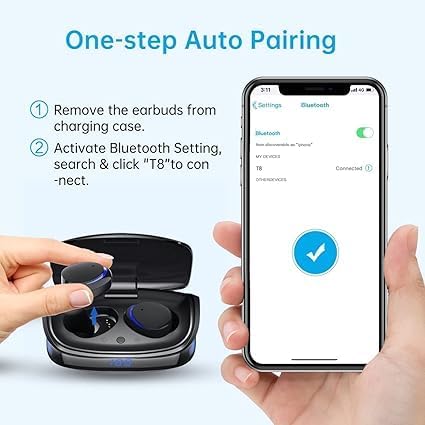
Image: Visual guide demonstrating the one-step auto pairing process for the earbuds, showing removal from case and Bluetooth connection on a smartphone.
Wearing the Earbuds
Choose the eartips that provide the most comfortable and secure fit. Insert the earbuds into your ears and gently twist them until they are snug. A proper fit ensures optimal sound quality and noise isolation.

Image: Examples of individuals wearing the TWS Earbuds comfortably in various settings, highlighting their ergonomic design.
Operating Instructions
Touch Controls
The earbuds feature smart touch controls for easy management of music and calls.
| Action | Control |
|---|---|
| Play/Pause Music | Single tap (either earbud) |
| Next Song | Double tap (right earbud) |
| Previous Song | Double tap (left earbud) |
| Answer/End Call | Double tap (either earbud) |
| Reject Call | Long press (either earbud) |
| Activate Voice Assistant (Siri/Google Assistant) | Triple tap (either earbud) |
| Volume Up | Long press (right earbud) |
| Volume Down | Long press (left earbud) |

Image: Detailed diagram illustrating the various touch control gestures for music playback, call management, and voice assistant activation on the earbuds.
Battery Life and Charging
The earbuds provide approximately 4.5 hours of playtime on a single charge. The charging case extends the total playtime to about 21 hours. The case itself takes approximately 1 hour to fully charge.

Image: Infographic detailing the battery life of the TWS Earbuds, including playtime per charge and total playtime with the charging case.
Maintenance
Cleaning
Regularly clean your earbuds and charging case with a soft, dry, lint-free cloth. Do not use harsh chemicals or abrasive materials. Remove eartips and clean them separately with mild soap and water if necessary, ensuring they are completely dry before reattaching.
Storage
When not in use, store the earbuds in their charging case to protect them and keep them charged. Store the case in a cool, dry place away from direct sunlight and extreme temperatures.
Water Resistance
The earbuds are IPX8 waterproof, meaning they are resistant to sweat, water, and rain. However, they are not designed for swimming or prolonged submersion. Ensure the charging port is dry before charging.

Image: A woman in the rain, illustrating the IPX8 waterproof capability of the earbuds, indicating resistance to sweat, water, and rain.
Troubleshooting
| Problem | Possible Cause | Solution |
|---|---|---|
| Earbuds not pairing | Low battery; Earbuds not in pairing mode; Bluetooth off on device; Interference | Charge earbuds and case; Ensure earbuds are removed from case; Turn Bluetooth on/off on device; Move closer to device; Reset earbuds (refer to manual for specific reset steps if needed). |
| No sound or low volume | Volume too low on device/earbuds; Earbuds not connected; Dirty eartips/speakers | Increase volume on both device and earbuds; Reconnect earbuds; Clean eartips and speaker mesh. |
| Intermittent connection | Distance from device; Obstructions; Interference from other devices | Reduce distance to device; Remove obstructions; Move away from other wireless devices. |
| Microphone not working | Microphone blocked; Software issue; Earbuds not selected as audio input | Ensure microphone is clear; Restart device; Check audio input settings on your device. |
Specifications
| Feature | Detail |
|---|---|
| Model Name | Cshidworld TWS Earbuds |
| Connectivity Technology | Wireless (Bluetooth 5.0) |
| Water Resistance Level | IPX8 Waterproof |
| Playtime (Earbuds) | Approx. 4.5 hours |
| Total Playtime (with Case) | Approx. 21 hours |
| Charging Time (Case) | Approx. 1 hour |
| Audio Quality | High-Fidelity Stereo Sound, Deep Bass |
| Microphone | Built-in Mic with CVC 8.0 Noise Reduction |
| Color | Black |
| Product Dimensions | 3.74 x 4.53 x 1.38 inches |
| Item Weight | 1 pounds (16 ounces) |
| Manufacturer | Cshidworld |

Image: An internal view of the earbud, highlighting the dual microphone anti-noise system designed to suppress ambient noise for clearer calls.
Warranty and Support
For warranty information and technical support, please refer to the contact details provided with your purchase or visit the manufacturer's official website. Keep your proof of purchase for warranty claims.
Protection plans are available for extended coverage:
- 2-Year Protection Plan
- 3-Year Protection Plan
- Complete Protect (monthly plan)
These plans offer additional coverage beyond the standard manufacturer's warranty.