
Introduction
This manual provides detailed instructions for the safe and efficient operation of your FREEFISH K-8 Retro Portable CD Player. Please read this manual thoroughly before using the device and retain it for future reference.
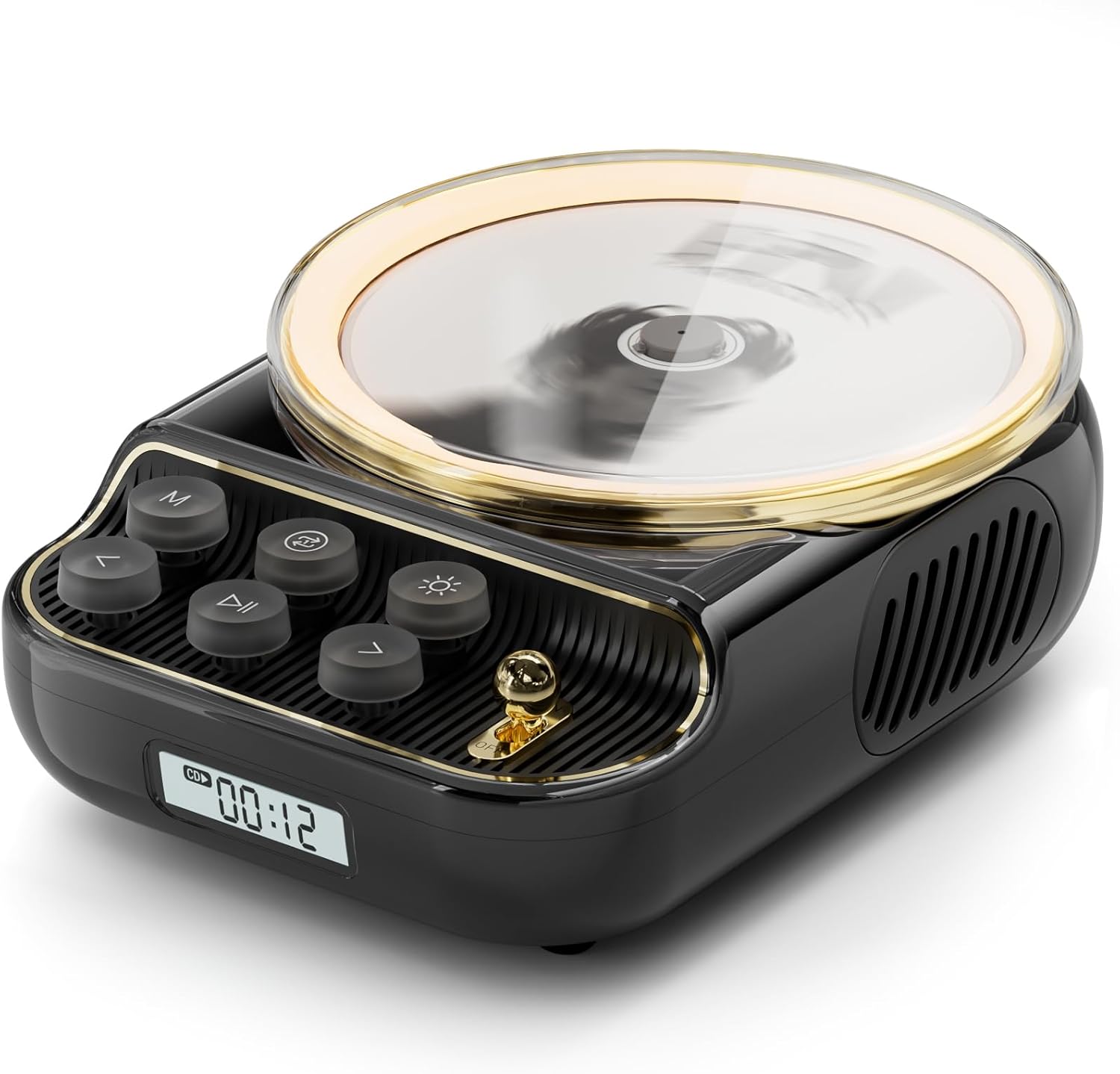
Image: FREEFISH K-8 Retro Portable CD Player, main view.
Important Safety Information
- Do not expose the device to rain, moisture, or extreme temperatures.
- Avoid dropping or subjecting the device to strong impacts.
- Do not attempt to disassemble or repair the device yourself. Contact qualified service personnel.
- Keep the device away from strong magnetic fields.
- Use only the specified charging cable.
- Ensure proper ventilation during operation.
Package Contents
Please check that all items are present in your package:
- FREEFISH K-8 Retro Portable CD Player
- Type-C Data Cable
- Instruction Manual (this document)
- Protective Cover

Image: Included accessories with the FREEFISH K-8 CD Player.
Product Overview
Familiarize yourself with the components and controls of your FREEFISH K-8 CD Player.
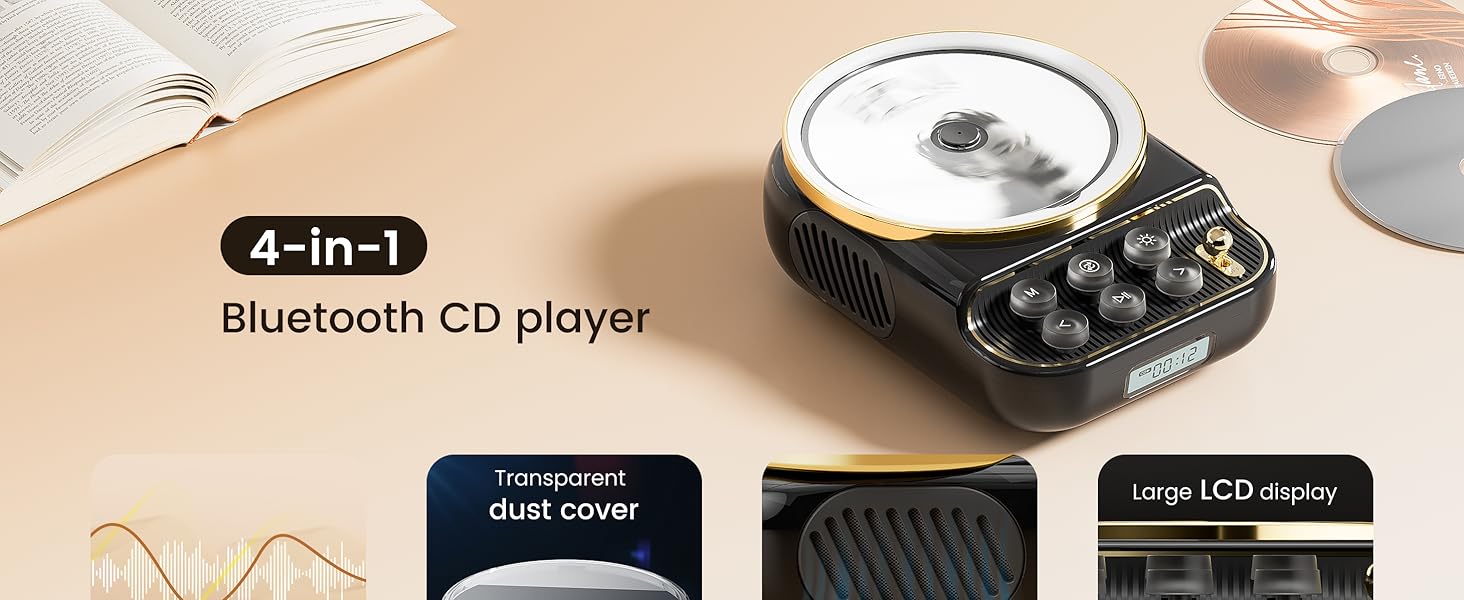
Image: Front view of the FREEFISH K-8 CD Player with key features labeled.
Control Buttons and Ports:

Image: Close-up of the control buttons and joystick on the FREEFISH K-8 CD Player.
- M Button: Switches music mode (Bluetooth/TF mode).
- Play/Pause Button: Short press to play/pause. Long press to stop.
- Skip Forward Button (>): Short press for next song. Long press to increase volume.
- Skip Backward Button (<): Short press for previous song. Long press to reduce volume.
- Loop Playback Mode Button: Adjusts CD/TF card loop modes.
- Night Light Button: Adjusts night light.
- Joystick Main Switch: Power on/off.
- LCD Display: Shows current mode and time.

Image: Rear ports of the FREEFISH K-8 CD Player.
- DC 5V Charging Port (Type-C): For charging the internal battery.
- TF Card Slot: For playing music from a TF card.
- AUX Port (3.5mm): For connecting external audio devices or headphones.
Setup
1. Charging the Device
Connect the provided Type-C data cable to the DC 5V charging port on the back of the player and plug the other end into a compatible USB power adapter (not included). The LCD display will indicate charging status. A full charge provides 8-15 hours of playback.
2. Powering On/Off
To power on the device, turn the joystick main switch. To power off, turn the joystick main switch again.
3. Inserting a CD
- Remove the transparent protective cover from the top of the player.
Image: Step 1 of CD insertion: Removing the protective cover.
- Carefully place your CD onto the CD tray until you hear a 'click' sound, indicating successful installation.
Image: Step 2 of CD insertion: Placing the CD.
- Turn on the joystick main switch and wait a few seconds for the CD to automatically read and start playing music.
Image: Step 3 of CD insertion: Powering on and starting playback.
Operating Instructions
1. Basic Controls
Image: Button functions on the FREEFISH K-8 CD Player.
- Volume Adjustment: Long press the > button to increase volume. Long press the < button to decrease volume.
- Track Navigation: Short press the > button for the next song. Short press the < button for the previous song.
- Play/Pause: Short press the Play/Pause button to toggle playback.
- Stop: Long press the Play/Pause button to stop playback.
2. CD Playback
After inserting a CD and powering on, the player will automatically begin playback. You can adjust the playback mode:
- Press the Loop Playback Mode button to cycle through 4 playback modes:
- Single Loop (repeats current track)
- All Loops (repeats all tracks)
- Random Loop (shuffles tracks)
- Sequential Loop (plays tracks in order)

Image: Explanation of the 4 loop playback modes for CD and TF card music.
3. Bluetooth Mode (Transmit/Receive)
The FREEFISH K-8 supports Bluetooth 5.4 for both transmitting and receiving audio.
Bluetooth Receive Mode (Speaker Function)
Use the K-8 as a Bluetooth speaker for your phone, tablet, or computer.
- Press the M button until "BT" appears on the LCD display, indicating Bluetooth receive mode.
- On your external device (phone, tablet, etc.), enable Bluetooth and search for "K-8".
- Select "K-8" to pair. Once connected, audio from your device will play through the K-8 speakers.

Image: FREEFISH K-8 in Bluetooth receive mode, acting as a speaker for various devices.
Bluetooth Transmit Mode (CD/TF Card to Headphones/Speakers)
Stream CD or TF card music wirelessly to Bluetooth headphones or external Bluetooth speakers. Note: Only CD and TF card modes support Bluetooth transmission.
- Ensure the player is in CD or TF card mode and playing music normally.
- Long press the M button until the word "BT" flashes on the left side of the screen. This indicates transmit pairing mode.
- Turn on the Bluetooth mode of your receiving device (headphones, speaker) and ensure it is in pairing mode.
- Wait for the K-8 to connect automatically. The flashing "BT" on the screen will become solid, indicating a successful connection.

Image: Steps for streaming CD music to Bluetooth headphones or speakers.
4. FM Radio
Listen to your favorite FM radio stations.
- Press the M button to switch to FM mode. The display will show "FM".
- Long press the Play/Pause button to automatically scan for available FM channels. This process may take 1-3 minutes.
- Once scanning is complete, short press the Play/Pause button to cycle through the saved channels. Use the > and < buttons for fine-tuning or manual station selection if available.
The built-in 40CM antenna provides reception. For optimal reception, ensure the device is not obstructed.

Image: Enjoying FM radio on the FREEFISH K-8 CD Player.
5. TF Card Playback
Play MP3, WMA, WAV, or FLAC files directly from a TF card (FAT32 format).
- Insert a TF card into the TF card slot on the back of the player.
- Press the M button until "TF" appears on the LCD display. The player will automatically begin playing music from the card.
- Use the > and < buttons to navigate tracks and the Play/Pause button to control playback. Loop modes are also available for TF card playback.
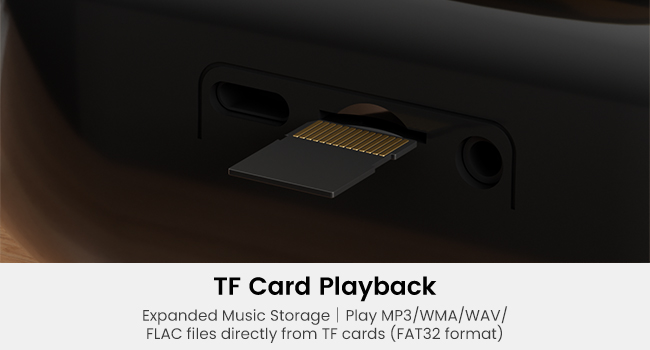
Image: Inserting a TF card for music playback.
6. AUX Input/Output
The 3.5mm AUX port allows for versatile audio connections.
AUX Output (Headphones/External Speakers)
Connect headphones or external speakers to the AUX port for private listening or enhanced sound. When headphones are connected, the internal speakers will be muted.
AUX Input (External Audio Source)
Connect an external audio source (e.g., an MP3 player) to the AUX port using a 3.5mm audio cable. The K-8 will act as a speaker for the external device.
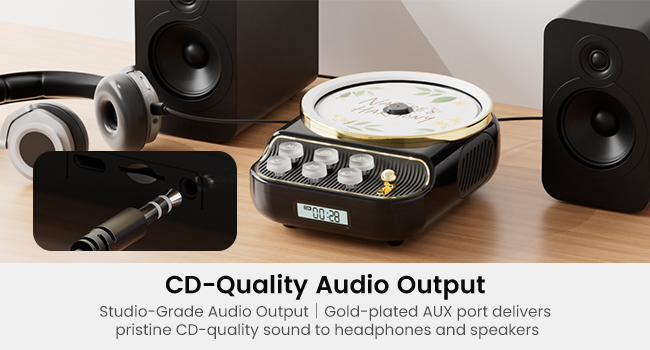
Image: Connecting external audio devices via the AUX port.
7. Night Light Function
The integrated night light provides a soft illumination.
- Press the Night Light button to turn the night light on or off.
- The night light can be used independently of music playback.

Image: The FREEFISH K-8 CD Player functioning as a warm night light.
Maintenance
Cleaning
- Wipe the exterior of the player with a soft, dry cloth.
- Do not use abrasive cleaners, waxes, or solvents.
- For the CD lens, use a specialized CD lens cleaner if necessary. Avoid touching the lens directly.
Battery Care
- To prolong battery life, avoid fully discharging the battery frequently.
- Charge the device regularly, even if not in use, to maintain battery health.
- Store the device in a cool, dry place when not in use for extended periods.
Troubleshooting
| Problem | Possible Cause | Solution |
|---|---|---|
| No power/Device won't turn on. | Battery is depleted. | Charge the device using the provided Type-C cable. |
| CD not playing or skipping. | CD is dirty, scratched, or incorrectly inserted. | Clean the CD, check for scratches, and ensure it is properly seated in the tray. |
| No sound from speakers. | Volume is too low; headphones are connected; device is in Bluetooth transmit mode. | Increase volume; disconnect headphones; switch to appropriate mode. |
| Bluetooth pairing failed. | Device not in pairing mode; external device Bluetooth off; too far apart. | Ensure K-8 is in correct Bluetooth mode (transmit/receive); enable Bluetooth on external device; keep devices within 33 feet (10 meters). |
| FM radio reception is poor. | Weak signal; interference. | Relocate the player to an area with better reception; avoid placing near electronic devices that may cause interference. |
Specifications
| Feature | Detail |
|---|---|
| Brand | FREEFISH |
| Model Number | K-8 |
| Connectivity Technology | Bluetooth 5.4, AUX, Type-C, TF Card |
| Special Features | Anti-Skip Protection, Wireless, FM Radio, Night Light, LCD Display, Bluetooth Transmit/Receive Dual Mode |
| Battery Capacity | 4000 mAh (8-15 hours playback) |
| Audio Output | 10W Dual Stereo Speakers |
| Supported Disc Formats | CD, CD-R, CD-RW |
| Supported TF Card Formats | MP3, WMA, WAV, FLAC (FAT32 format) |
| FM Frequency Range | 87.5-108 HMZ |
| Item Weight | 1.94 pounds |
| Package Dimensions | 9.17 x 6.3 x 3.58 inches |
Warranty and Support
FREEFISH offers a 12-month replacement warranty and lifetime technical support for this product.
If you have any questions or encounter quality issues with your FREEFISH K-8 CD Player, please do not hesitate to contact us. Our customer service team is available to respond within 24 hours.
For support, please refer to the contact information provided with your purchase or visit the official FREEFISH store on Amazon: FREEFISH Store
Image: Warranty and support information.


