1. Product Overview
The TJCXELE 19-in-1 Displaylink Docking Station is designed to expand the connectivity of your laptop, providing a comprehensive solution for multi-monitor setups and peripheral integration. This docking station allows you to connect up to three external monitors, offering 4K@60Hz resolution, alongside a variety of USB ports, Ethernet, and audio/card reader functionalities.
It is compatible with both Windows and macOS systems, including M1/M2/M3 MacBooks, and supports Power Delivery up to 100W to charge your laptop while in use.

Figure 1.1: TJCXELE 19-in-1 Displaylink Docking Station in a triple monitor setup.
2. Product Features and Ports
This docking station offers 19 ports for extensive connectivity. Below is a detailed breakdown of each port and its function:

Figure 2.1: Front and Rear Port Layout of the Docking Station.
- USBC-IN (Thunderbolt 3): Main input port for connecting to your laptop. Supports 4K60Hz video output.
- OUT1 (HDMI 2.0): HDMI output for external display, supports 4K60Hz.
- OUT2 (DisplayPort 1.4): DisplayPort output for external display, supports 4K60Hz.
- OUT3 (HDMI or DisplayPort): Versatile output for a third external display. Choose either HDMI or DisplayPort; cannot output simultaneously. Supports 4K60Hz.
- LAN IN (Ethernet): RJ45 port for wired network connection, supports 1000Mbps.
- USB-A 3.2 (10Gbps): High-speed USB-A port for data transfer.
- USB-C 3.2 (10Gbps): High-speed USB-C port for data transfer.
- USB-A 3.0 (5Gbps): Two USB-A ports for data transfer.
- USB-A 2.0 (480Mbps): Two USB-A ports for connecting peripherals like keyboards and mice.
- SD/Micro SD: Card reader slots for SD and Micro SD cards.
- Audio+Mic (2-in-1): Combined 3.5mm jack for headphones with microphone.
- Audio (Single): Dedicated 3.5mm audio output.
- Mic (Single): Dedicated 3.5mm microphone input.
- 100W Charge (to Laptop): USB-C Power Delivery port for charging your laptop. Requires connection to a PD port for power supply.
- 18W Charge (to Phone): USB-C port for fast charging mobile phones. This port does not support data transmission.
- DC12V: Power input for the docking station.
- ON/OFF: Power switch for the docking station.
3. Setup and Installation
3.1 Important Prerequisites
- The USB-C port on your laptop must be a Thunderbolt 3 port or a higher version. Standard data-only USB-C ports are not supported for full functionality.
- Always use the included power adapter (12V/3A charger) or connect to a PD port for power supply to the docking station.
- The cable connecting your laptop to the docking station must be the included USB-C to USB-C cable or a full-featured Type-C cable.
3.2 DisplayLink Driver Installation
The DisplayLink driver is essential for the proper functioning of the video outputs (OUT2 and OUT3). Without this driver, these ports will not display images correctly.
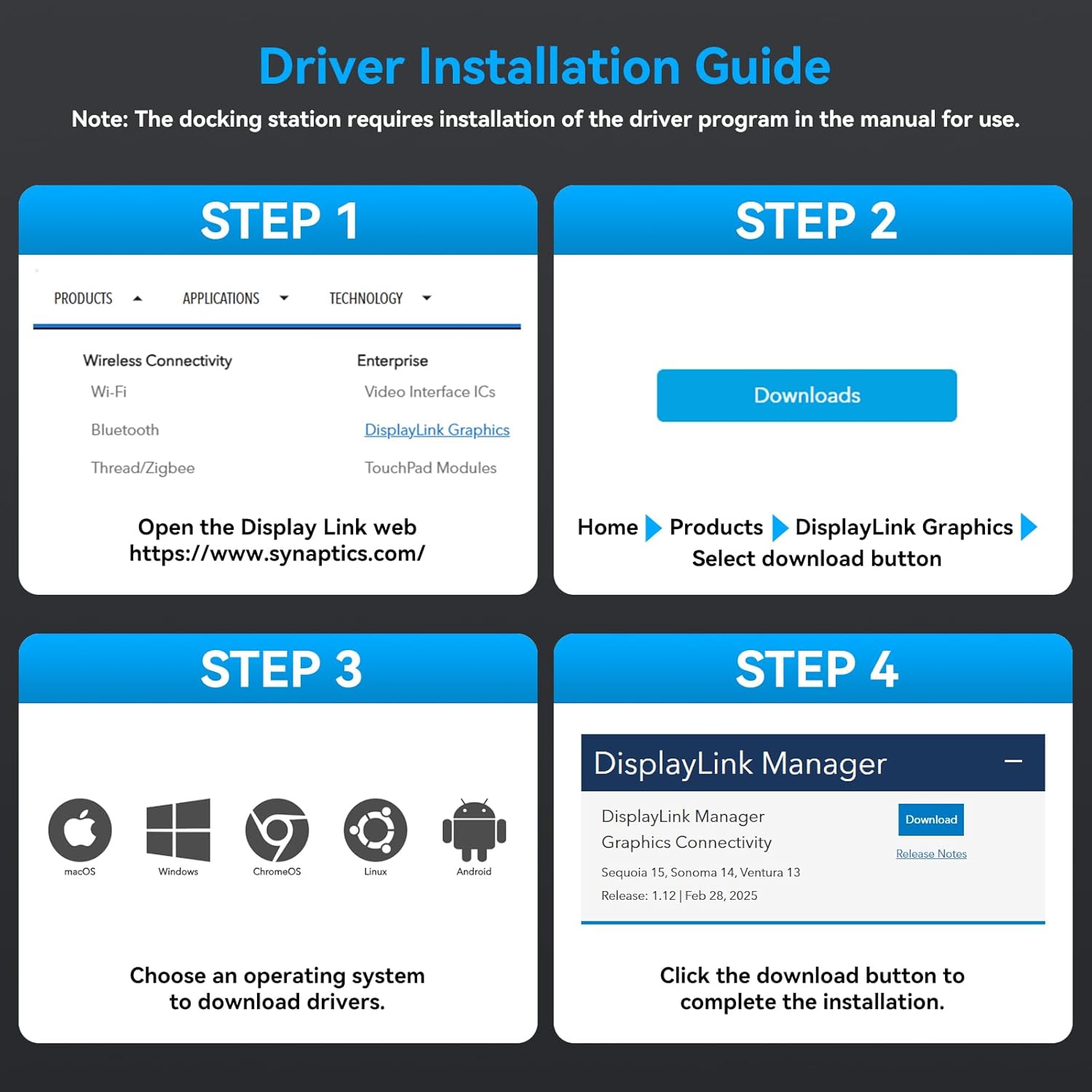
Figure 3.1: DisplayLink Driver Installation Guide.
- Step 1: Open the DisplayLink web page. Navigate to https://www.synaptics.com/.
- Step 2: From the website, navigate to "Products" > "Video Interface ICs" > "DisplayLink Graphics". Locate and click the "Downloads" button.
- Step 3: Choose your operating system (macOS, Windows, ChromeOS, Linux, Android) to download the appropriate drivers.
- Step 4: Click the download button for the DisplayLink Manager Graphics Connectivity and follow the on-screen instructions to complete the installation.
4. Operating Modes and Display Configuration
The docking station supports triple extended display and mirror modes for both Windows and macOS systems, breaking through typical macOS limitations for multi-monitor setups.
4.1 Triple Extended Display
Achieve a triple extended display setup with resolutions up to 3840x2160@60Hz (4K@60Hz) on each screen.
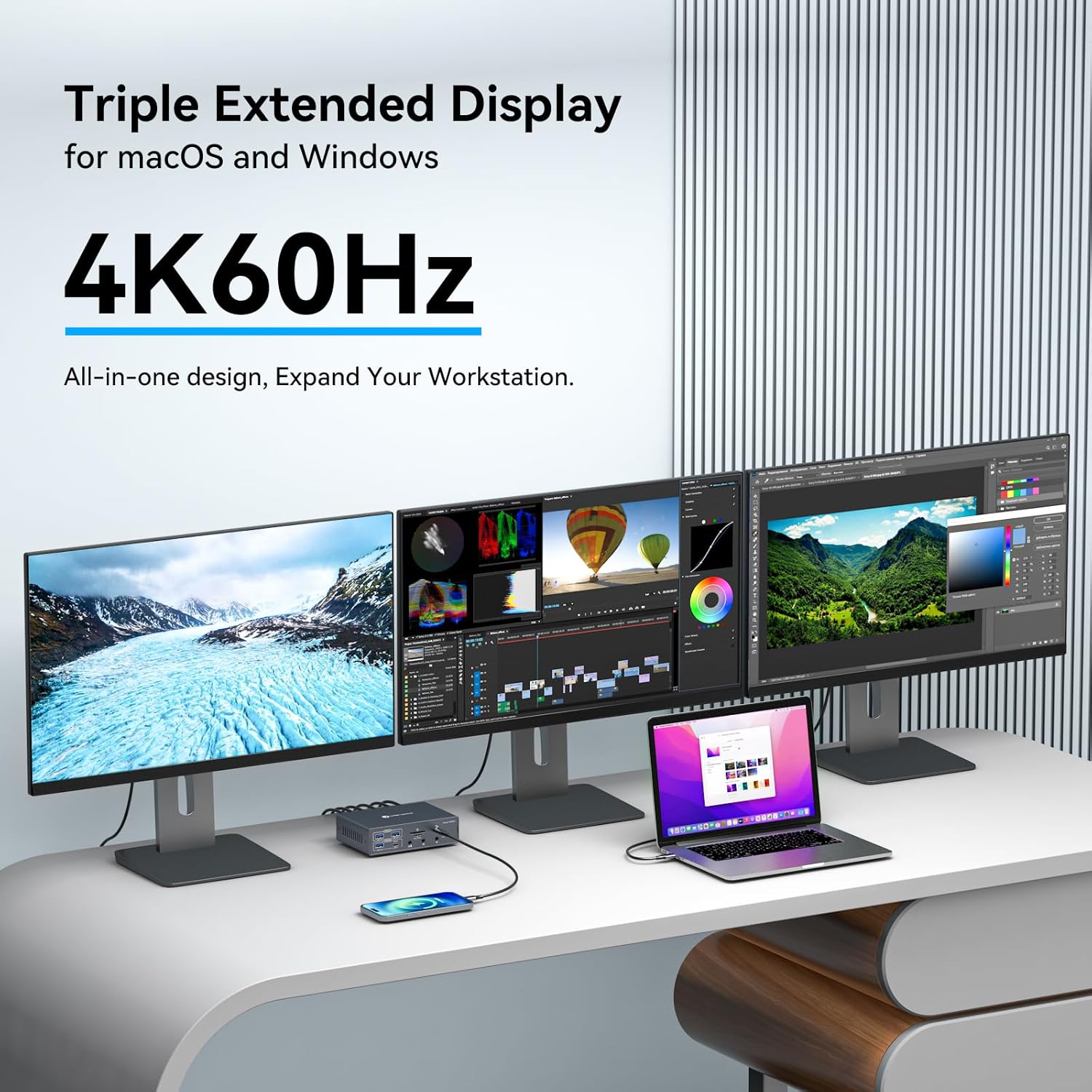
Figure 4.1: Triple Extended Display Setup.
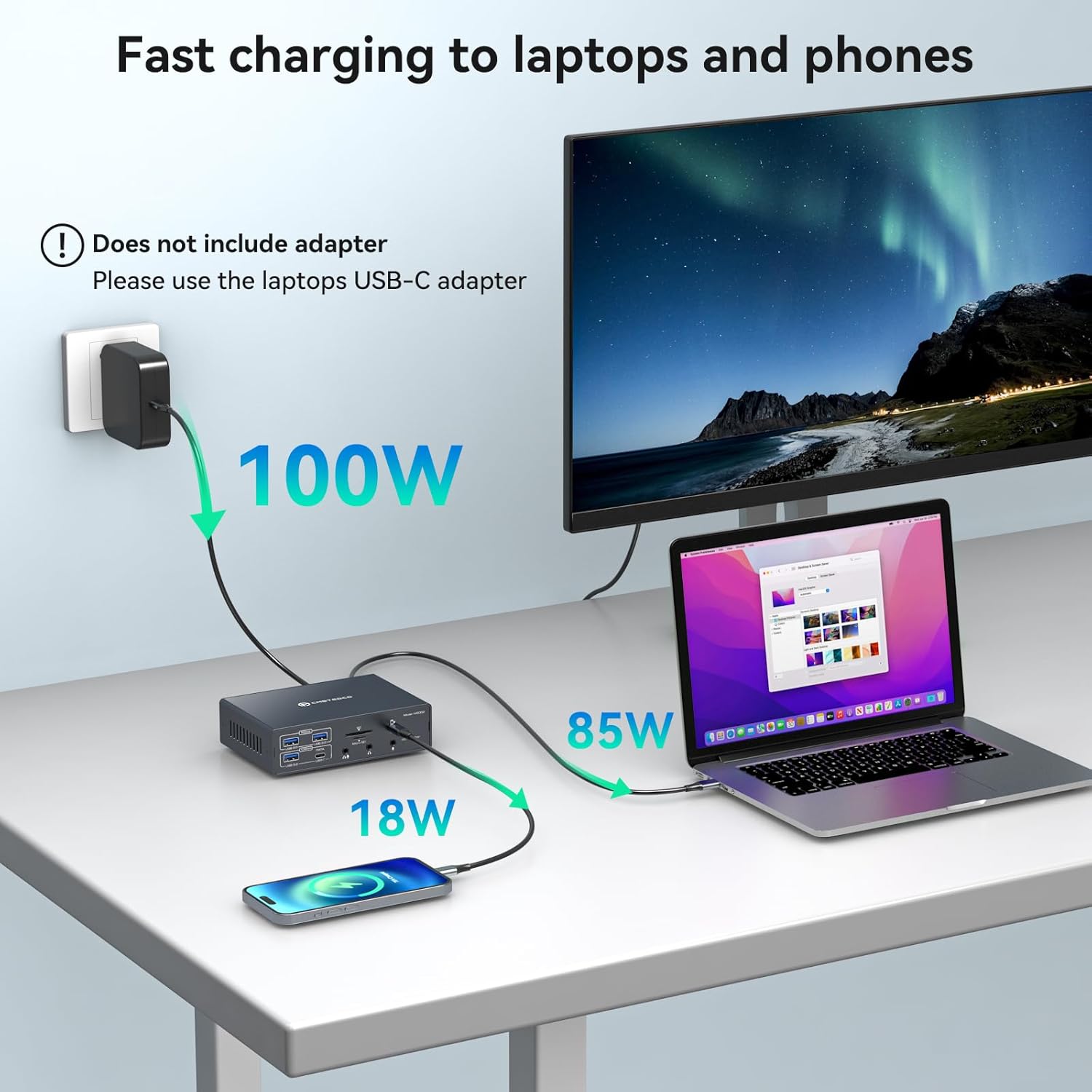
Figure 4.2: Extend Mode (Top) and Mirror Mode (Bottom) Configurations.
- Extend Mode: Each connected monitor (HDMI, DP, and HDMI/DP) can display different content, expanding your desktop workspace.
- Mirror Mode: All connected monitors display the same content as your laptop screen.
To configure display settings, refer to your operating system's display preferences (e.g., System Preferences > Displays on macOS, or Display Settings on Windows).
5. Power Delivery and Charging
The docking station provides robust power delivery capabilities for both your laptop and mobile devices.
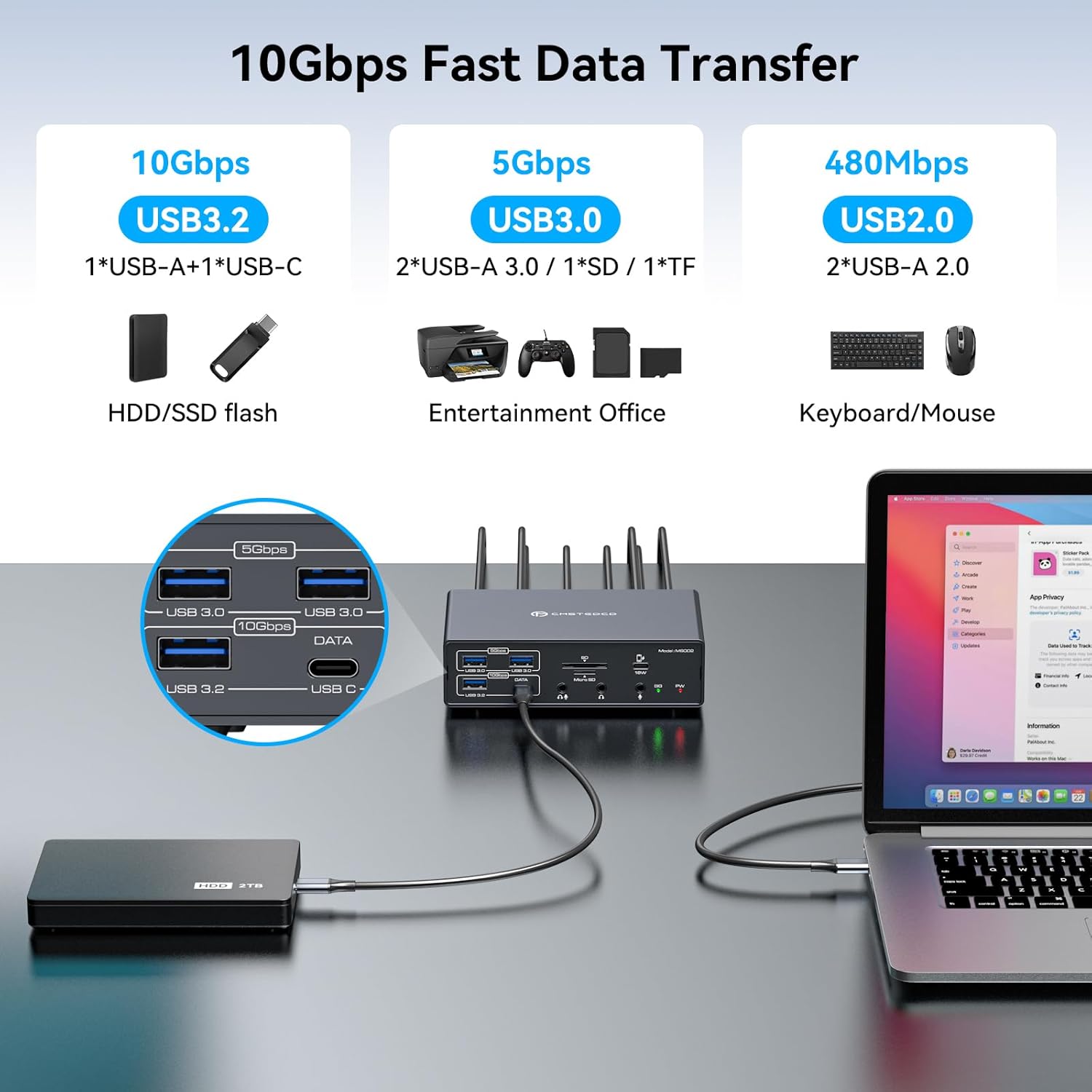
Figure 5.1: Power Delivery to Laptop and Phone.
- 100W Power Delivery (PD): Connect your laptop's charging cable to the PD100W port on the docking station to power and charge your laptop while using the dock.
- 18W Fast Charging (Type-C): A dedicated Type-C port is available for fast charging mobile phones with a maximum power of 18W. Note that this specific Type-C port is for charging only and does not support data transmission.
6. Data Transfer and Connectivity
The docking station is equipped with various USB ports to facilitate high-speed data transfer and connect a wide range of peripherals.
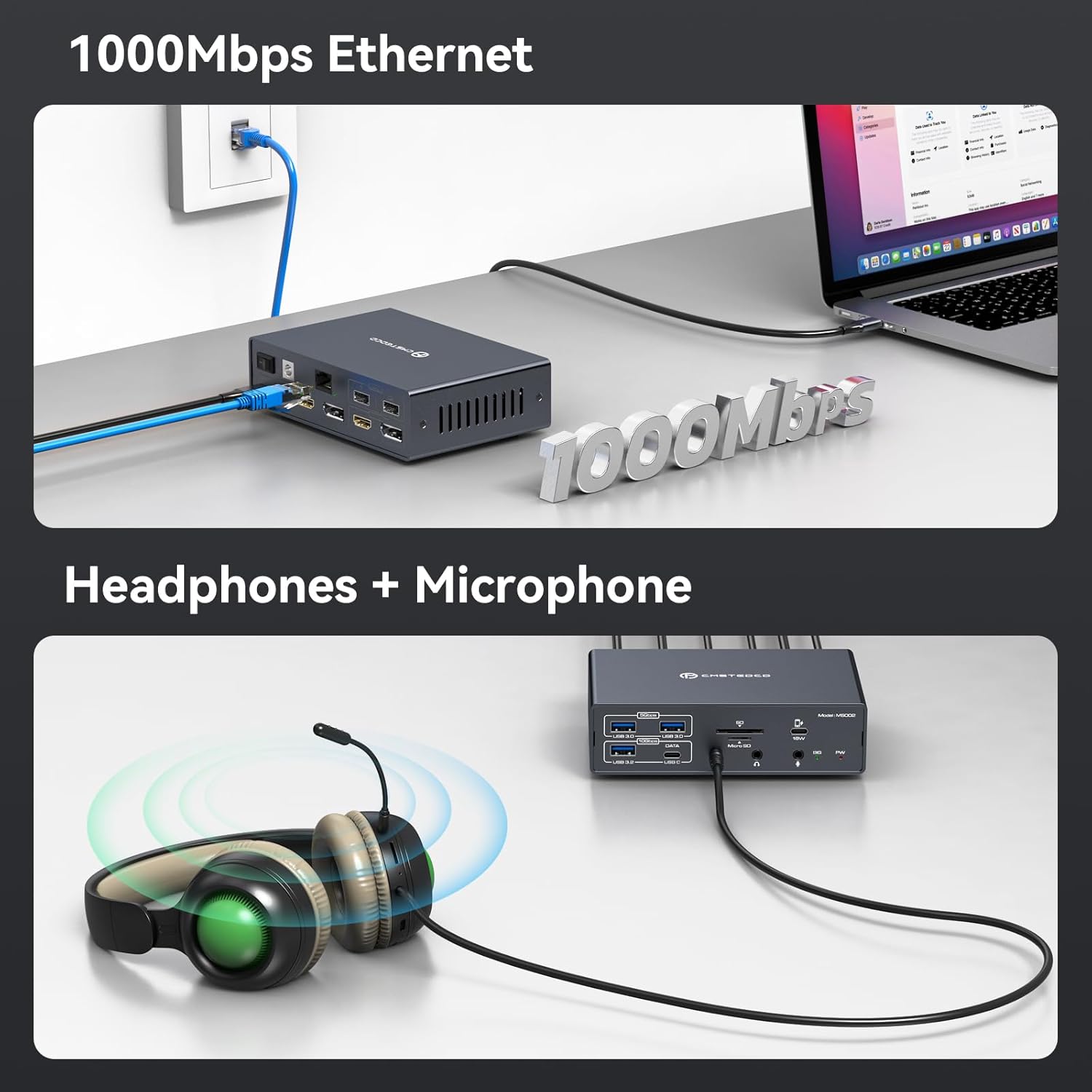
Figure 6.1: USB Port Data Transfer Speeds.
- USB 3.2 (10Gbps): One USB-A and one USB-C port offer ultra-fast data transfer speeds, ideal for external SSDs or high-bandwidth devices.
- USB 3.0 (5Gbps): Two USB-A ports provide fast data transfer, suitable for flash drives, external hard drives, and other standard USB devices.
- USB 2.0 (480Mbps): Two USB-A ports are available for connecting common peripherals such as keyboards, mice, and printers.
- SD/Micro SD Card Slots: Integrated slots allow direct access to data on SD and Micro SD memory cards.
6.1 Ethernet and Audio Connectivity
Ensure stable network connection and versatile audio options.

Figure 6.2: Ethernet and Audio Port Usage.
- 1000Mbps Ethernet Port: Provides a stable and high-speed wired internet connection, ideal for online gaming, streaming, and large file transfers.
- 3.5mm Audio+Mic 2-in-1 Port: A single port for connecting headsets with integrated microphones.
- Dedicated 3.5mm Audio Output: For headphones or speakers.
- Dedicated 3.5mm Microphone Input: For external microphones.
7. Specifications
| Feature | Detail |
|---|---|
| Model Number | TJ-MS002-DE |
| Package Dimensions | 21.4 x 17.7 x 5.9 cm |
| Item Weight | 390 Grams |
| Total Ports | 19 |
| Video Output | HDMI (4K@60Hz), DisplayPort (4K@60Hz), HDMI/DP (4K@60Hz) |
| USB Ports | 2x USB 2.0, 2x USB 3.0, 1x USB 3.2, 1x USB-C 3.2 |
| Ethernet | 1000Mbps (Gigabit) |
| Card Readers | SD, Micro SD |
| Audio Ports | 3.5mm Audio+Mic (2-in-1), 3.5mm Audio, 3.5mm Mic |
| Power Delivery (Laptop) | Up to 100W (via PD port) |
| Charging (Phone) | 18W (via dedicated Type-C port) |
| Input Voltage | 12 Volts (DC) |
| Compatible Devices | Laptops with Thunderbolt 3 or higher USB-C ports (macOS, Windows) |
8. Troubleshooting
- No Display on OUT2 or OUT3: Ensure the DisplayLink driver is correctly installed. Refer to Section 3.2 for installation instructions.
- No Power to Laptop: Verify that the included power adapter is connected to the docking station's DC12V port and the laptop's charging cable is connected to the PD100W port. Confirm your laptop's USB-C port supports Power Delivery.
- Docking Station Not Recognized: Ensure your laptop's USB-C port is a Thunderbolt 3 or higher version. Use the included USB-C to USB-C cable or a full-featured Type-C cable. Try restarting both the laptop and the docking station.
- Intermittent Connectivity: Check all cable connections to ensure they are secure. Avoid placing the docking station in areas with poor ventilation or high temperatures.
- Slow Data Transfer: Ensure you are using the correct USB ports for high-speed devices (USB 3.0/3.2). Older USB 2.0 devices will operate at their maximum speed of 480Mbps.
- Audio Issues: Verify that the correct audio output device is selected in your operating system's sound settings. Check cable connections for headphones/microphones.
9. Maintenance
- Cleaning: Use a soft, dry cloth to clean the exterior of the docking station. Do not use liquid cleaners or aerosols.
- Ventilation: Ensure the docking station has adequate airflow to prevent overheating. Do not block ventilation openings.
- Storage: Store the device in a cool, dry place away from direct sunlight and extreme temperatures when not in use.
- Cable Management: Keep cables organized and untangled to prevent damage to ports and cables.
10. Package Contents
The following items are included in your TJCXELE 19-in-1 Displaylink Docking Station package:

Figure 10.1: Package Contents.
- TJCXELE 19-in-1 Displaylink Docking Station
- High-quality USB-C to USB-C Cable
- 12V/3A DC Power Adapter
- User Manual (this document)
11. Warranty and Support
TJCXELE provides comprehensive after-sales service for your docking station.
- Warranty Period: If the device exhibits abnormal behavior within the 12-month use period, return and exchange services are available.
- Customer Support: For any questions or assistance, please contact TJCXELE customer service. Professional answers and support will be provided.