
M113
User Manual for AI Intelligent Translation M113 Bluetooth Headset
Model: M113 | Brand: Generic
Introduction
Thank you for choosing the Generic M113 AI Intelligent Translation Bluetooth Headset. This manual provides detailed instructions on how to set up, operate, and maintain your new headset. Designed for convenience and high-quality audio, these true wireless earbuds feature a multi-function screen display and long battery life, making them ideal for various uses including entertainment and communication.
Safety Information
- Do not expose the device to extreme temperatures or humidity.
- Keep the device away from water and liquids, as it is not water resistant.
- Avoid dropping or subjecting the device to strong impacts.
- Do not attempt to disassemble or repair the device yourself. Contact qualified service personnel.
- Use only the provided or approved charging cables and adapters.
- Prolonged listening at high volume levels may cause hearing damage.
Package Contents
Please check the package for the following items:
- Generic M113 AI Intelligent Translation Bluetooth Headset (Left and Right Earbuds)
- Charging Case
- Ear Cushions
- User Manual
- Charging Cable
Product Overview
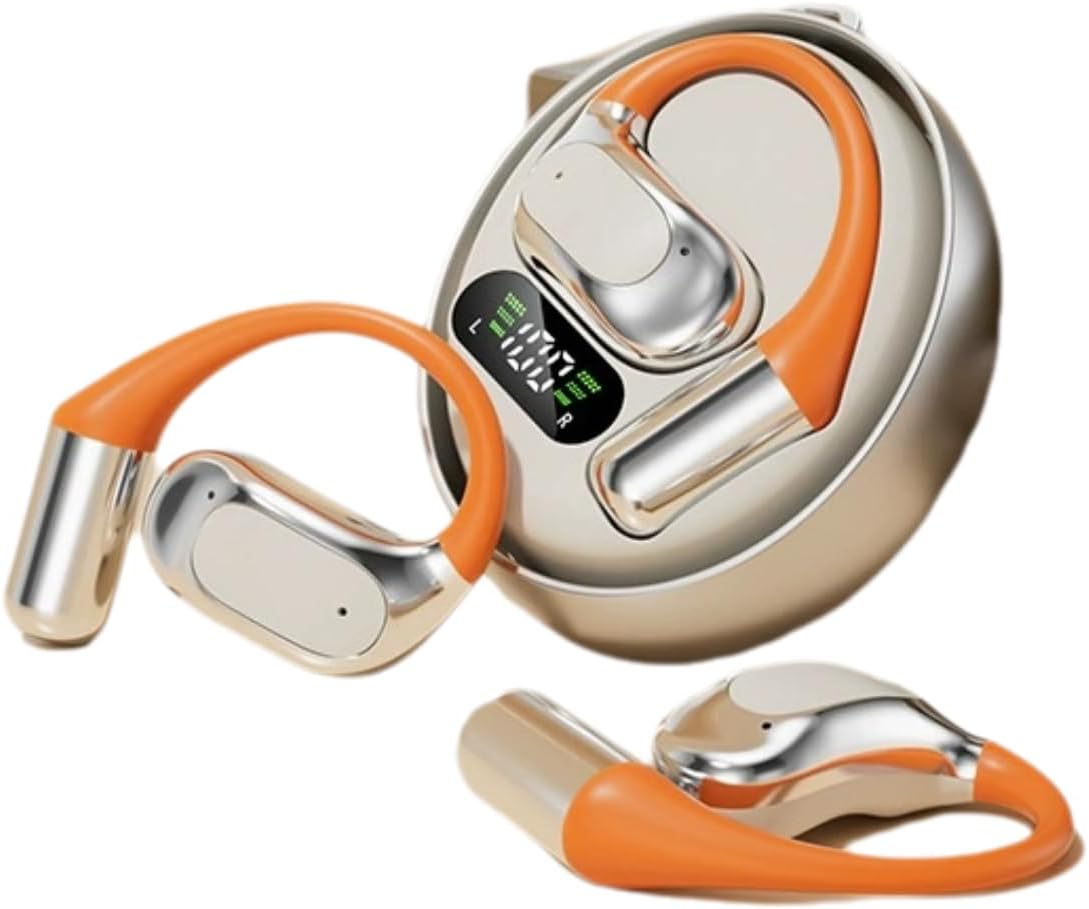
Figure 1: M113 Headset and Charging Case. This image displays the two earbuds alongside their charging case, which features a digital display indicating battery levels for both the case and individual earbuds.

Figure 2: Earbud in Charging Case. This image shows one earbud partially inserted into its charging slot within the case, highlighting the design and charging contacts.
Components:
- Earbuds: Left (L) and Right (R) earbuds with in-ear design.
- Charging Case: Portable case with a multi-function screen display for battery status.
- Touch Control Area: For playback, calls, and AI translation activation.
- Charging Contacts: Located on earbuds and inside the charging case.
Setup
1. Charging the Headset
- Place both earbuds into the charging case. Ensure they are correctly seated, and the charging indicators on the case's screen light up.
- Connect the charging case to a power source using the provided charging cable. The screen display will show the charging progress.
- A full charge typically takes approximately 1-2 hours for the earbuds and 2-3 hours for the charging case.
- The digital display on the case indicates the battery level of the case and each earbud (L and R).
2. Bluetooth Pairing
- Ensure the earbuds are fully charged.
- Open the charging case. The earbuds will automatically enter pairing mode, and an indicator light (if present) will flash.
- On your device (smartphone, tablet, etc.), enable Bluetooth.
- Search for available Bluetooth devices. Select "M113" from the list.
- Once connected, a voice prompt will confirm the successful pairing, and the indicator light will turn off or change color.
- If pairing fails, place the earbuds back into the case, close it, and repeat the steps.
Operating Instructions
Power On/Off
- Power On: Open the charging case, and the earbuds will automatically power on. Alternatively, press and hold the touch control area on both earbuds for 3 seconds.
- Power Off: Place the earbuds back into the charging case and close the lid. They will automatically power off and begin charging. Alternatively, press and hold the touch control area on both earbuds for 5 seconds.
Music Playback
- Play/Pause: Tap the touch control area on either earbud once.
- Next Track: Double-tap the touch control area on the Right earbud.
- Previous Track: Double-tap the touch control area on the Left earbud.
- Volume Up: Triple-tap the touch control area on the Right earbud.
- Volume Down: Triple-tap the touch control area on the Left earbud.
Call Management
- Answer/End Call: Tap the touch control area on either earbud once.
- Reject Call: Press and hold the touch control area on either earbud for 2 seconds.
AI Intelligent Translation Function
The M113 headset features AI intelligent translation capabilities. To utilize this function, you may need to download a dedicated application on your smartphone. Please refer to the app's instructions for language selection and real-time translation usage.
Maintenance
- Cleaning: Use a soft, dry, lint-free cloth to clean the earbuds and charging case. Do not use abrasive cleaners or solvents.
- Storage: When not in use, store the headset in its charging case to protect it from dust and damage. Store in a cool, dry place.
- Battery Care: To prolong battery life, avoid fully discharging the battery frequently. Charge the device regularly, even if not in use for extended periods.
- Water Exposure: The device is not water resistant. Avoid exposure to rain, sweat, or other liquids.
Troubleshooting
| Problem | Possible Cause | Solution |
|---|---|---|
| Earbuds not powering on. | Low battery. | Charge the earbuds and charging case fully. |
| Cannot pair with device. | Bluetooth is off; earbuds not in pairing mode; device too far. | Ensure Bluetooth is enabled on your device. Place earbuds in case, close, then open to re-enter pairing mode. Keep devices within 10 meters. |
| No sound from one earbud. | Earbud not connected; low battery; dirty charging contacts. | Place both earbuds back in the case, close, then open. Ensure both are charged. Clean charging contacts. |
| Poor sound quality. | Weak Bluetooth signal; earbud placement; dirty ear cushions. | Move closer to your device. Adjust earbud fit. Clean or replace ear cushions. |
Specifications
| Feature | Detail |
|---|---|
| Model Name | M113 |
| Brand | Generic |
| Ear Placement | In Ear |
| Form Factor | In Ear |
| Connectivity Technology | Bluetooth (Wireless) |
| Control Type | App Control / Touch Control |
| Material | Aluminum |
| Water Resistance Level | Not Water Resistant |
| Item Weight | 200 Grams (7.1 ounces) |
| Package Dimensions | 4 x 4 x 1.58 inches |
| Included Components | Ear Cushions |
Warranty and Support
For warranty information and technical support, please refer to the documentation provided with your purchase or contact the seller directly. Keep your proof of purchase for any warranty claims.
For further assistance, you may visit the Generic brand's official support channels if available, or contact the retailer where the product was purchased.
Ask a question about this manual
Ask about setup, troubleshooting, compatibility, parts, safety, or missing instructions. Manuals+ will review the question and use this page’s manual context to help answer it.