1. Introduction
This manual provides comprehensive instructions for the BMPNLSZ Universal Tablet Case, designed to protect and enhance the usability of your 10.3-11 inch tablet. Please read this manual thoroughly before use to ensure proper installation and care.
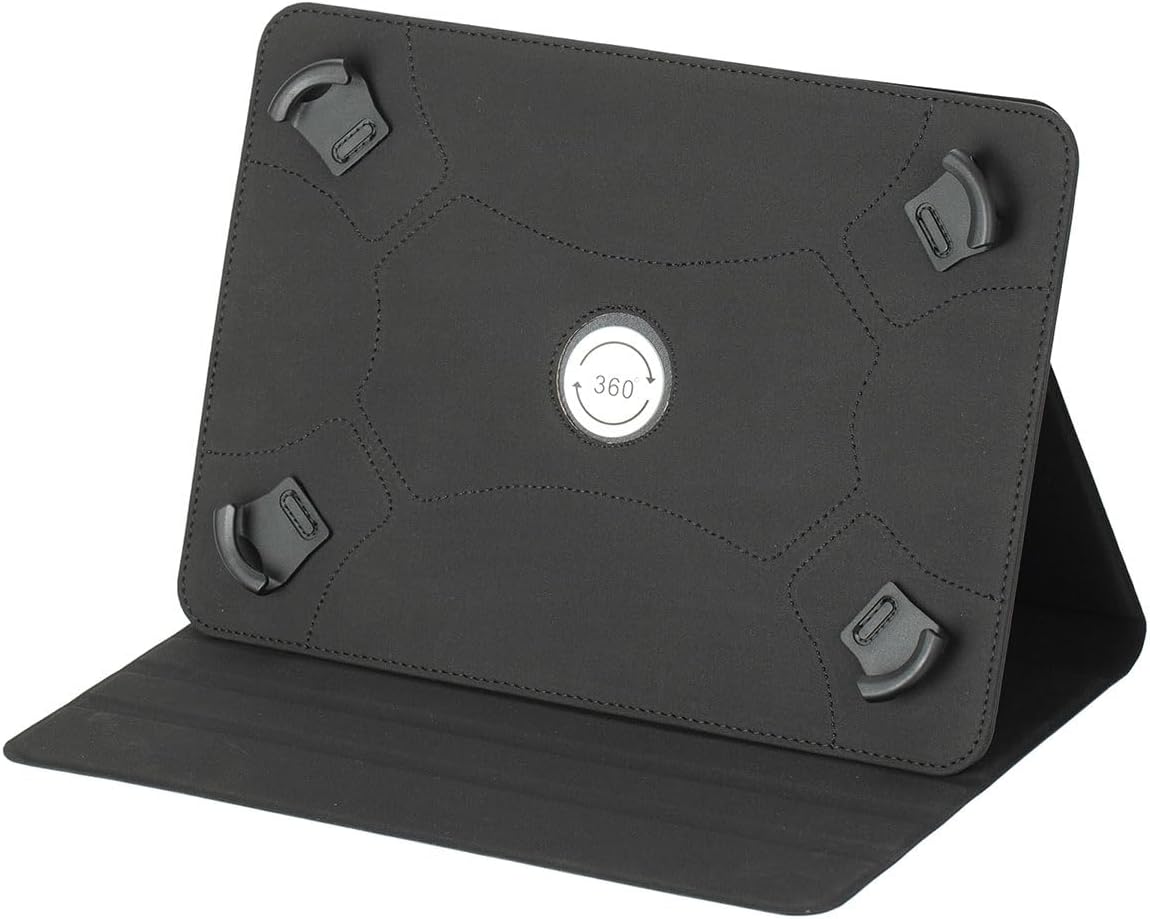
Image 1.1: Rear view of the BMPNLSZ Universal Tablet Case in black, highlighting the adjustable silicone straps and the central 360-degree rotation mechanism.
2. Compatibility
This universal case is compatible with all tablets ranging from 10.3 to 11 inches in screen size. Please verify your device's dimensions before purchase.
- Screen Size: 10.3 to 11 inches.
- Note: This case does not feature a back camera opening.
- Note: This case does not support automatic sleep/wake functions for any tablet.
3. Key Features
The BMPNLSZ Universal Tablet Case offers several features designed for protection and convenience:
- Universal Fit: Designed for 10.3-11 inch tablets with adjustable silicone fixing straps.
- Robust Protection: Features shock absorption technology, anti-scratch, wear-resistant, anti-shock, and protection against fingerprints, dust, damage, and drops.
- Premium Materials: Constructed with high-quality PU leather exterior and a soft interior lining.
- Multi-Angle Stand: Equipped with three leather rails to provide multiple stable horizontal viewing angles for typing and watching.
- Full Body Coverage: Provides comprehensive protection for your tablet.

Image 3.1: The BMPNLSZ Universal Tablet Case in red, illustrating the adjustable silicone straps and 360-degree rotation. Other color options are displayed below.
4. Setup: Installing Your Tablet
- Open the Case: Lay the case flat on a clean surface with the interior facing upwards.
- Position Your Tablet: Carefully place your 10.3-11 inch tablet onto the central area of the case, ensuring it is centered.
- Secure with Straps: Gently pull each of the four adjustable silicone fixing straps over the corners of your tablet. Ensure the straps are snug and securely hold the tablet in place without obstructing the screen.
- Verify Fit: Once all straps are in place, gently shake the case to confirm your tablet is firmly secured and will not slip out.

Image 4.1: A tablet securely installed within the red universal case, demonstrating the upright viewing position.
5. Operating the Multi-Angle Stand
The case features a versatile stand function for comfortable viewing and typing.
- Open the Front Cover: Fold the front cover of the case completely open.
- Position for Viewing: Locate the three leather rails on the inside of the front cover. Lift your tablet and place its bottom edge into one of these rails to achieve your desired viewing angle. The rails provide stable support for horizontal viewing.
- 360-Degree Rotation (if applicable): The central mechanism on the back of the case allows for 360-degree rotation of your tablet while it is secured. This enables both landscape and portrait viewing orientations when using the stand.

Image 5.1: The red universal case supporting a tablet in a horizontal viewing angle, utilizing the integrated stand.

Image 5.2: Back view of the red case, illustrating the design of the stand when folded and the central rotation point.

Image 5.3: The red universal case with a tablet positioned vertically, showcasing the flexibility of the 360-degree rotation for portrait mode viewing.
6. Maintenance and Care
To ensure the longevity and appearance of your tablet case, follow these care instructions:
- Cleaning: Wipe the exterior PU leather with a soft, damp cloth. For stubborn stains, use a mild soap solution and then wipe clean with a dry cloth. Avoid harsh chemicals or abrasive cleaners.
- Drying: Allow the case to air dry completely after cleaning. Do not expose to direct sunlight or high heat.
- Storage: Store the case in a cool, dry place away from extreme temperatures and direct sunlight when not in use.
- Avoid Sharp Objects: Prevent contact with sharp objects to avoid scratches or damage to the PU leather.
7. Troubleshooting
If you encounter any issues with your BMPNLSZ Universal Tablet Case, consider the following:
- Tablet Not Fitting Securely: Ensure your tablet's screen size is within the 10.3-11 inch range. Double-check that all four silicone straps are correctly positioned over the tablet corners and are snug.
- Stand Instability: Make sure the tablet's edge is properly seated within one of the three leather rails on the front cover. Adjust the angle as needed for optimal stability.
- Difficulty Rotating: Ensure the tablet is fully secured by the straps. The 360-degree rotation mechanism should turn smoothly. If it feels stiff, gently rotate it a few times to loosen.
- General Wear: Over time, normal wear and tear may occur. Regular cleaning and proper handling can extend the product's lifespan.
8. Specifications
| Feature | Detail |
|---|---|
| Product Dimensions | 24 x 12 x 2 cm |
| Item Model Number | Tablette 10.3-11 pouces |
| Item Weight | 300 g |
| Colour | Black (for this specific model) |
| Manufacturer | BMPNLSZ |
| Compatibility | Universal for 10.3-11 inch tablets |
9. Warranty and Support
For warranty information or technical support, please refer to the documentation provided at the time of purchase or contact your retailer. You may also visit the official BMPNLSZ website for further assistance.