
1. Introduction
This manual provides detailed instructions for the installation, operation, and maintenance of your SICSOLINK 10-Port 2.5Gb PoE+ Unmanaged Switch. This device is designed to provide high-speed network connectivity and Power over Ethernet (PoE) capabilities for various network devices.
2. Product Overview
2.1 Key Features
- Full Gigabit PoE Switch & 120W Power Output: Includes 8x 10/100/1000/2500 Mbps Base-TX RJ45 ports and 2x 10 Gigabit SFP+ ports. Supports simultaneous data and power transmission with a total PoE power output of 120W (max 30W per port).
- Built-in Power Supply & 4KV Lightning Protection: Integrated 120W power supply simplifies installation. 4KV lightning protection ensures stable operation in adverse weather conditions.
- Unmanaged Plug and Play: Automatically detects devices and supports 802.3AT/AF standards. Requires no software installation or configuration.
- Intelligent PD Detection & QoS Function: Automatically identifies if a connected device requires power, protecting non-PoE devices. Quality of Service (QoS) prioritizes important content transmission for ports 1-2.
- Multiple Installation Options: Supports desktop and wall mounting.
- Metal Case: Durable metal casing provides fast thermal conductivity.
2.2 Package Contents
Upon opening the package, verify that all items are present and in good condition:
- SICSOLINK 10-Port 2.5Gb PoE+ Switch
- Power Adapter (AC power cord)
- 1M Network Cable
- User Manual
- 19-inch Rackmount Kit (if applicable)

Video: Unboxing the SICSOLINK 2.5Gb PoE+ Switch. This video demonstrates the contents of the product package, including the switch, power adapter, network cable, user manual, and rackmount kit.

Image: Front and rear view of the SICSOLINK 10-Port 2.5Gb PoE+ Switch. The front panel features 8x 2.5G PoE+ ports and 2x 10G SFP+ ports. The rear panel includes the AC 100-240V 1A power input and a grounding screw.
3. Setup Instructions
3.1 Physical Installation
The SICSOLINK PoE+ Switch supports both desktop and wall mounting. Ensure the installation location is dry, well-ventilated, and away from direct sunlight or heat sources.
- Desktop Placement: Place the switch on a stable, flat surface. The bottom of the switch includes desktop anti-slip mats for stability.
- Wall Mounting: Use the provided 19-inch rackmount kit to secure the switch to a wall or rack. Refer to the kit's instructions for proper installation.

Image: Physical features of the SICSOLINK 2.5Gb PoE+ Switch. This image shows the switch's plug & play design, options for desktop or wall mounting, fanless quiet operation, 6KV lightning protection, and robust metal casing.
3.2 Connecting the Switch
- Power Connection: Connect the provided AC power cord to the power input on the rear panel of the switch, then plug it into a standard electrical outlet.
- Network Device Connection (PoE Ports): Connect your PoE-compatible devices (e.g., IP cameras, wireless access points, IP phones) to any of the 8x 2.5Gb PoE+ RJ45 ports using standard Ethernet cables (CAT5e, CAT6, or CAT6A recommended for optimal performance). The switch will automatically detect and power these devices.
- Uplink Connection (SFP+ Ports): For high-speed network uplinks, insert compatible 1G/2.5G/10G SFP+ optical modules into the 2x 10G SFP+ ports and connect them to your router, server, or other network backbone using fiber optic cables.
- Non-PoE Device Connection: Non-PoE devices can also be connected to the RJ45 ports. The intelligent PD detection feature will prevent power delivery to these devices.
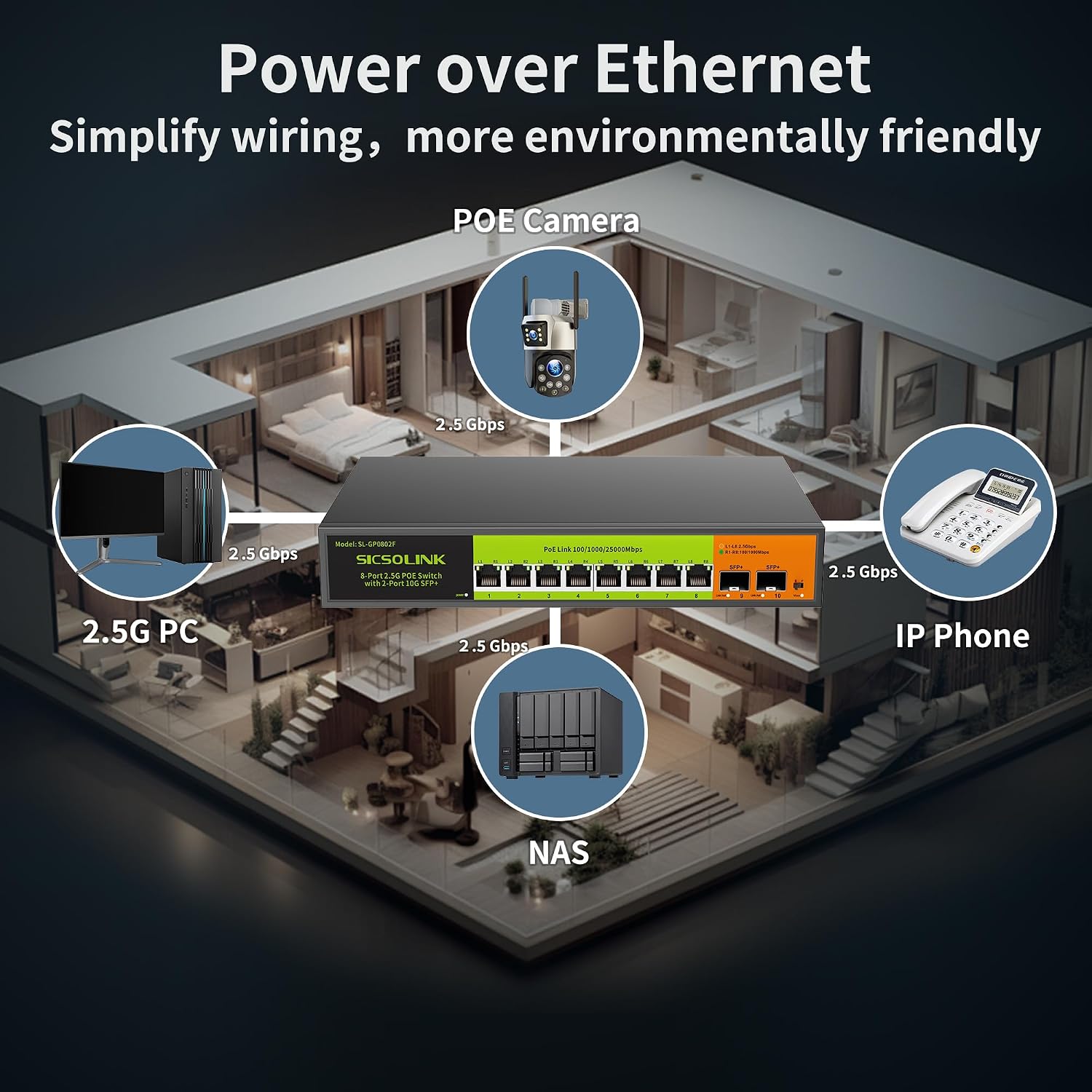
Image: Power over Ethernet application diagram. This illustration demonstrates how the SICSOLINK 2.5Gb PoE+ Switch provides both power and data through a single cable to various devices in a home or office environment, including PoE cameras, 2.5G PCs, NAS, and IP phones.

Image: Cable compatibility for 2.5G speeds. This image shows that the SICSOLINK 2.5Gb PoE+ Switch supports CAT5e, CAT6, and CAT6A cables for achieving 2.5G speeds without needing to change existing cabling. It also illustrates adaptive 1G/2.5G/10G optical module options for the SFP+ ports.
4. Operating Instructions
4.1 Powering On
Once the power cord is connected, the switch will automatically power on. There is no power button. The LED indicators on the front panel will illuminate to show power status and port activity.
4.2 Network Operation
- Plug and Play: The switch is unmanaged, meaning it requires no configuration. Simply connect your devices, and they will automatically establish network connections.
- PoE Functionality: The switch automatically detects and supplies power to IEEE 802.3af/at compliant Powered Devices (PDs) connected to its PoE ports. The intelligent PD detection feature ensures that only PoE devices receive power, protecting non-PoE equipment.
- Quality of Service (QoS): For critical applications, the QoS function enables the switch to prioritize data transmission on ports 1-2, ensuring smoother performance for high-bandwidth or latency-sensitive traffic.
- Multi-Gigabit Performance: The 2.5Gb RJ45 ports support 100/1000/2500 Mbps speeds, while the 10G SFP+ ports support 1G/2.5G/10G speeds, providing flexible and high-performance connectivity for various network demands.

Image: Multi-Gigabit Performance. This diagram illustrates the SICSOLINK 2.5Gb PoE+ Switch delivering high-speed network performance to devices such as security cameras, gaming PCs, 2.5G NAS, and IP phones, utilizing 1Gbps, 2.5Gbps, and 10Gbps SFP+ connections.

Image: Network Expansion Capabilities. This diagram shows how the SICSOLINK 2.5Gb PoE+ Switch expands network reach. RJ45 ports support distances up to 100M with Cat5e or higher cables, while SFP+ ports support distances of 1000M or more with fiber optic cables and optical modules.
5. Maintenance
To ensure optimal performance and longevity of your SICSOLINK PoE+ Switch, follow these maintenance guidelines:
- Cleaning: Keep the switch clean and free from dust. Use a soft, dry cloth for cleaning. Do not use liquid or aerosol cleaners.
- Ventilation: Ensure proper airflow around the switch. Do not block the ventilation holes. The fanless design contributes to quiet operation and relies on natural convection for cooling.
- Environmental Conditions: Operate the switch within the recommended temperature and humidity ranges. Avoid extreme conditions.
- Cable Management: Organize network cables to prevent strain on ports and ensure proper airflow.
- Lightning Protection: The built-in 4KV lightning protection helps safeguard the device. However, for enhanced protection during severe electrical storms, consider disconnecting the power and network cables.
6. Troubleshooting
If you encounter issues with your SICSOLINK PoE+ Switch, refer to the following troubleshooting steps:
- No Power:
- Ensure the power cord is securely connected to both the switch and a working electrical outlet.
- Verify the power outlet is functional by plugging in another device.
- No Link/Connectivity:
- Check if the Ethernet cables are securely connected to both the switch and the network device.
- Ensure the cables are not damaged. Try a different cable.
- Verify that the connected device is powered on and functioning correctly.
- For SFP+ ports, ensure the optical module is correctly inserted and compatible, and the fiber optic cable is intact.
- No PoE Power to Device:
- Confirm that the connected device is a Power Device (PD) compliant with IEEE 802.3af/at standards.
- Check the total power budget of the switch (120W). Ensure the combined power draw of all connected PoE devices does not exceed this limit.
- Verify the Ethernet cable is suitable for PoE (CAT5e or higher).
- The intelligent PD detection feature should automatically provide power. If not, try connecting the device to a different PoE port.
- Slow Network Speed:
- Ensure you are using appropriate cables (CAT5e, CAT6, or CAT6A for 2.5Gbps).
- Verify that your connected devices and network adapters support 2.5Gbps or 10Gbps speeds.
- Check for network congestion or other devices consuming significant bandwidth.
7. Specifications
| Feature | Description |
|---|---|
| Brand | SICSOLINK |
| Model Number | 8KPOE-2UP-2G |
| Number of Ports | 10 (8x 2.5G Base-T PoE+, 2x 10G SFP+) |
| Interface Type | RJ45, SFP+, PoE+ |
| Switching Capacity | 80Gbps |
| PoE Standard | IEEE 802.3af/at |
| Total PoE Power Budget | 120W |
| Max Power Per Port | 30W |
| Lightning Protection | 4KV |
| Housing Material | Metal |
| Item Weight | 2.4 Pounds |
| Compatible Devices | Desktop, Gaming Console, Laptop, PoE Security Camera, Access Point, IP Phone, NAS |
8. Warranty and Support
All SICSOLINK PoE Switches undergo rigorous testing for reliability, quality, and performance. We promise that this product will work well for at least one year and provide technical support for its entire product lifetime.
If you have any questions or require technical assistance, please contact SICSOLINK customer support. We aim to respond to inquiries within 24 hours.