
1. Introduction
Thank you for choosing the CHAKEYAKE Kids Phone Camera. This device is designed to provide children aged 3-8 with an engaging and educational experience, combining the fun of a toy phone with the functionality of a camera, MP3 player, and various learning games. This manual will guide you through the setup, operation, maintenance, and troubleshooting of your new device.
2. Product Overview
The CHAKEYAKE Kids Phone Camera features a 2.8-inch IPS touchscreen, dual cameras, and comes with a pre-installed 32GB SD card. Its compact and durable design, including a silicone protective case, makes it ideal for young users.

The CHAKEYAKE Kids Phone Camera, featuring a pink casing with a cute unicorn design, a 2.8-inch touchscreen, and various app icons displayed on the screen.
Package Contents:
- 1 x Kids Phone Camera
- 1 x USB-C Charging Cable
- 1 x 32GB Memory Card (pre-installed)
- 1 x Lanyard
- 1 x User Manual
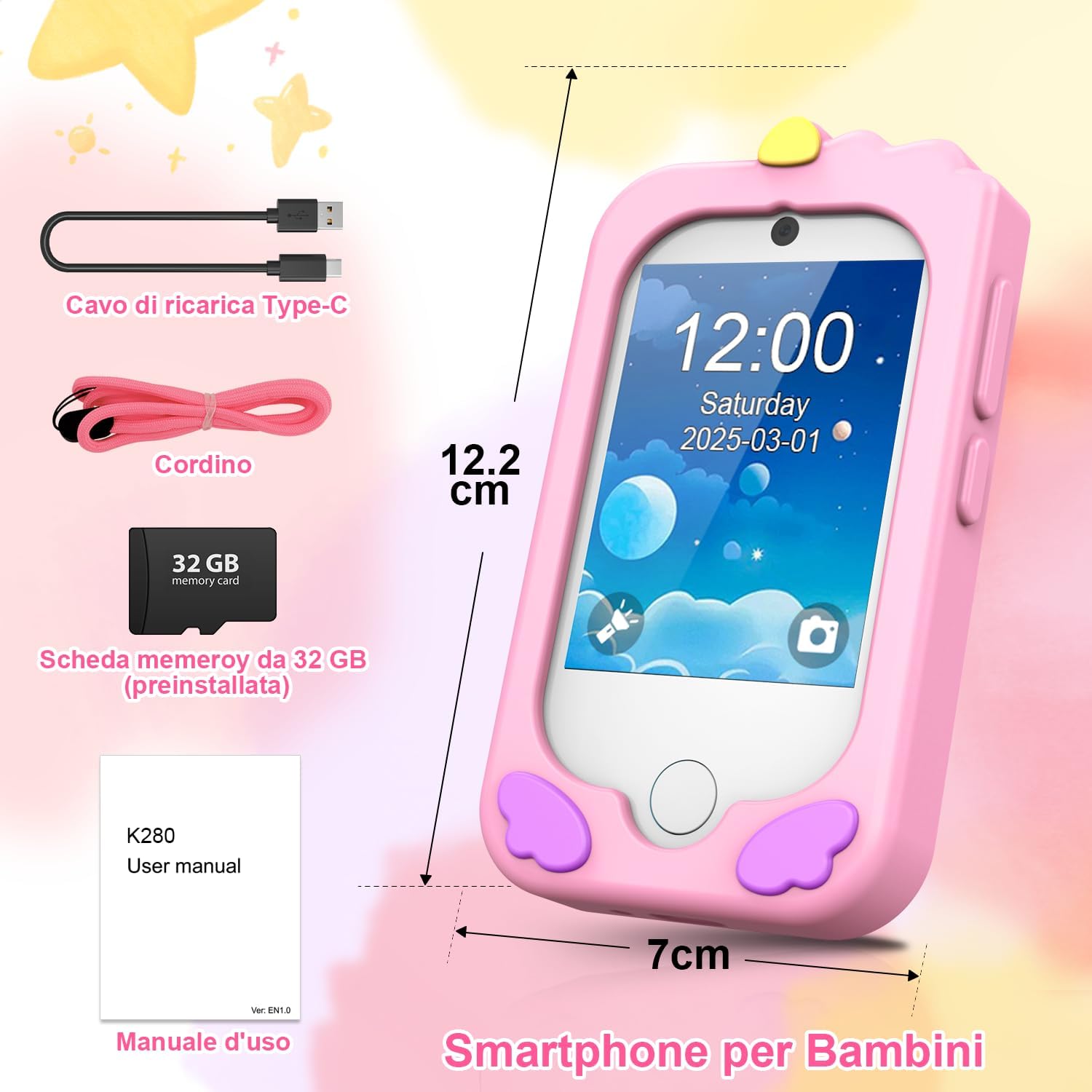
This image displays the CHAKEYAKE Kids Phone Camera, its dimensions (approximately 12.2 cm height, 7 cm width), and the included accessories: a USB-C charging cable, a lanyard, a pre-installed 32GB memory card, and the user manual.
3. Setup
3.1 Charging the Device
Before first use, fully charge the device. Connect the provided USB-C cable to the charging port on the phone and the other end to a compatible USB power adapter (not included) or a computer's USB port. The charging indicator will show the charging status.
3.2 Power On/Off
- To Power On: Press and hold the power button (usually located on the side) until the screen lights up.
- To Power Off: Press and hold the power button until a power-off option appears on the screen, then select it. Alternatively, hold the power button for a longer duration to force a shutdown.
3.3 Memory Card
The device comes with a 32GB SD card pre-installed. This card is essential for storing photos, videos, music, and other files. Ensure it is properly inserted before use. If you need to remove or replace it, gently push the card into its slot until it clicks, then release to eject.
4. Operating Instructions
4.1 Basic Navigation
The device features a 2.8-inch IPS touchscreen. Navigate through menus and applications by tapping, swiping, and selecting icons on the screen. The home button (if present) will return you to the main menu.

An overview of the CHAKEYAKE Kids Phone Camera's multifunctional capabilities, including camera, video recording, music player, games, 32GB SD card support, flashlight, voice recorder, alarm, timer, stopwatch, calculator, calendar, theme customization, and settings.
4.2 Camera Functions
The device is equipped with dual cameras (front and rear) for taking photos and recording videos.
- Taking Photos: Open the camera application. Select the front or rear camera. Tap the shutter icon to capture an image.
- Recording Videos: In the camera app, switch to video mode. Tap the record icon to start and stop recording.
- Filters and Stickers: Explore the available filters and stickers within the camera app to add fun effects to photos and videos.

The CHAKEYAKE Kids Phone Camera features both front and rear cameras, allowing children to take selfies, photos, and record videos. The image shows a family enjoying the camera's photo-taking capabilities, along with various fun filters and stickers.
4.3 MP3 Player
The built-in MP3 player allows children to listen to their favorite music or pre-loaded stories. Transfer MP3 files to the device's 32GB SD card via a computer using the USB-C cable.

The CHAKEYAKE Kids Phone Camera includes an MP3 player for music and pre-loaded stories, providing entertainment and educational content. The image shows a child sleeping with a teddy bear, suggesting the use of the device for bedtime stories.
4.4 Educational Games and Activities
The device includes 22 educational and fun functions, such as ABC learning, word recognition, fruit and animal identification, and 20 logic games.
- ABC Learning: Interactive activities to learn the alphabet.
- Fruits & Animals: Games for recognizing different fruits and animals.
- Logic Games: 20 pre-installed games designed to develop reflexes and hand-eye coordination.
- Doodle Function: A drawing application to stimulate creativity.
- Piano Simulation: An interactive piano feature for musical exploration.

The CHAKEYAKE Kids Phone Camera includes educational games and activities, such as learning the alphabet (A-Z), recognizing various fruits, and identifying different animals, designed to stimulate early learning.

The CHAKEYAKE Kids Phone Camera offers a piano simulation feature, allowing children to play musical notes and explore their creativity. The image shows a child interacting with a piano while the toy phone displays its musical interface.

The CHAKEYAKE Kids Phone Camera provides entertainment with 20 logic games and a doodle function for creative expression. The image shows a child engaged in drawing, with the phone displaying a selection of available games.
4.5 Other Tools
The device also includes practical tools:
- Flashlight: For illumination.
- Calculator: Basic arithmetic functions.
- Alarm, Timer, Stopwatch: For time management and fun activities.
- Calendar: To view dates.
5. Maintenance
5.1 Cleaning
Wipe the device with a soft, dry cloth. Do not use liquid cleaners or abrasive materials, as they may damage the screen or casing.
5.2 Battery Care
The device uses a 1000mAh lithium-ion battery. To prolong battery life:
- Avoid fully discharging the battery frequently.
- Charge the device regularly, even if not in use for extended periods.
- Do not expose the device to extreme temperatures.
5.3 Protective Case
The included silicone case provides shockproof protection against drops and impacts. Ensure the case is properly fitted to maximize protection.

The CHAKEYAKE Kids Phone Camera is designed with durability in mind, featuring a protective silicone case that safeguards the device from drops and impacts, as illustrated by the phone falling onto a surface.
6. Troubleshooting
If you encounter issues with your CHAKEYAKE Kids Phone Camera, refer to the following common solutions:
- Device not turning on: Ensure the battery is charged. Connect the device to a charger and wait a few minutes before attempting to power it on again.
- Screen unresponsive: Try restarting the device by holding the power button. If the issue persists, ensure the screen is clean and free of debris.
- Battery drains quickly or device turns off when unplugged: This may indicate a battery issue. Ensure the device is fully charged. If the problem continues, contact customer support.
- Cannot take photos/videos or save files: Check if the 32GB SD card is properly inserted and has sufficient free space.
- Sound issues: Check the volume settings. Ensure the speaker is not obstructed.
7. Specifications
| Feature | Specification |
|---|---|
| Brand | CHAKEYAKE |
| Model Name | RM |
| Screen Size | 2.8 Inches |
| Screen Type | IPS Touchscreen |
| Max Screen Resolution | 1280 x 720 |
| Camera Resolution | 8 MP (rear webcam), 5 MP (max screen resolution) |
| Video Capture Resolution | 720p |
| Optical Zoom | 10x |
| Memory Card | 32GB SD (pre-installed, supports up to 32GB) |
| Battery Type | Lithium-Ion |
| Average Battery Life | 6-7 Hours |
| Connectivity Technology | USB-C |
| Supported File Formats | JPEG, MP4 |
| Age Range | 3-8 Years |
| Special Features | Autoselfie, Dual Camera, MP3 Player, Games, Educational Content |
8. Warranty and Support
The CHAKEYAKE Kids Phone Camera is designed and manufactured to high-quality standards. It includes CE certification for safety.
For any product inquiries, technical support, or warranty claims, please refer to the contact information provided by your retailer or the CHAKEYAKE official website. Please retain your proof of purchase for any warranty services.
