
vannect X390S
Vannect 6-in-1 Foldable Treadmill User Manual
Model: X390S
Introduction
Thank you for choosing the Vannect 6-in-1 Foldable Treadmill. This manual provides essential information for the safe and effective operation, setup, and maintenance of your new fitness equipment. Please read this manual thoroughly before first use and keep it for future reference.
The Vannect X390S is a versatile and compact treadmill designed for home use, offering multiple exercise modes, a powerful yet quiet motor, and smart connectivity features to enhance your workout experience.
Safety Information
Your safety is paramount. Adhere to all warnings and instructions to prevent injury or damage to the equipment.
- General Safety: Always consult with a healthcare professional before starting any new exercise program. Ensure the treadmill is placed on a flat, stable surface with adequate clearance around it (at least 2 meters behind and 0.6 meters on each side). Keep children and pets away from the treadmill during operation.
- Electrical Safety: Use only a grounded power outlet. Do not use extension cords. Unplug the treadmill when not in use or before cleaning/maintenance. Keep the power cord away from hot surfaces.
- User Safety: Wear appropriate athletic footwear. Do not operate the treadmill if you feel dizzy, faint, or experience any pain. The maximum user weight capacity is 150 kg (350 lbs). Do not exceed this limit.
- Safety Key: The treadmill is equipped with a magnetic safety key. Attach the clip of the safety key to your clothing before starting the treadmill. If the safety key is detached, the treadmill will stop immediately. This is a crucial safety feature.
Setup Guide
The Vannect X390S treadmill comes 100% pre-installed, requiring no complex assembly. Follow these steps for initial setup:
- Unpacking: Carefully remove the treadmill from its packaging. Retain packaging materials for future storage or transport if needed.
- Placement: Choose a suitable location with a stable, level floor. Ensure there is enough space around the treadmill for safe operation and access.
- Unfolding:
If the handlebar is folded down for storage, gently lift it into the upright position until it locks securely. Ensure all locking mechanisms are engaged before use.

Image: The Vannect treadmill shown in its unfolded state for use and folded flat for compact storage, highlighting its space-saving design and ease of movement with integrated wheels.
- Power Connection: Connect the power cable to the treadmill's power port and then plug it into a grounded electrical outlet.
- Initial Check: Before first use, ensure all parts are secure and there are no visible damages.
Operating Instructions
Control Panel and Display
The treadmill features a dual LED display that provides real-time workout data.

Image: A close-up of the treadmill's dual LED display, illustrating the various metrics tracked such as speed, time, distance, calories burned, and steps. The magnetic remote control is also visible, highlighting its convenient attachment to the handlebar.
- Display Metrics: The LED screen shows Speed (1-12 km/h), Time, Distance, Calories, and Steps.
- Magnetic Remote Control: The treadmill comes with a magnetic remote control that can be conveniently attached to the handlebar. Use it to start/stop the treadmill and adjust speed.
Starting and Adjusting Your Workout
- Power On: Plug in the treadmill and ensure the safety key is in place.
- Start: Press the 'Start' button on the control panel or remote. The treadmill will begin at a low speed.
- Speed Adjustment: Use the '+' and '-' buttons on the control panel or remote to increase or decrease the speed. The speed range is 1 to 12 km/h.
- Incline Adjustment: This model features a 9% manual incline. To adjust the incline, you will need to manually set the incline mechanism located at the rear of the treadmill. Ensure the treadmill is off and unplugged before adjusting the incline.
- Stopping: Press the 'Stop' button on the control panel or remote. For emergency stops, pull the safety key.

Image: This image demonstrates the effectiveness of the 9% manual incline, showing how it significantly boosts calorie expenditure during workouts, making exercise more efficient.
App Connectivity (Fitshow App)
Enhance your workout experience by connecting your treadmill to the Fitshow app via Bluetooth.

Image: A user engaged in a workout on the Vannect treadmill, with a tablet displaying the Fitshow app interface. The app shows real-time activity indicators, including calories, heart rate, and distance, along with various workout procedures, demonstrating intelligent and personalized exercise control.
- Download App: Download the "Fitshow" app from your device's app store (available on Android and iOS).
- Bluetooth Pairing: Enable Bluetooth on your mobile device. Open the Fitshow app and follow the on-screen instructions to pair with your treadmill.
- Features: The app allows you to view real-time workout data (speed, calories, distance, etc.), participate in challenges, track your progress, and access diversified fitness courses.
Exercise Modes
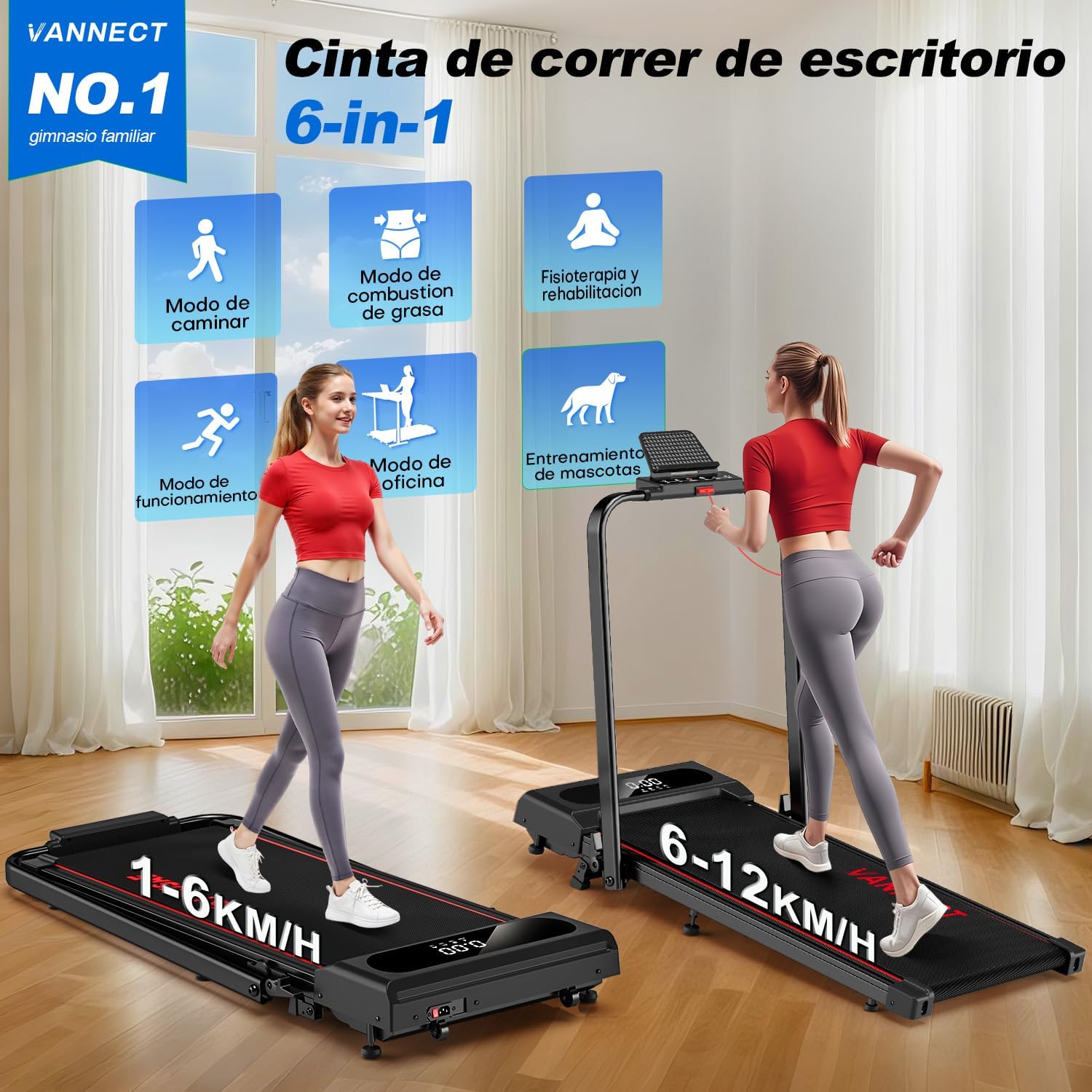
Image: An illustration showcasing the Vannect treadmill's 6-in-1 functionality, depicting various modes such as walking, fat burning, physiotherapy, office use (with a standing desk), and even pet training. It highlights the versatility for different user needs and speeds (1-6 KM/H for walking, 6-12 KM/H for running).
- Walking Mode: Ideal for light exercise, rehabilitation, or use with a standing desk. Speeds typically range from 1-6 km/h.
- Running Mode: For more intense cardiovascular workouts, with speeds up to 12 km/h.
- Incline Training: The 9% manual incline simulates uphill walking or running, increasing calorie burn and muscle engagement.
- Quiet Operation: The 2.75 HP motor operates at less than 30dB, allowing for quiet workouts at any time.
Maintenance
Regular maintenance ensures the longevity and optimal performance of your treadmill.
- Cleaning: Wipe down the treadmill with a damp cloth after each use to remove sweat and dust. Do not use abrasive cleaners or solvents.
- Lubrication: The running belt may require periodic lubrication to reduce friction. Refer to the specific instructions in the included user manual for your model's lubrication requirements and recommended lubricant.
- Belt Tension and Alignment: Check the running belt tension and alignment regularly. If the belt slips or drifts to one side, adjust it according to the instructions in the detailed user manual.
- Shock Absorption System: The treadmill features a 5-layer anti-slip surface and 8 silicone shock absorbers designed to protect your joints and provide a comfortable running experience.
- Storage: The treadmill's foldable design allows for easy storage. Fold the handlebar down and use the integrated transport wheels to move it. Its ultra-slim profile (13.5 cm height when folded) allows it to be stored under a sofa or bed.

Image: This image highlights the treadmill's advanced knee protection features, including a 7-layer anti-slip running belt and 8 silicone shock absorbers, designed to improve cushioning performance by 50%.
Troubleshooting
If you encounter any issues with your treadmill, refer to the following common problems and solutions:
| Problem | Possible Cause | Solution |
|---|---|---|
| Treadmill does not start. | Power cord not plugged in, safety key not in place, power switch off. | Ensure power cord is securely plugged in, safety key is correctly placed, and power switch is on. |
| Running belt slips or hesitates. | Belt too loose, lack of lubrication. | Adjust belt tension. Lubricate the running belt as per maintenance instructions. |
| Unusual noise during operation. | Loose parts, motor issue, belt friction. | Check for loose screws and tighten them. If noise persists, contact customer support. |
| Display not working. | Loose connection, power issue. | Check power connection. If problem persists, contact customer support. |
For issues not listed here or if solutions do not resolve the problem, please contact Vannect customer support.
Specifications
Below are the detailed specifications for the Vannect X390S Foldable Treadmill:

Image: This image provides a detailed comparison of the Vannect treadmill's 2.75 HP motor against other typical motors, emphasizing its superior performance in terms of maximum load capacity, speed range, and significantly lower noise levels (below 30dB), ensuring a quiet and powerful workout.
| Feature | Detail |
|---|---|
| Model Number | X390S |
| Motor Power | 2.75 HP |
| Speed Range | 1 - 12 km/h |
| Incline | 9% Manual Incline |
| Maximum User Weight | 150 kg (350 lbs) |
| Running Surface Dimensions | 110 x 40 cm |
| Product Dimensions (Unfolded) | 120.8 x 102.1 x 56 cm |
| Product Dimensions (Folded Height) | 13.5 cm |
| Material | Metal |
| Noise Level | <30 dB |
| Connectivity | Bluetooth, Fitshow App |
| Assembly Required | No (100% pre-installed) |
| What's in the Box | Treadmill base, motor housing, power cable, user manual |
Warranty and Support
Vannect is committed to providing high-quality products and excellent customer service.
- Warranty: Your Vannect treadmill comes with a 5-year warranty for free spare parts. This warranty covers manufacturing defects and significant component failures under normal use.
- Customer Support: For any questions, concerns, or technical assistance, please contact Vannect customer service. Our support team is available 24/7 to assist you. Refer to the contact information provided in the packaging or on the official Vannect website.
We appreciate your trust in Vannect products and wish you a rewarding fitness journey.
Ask a question about this manual
Ask about setup, troubleshooting, compatibility, parts, safety, or missing instructions. Manuals+ will review the question and use this page’s manual context to help answer it.