
BIFANS TX Remote S2
BIFANS Replacement Remote Control User Manual
Model: TX Remote S2 | Brand: BIFANS
1. Product Overview
This BIFANS replacement remote control is designed for seamless operation of various Tanix Android TV Box models. It offers a direct replacement solution without the need for complex programming or pairing, ensuring a straightforward user experience. Constructed from durable ABS shell and silicone buttons, it is built for longevity and reliable performance.
Key Features:
- Direct Replacement: No programming or pairing required. Simply insert batteries and use.
- Durable Construction: Made from high-quality ABS shell and silicone buttons for wear resistance and durability.
- Extended Range: Operates effectively up to 10 meters (33 feet).
- Broad Compatibility: Specifically designed for Tanix Android TV Box models including TX3 Mini, TX3 Mini+, TX2, TX5, TX6, TX9, TX3 Pro, TX92, TX95, TX5 Pro, and TX5.
Note: This remote control is NOT compatible with Amazon Fire Stick or Amazon Box devices.
2. Setup and Initial Use
2.1. Battery Installation
The remote control requires two AAA batteries (not included). Follow these steps to install them:
- Locate the battery compartment cover on the back of the remote control.
- Slide the cover downwards or press the latch to open it.
- Insert two AAA batteries, ensuring the positive (+) and negative (-) terminals align correctly with the indicators inside the compartment.
- Replace the battery compartment cover by sliding it back into place until it clicks securely.
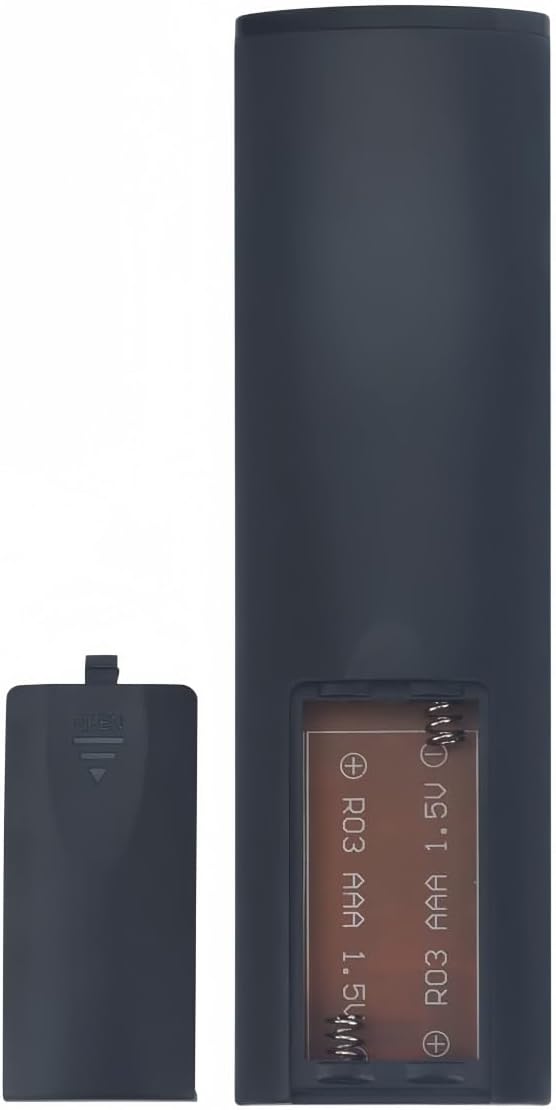
2.2. First Use
Once batteries are installed, the remote control is ready for immediate use with your compatible Tanix Android TV Box. Point the remote towards your TV Box and begin operating. No additional setup or configuration is necessary.
3. Compatibility
This remote control is designed to be fully compatible with the following Tanix Android TV Box models:
- TX3 Mini
- TX3 Mini+
- TX3 Plus
- TX3 MAX
- TX2
- TX5
- TX6
- TX9
- TX3 Pro
- TX92
- TX95
- TX5 Pro

4. Specifications
| Feature | Detail |
|---|---|
| Model Number | TX Remote S2 |
| Material | ABS Shell + Silicone Button |
| Color | Black |
| Remote Control Distance | Up to 10m (33ft) |
| Battery Type | 2 x AAA Batteries (Not Included) |
| Product Dimensions | 5.5 x 1.5 x 0.6 inches |
| Item Weight | 1.38 ounces |
| Special Feature | No Programming Required |
| Max Number of Supported Devices | 1 |
5. Operating Instructions
This remote functions identically to your original Tanix Android TV Box remote. Simply point the remote at your TV Box and press the desired buttons for navigation, volume control, power, and other functions. Ensure there are no obstructions between the remote and the TV Box for optimal performance.
Basic Functions:
- Power Button: Turns the TV Box on or off.
- Navigation Pad (Up/Down/Left/Right/OK): Used to navigate menus and select items.
- Volume Buttons (+/-): Adjusts the audio volume.
- Mute Button: Mutes or unmutes the audio.
- Home Button: Returns to the main home screen of the TV Box.
- Back Button: Returns to the previous screen or menu.
6. Maintenance
To ensure the longevity and optimal performance of your remote control, please follow these maintenance guidelines:
- Cleaning: Wipe the remote with a soft, dry cloth. Avoid using liquid cleaners or abrasive materials.
- Battery Replacement: Replace batteries when the remote's responsiveness decreases. Always replace both batteries at the same time with new ones.
- Storage: Store the remote in a cool, dry place away from direct sunlight and extreme temperatures.
- Avoid Drops: Protect the remote from physical impact, as this can damage internal components.
7. Troubleshooting
If you encounter issues with your remote control, try the following steps:
- Remote Not Responding:
- Check if the batteries are inserted correctly with the correct polarity.
- Replace old batteries with new AAA batteries.
- Ensure there are no obstructions between the remote and the TV Box.
- Verify that the remote is pointed directly at the TV Box's IR receiver.
- Intermittent Functionality:
- This could indicate low battery power; replace batteries.
- Ensure you are within the effective operating range (up to 10 meters).
- Compatibility Issues:
- Confirm your TV Box model is listed under the compatible devices section. This remote is not universal and will not work with all Android TV Boxes or other devices like Amazon Fire Stick.
8. Warranty and Support
For any product-related inquiries, technical support, or warranty information, please refer to the contact details provided by your retailer or the BIFANS official support channels. Keep your purchase receipt as proof of purchase for warranty claims.