
SHIHUANI DDSU666, DTSU666
DDSU666 / DTSU666 Electric Energy Meter User Manual
Brand: SHIHUANI
1. Product Overview
The SHIHUANI DDSU666 and DTSU666 series are advanced electric energy meters designed for precise measurement and display of various electrical parameters. These meters are capable of simultaneously measuring voltage, current, active power, energy consumption, frequency, and power factor. They are suitable for both single-phase (DDSU666) and three-phase (DTSU666) applications, including solar PV inverter systems.
Key features include a split current transformer for simplified installation, an overload alarm function, automatic data storage to prevent data loss during power outages, and intuitive one-touch controls for backlight management, energy reset, and alarm limit settings. The high-definition display ensures clear visibility from a 180-degree viewing angle, day or night.

Figure 1: SHIHUANI DDSU666 Single-Phase Smart Meter (left) and DTSU666 Three-Phase Smart Meter (right). These meters provide comprehensive electrical parameter monitoring for various applications.
2. Setup and Installation
Proper installation is crucial for accurate readings and safe operation. Always ensure power is disconnected before beginning any installation procedures. The meters are designed for DIN rail mounting.
2.1 DDSU666 Single-Phase Meter Installation
For the DDSU666 single-phase meter, connect the live (L) and neutral (N) wires as indicated on the terminal diagram. For models requiring a Current Transformer (CT), ensure the CT is correctly installed around the live wire, and its secondary wires are connected to the meter's CT input terminals.
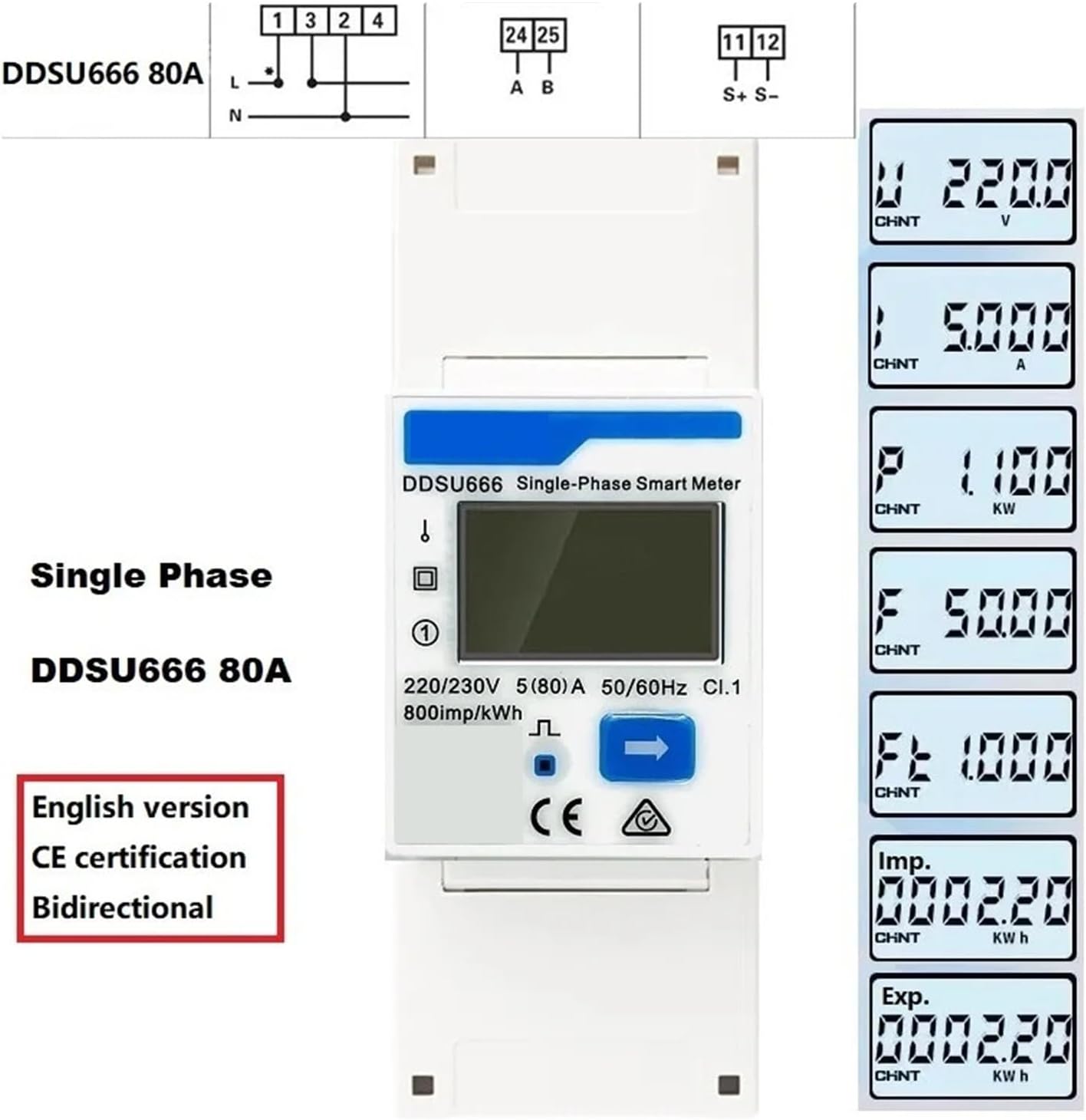
Figure 2: Connection diagram for the DDSU666 80A single-phase meter, showing L and N connections, and typical display readings for Voltage (V), Current (A), Power (kW), Frequency (Hz), and Energy (kWh).

Figure 3: Connection diagram for the DDSU666 1.5(6)A single-phase meter, illustrating the required external Current Transformer (CT) connection for current measurement. Display readings are similar to the 80A model.
2.2 DTSU666 Three-Phase Meter Installation
For the DTSU666 three-phase meter, connect the three-phase lines (L1, L2, L3) and neutral (N) according to the terminal markings. For models requiring Current Transformers (CTs), ensure three CTs are correctly installed, one for each phase, and their secondary wires are connected to the meter's corresponding CT input terminals.
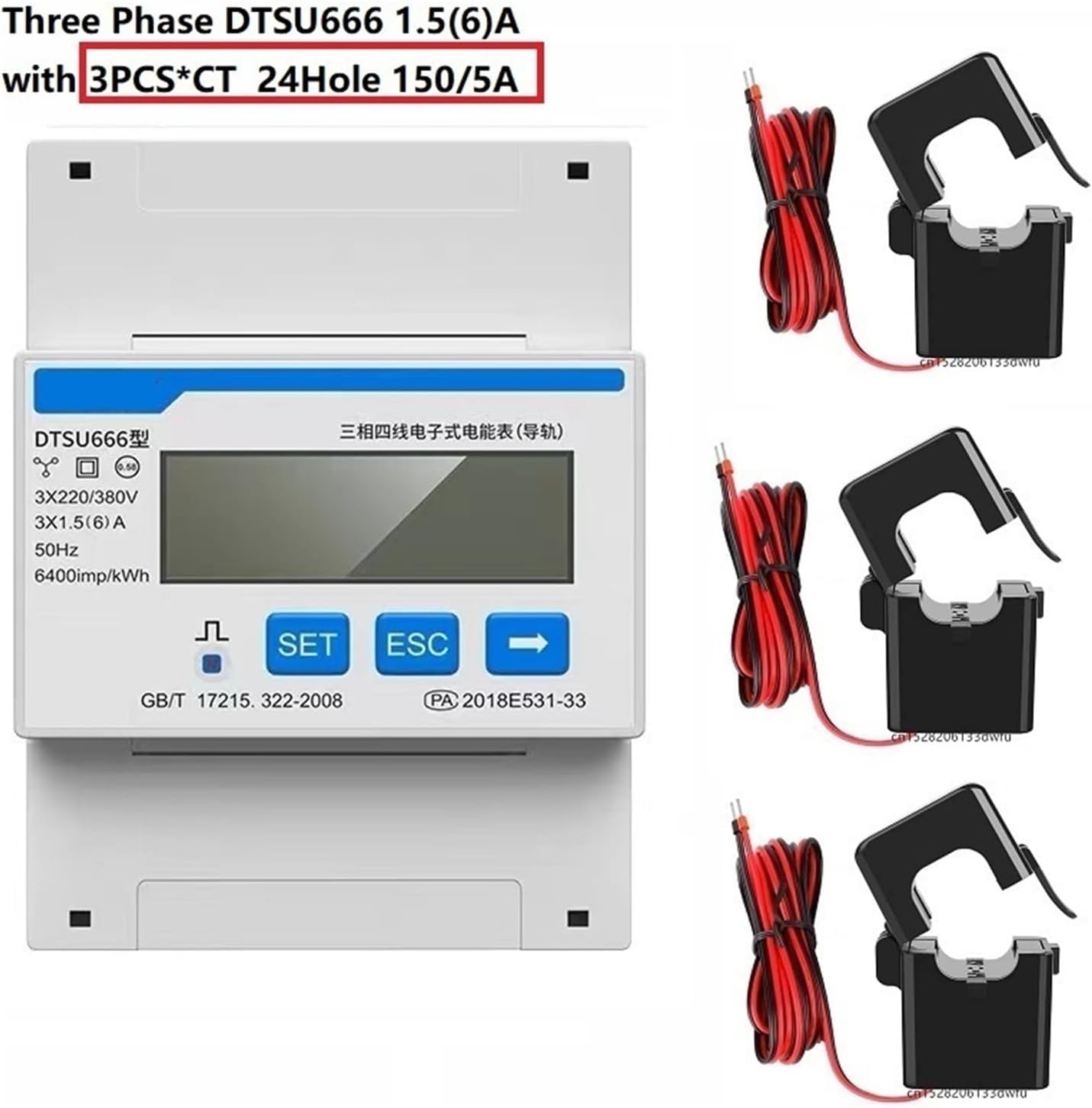
Figure 4: The DTSU666 three-phase smart meter shown with three external Current Transformers (CTs), typically used for models like the 1.5(6)A with 150/5A CTs.
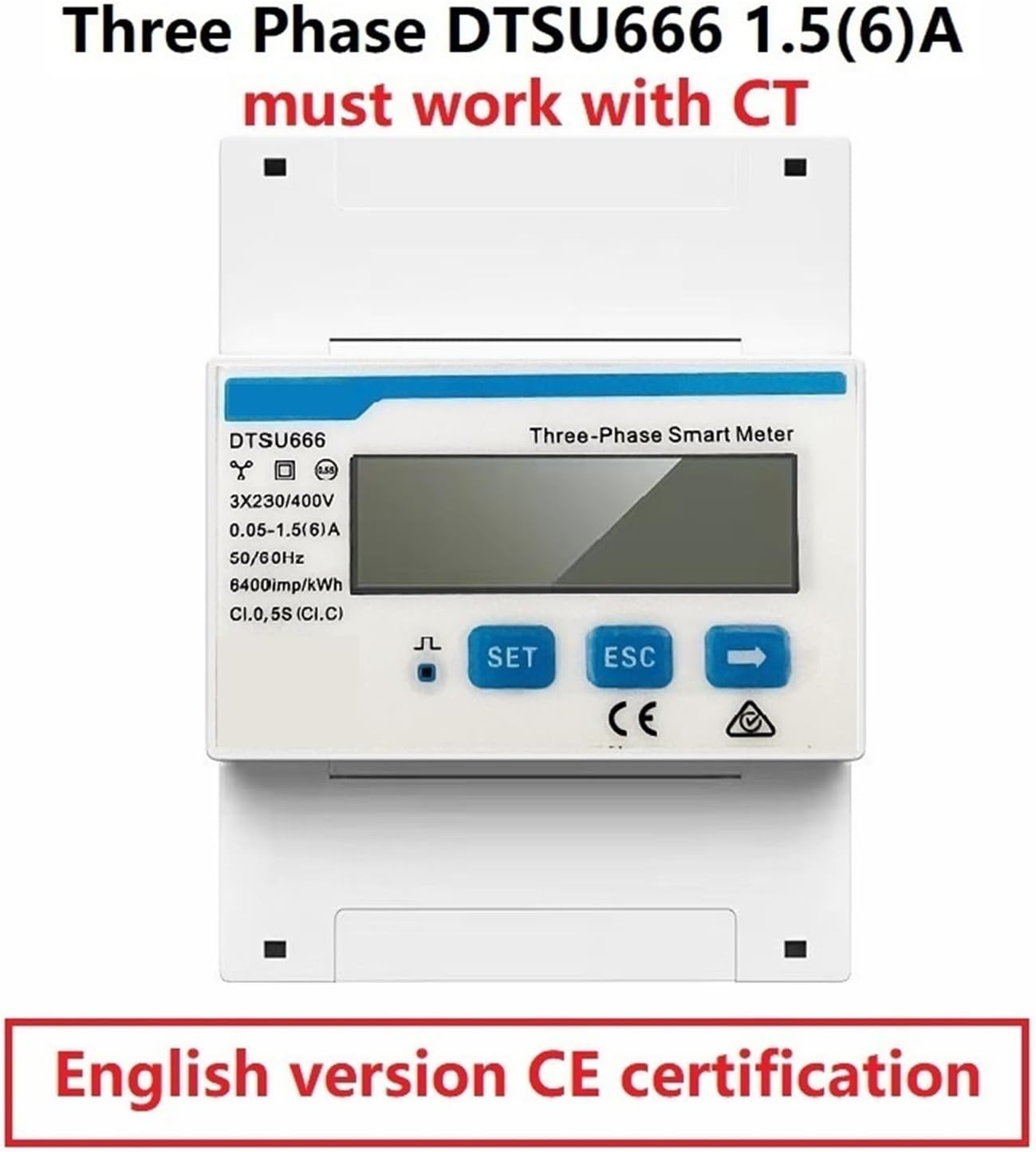
Figure 5: The DTSU666 1.5(6)A three-phase meter, explicitly stating that it must work with external Current Transformers (CTs). This model is CE certified and available in an English version.

Figure 6: The DTSU666 1.5(6)A three-phase meter packaged with three 24-hole 250/5A Current Transformers, indicating a complete solution for three-phase current measurement.
Important: Always refer to the specific wiring diagram printed on your meter or included in its packaging for precise connection instructions. Incorrect wiring can damage the device or pose safety risks.
3. Operating Instructions
Once installed and powered on, the meter will automatically begin displaying real-time electrical parameters on its HD screen.
3.1 Display Navigation
The meter's display cycles through various parameters such as voltage (V), current (A), active power (kW), frequency (Hz), and total energy (kWh). Some models may also display power factor. Use the navigation buttons (e.g., 'SET', 'ESC', arrow buttons) to manually cycle through display screens or access settings.

Figure 7: Front view of the DTSU666 80A three-phase smart meter, highlighting its clear HD display and control buttons. This model is CE certified and available in an English version.
3.2 One-Touch Control Functions
- Backlight Control: Press the designated button (often 'SET' or an arrow) to toggle the display backlight on or off, or to adjust its brightness.
- Reset Energy: To reset the accumulated energy (kWh) reading, press and hold the appropriate button (refer to your specific model's instructions, often 'SET' or 'ESC' in combination) until the energy value resets.
- Preset Power Alarm Limit: The meter features an overload alarm. You can set a maximum power limit. If the measured power exceeds this preset value, the backlight and power display will flash simultaneously to indicate an overload condition. Consult your meter's specific menu navigation for setting this limit.
3.3 Automatic Data Storage
The meter is equipped with an automatic data storage function. In the event of a sudden power loss, the last recorded test data is automatically saved. This feature prevents data loss and ensures continuity of monitoring.
4. Maintenance
The DDSU666 and DTSU666 meters are designed for long-term, reliable operation with minimal maintenance.
- Cleaning: Periodically wipe the meter's display and casing with a soft, dry cloth. Do not use abrasive cleaners or solvents, as they may damage the plastic.
- Inspection: Regularly inspect the wiring connections to ensure they are secure and free from corrosion or damage.
- Environment: Ensure the meter is operated within its specified environmental conditions (temperature, humidity) to prevent malfunction.
No user-serviceable parts are inside the meter. Any repairs should be performed by qualified personnel.
5. Troubleshooting
This section addresses common issues and their resolutions.
- No Display/Power: Check the power supply connections to the meter. Ensure the circuit breaker is on.
- Incorrect Readings: Verify that all wiring, especially CT connections (if applicable), are correct and secure according to the installation diagrams. Ensure the CTs are installed in the correct direction (indicated by an arrow on the CT).
- Overload Alarm Flashing: This indicates that the measured power has exceeded the preset alarm limit. Reduce the load or adjust the alarm limit if necessary (refer to Section 3.2).
- Data Loss: The meter features automatic data storage. If data appears lost after a power interruption, ensure the power was fully restored and the meter had sufficient time to save the last state.
For issues not covered here, please contact customer support.
6. Specifications
| Parameter | Value / Description |
|---|---|
| Product Type | Electric Energy Meter (Digital Multimeter) |
| Models | DDSU666 (Single-Phase), DTSU666 (Three-Phase) |
| Measurement Parameters | Voltage, Current, Active Power, Energy, Frequency, Power Factor |
| DDSU666 Voltage Range | AC 220V / 220V-230V |
| DDSU666 Current Range | AC 5(80)A or 0.015-0.075(6)A/1.5(6)A (with CT) |
| DTSU666 Voltage Range | 3X230/400V or 3X220/380V |
| DTSU666 Current Range | 0.25-5(80)A or 0.05-1.5(6)A (with CT) |
| Frequency | 50/60Hz |
| Impulse Constant | 800imp/kWh (DDSU666), 400imp/kWh (DTSU666), 6400imp/kWh (specific models) |
| Display | HD Display, 180° viewing angle, Backlight function |
| Special Features | Overload Alarm, Automatic Data Storage, One-touch Control |
| Certifications | CE certified |
| Package Dimensions | 1.18 x 0.79 x 0.39 inches |
| Item Weight | 1.1 pounds |
| Material | Alloy (as per product description) |
7. Warranty and Support
For information regarding product warranty, returns, or technical support, please contact your original point of purchase or the manufacturer directly. Keep your purchase receipt or order details handy when contacting support.
Manufacturer: SHIHUANI
Related Documents - DDSU666, DTSU666
 |
Growatt Smart Meter Installation and Configuration Guide Comprehensive guide for installing and configuring Growatt smart meters, including models like Chint DTSU666, DDSU666, Eastron SDM630MCT, SDM630-MODBUS V3, SDM230, and SDM120CT. Covers technical specifications, wiring, communication setup, and troubleshooting for various smart meter installations with Growatt inverters. |
 |
CHINT Energy Meter Safety Instructions Comprehensive safety guidelines for CHINT DDSU666 and DTSU666 digital energy meters, covering installation, operation, maintenance, and general safety precautions for safe use. |
 |
APsystems Export Power Control with ECU-R and CHINT Meter: System Guide A comprehensive guide to the APsystems Export Power Control solution, detailing the ECU-R and CHINT electric meters for photovoltaic system export management and data monitoring. Covers system composition, meter selection, wiring configurations, and configuration settings. |
 |
Hoymiles Microinverter System Export Management Guide Comprehensive installation and configuration guide for the Hoymiles Export Management System, including meter setup, grid configuration, and troubleshooting for microinverter systems. |
 |
Hoymiles Microinverter System Export Management Guide A technical guide from Hoymiles detailing the installation, configuration, and operation of their Export Management System for microinverter solar power systems, ensuring grid compliance and efficient energy management. |
 |
Huawei SUN2000L/SUN2000 Wechselrichter & Akku Kurzanleitung Schnellstartanleitung für Huawei SUN2000L-(2KTL-5KTL) und SUN2000-(2KTL-6KTL)-L1 Solarwechselrichter, LG RESU-Akkus und Smart Power Sensoren. Enthält Installations- und Anschlussinformationen. |
Ask a question about this manual
Ask about setup, troubleshooting, compatibility, parts, safety, or missing instructions. Manuals+ will review the question and use this page’s manual context to help answer it.