
Introduction
Thank you for purchasing the Kenneth Cole REACTION Men's Analog Digital Watch, Model KRWGP2188703. This manual provides essential information for the proper setup, operation, and maintenance of your watch. Please read it carefully to ensure optimal performance and longevity of your timepiece.
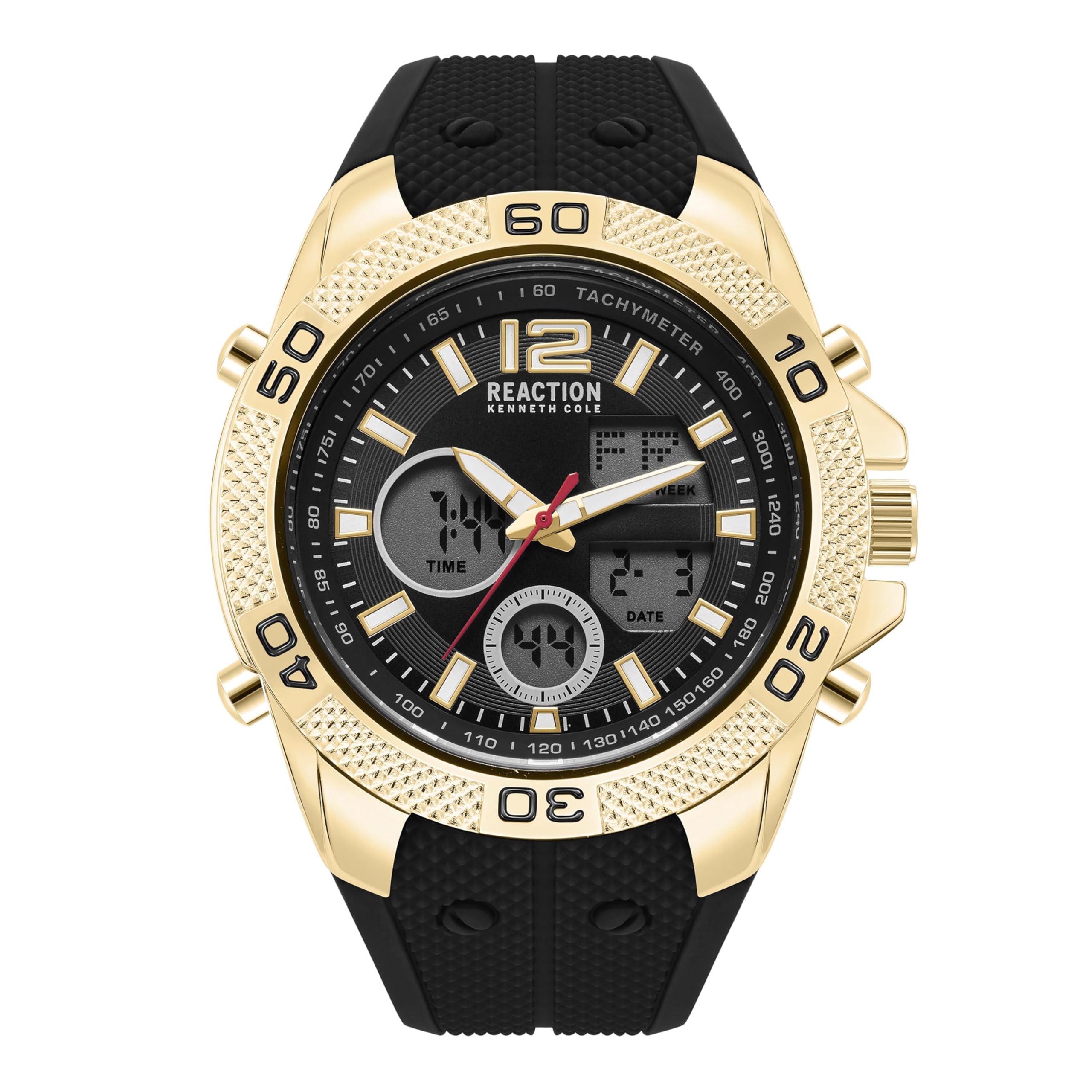
Image: Front view of the Kenneth Cole REACTION Men's Analog Digital Watch, Model KRWGP2188703. The watch features a gold-tone case, black dial with four digital windows, and a textured black silicone strap.
Safety Information
- Avoid exposing the watch to extreme temperatures or sudden temperature changes.
- Do not attempt to open the watch case or replace the battery yourself, as this may void the warranty and damage the watch.
- Keep the watch away from strong magnetic fields.
- This watch is water resistant up to 30 meters. It is suitable for splashes or brief immersion in water, but not for swimming or diving. Do not operate buttons while the watch is wet.
Components
Familiarize yourself with the main components of your watch:
- Crown: Used for setting analog time.
- Push Buttons (A, B, C, D): Used for operating digital functions (e.g., mode, adjust, start/stop, reset). Specific functions may vary; refer to the "Operating Instructions" section.
- Analog Dial: Displays time with hands.
- Digital Display Windows: Four windows displaying digital time, date, and other functions.
- Bezel: Stationary sport tachometer bezel with markings.
- Silicone Strap: Secures the watch to your wrist.
- Buckle Clasp: For fastening the strap.
Setup
Setting Analog Time
- Pull the crown out to the first position.
- Turn the crown to set the hour and minute hands to the desired time.
- Push the crown back into its normal position.
Initial Digital Setup (Time and Date)
The digital display typically requires initial setup. The exact button sequence may vary slightly, but generally follows these steps:
- Press the MODE button (often labeled 'A' or 'B') repeatedly until you reach the time setting mode (usually indicated by flashing digits).
- Use the ADJUST button (often labeled 'C') to select the digit or setting you wish to change (e.g., hours, minutes, 12/24-hour format, year, month, day).
- Use the SET or START/STOP button (often labeled 'D') to increase the value of the flashing digit.
- Once all settings are correct, press the MODE button again to exit the setting mode.
Operating Instructions
Digital Functions
Your watch features multiple digital functions accessible via the push buttons. Common functions include:
- Time Display: Shows current digital time (hours, minutes, seconds).
- Date Display: Shows month, day, and day of the week.
- Alarm: Set a daily alarm.
- Stopwatch: Measure elapsed time.
- Backlight: Illuminates the digital display for visibility in low light conditions. (Press a specific button, usually 'B' or 'D', for backlight).
Refer to the button labels on your specific watch model for precise operation of each function. Typically, one button cycles through modes, while others adjust settings or start/stop functions.
Maintenance
Cleaning Your Watch
Wipe the watch case and strap regularly with a soft, dry cloth. For silicone straps, a slightly damp cloth with mild soap can be used, followed by thorough drying. Avoid using chemical cleaners or abrasive materials.
Water Resistance
This watch has a water resistance depth of 30 meters (3 ATM). This means it is resistant to splashes, rain, and brief immersion. It is not suitable for showering, swimming, diving, or any water sports. Ensure the crown is fully pushed in before any contact with water. Do not operate buttons underwater.
Battery Replacement
The watch requires 2 Lithium Metal batteries (included). When the display dims or the watch stops functioning, it's time for battery replacement. It is recommended to have batteries replaced by a qualified watch technician to ensure proper sealing and maintain water resistance.
Troubleshooting
| Problem | Possible Cause | Solution |
|---|---|---|
| Analog hands not moving | Crown is pulled out; battery depleted. | Push crown in; replace battery. |
| Digital display is blank or dim | Battery depleted. | Replace battery. |
| Watch gains or loses time significantly | Exposure to strong magnetic fields; internal malfunction. | Reset time; consult a watch technician if problem persists. |
| Water condensation inside watch | Water resistance compromised; extreme temperature change. | Immediately take to a watch technician. Do not attempt to dry it yourself. |
| Buttons not responding | Watch is wet; internal issue. | Ensure watch is dry; if problem persists, consult technician. |
Specifications
- Model Number: KRWGP2188703
- Display Type: Analog-Digital
- Watch Movement Type: Chinese Quartz
- Case Material: Alloy Steel
- Case Diameter: 50 millimeters
- Case Thickness: 17 millimeters
- Band Material: Silicone
- Band Width: 34 millimeters
- Band Length: 9 inches
- Crystal: Mineral Glass
- Water Resistance Depth: 30 meters (3 ATM)
- Power Source: Battery Powered (2 Lithium Metal batteries included)
- Clasp Type: Buckle
- Item Weight: 140 g (4.94 ounces)
- Product Dimensions: 9.45 x 1.97 x 0.67 inches
- Additional Features: Bezel Markings, Lightweight, Scratch-Resistant, Second Hand
Warranty Information
This Kenneth Cole REACTION watch comes with a Limited Warranty. The warranty covers manufacturing defects under normal use. It does not cover damage resulting from improper handling, accidents, unauthorized repairs, or normal wear and tear. For specific terms and conditions, please refer to the warranty card included with your purchase or contact customer support.
Customer Support
For further assistance, technical support, or warranty claims, please contact Kenneth Cole REACTION customer service. Contact details are typically provided on the product packaging or the official brand website.
Please retain your proof of purchase for warranty purposes.