
1. Introduction
This manual provides detailed instructions for the installation, operation, and maintenance of the AWAVINGCEM AS5048A 14-Bit Magnetic Rotary Encoder Sensor. The AS5048A is a high-precision, contactless magnetic rotary encoder designed for accurate angular position measurement, particularly suitable for brushless motor applications. Please read this manual thoroughly before using the device to ensure proper functionality and longevity.
2. Product Overview
The AS5048A is a robust 14-bit rotary encoder that utilizes a magnetic field to determine angular position. It features an SPI (Serial Peripheral Interface) for data communication, offering high precision and reliable performance without the need for a brush holder. Its design emphasizes ease of integration and user-friendliness, making it suitable for various industrial, automotive, and household electronic applications.
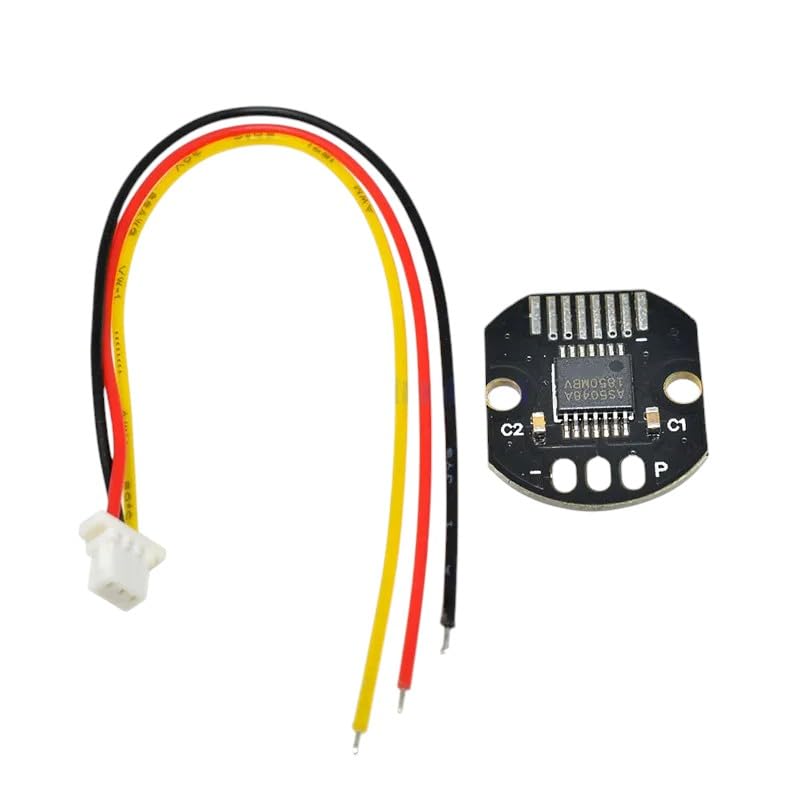
Figure 2.1: The AWAVINGCEM AS5048A Magnetic Rotary Encoder Sensor module, shown with its associated connecting wires. This image illustrates the compact design and the wiring harness for integration into electronic systems.

Figure 2.2: An isometric illustration depicting a variety of semiconductor electronic components. This image represents the high-quality electronic components used in the manufacturing of devices like the AS5048A sensor.
3. Specifications
| Feature | Description |
|---|---|
| Model | AS5048A |
| Resolution | 14-bit (16384 positions per revolution) |
| Interface | SPI (Serial Peripheral Interface) |
| Type | Magnetic Rotary Encoder |
| Application | Brushless Motors, Robotics, Industrial Automation |
| Manufacturer | AWAVINGCEM |
| ASIN | B0F2B3NKX2 |
4. Setup and Installation
Proper installation is crucial for the accurate performance of the AS5048A sensor. Follow these general guidelines:
- Mounting: Securely mount the AS5048A sensor module in the desired position, ensuring the magnetic field source (e.g., a diametrically magnetized magnet) is correctly aligned with the sensor's center. The air gap between the magnet and the sensor is critical for optimal performance; refer to the AS5048A datasheet for specific recommendations.
- Electrical Connections: Connect the sensor to your microcontroller or system using the SPI interface. Typical connections include:
- VCC (Power Supply)
- GND (Ground)
- SCK (Serial Clock)
- MISO (Master In, Slave Out) - Note: For AS5048A, MOSI might not be used for reading position, but check specific datasheet for configuration.
- CS (Chip Select)
- Magnet Placement: Position the magnet centrally above the sensor. The magnet's orientation (north/south pole facing the sensor) may affect the direction of rotation readings.
5. Operating Instructions
Once installed, the AS5048A sensor can be operated by communicating with it via its SPI interface. The general steps for reading angular position are:
- Initialize SPI: Configure your microcontroller's SPI peripheral with the correct clock speed, data order, and mode.
- Chip Select: Assert the Chip Select (CS) line low to select the AS5048A sensor.
- Read Position: Send the appropriate command (e.g., a read command for the angular position register) over SPI. The sensor will respond with the 14-bit angular data.
- De-assert Chip Select: Raise the CS line high to deselect the sensor.
- Data Interpretation: The 14-bit data represents the absolute angular position. This value can be converted to degrees or radians based on your application's requirements (e.g.,
angle_degrees = (raw_value / 16384.0) * 360.0).
Refer to the official AS5048A datasheet for detailed SPI communication protocols, register maps, and error flag interpretations.
6. Maintenance
The AS5048A magnetic rotary encoder is designed for long-term, maintenance-free operation due to its contactless nature. However, adhering to the following guidelines can help ensure its continued reliability:
- Cleanliness: Keep the sensor and its immediate environment free from excessive dust, dirt, and metallic particles, which could interfere with the magnetic field or electrical connections.
- Environmental Conditions: Operate the sensor within its specified temperature and humidity ranges. Avoid exposure to strong magnetic fields from other sources, which could cause interference.
- Physical Inspection: Periodically inspect the wiring and connections for any signs of damage or corrosion. Ensure the sensor remains securely mounted.
- Magnet Integrity: Verify that the magnet used with the sensor is not damaged or demagnetized, as this would directly impact performance.
7. Troubleshooting
If you encounter issues with your AS5048A sensor, consider the following troubleshooting steps:
- No Reading or Erratic Data:
- Check all electrical connections (VCC, GND, SPI lines) for proper wiring and secure contact.
- Verify the power supply voltage is within the sensor's operating range.
- Ensure the magnet is correctly positioned and aligned with the sensor, and the air gap is optimal.
- Confirm your SPI communication code is correct (clock speed, mode, data order, chip select timing).
- Check for strong external magnetic interference.
- Incorrect Angular Position:
- Re-check magnet alignment and orientation.
- Ensure the magnet is diametrically magnetized and of appropriate strength.
- Verify your data interpretation logic (e.g., conversion from raw 14-bit value to degrees/radians).
- Sensor Not Responding:
- Confirm the sensor is receiving power.
- Test the SPI lines for continuity and proper signal levels.
- If possible, test with a known working sensor or a different microcontroller.
8. Warranty and Support
AWAVINGCEM is committed to providing high-quality electronic components and exceptional customer support. Your AS5048A sensor is backed by our commitment to quality.
- Money-Back Guarantee: We offer a money-back guarantee, reflecting our confidence in the product's quality and performance.
- Customer Support: Should you have any questions, require technical assistance, or encounter issues not covered in this manual, please contact our dedicated customer support team.
For support, please visit our official website or refer to your purchase documentation for contact details.