
1. Introduction
Thank you for choosing the coolid Portable Projector. This device is designed to provide a high-quality visual experience with its 1080P HD resolution, smart features, and versatile connectivity. Please read this manual carefully before use to ensure proper operation and to maximize your viewing pleasure.
2. Product Overview
2.1 Package Contents
Ensure all the following items are included in your package:
- coolid Portable Projector
- Remote Control
- HDMI Cable
- User Manual
- Power Adapter (not explicitly listed but implied)
2.2 Projector Features
The coolid Portable Projector offers a range of advanced features for an enhanced user experience:
- 1080P Full HD Native Resolution: Delivers crisp and clear images.
- 4K Video Support: Capable of decoding and displaying 4K content.
- 1400 Lumens Brightness: Provides vibrant and bright projections.
- WiFi 6 (2.4G/5G) & Bluetooth 5.4: Ensures high-speed, stable wireless connectivity and audio expansion.
- Built-in Android TV: Access to popular streaming apps like YouTube, Prime Video, Netflix, Hulu, Spotify, and more.
- Automatic Electronic Focus: Sharpens the image automatically.
- Automatic Keystone Correction: Adjusts image distortion for a perfectly rectangular screen.
- Digital Zoom (35%-100%): Adjusts screen size without moving the projector.
- 180° Rotatable Design: Allows flexible projection angles, including ceiling projection.
- Dual Control System: Operate with the wireless remote or smart air mouse.

Image: coolid Portable Projector showcasing its smart features and app integration.
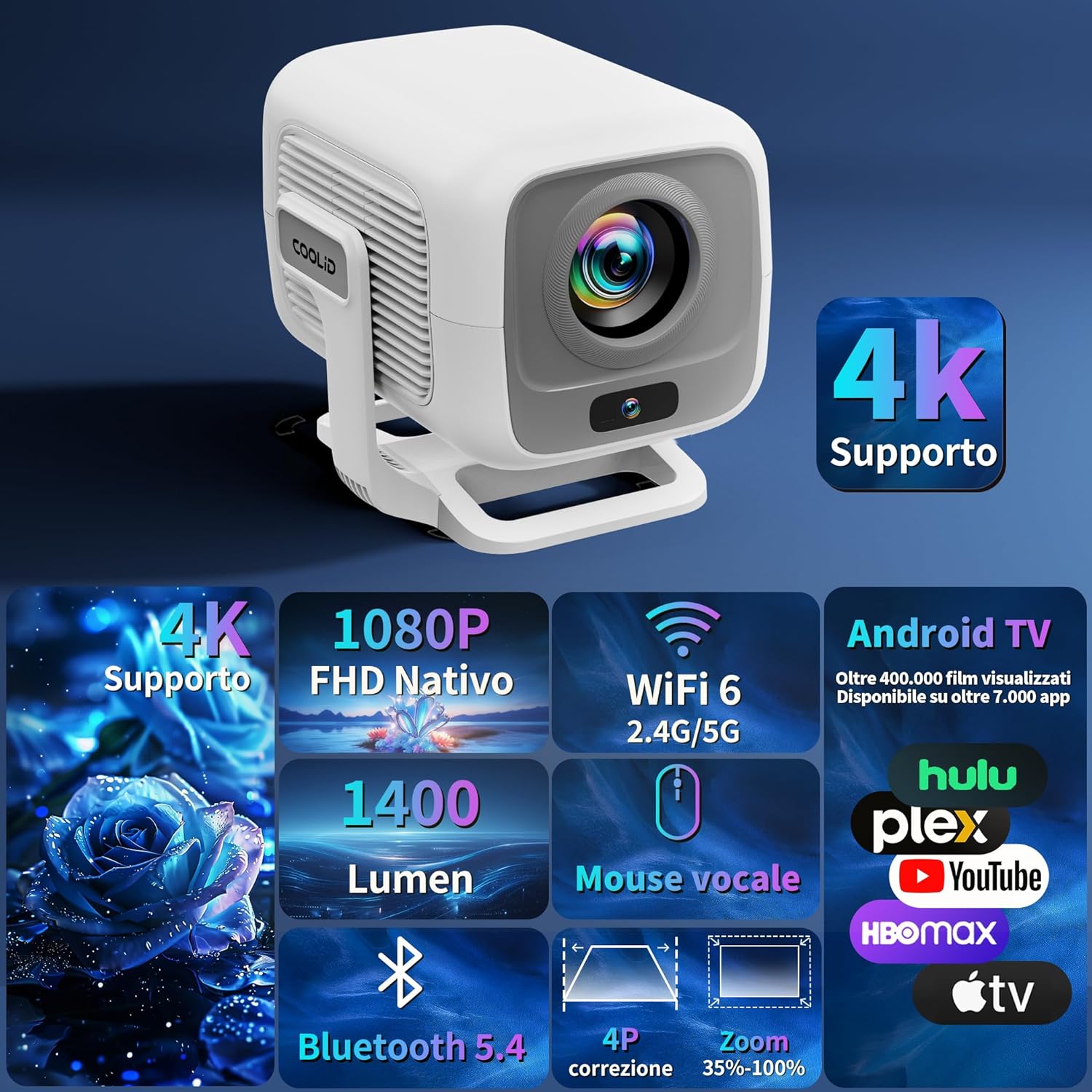
Image: Visual representation of the projector's core specifications and capabilities.
3. Setup
3.1 Initial Placement
Place the projector on a stable, flat surface. The 180° rotatable design allows for versatile placement, including tabletop, tripod, or ceiling mounting. Ensure there are no obstructions in front of the lens.
3.2 Power Connection
- Connect the power adapter to the DC input port on the projector.
- Plug the power adapter into a wall outlet.
- Press the power button on the projector or remote control to turn it on.
3.3 First-Time Setup
Upon first power-on, the projector will guide you through initial setup steps, including language selection and network configuration. Follow the on-screen prompts.
4. Operating Instructions
4.1 Navigation and Control
The projector can be controlled using the included wireless remote control. The remote features a smart air mouse function for easier navigation within the Android TV interface.
- Use the directional buttons to navigate menus.
- Press the OK button to select items.
- The Back button returns to the previous screen.
- The Home button takes you to the main Android TV interface.
- For Bluetooth audio mode, pressing the OK button on the remote will turn off the screen. Press OK again to reactivate the screen.

Image: Demonstrates smart control with voice commands and various streaming apps.
4.2 Image Adjustment
The projector features intelligent screen adaptation for optimal viewing:
- Automatic Electronic Focus: The projector automatically adjusts the focus to ensure a sharp image. This typically occurs within 3 seconds after repositioning the projector.
- Automatic Keystone Correction: The projector automatically corrects trapezoidal distortion, ensuring a rectangular image even when projected at an angle.
- Digital Zoom: Adjust the screen size from 35% to 100% via the settings menu without physically moving the projector.

Image: Illustration of the automatic screen adaptation features.
5. Connectivity
5.1 Wireless Connectivity
- WiFi 6 (2.4G/5G): Connect to your home network for streaming content. Navigate to Settings > Network > Wi-Fi and select your network.
- Bluetooth 5.4: Connect to external Bluetooth speakers, headphones, or mobile devices for audio input/output. Navigate to Settings > Bluetooth to pair devices.

Image: Demonstrates the high-speed bidirectional WiFi 6 and Bluetooth 5.4 connectivity.
5.2 Wired Connections
The projector offers multiple ports for connecting various devices:
- HDMI Port: Connect to laptops, gaming consoles, TV sticks, or other HDMI-enabled devices.
- USB Port: Connect USB drives for media playback or other USB accessories.
- 3.5mm Audio Jack: Connect external headphones or speakers via a wired connection.

Image: Overview of multi-device connectivity options.
6. Maintenance
6.1 Cleaning the Lens
Use a soft, lint-free cloth specifically designed for optical lenses to gently wipe the projector lens. Avoid using abrasive materials or harsh chemicals.
6.2 Cleaning the Projector Body
Wipe the projector's exterior with a soft, dry cloth. Do not use liquid cleaners directly on the device.
6.3 Storage
When not in use for extended periods, store the projector in a cool, dry place, away from direct sunlight and extreme temperatures. Use the original packaging or a protective case to prevent dust accumulation and damage.
7. Troubleshooting
| Problem | Possible Cause | Solution |
|---|---|---|
| No image displayed | Power cable disconnected; Input source not selected; Lens cap on. | Check power connection; Select correct input source (HDMI, USB); Remove lens cap. |
| Image is blurry | Out of focus; Projector moved. | Allow automatic focus to adjust (reposition slightly if needed); Manually adjust focus if auto-focus fails. |
| Image is distorted (trapezoid shape) | Projector not perpendicular to screen. | Allow automatic keystone correction to adjust; Adjust projector position. |
| No sound | Volume too low; External audio device not connected/paired; Muted. | Increase volume; Connect/pair external audio device; Unmute. |
| Remote control not working | Batteries low/dead; Obstruction between remote and projector. | Replace batteries; Ensure clear line of sight to projector's IR receiver. |
| Cannot connect to Wi-Fi | Incorrect password; Router too far; Wi-Fi disabled. | Verify password; Move projector closer to router; Enable Wi-Fi in settings. |
8. Specifications
| Feature | Detail |
|---|---|
| Brand | coolid |
| Model | B0F29SP58N |
| Dimensions (L x W x H) | 12.7 x 15.24 x 17.78 cm |
| Weight | 1.12 kg |
| Display Technology | LED |
| Native Resolution | 1920 x 1080 Pixels (Full HD) |
| Supported Resolution | Up to 4K |
| Brightness | 1400 Lumens |
| Contrast Ratio | 1500:1 |
| Aspect Ratio | 16:9 |
| Wireless Connectivity | WiFi 6 (2.4G/5G), Bluetooth 5.4 |
| Wired Connectivity | USB, HDMI, 3.5mm Audio Jack |
| Operating System | Built-in Android TV |
| Special Features | Automatic Electronic Focus, Automatic Keystone Correction, Digital Zoom (35%-100%), 180° Rotatable Design, Dual Control (Remote & Air Mouse) |
| Installation Options | Tabletop, Tripod, Ceiling |
| Recommended Use | Home cinema |
9. Warranty and Support
For warranty information and technical support, please refer to the warranty card included with your product or visit the official coolid website. Keep your purchase receipt as proof of purchase for warranty claims.
If you encounter any issues not covered in this manual, please contact coolid customer service for assistance.