
Introduction
Thank you for choosing the ALSTU 3 Pack Rechargeable Flashlight. This manual provides essential information for the safe and effective use, maintenance, and troubleshooting of your new flashlights. Please read this manual thoroughly before operating the product.

Image: Three ALSTU rechargeable flashlights, showcasing their design and included accessories like USB cables and lanyards.
Package Contents
Verify that all items are present in the package:
- 3x ALSTU Rechargeable Flashlights (with built-in batteries)
- 3x USB Charging Cables
- 3x Lanyards
- 1x User Manual (this document)

Image: A visual representation of the package contents, showing three flashlights, three USB cables, three lanyards, and the user manual.
Product Overview
Familiarize yourself with the main components of the ALSTU flashlight:
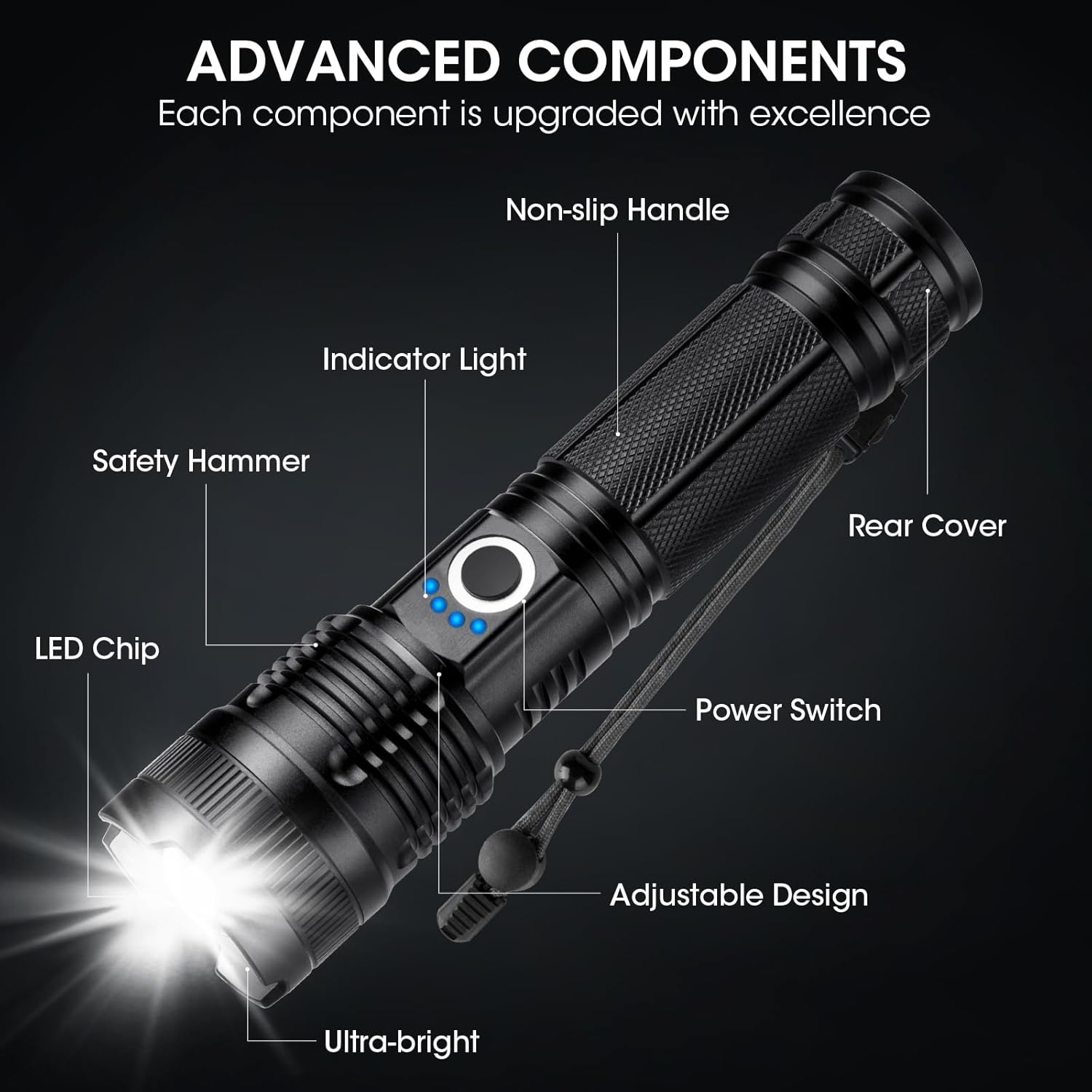
Image: A detailed diagram highlighting key components of the flashlight, such as the LED chip, power switch, indicator lights, adjustable design, non-slip handle, safety hammer, and rear cover.
- LED Chip: The light source for illumination.
- Indicator Light: Displays battery charge level.
- Power Switch: Controls power and cycles through lighting modes.
- Adjustable Design: Allows for focus adjustment (wide to narrow beam).
- Non-slip Handle: Provides a secure grip.
- Safety Hammer: Located at the rear cover, for emergency use.
- Rear Cover: Protects internal components.
Setup
Initial Charging
Before first use, fully charge the flashlight. The built-in 5000mAh battery provides up to 15 hours of operation on a full charge.
- Locate the smart charging port on the flashlight.
- Connect one end of the provided USB cable to the flashlight's charging port.
- Connect the other end of the USB cable to a compatible USB power adapter (not included) or a computer's USB port.
- The 4 power indicators (25%, 50%, 75%, 100%) will illuminate sequentially during charging, indicating the current charge level.
- Charging typically takes approximately 3 hours for a full charge. All four indicator lights will be solid when fully charged.

Image: The flashlight connected to a USB charging cable, illustrating the power indicator lights that show the charging progress.
Operating Instructions
Power On/Off
Press the power switch button located on the flashlight body to turn the flashlight on or off.
Changing Light Modes
The flashlight features 5 lighting modes. While the flashlight is on, press the power switch button repeatedly to cycle through the modes:
- High: Maximum brightness (99,000 lumens).
- Medium: Moderate brightness.
- Low: Reduced brightness for extended battery life.
- Strobe: Flashing light for signaling or disorientation.
- SOS: International Morse code signal for emergencies.

Image: A visual guide demonstrating the effect of each of the five lighting modes: High, Medium, Low, Strobe, and SOS.
Adjusting Focus (Zoom Function)
The flashlight head can be adjusted to change the beam focus from a wide floodlight to a narrow spotlight.
- To achieve a wide beam, gently pull the flashlight head forward. This provides a broader illumination area, suitable for close-range tasks or lighting a large space.
- To achieve a narrow beam (spotlight), gently push the flashlight head backward. This concentrates the light into a focused beam, ideal for long-distance illumination up to 3280 feet.

Image: A visual comparison illustrating the difference between the wide beam (floodlight) and narrow beam (spotlight) modes of the flashlight.
Maintenance
Cleaning
To maintain optimal performance and appearance:
- Wipe the flashlight body with a soft, damp cloth.
- Do not use abrasive cleaners or solvents, as they may damage the finish.
- Keep the lens clean for clear light output.
Water Resistance
The ALSTU flashlight is rated IPX7 waterproof, meaning it can withstand immersion in water up to 1 meter for 30 minutes. It is designed to function reliably in heavy rain, snow, and other harsh weather conditions.

Image: The flashlight shown under running water, illustrating its waterproof capabilities.
Storage
When storing the flashlight for extended periods:
- Ensure the battery is partially charged (around 50%) to prolong battery life.
- Store in a cool, dry place away from direct sunlight and extreme temperatures.
Troubleshooting
If you encounter issues with your ALSTU flashlight, refer to the following common problems and solutions:
| Problem | Possible Cause | Solution |
|---|---|---|
| Flashlight does not turn on. | Battery is depleted. | Charge the flashlight fully using the provided USB cable. |
| Flashlight does not charge. | USB cable or power adapter is faulty; charging port is obstructed. | Try a different USB cable or power adapter. Ensure the charging port is clean and free of debris. |
| Light output is dim. | Low battery; dirty lens. | Recharge the flashlight. Clean the flashlight lens with a soft cloth. |
| Cannot change light modes. | Power switch malfunction. | Ensure the flashlight is on. If the issue persists, contact customer support. |
If these solutions do not resolve the issue, please contact ALSTU customer service for further assistance.
Specifications
| Feature | Detail |
|---|---|
| Model Number | M082 L-3P |
| Brand | ALSTU |
| Light Source Type | LED |
| Brightness | 99,000 Lumens (Max) |
| Light Modes | High, Medium, Low, Strobe, SOS (5 Modes) |
| Adjustable Focus | Yes (Wide Beam / Narrow Beam) |
| Power Source | Battery Powered |
| Battery Type | Built-in 5000mAh Rechargeable NiCAD Battery |
| Charging Time | Approx. 3 hours |
| Operating Time | Up to 15 hours |
| Voltage | 3.7 Volts |
| Wattage | 30 Watts |
| Material | Aluminum |
| Color | Black |
| Water Resistance | IPX7 Waterproof |
| Product Dimensions | 1.9"D x 1.3"W x 6.5"H |
| Item Weight | 1.5 pounds (for the pack) |
| Special Features | Rechargeable, High Power, Adjustable Light Modes, Adjustable Focus, Durable, Impact Resistant, Long Range, Portable |
Warranty and Support
Warranty Information
ALSTU products come with an extended warranty. Please refer to the warranty card included in your package or contact ALSTU customer service for specific details regarding warranty coverage and duration.
Customer Support
For any questions, concerns, or issues regarding your ALSTU flashlights, including malfunction, lost accessories, or damaged packages, please contact ALSTU customer service directly through the Amazon platform. Our team of engineers is available to provide professional assistance.