
1. Introduction
Thank you for choosing the VANNECT X390S Foldable 6-in-1 Treadmill. This manual provides essential information for the safe and effective operation, setup, and maintenance of your new fitness equipment. The X390S is designed for home and office use, featuring a foldable design, LED display, smart app connectivity, and multiple training modes to support various fitness goals.
Please read this manual thoroughly before using the treadmill and retain it for future reference.
2. Safety Instructions
To ensure your safety and prolong the life of your treadmill, please observe the following precautions:
- Always consult with a physician before starting any new exercise program.
- Read all instructions in this manual before using the treadmill.
- Place the treadmill on a flat, stable surface with adequate clearance around it (at least 2 meters behind and 0.6 meters on each side).
- Wear appropriate athletic footwear and clothing. Do not use the treadmill barefoot or in loose clothing.
- Keep children and pets away from the treadmill during operation.
- The maximum user weight capacity for this treadmill is 160 kg (352 lbs).
- Use the emergency stop key/clip at all times. Attach the clip to your clothing before starting your workout.
- Do not operate the treadmill if it has a damaged cord or plug, or if it is not working properly.
- Always hold the handrails when starting or stopping the treadmill, or when adjusting speed/incline.
- Do not step on or off the treadmill while the belt is moving.
- Unplug the treadmill from the power outlet when not in use or before cleaning and maintenance.
3. Package Contents
Carefully unpack your VANNECT X390S Treadmill and verify that all components are present:
- 1 x VANNECT Foldable Treadmill
- 1 x User Manual
- 1 x Remote Control
4. Setup and Storage
The VANNECT X390S treadmill features a no-assembly design, allowing for quick setup and convenient storage.
4.1 Unfolding the Treadmill
- Place the treadmill on a flat, stable surface.
- Locate the latch mechanism (usually at the base or side of the uprights).
- Turn or release the latch to unlock the uprights.
- Carefully raise the uprights until they click into their fully extended and locked position. Ensure they are securely locked before use.
4.2 Folding and Storage
To fold the treadmill for storage:
- Ensure the treadmill is turned off and unplugged.
- Locate and release the latch mechanism that secures the uprights.
- Gently lower the uprights until they are flat against the running deck. Ensure the latch re-engages to secure the folded position.
- The treadmill is equipped with transport wheels for easy movement. Tilt the treadmill slightly and roll it to your desired storage location.
- When folded, the treadmill can be stored under a sofa or table, saving space.
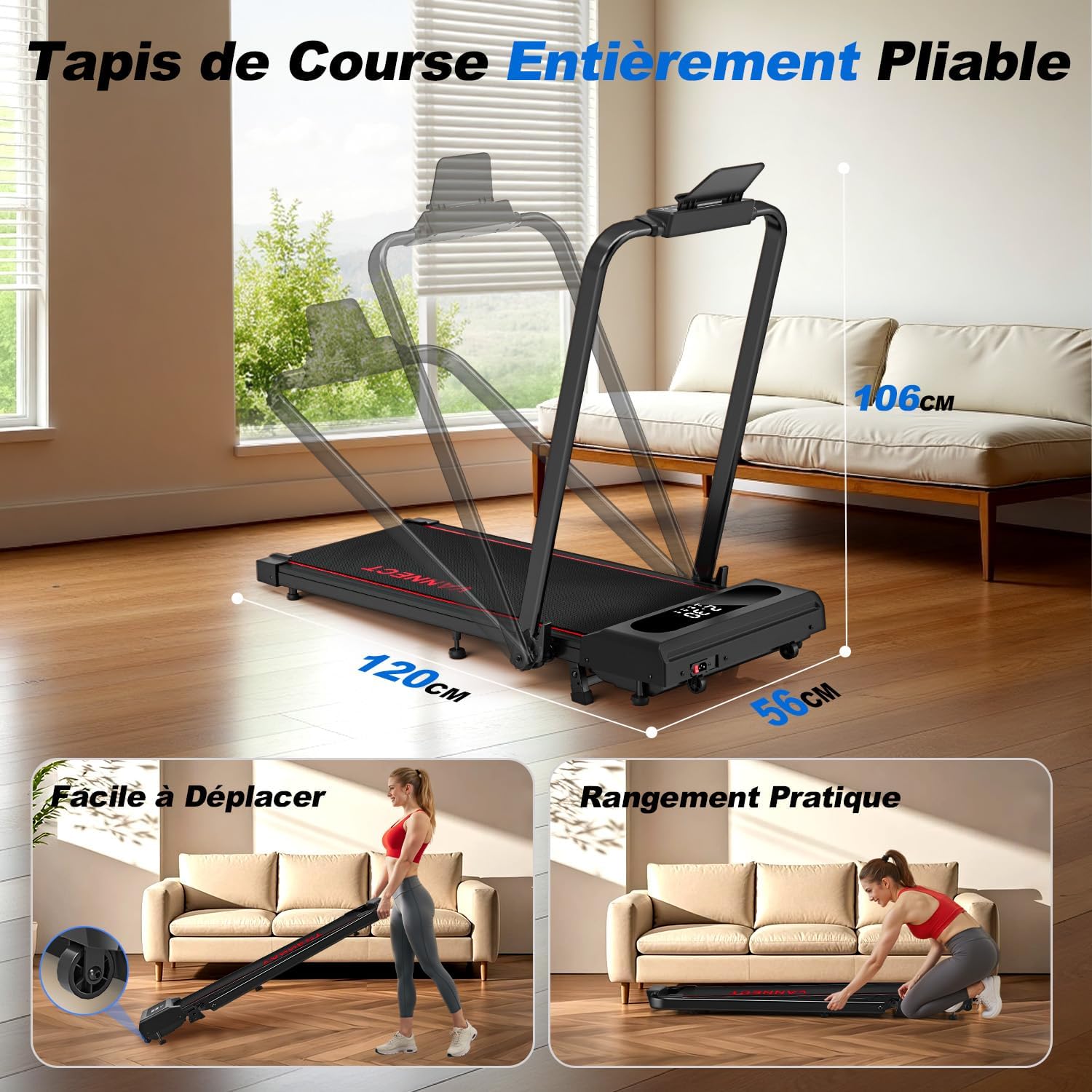
Image: Demonstration of the treadmill's folding mechanism, showing how it can be easily moved using transport wheels and stored compactly under furniture.
5. Operating Instructions
Familiarize yourself with the treadmill's controls and features before beginning your workout.
5.1 Control Panel and LED Display
The high-definition LED display provides real-time feedback on your workout:
- Speed: Current speed of the running belt (km/h).
- Distance: Total distance covered during your workout.
- Time: Duration of your workout.
- Calories: Estimated calories burned.
5.2 Remote Control
The treadmill comes with a remote control for convenient adjustment of speed and other settings. The remote features a magnetic design, allowing it to be securely attached to the treadmill's handrail to prevent loss and ensure easy access.

Image: Close-up of the treadmill's LED display showing workout metrics and the remote control, highlighting its magnetic attachment feature.
5.3 Training Modes
The X390S offers various training modes to suit different fitness levels and goals:
- Walking Mode: Speed range of 1 to 6 km/h, ideal for light exercise or active office work.
- Running Mode: Speed range of 6 to 12 km/h, suitable for more intense cardio workouts.
- Fat Burning Mode: Specific program designed to optimize calorie expenditure.
- 6-in-1 Versatility: Beyond walking and running, the treadmill supports modes for office use (under a standing desk), kinesitherapy, and even pet training.

Image: Visual representation of the treadmill's six versatile modes, including walking, running, fat burning, office use, kinesitherapy, and pet training.
5.4 Incline Adjustment
The treadmill features a manual 9% incline, allowing you to vary your workout intensity, increase calorie burn, promote fat burning, and improve cardiovascular endurance. Adjust the incline before starting your workout by manually setting the support legs at the rear of the treadmill.

Image: Illustration of the treadmill operating with a 9% incline, demonstrating how it can increase workout intensity and calorie expenditure compared to a flat surface.
5.5 Smart App Integration
Connect your treadmill to the Fitshow smart application for enhanced control and personalized training programs. The app allows you to track your daily indicators, monitor activity, and access 12 pre-set programs for varied workouts.
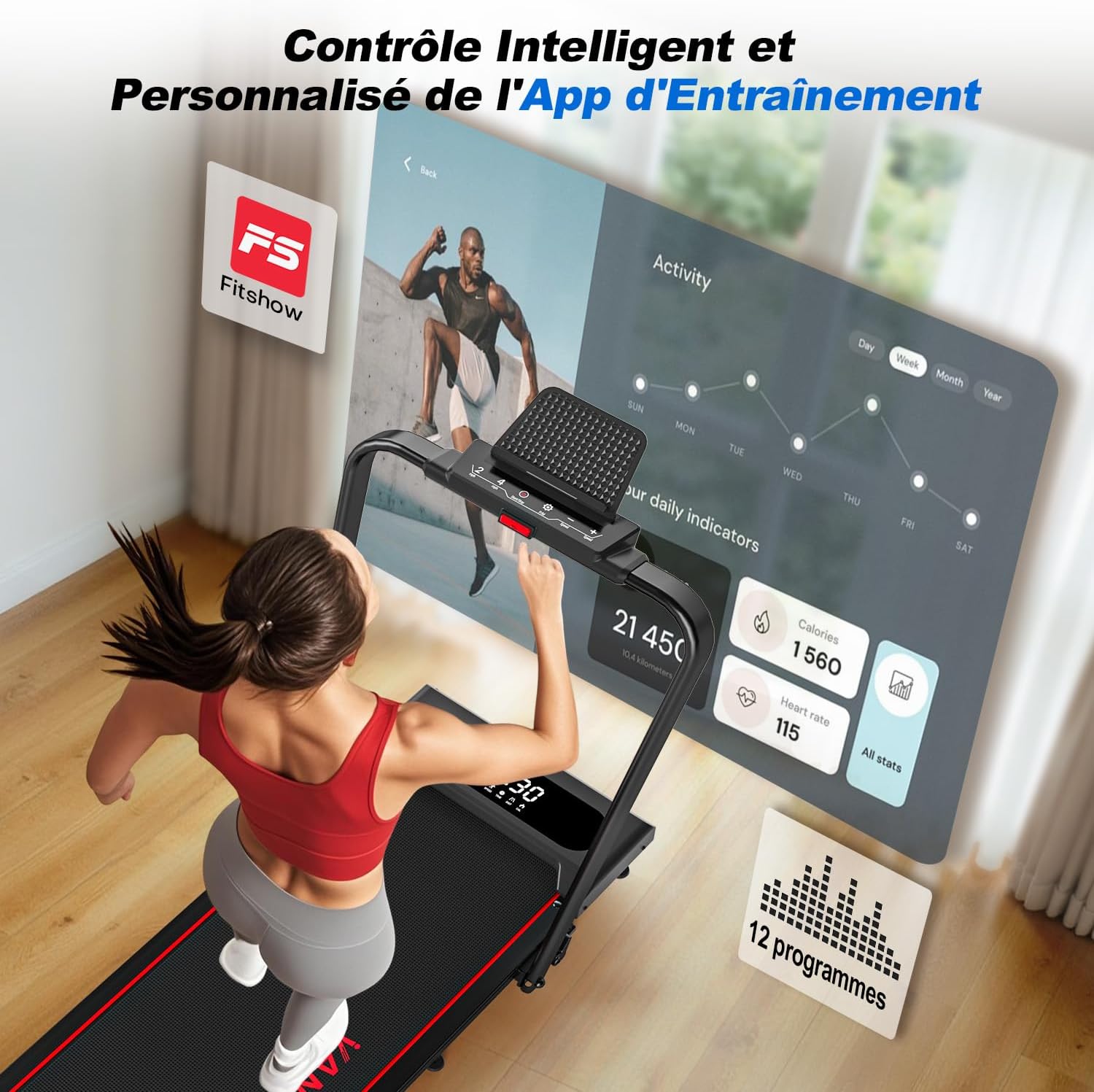
Image: Screenshot of the Fitshow smart application interface, showing activity tracking, daily indicators, and available workout programs for the treadmill.
6. Maintenance
Regular maintenance ensures optimal performance and longevity of your treadmill.
- Cleaning: Wipe down the treadmill surfaces with a damp cloth after each use. Avoid using abrasive cleaners or solvents.
- Belt Lubrication: The running belt requires periodic lubrication to reduce friction and wear. Refer to the specific instructions for lubrication frequency and type of lubricant (not provided in source, but general advice).
- Belt Tension and Alignment: Check the running belt tension and alignment regularly. If the belt feels loose or drifts to one side, adjust it according to the instructions (not provided in source, but general advice).
- Motor Area: Keep the motor cover area clean and free of dust and debris to ensure proper ventilation.
7. Troubleshooting
If you encounter any issues with your treadmill, refer to the following common troubleshooting steps:
- Treadmill Not Starting: Ensure the power cord is securely plugged into a working outlet and the safety key is properly in place. Check if the main power switch is on.
- Belt Slipping: This may indicate that the running belt is too loose. Refer to the maintenance section for belt tension adjustment.
- Unusual Noise: Check for any loose parts or foreign objects under the belt. If the noise persists, contact customer support.
- Display Not Working: Ensure all connections are secure. If the issue continues, power cycle the treadmill.
For problems not covered here, please contact VANNECT customer support.
8. Specifications
Detailed technical specifications for the VANNECT X390S Treadmill:
| Model Number | X390S |
| Brand | VANNECT |
| Color | Enhanced Red 6-in-1 |
| Main Material | High-carbon Steel |
| Motor Power | 1 Watt (Note: This value may be a misrepresentation in the source data, typically treadmills are rated in Horsepower.) |
| Speed Range | 1 - 12 km/h |
| Maximum Incline | 9% (Manual) |
| Maximum User Weight | 160 kg |
| Unfolded Dimensions (L x W x H) | 120 x 56 x 102 cm |
| Folded Dimensions (L x W x H) | 120 x 56 x 102 cm (Note: Source data indicates same dimensions for folded and unfolded, which may be an error. Please refer to product for actual folded dimensions.) |
| Product Weight | 20 kg |
| Display Metrics | Speed, Distance, Time, Heart Rate, Calories |
| Number of Programs | 5 (plus 12 via app) |
| Special Features | Shock Absorbers, Foldable Design, Smart App Connectivity, Magnetic Remote Storage |
| Assembly Required | No |
8.1 Advanced Running Belt and Shock Absorption
The treadmill is equipped with a 7-layer anti-slip running belt and 8 shock absorbers. This design effectively reduces impact on your knees and joints, providing a safer and more comfortable walking or running experience with improved foot grip.

Image: Diagram illustrating the 7-layer anti-slip running belt and the placement of 8 shock absorbers, highlighting their role in reducing impact and enhancing user comfort.
8.2 Motor Performance Comparison
The VANNECT X390S features an optimized motor designed for quiet operation and efficiency, supporting a maximum load of 160kg and speeds up to 12km/h with noise levels below 30dB.

Image: Comparison chart detailing the VANNECT treadmill's motor specifications (e.g., 2.75HP, 160kg max capacity, 1-12km/h speed, <30dB noise) against generic 'other' treadmill motors.
9. Warranty and Support
VANNECT is committed to providing high-quality customer service and product reliability.
- Warranty: Your VANNECT X390S Treadmill comes with a 5-year warranty. This warranty covers manufacturing defects and significant operational failures under normal use. Please retain your proof of purchase.
- Customer Support: If you have any questions, concerns, or require assistance with your treadmill, please do not hesitate to contact our professional support team. Contact details can typically be found on the product packaging or the official VANNECT website.