
1. Product Overview
The Linksys 8-Port 2.5G Multi-Gigabit Unmanaged PoE++ Switch (Model LN2308P) is designed to expand your network with high-speed connectivity and Power over Ethernet capabilities. This unmanaged switch offers plug-and-play simplicity, requiring no complex configuration.
Key features include:
- 8 Multi-Gigabit Ports: Four ports support PoE++ (up to 60W per port) and four ports support PoE+ (up to 30W per port), all operating at 2.5 Gbps.
- High Power Budget: A total PoE budget of 180 Watts to power multiple devices simultaneously.
- Multi-Gig Speeds: Provides up to 2.5 Gbps per port for high-bandwidth applications.
- Plug-and-Play: No software or configuration required for immediate use.
- Energy Efficient: Complies with the 802.3az Energy-Efficient Ethernet standard.
- Durable Design: Features a fanless metal casing for silent operation and robust durability.
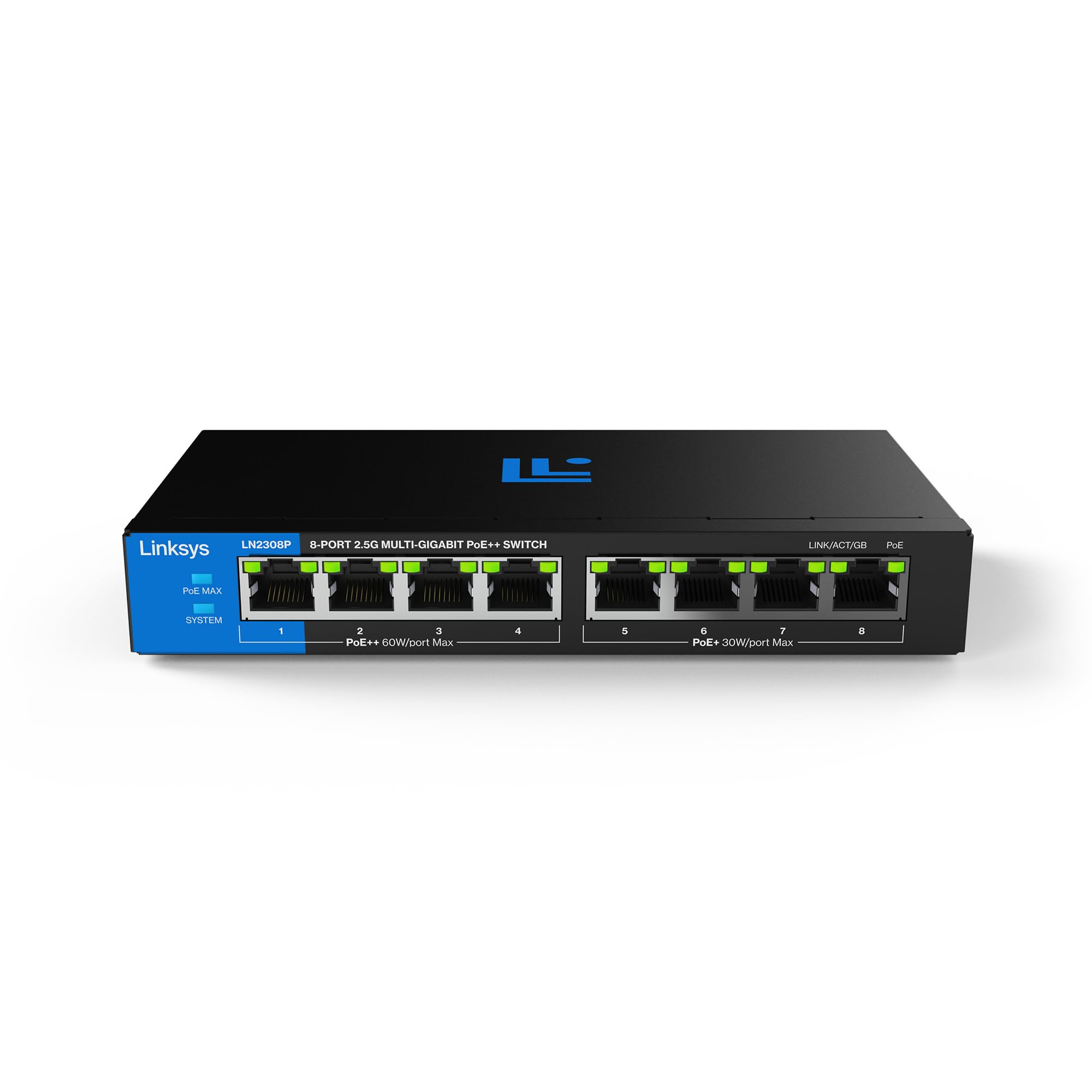
Image 1.1: Front view of the Linksys LN2308P switch, highlighting its 8 multi-gigabit ports and PoE capabilities.

Image 1.2: The switch provides multi-gig performance, minimizing transfer times for high-bandwidth applications.
2. What's in the Box
Verify that your package contains the following items:
- 1x Linksys 8-Port Multi-Gig Unmanaged PoE++ Switch (LN2308P)
- 1x Power Adapter
- 1x Quick Start Guide
- 1x Mounting Kit

Image 2.1: Illustration of the package contents for the LN2308P switch.
3. Setup Instructions
The Linksys LN2308P switch is designed for simple plug-and-play installation. Follow these steps to set up your switch:
- Placement: Choose a suitable location for the switch. Its fanless metal casing allows for desktop placement or wall mounting using the included kit. Ensure adequate ventilation around the device.
- Connect Power: Connect the included power adapter to the switch's DC IN port and then plug the adapter into a standard electrical outlet. The System LED on the switch will illuminate, indicating power.
- Connect Network Devices:
- Connect your network devices (e.g., router, computer, network storage) to any of the 8 Ethernet ports using standard RJ45 Ethernet cables.
- For Power over Ethernet (PoE) compatible devices such as WiFi 6/6E/7 access points, IP cameras, or PTZ cameras, connect them to the switch. The switch will automatically detect and provide power to these devices through the Ethernet cable, eliminating the need for separate power adapters.
- Verify Connection: Once devices are connected, observe the LINK/ACT/GB LEDs for each port. A solid green light indicates a successful network link, and a blinking light indicates data activity. The PoE LEDs will illuminate when power is being supplied to a connected PoE device.

Image 3.1: Setup diagram illustrating power and data delivery via a single Ethernet cable for PoE devices.

Image 3.2: The switch is ready for immediate use with simple plug-and-play connectivity.
4. Operating the Switch
As an unmanaged switch, the LN2308P operates automatically without requiring user configuration. Once powered on and devices are connected, it functions as a network hub, facilitating data transfer and power delivery.
LED Indicators:
- System LED: Indicates the power status of the switch.
- Solid Green: Power is on.
- Off: Power is off.
- LINK/ACT/GB LEDs (per port): Indicates the connection status and activity for each Ethernet port.
- Solid Green: A network link is established.
- Blinking Green: Data is being transmitted or received.
- Off: No device is connected or the link is down.
- PoE LEDs (per port): Indicates the Power over Ethernet status for each port.
- Solid Green: PoE power is being supplied to the connected device.
- Off: No PoE device is connected or no power is being supplied.
The switch supports full-duplex flow control, ensuring efficient data transmission without interference, even under high network loads.

Image 4.1: The switch provides multiple Gigabit ports for enhanced network performance.
5. Maintenance
The Linksys LN2308P switch is designed for minimal maintenance due to its fanless operation and durable metal casing.
- Cleaning: To clean the exterior of the switch, use a soft, dry, or slightly damp cloth. Avoid using abrasive cleaners, solvents, or harsh chemicals, as these can damage the casing.
- Ventilation: Although fanless, ensure that the switch is placed in an area with adequate airflow to prevent overheating. Do not block any ventilation openings.
- Cable Management: Periodically check all connected Ethernet cables to ensure they are securely plugged in and free from damage. Proper cable management can prevent accidental disconnections and improve network reliability.
6. Troubleshooting
If you encounter issues with your Linksys LN2308P switch, refer to the following troubleshooting tips:
- No Power:
- Ensure the power adapter is securely connected to the switch and a working electrical outlet.
- Check if the power outlet is functional by plugging in another device.
- Verify the System LED on the switch is illuminated.
- No Network Link (LINK/ACT/GB LED Off):
- Confirm that the Ethernet cable is properly connected to both the switch port and the network device.
- Try a different Ethernet cable to rule out a faulty cable.
- Ensure the connected network device is powered on and functioning correctly.
- Test with a different port on the switch.
- PoE Device Not Powering On (PoE LED Off):
- Verify that the connected device is PoE compatible (802.3af, 802.3at, or 802.3bt).
- Check the total PoE power budget (180W) of the switch. If multiple high-power devices are connected, the budget might be exceeded.
- Ensure the Ethernet cable is of good quality and within recommended length limits for PoE.
- Try connecting the PoE device to a different PoE port on the switch.
- Slow Network Speeds:
- Ensure all connected devices and cables support 2.5 Gigabit Ethernet for optimal performance.
- Check for network congestion.
- Verify that the cables are not damaged or excessively long.
7. Specifications
| Model Number | LN2308P |
| Ports | 8x 2.5G Multi-Gigabit Ethernet Ports (4x PoE++, 4x PoE+) |
| PoE Standards | IEEE 802.3af, IEEE 802.3at, IEEE 802.3bt |
| PoE Power Budget | 180 Watts total |
| Data Transfer Rate | 2.5 Gbps per port |
| Switching Capacity | 40 Gbps |
| Switch Type | Unmanaged |
| Compatible Devices | WiFi 6/6E/7 access points, building lighting systems, PTZ cameras, IP cameras, computers, printers, laptops |
| Casing Material | Metal |
| Dimensions (L x W x H) | 168 x 126 x 26 mm |
| Weight | 1.15 Kilograms |
| Operating Temperature | Up to 40°C (104°F) |
| Energy Efficiency | IEEE 802.3az Energy-Efficient Ethernet |
| Mounting Options | Desktop / Wall Mount |

Image 7.1: Visual summary of the switch's technical specifications.
8. Warranty and Support
For warranty information and technical support, please refer to the official Linksys website or the documentation included with your product. Linksys provides resources to assist with product registration, troubleshooting, and service inquiries.
Linksys Official Website: www.linksys.com


