
1. Introduction
The PERFORMANCE GURU AK23 is a versatile 16-in-1 air quality monitor designed to provide real-time data on various indoor air pollutants and environmental factors. This device helps you maintain a healthy living or working environment by detecting harmful substances and providing timely alerts. It is suitable for use in homes, offices, bedrooms, kitchens, and other indoor spaces.
2. Key Features
- Comprehensive Monitoring: Measures 16 essential air quality indicators including CO2, PM1.0, PM2.5, PM10, temperature, humidity, formaldehyde (HCHO), and volatile organic compounds (VOCs).
- High Precision Sensors: Equipped with advanced sensors for fast and accurate readings, refreshing data every 1.5 seconds.
- Intelligent Buzzer Alarm: Alerts you with a distinct sound when air quality parameters exceed safe levels. The alarm can be manually turned off.
- Portable Design: Built-in high-capacity lithium battery (2500mAh) provides up to 8 hours of continuous use, rechargeable via USB Type-C.
- Color-Coded Display: A bright, high-resolution screen displays values with color-coded indicators (green for good, yellow for moderate, red for poor) for easy interpretation.
- Automatic Brightness Adjustment: Screen brightness adjusts automatically when detecting poor air quality.
3. Package Contents
- PERFORMANCE GURU AK23 Air Quality Monitor x 1
- USB Charging Cable (USB to Micro USB interface) x 1
- User Manual x 1
4. Product Overview
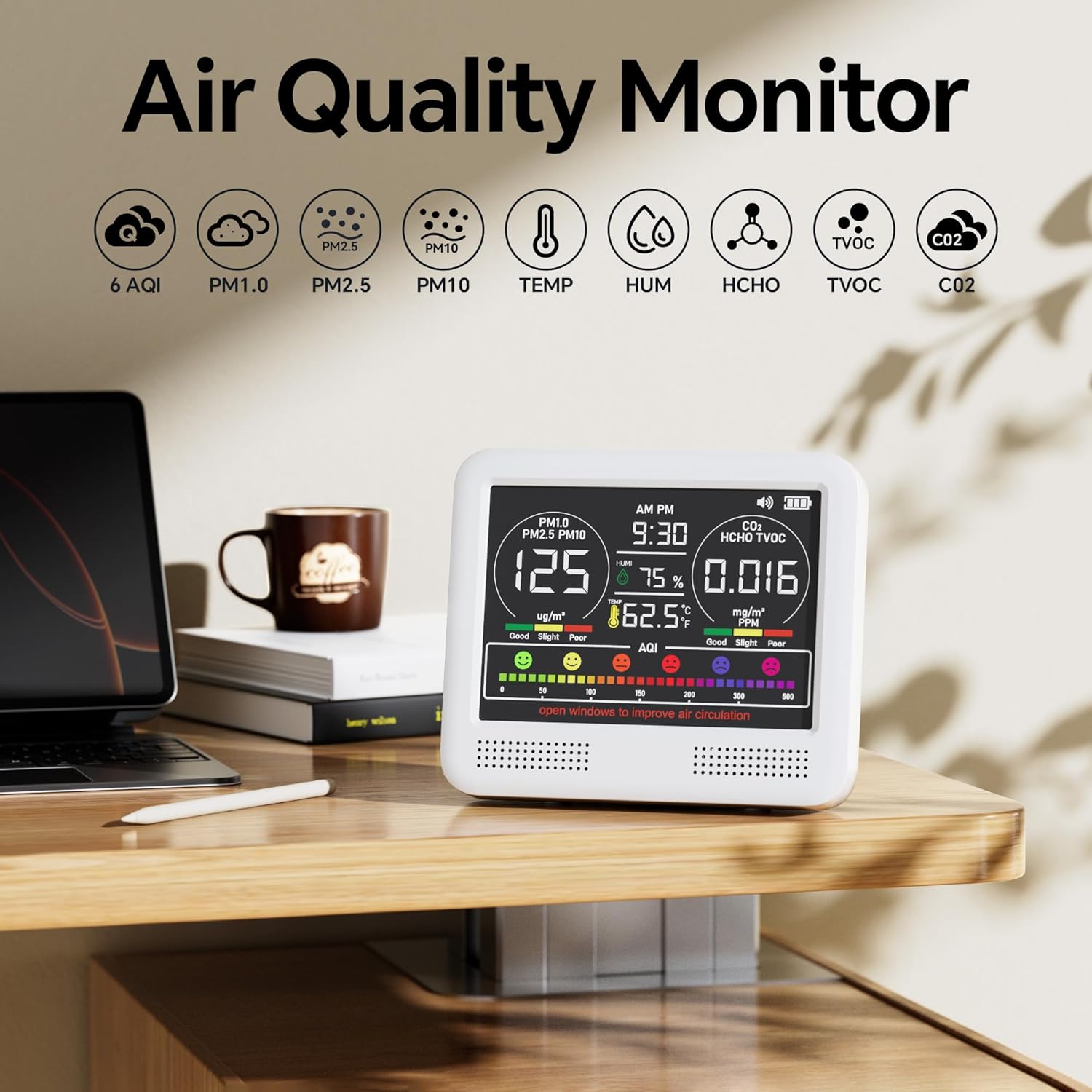
The AK23 monitor features a clear display and intuitive controls. Below is an image illustrating the device's appearance and its primary display elements.
5. Setup and Basic Operation
5.1. Initial Charging
Before first use, ensure the device is fully charged. Connect the provided USB charging cable to the monitor's USB Type-C port and a suitable USB power adapter (not included). The battery icon on the display will indicate charging status.

5.2. Powering On/Off
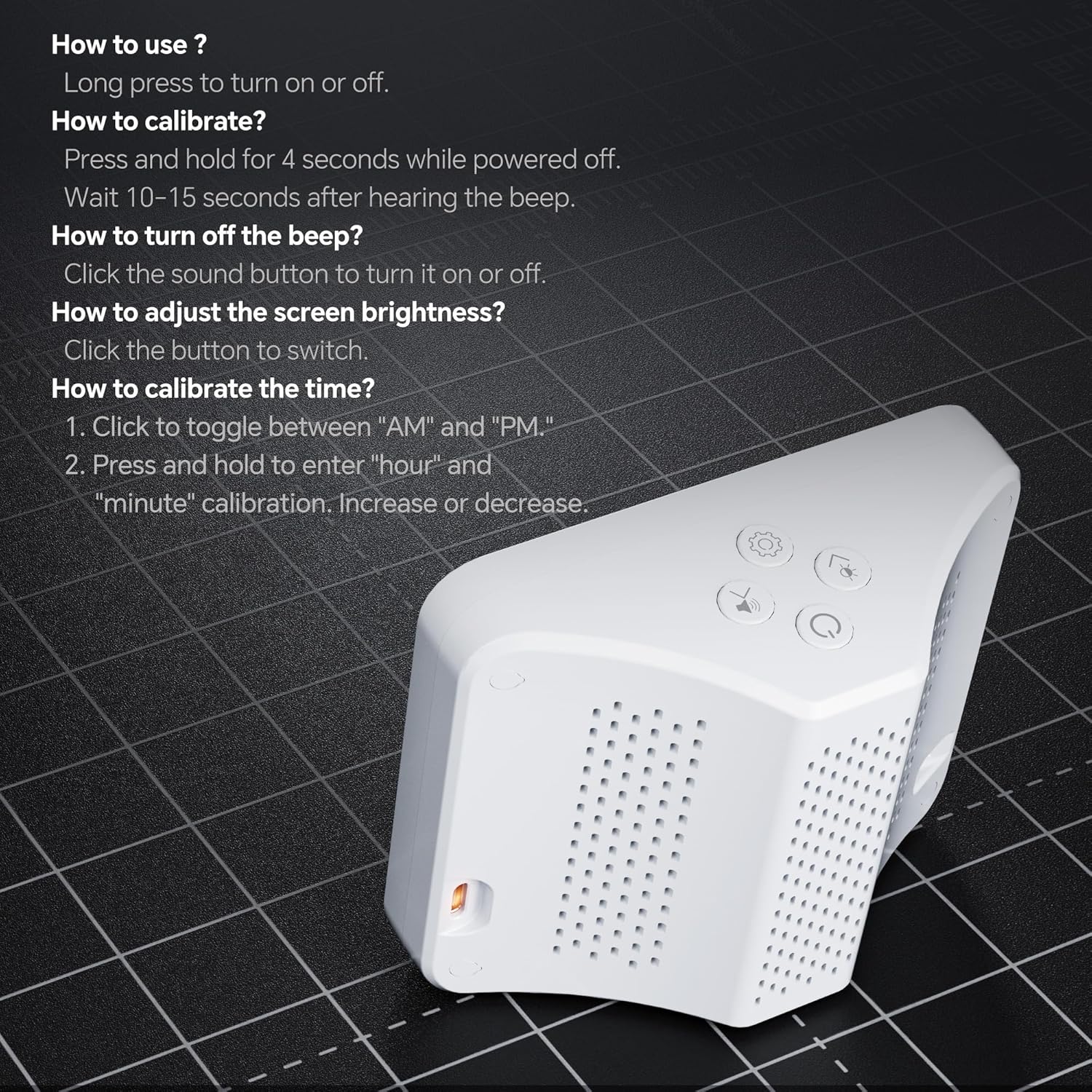
- To Power On: Long press the power button (usually located on the top or side) until the display illuminates.
- To Power Off: Press and hold the power button for approximately 4 seconds. Wait 10-15 seconds after hearing the beep for the device to fully shut down.
6. Operating Instructions
6.1. Understanding the Display
The monitor's display uses color-coded indicators to quickly convey air quality status:
- Green: Indicates good air quality.
- Yellow/Orange: Indicates moderate or slight pollution.
- Red/Purple: Indicates poor air quality or alert levels.

6.2. Buzzer Alarm
The device features an intelligent buzzer alarm that activates when air quality parameters exceed predefined safe levels. This serves as a reminder to ventilate the area.
- To Turn On/Off the Buzzer: Click the dedicated sound button (refer to Figure 3 for button location) to toggle the buzzer alarm on or off.
Video 1: Demonstration of the AK23 Air Quality Monitor's features, including real-time monitoring and alarm functionality.
6.3. Calibrating Time
To set the correct time on your device:
- Click the appropriate button (refer to Figure 3) to toggle between "AM" and "PM".
- Press and hold the button to enter "hour" and "minute" calibration mode. Use the adjustment buttons to increase or decrease the values.
6.4. Adjusting Screen Brightness
To adjust the screen brightness:
- Click the dedicated brightness button (refer to Figure 3) to cycle through available brightness levels.
7. Sensor Details
The AK23 monitor incorporates highly sensitive sensors to ensure accurate detection of various air quality parameters. The internal structure and sensor capabilities are designed for reliable performance.

Key sensor specifications:
- Temperature: 0°F to 99°F (error: ±2°F)
- Humidity: 20% to 90% (error: ±4%)
- PM1/PM2.5/PM10: 0 to 999 ug/m³ (concentration unit)
- HCHO (Formaldehyde): 0 to 1.000 mg/m³ (concentration unit, error: ±4%)
- TVOC (Total Volatile Organic Compounds): 0 to 5.000 mg/m³ (concentration unit, error: ±4%)
- CO2 (Carbon Dioxide): 0 to 5000 ppm (error: ±50ppm, resolution: 25 ppm)
8. Application Scenarios
The PERFORMANCE GURU AK23 Air Quality Monitor is suitable for a wide range of indoor environments where air quality monitoring is essential.

Common application areas include:
- Living Rooms
- Bedrooms
- Kitchens
- Offices
- Garages
- Warehouses
- Laundry Rooms
9. Specifications
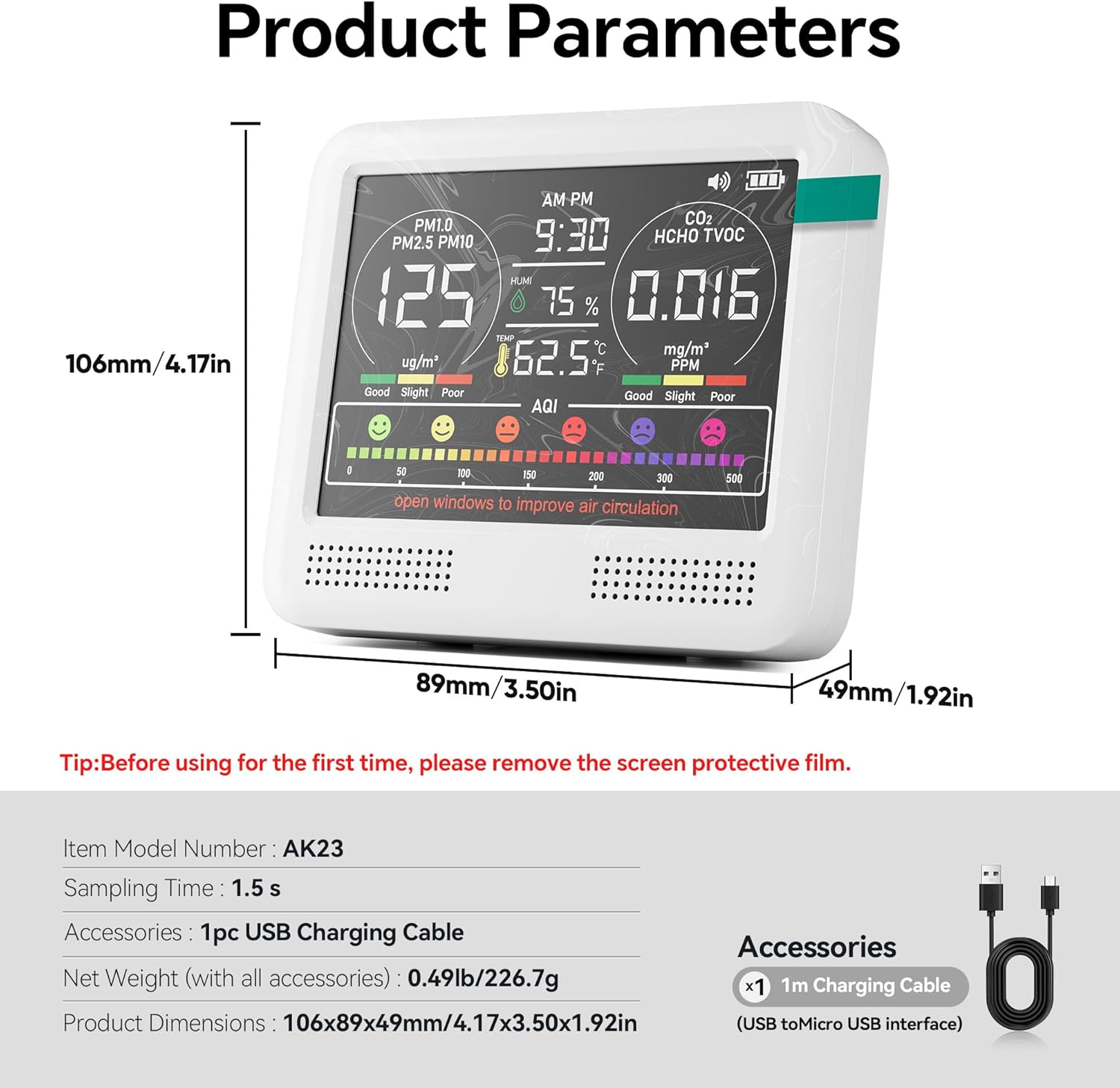
Detailed technical specifications for the AK23 Air Quality Monitor:
| Parameter | Value |
|---|---|
| Model Number | AK23 |
| Sampling Time | 1.5 seconds |
| Power Source | Battery Powered (Lithium Ion) |
| Battery Capacity | 2500mAh |
| Battery Life | Up to 8 hours (continuous use) |
| Charging Port | USB Type-C |
| Product Dimensions | 0.3"D x 0.3"W x 0.34"H (106x89x49mm / 4.17x3.50x1.92in) |
| Item Weight | 14.9 ounces (0.49lb / 226.7g) |
| Color | Bright White |
| UPC | 717690740580 |
10. Maintenance
To ensure the longevity and accuracy of your PERFORMANCE GURU AK23 Air Quality Monitor, follow these maintenance guidelines:
- Cleaning: Gently wipe the device with a soft, dry cloth. Do not use abrasive cleaners, solvents, or immerse the device in water.
- Storage: Store the monitor in a cool, dry place away from direct sunlight, extreme temperatures, and high humidity when not in use.
- Avoid Obstruction: Ensure that the sensor vents are not blocked by dust or debris, as this can affect measurement accuracy.
- Battery Care: For optimal battery life, avoid fully discharging the battery frequently. Charge the device regularly.
11. Troubleshooting
If you encounter issues with your AK23 Air Quality Monitor, refer to the following common problems and solutions:
- Device not turning on:
- Ensure the device is fully charged. Connect it to a power source and allow it to charge for at least 30 minutes before attempting to power on again.
- Verify that the power button is pressed and held for the required duration (long press for on, 4 seconds for off).
- Inaccurate readings:
- Ensure the device has been operating for at least 5-10 minutes to stabilize after power-on.
- Check for any obstructions around the sensor vents.
- Avoid placing the monitor near strong air currents, direct heat sources, or areas with high concentrations of chemicals (e.g., cleaning products, fresh paint) that could skew readings.
- If temperature readings are consistently off, allow the device to acclimate to the room temperature for an extended period (e.g., 1 hour).
- Buzzer alarm not working:
- Ensure the buzzer is not turned off. Press the sound button to toggle it on.
- Check if the air quality parameters are actually exceeding the alarm thresholds.
- Screen is dim or unresponsive:
- Adjust the screen brightness using the dedicated button.
- If the screen is completely black, try charging the device.
- Perform a power cycle (turn off and on) if the screen is unresponsive.
If the issue persists after trying these steps, please contact customer support.
12. Warranty and Support
The PERFORMANCE GURU AK23 Air Quality Monitor comes with a standard manufacturer's warranty. Please refer to the product packaging or the seller's website for specific warranty terms and conditions.
For technical support, troubleshooting assistance, or warranty claims, please contact the seller or PERFORMANCE GURU customer service through the platform where you purchased the product. Keep your purchase receipt or order number handy for faster service.