
Introduction
Thank you for choosing the Iaret Smart Watch Model I109-2. This device is designed to enhance your daily life with smart notifications, comprehensive health monitoring, and advanced fitness tracking capabilities. This manual provides essential information for setting up, operating, and maintaining your new smartwatch.
What's in the Box
- 1 Smartwatch
- 1 Black Gold Stainless Steel Smart Watch Band
- 1 Pink Silicone Smart Watch Band
- 1 White Silicone Smart Watch Band
- 1 Smart Watch Charger
- User Manual
Setup
1. Charging the Smart Watch
Before initial use, fully charge your smartwatch. The device uses a magnetic charging cable.
- Connect the magnetic end of the charging cable to the charging points on the back of the watch.
- Connect the USB end of the cable to a USB power adapter (not included) or a computer's USB port.
- The watch display will indicate charging status. A full charge typically takes approximately 2.5 hours.

Image: Magnetic charging cable connecting to the back of the Iaret Smart Watch. The watch features sensors on its underside for health monitoring.
2. App Installation
Download the companion app to your smartphone to unlock full functionality and data synchronization.
- Scan the QR code displayed on the watch screen or in the user manual to download the VeryFit app (or FitCloudPro, depending on your model) from the Google Play Store (for Android) or Apple App Store (for iOS).
- Install the app and follow the on-screen instructions to create an account and set up your profile.
Video: Demonstrates the process of downloading the VeryFit app and navigating its interface to view health data and customize watch faces.
3. Bluetooth Pairing
Ensure Bluetooth is enabled on your smartphone. Open the VeryFit app and follow the instructions to pair your smartwatch.
- In the app, navigate to the device section and select 'Add Device'.
- The app will search for nearby devices. Select your Iaret Smart Watch from the list.
- Confirm the pairing request on both your phone and the watch.
- Once paired, the watch will synchronize time and data with your phone.
Operating Instructions
1. Basic Navigation
- Touchscreen: Swipe left, right, up, or down to navigate through menus and features. Tap to select.
- Side Button: Press the side button to return to the main watch face or to access the main menu.
2. Watch Face Customization
Personalize your watch with over 200 watch faces or use your own photos.
- From the main watch face, long-press the screen to enter the watch face selection interface.
- Swipe left or right to browse pre-installed watch faces. Tap to select.
- For more options, open the VeryFit app on your phone and navigate to the 'Watch Face Market' to download new designs or upload your own photos.

Image: The Iaret Smart Watch screen showcasing a vibrant butterfly watch face, with additional options for customizing with personal photos visible on a smartphone screen.
3. Bluetooth Call Function
Make and receive calls directly from your wrist when connected via Bluetooth 5.3.
- Ensure your watch is paired with your phone via Bluetooth.
- Access the 'Phone' function on your watch. You can dial numbers, select from frequent contacts, or view call history.
- To answer an incoming call, tap the green icon on the watch screen. To reject, tap the red icon.

Image: The Iaret Smart Watch displaying various smart features including Bluetooth call options (dial pad, contacts), message notifications from apps like WhatsApp, and voice assistant integration.
4. Smart Notifications
Receive real-time alerts for messages, calls, and app notifications.
- Enable 'Smart Notifications' in the VeryFit app and select which apps you want to receive alerts from (e.g., Facebook, WhatsApp, Instagram, Twitter).
- Notifications will be displayed on your wrist with vibration or ringtone alerts. Note: The watch receives but cannot send texts.
5. AI Voice Assistant
Activate and control your phone's voice assistant (Siri, Bixby, Google Assistant) directly from the watch.
- Access the 'AI Voice' function on your watch.
- Speak your commands, such as 'Call John' or 'How is the weather today?'.
6. Music Control
Control music playback on your smartphone.
- Open the 'Music Player' function on your watch.
- You can play, pause, skip tracks, and adjust volume directly from your wrist.
7. Essential Utilities
The watch includes various useful tools:
- Find Phone: Locate your misplaced smartphone.
- Calculator: Perform basic calculations.
- Weather Forecast: Get real-time weather updates.
- Alarm Clock: Set alarms with vibration alerts.
- Camera Control: Remotely trigger your phone's camera shutter.
- Stopwatch & Timer: For precise time measurement.
- Password Protection: Secure your device.
- Raise to Wake: Automatically activate the screen when you raise your wrist.
- Adjustable Brightness & Screen Time: Customize display settings.
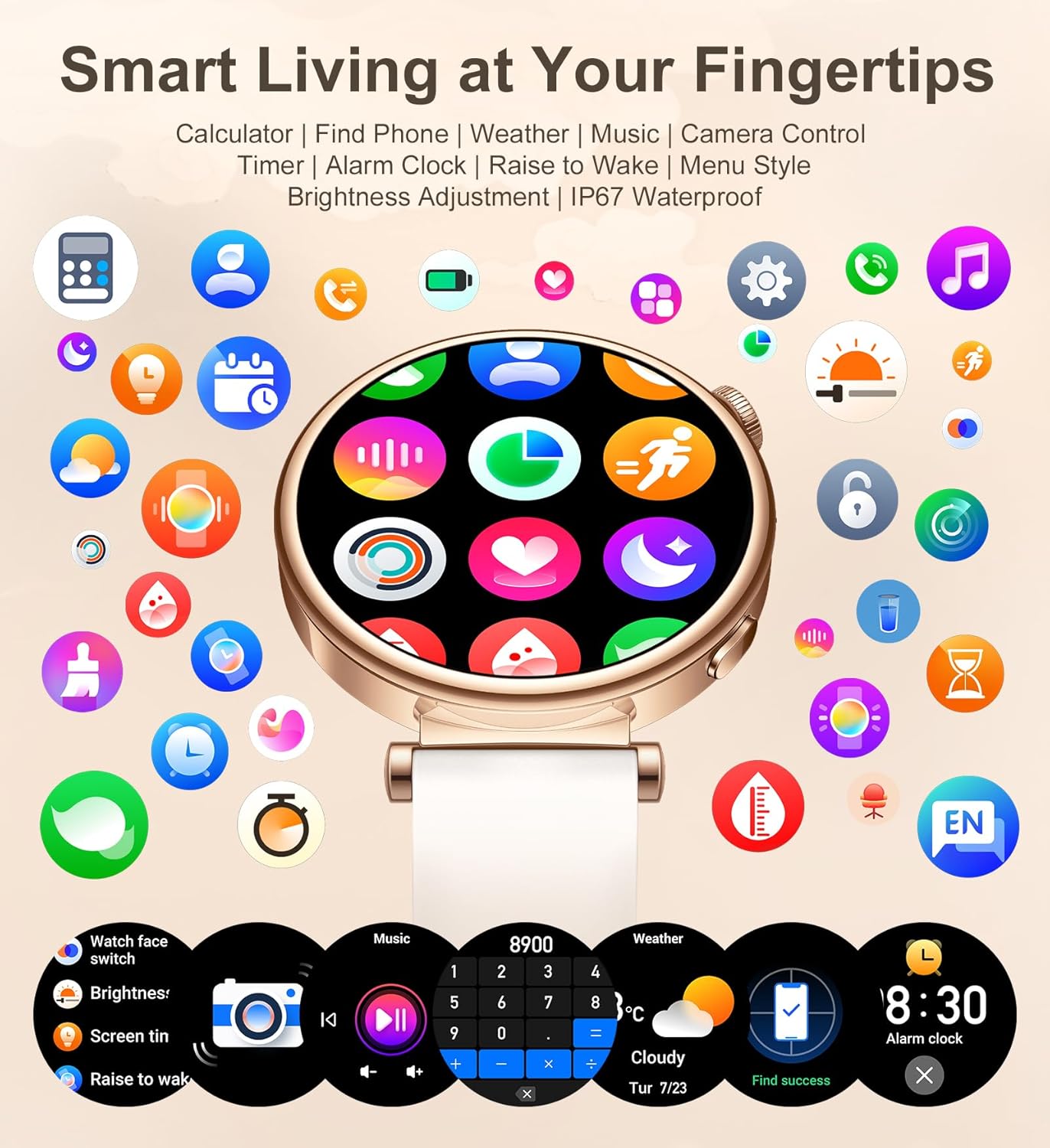
Image: The Iaret Smart Watch showcasing a variety of smart living features, including icons for calculator, find phone, weather, music control, camera control, timer, alarm clock, and brightness adjustment.
Fitness Tracking
Monitor your daily activities and track your workouts with precision.
- Daily Activity Tracking: The watch automatically tracks your steps, calories burned, and distance traveled throughout the day.
- 100+ Sports Modes: Choose from eight built-in sports modes directly on the watch, or access over 100 additional modes via the VeryFit app. These modes provide real-time data for various activities like running, cycling, yoga, and more.

Image: The Iaret Smart Watch illustrating its '100+ Sports Modes' feature, showing a woman playing tennis and various activity icons like running, cycling, and basketball, along with real-time tracking metrics.
Health Monitoring
The Iaret Smart Watch provides 24/7 health monitoring to help you stay on top of your well-being.
- Heart Rate Monitoring: Continuous 24/7 heart rate tracking. View your heart rate data in the app for detailed analysis.
- Sleep Monitoring: Automatically tracks your sleep patterns, including deep sleep, light sleep, and awake time. Analyze your sleep quality in the VeryFit app.
- Blood Oxygen (SpO2) Monitoring: Measure your blood oxygen levels on demand.
- Stress Monitoring: Track your stress levels throughout the day.
- Breathing Training: Guided breathing exercises to help you relax and reduce stress.
- Reminders: Set timely reminders for hydration, sedentary periods, and women's menstrual cycle tracking.

Image: The Iaret Smart Watch highlighting its 24/7 automatic health monitoring capabilities, including heart rate, SpO2, sleep tracking, and menstrual cycle tracking, with corresponding graphical data.
Durability and Compatibility
- Battery Life: Equipped with a 290mAh battery, providing 1-2 days of heavy use or 3-5 days of normal use.
- Water Resistance: IP67 rated, making it suitable for daily activities like handwashing, rain, and sweating. Note: Not suitable for hot conditions such as hot baths or saunas, or prolonged submersion.
- Wide Compatibility: Compatible with Android 4.4 and above, and iOS 7.1 and above. Works seamlessly with most existing devices.
Maintenance
To ensure the longevity and optimal performance of your Iaret Smart Watch, follow these maintenance guidelines:
- Cleaning: Regularly clean the watch screen and strap with a soft, dry cloth. If necessary, use a slightly damp cloth with mild soap, then wipe dry.
- Avoid Harsh Chemicals: Do not use abrasive cleaners, solvents, or harsh chemicals as they can damage the watch's finish and internal components.
- Charging: Use only the provided magnetic charging cable. Avoid exposing the charging contacts to water or sweat.
- Storage: Store the watch in a cool, dry place away from direct sunlight and extreme temperatures when not in use.
- Water Exposure: While IP67 rated, avoid prolonged submersion or exposure to hot water/steam to prevent damage.
Troubleshooting
If you encounter any issues with your Iaret Smart Watch, please refer to the following common solutions:
- Watch not turning on: Ensure the watch is fully charged. Connect it to the charger for at least 30 minutes.
- Unable to pair with phone:
- Make sure Bluetooth is enabled on your phone.
- Ensure the watch is within Bluetooth range (8-10 meters).
- Restart both your phone and the watch, then try pairing again.
- Check if the VeryFit app has necessary permissions enabled on your phone.
- No notifications:
- Verify that smart notifications are enabled in the VeryFit app for specific applications.
- Ensure the watch is connected to your phone via Bluetooth.
- Check your phone's notification settings to ensure apps are allowed to send notifications.
- Inaccurate health data:
- Ensure the watch is worn snugly on your wrist, not too tight or too loose.
- Clean the sensors on the back of the watch.
- Avoid excessive movement during measurements for more accurate readings.
- Short battery life:
- Reduce screen brightness and screen-on time.
- Disable continuous heart rate monitoring if not needed 24/7.
- Limit the number of app notifications.
Specifications
| Feature | Detail |
|---|---|
| Model Name | I109-2 |
| Brand | Iaret |
| Screen Size | 1.27 Inches |
| Screen Shape | Round |
| Connectivity Technology | Bluetooth 5.3 |
| Battery Capacity | 290 Milliamp Hours |
| Water Resistance | IP67 |
| Compatibility | Android 4.4+ / iOS 7.1+ |
| Product Dimensions | 1.61 x 1.73 x 0.43 inches |
| Item Weight | 7.8 ounces (0.22 Kilograms) |
Warranty and Support
For warranty information and customer support, please refer to the documentation included with your product or visit the official Iaret website. Keep your purchase receipt for warranty claims.