
1. Introduction
This instruction manual provides detailed guidance for installing and operating your BRIKSMAX 2.0 Light Kit, designed specifically for the Lego Dinosaur Fossils: Tyrannosaurus rex set (Lego Model 76968). This light kit enhances your Lego model with innovative LED lighting, creating a vivid and realistic display. Please note that the Lego set itself is not included with this light kit.

This image illustrates the dramatic effect of the BRIKSMAX light kit on the Lego Tyrannosaurus Rex fossil model. The top half shows the model illuminated with vibrant green, yellow, and red LED lights, highlighting the skeletal structure. The bottom half shows the same model unlit, demonstrating the contrast.
2. Safety Information
- This product contains small parts and is not suitable for children under 3 years of age due to choking hazards.
- Recommended age for use: 8 years and up.
- Handle LED wires and components with care to prevent damage. Do not pull excessively on wires.
- Ensure the power source (battery box) is correctly connected and batteries are inserted with the correct polarity.
- Do not expose the light kit to water or extreme temperatures.
3. What's Included
Your BRIKSMAX 2.0 Light Kit package includes the following components:
- LED Light Kit components
- Paper Instructions
- User Guide
- AA Battery Box (batteries not included)
- USB cable

This image shows the complete contents of the BRIKSMAX light kit package. It includes the LED light components, a detailed paper instruction manual, a user guide, and an AA battery box for power.
4. Setup and Installation
Follow these steps to install the BRIKSMAX 2.0 Light Kit onto your Lego Dinosaur Fossils: Tyrannosaurus rex model (Lego Set 76968). Refer to the included paper instructions for specific placement details.
- Prepare Your Lego Model: Ensure your Lego Tyrannosaurus rex model is fully assembled according to its original instructions. Some disassembly of specific sections may be required to integrate the light components.
- Identify Light Placement: Consult the BRIKSMAX paper instructions to identify the designated locations for each LED light and expansion board. The instructions will guide you on which Lego bricks to remove or modify for light integration.
- Install LED Lights: Carefully place the LED lights into the specified areas. BRIKSMAX lights and expansion boards are designed with a brick shell to reduce exposed components, ensuring a secure and aesthetic fit.
- Manage Wires: Utilize the newly designed wire organizer parts to conceal wires within the Lego structure. This prevents wire breakage and maintains a neat appearance for your model.
- Connect Components: Connect the individual LED lights to the expansion boards, and then connect the expansion boards to the main power cable. Ensure all connections are secure and firm.
- Connect Power Source: Connect the main power cable to the AA battery box. Insert the required AA batteries (not included) into the battery box, ensuring correct polarity. Alternatively, you can use the provided USB cable to connect to a compatible USB power source.
- Test Lights: Before reassembling all Lego parts, test the lights to ensure all connections are working correctly.
- Final Assembly: Carefully reassemble any disassembled Lego sections, ensuring wires are not pinched and remain neatly organized.
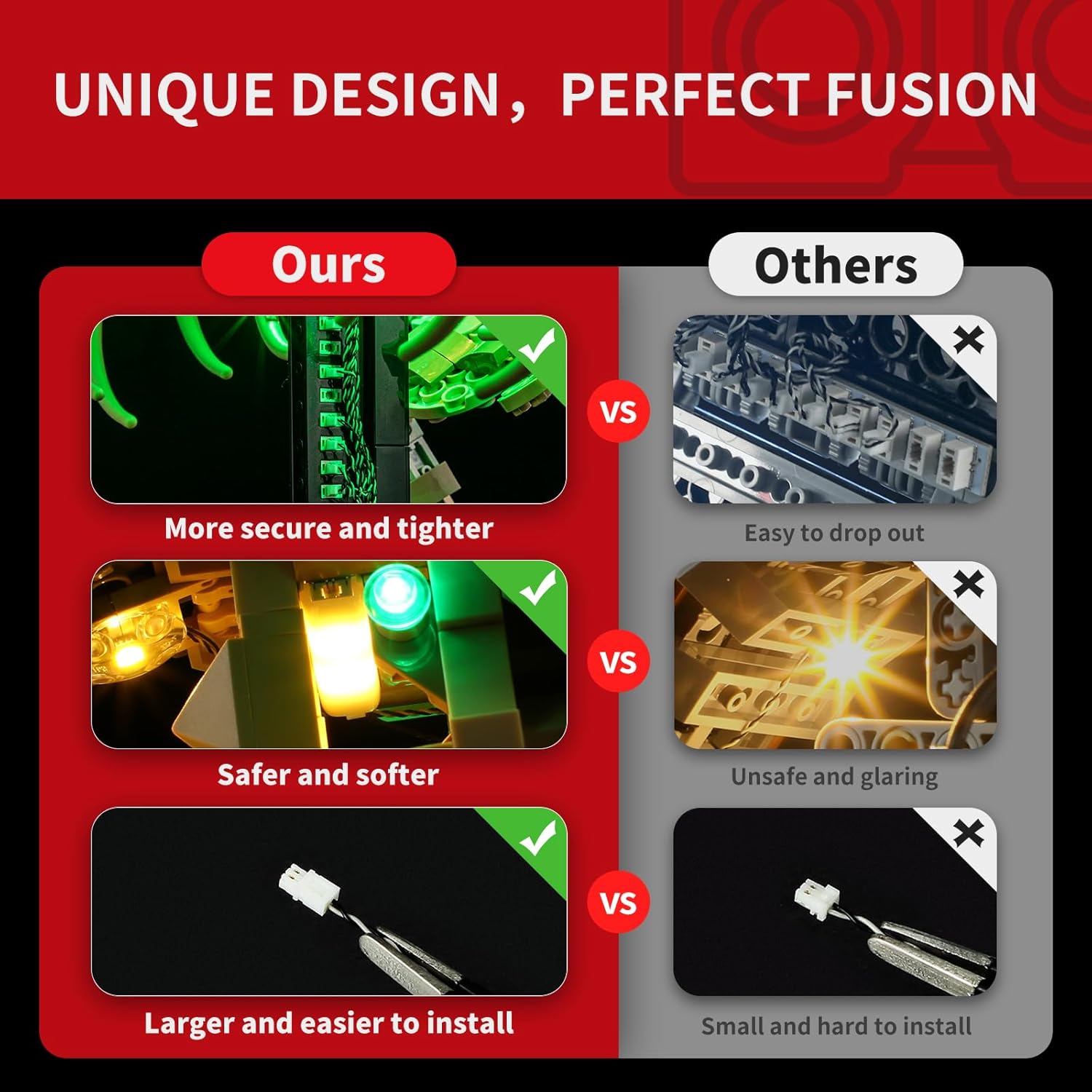
This image compares the BRIKSMAX light kit's design advantages over other lighting kits. It illustrates that BRIKSMAX connections are more secure, lights are safer and softer, and connectors are larger and easier to install, reducing the risk of components falling out or causing glare.

This image displays the innovative wire organizer parts included with the BRIKSMAX light kit. These parts are designed to integrate seamlessly with Lego bricks, helping to conceal wires, prevent damage, and ensure a clean, organized look for your illuminated model.
This video provides a dynamic demonstration of the BRIKSMAX light kit for the Lego Tyrannosaurus Rex fossil model. It shows the fully assembled and lit model from multiple angles, highlighting the vibrant green, yellow, and red lights that bring the skeleton to life. The video illustrates the overall aesthetic and the detailed illumination of different parts of the model.
5. Operating Instructions
Once the light kit is fully installed and connected to a power source:
- Power On/Off: If using the battery box, locate the switch on the box to turn the lights on or off. If using a USB power source, the lights will typically turn on when power is supplied and turn off when disconnected.
- Display: Position your illuminated Lego model in your desired display location to showcase the lighting effects.

These four detailed images highlight the precise placement and effect of the LED lights within the Lego Tyrannosaurus Rex fossil model. They show close-ups of the illuminated head, the glowing rib cage, and the lit tail section, emphasizing the intricate lighting design.
6. Maintenance
- Cleaning: Gently dust the LED components and wires with a soft, dry cloth. Avoid using liquid cleaners directly on the lights or connections.
- Wire Management: Periodically check that all wires are securely in place and not exposed or pinched. Adjust wire organizers as needed.
- Battery Replacement: If using the battery box, replace AA batteries when the lights dim or stop working. Ensure to use fresh batteries and dispose of old ones responsibly.
- Storage: If storing the model, ensure it is placed in a stable environment to prevent damage to the delicate wiring.
7. Troubleshooting
| Problem | Possible Cause | Solution |
|---|---|---|
| Lights do not turn on. | Loose connection, dead batteries, incorrect battery polarity, faulty power source. | Check all wire connections. Replace batteries if using the battery box. Ensure batteries are inserted correctly. Try a different USB power source if applicable. |
| Some lights are not working. | Loose connection to a specific light or expansion board, damaged wire. | Inspect connections for the non-working lights. Gently check wires for visible damage. |
| Lights are dim. | Low battery power. | Replace batteries with fresh ones. |
8. Specifications
- Brand: BRIKSMAX
- Model Compatibility: Lego Dinosaur Fossils: Tyrannosaurus rex (Lego Set 76968)
- Product Model Number: BX736
- Material: Plastic
- Power Source: Battery (AA batteries, not included) or USB cable
- Assembly Required: Yes
- Educational Objective: Learning about electronics, lighting, and assembly skills through play
- Manufacturer Minimum Age: 96 months (8 years)
9. Warranty and Support
BRIKSMAX provides a 1 Year Warranty On Parts for this light kit. If you encounter any damaged or missing parts, please contact BRIKSMAX customer support for assistance and replacement. For further support or inquiries, refer to the contact information provided in your product packaging or visit the official BRIKSMAX website.


